Kijunsen MTF very slow to calculate

Viewing 10 posts - 1 through 10 (of 10 total)
  • Author
    Posts
  • #162549 quote
    gfxgfx
    Participant
    Average

    Hi all,

    I wanted to play around with the instruction timeframe()

    DEFPARAM CALCULATEONLASTBARS = 200
    
    inpS =   9  
    inpM =  26  
    inpL = 52   
    
    timeframe(default)
    // Compute 
    KjS  = KijunSen[inpS,inpM,inpL]
    
    return KjS

    This is immediately displayed on screen


    DEFPARAM CALCULATEONLASTBARS = 200 
    
    inpS = 9 
    inpM = 26 
    inpL = 52 
    
    timeframe(default) 
    
    KjS = KijunSen[inpS,inpM,inpL] 
    
    timeframe(30 minutes, updateonclose)
    
    htfKjS  = KijunSen[inpS,inpM,inpL]
    
    return KjS, htfKjS
    

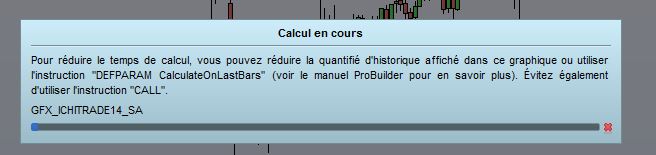
    Still calcultating after  5 minutes

    #162550 quote
    gfxgfx
    Participant
    Average

    any idea why ?

    #162552 quote
    robertogozzirobertogozzi
    Moderator
    Legend

    It calculates every 5 minutes if your default TF is 5 minutes.

    But what’s inside the 30-minute TF should remain unchanged for 30 minutes.

    #162556 quote
    VonasiVonasi
    Moderator
    Master

    gfx – Topic moved to ProBuilder forum as it is an indicator question and not a platform issue.

    Have you read this?

    https://www.prorealcode.com/blog/learning/approach-multi-timeframe-trading-prorealtime/

    #162560 quote
    gfxgfx
    Participant
    Average

    thks. I did read the post. When I say it is still calculating, I mean … (see attached)

    On a 15 minutes Dax chart.

    Indeed, I do not expect an update of values every 15 minutes for the 30 minutes TF calculation.

    But I would expect the indicator to be displayed on chart immediately for previous bars.

    Have you tried it on a live account ?

    c2.jpg c2.jpg
    #162565 quote
    robertogozzirobertogozzi
    Moderator
    Legend

    You mean calculating time!?

    Since there was no pic attached, I thought you were talking about the different TF’s timing.

    On my PC it works like a charm, even increasing 200 to 2000 did not make any difference, just 20000 caused some slight delay.

    #162566 quote
    gfxgfx
    Participant
    Average

    ok. Thanks for testing. I did close PRT and reboot PC. Much better now.

    Certainly memory issue.

    #162567 quote
    VonasiVonasi
    Moderator
    Master

    OK – so what you are actually saying is that just a 15 minute Kijunsen calculates quickly on a DAX 15 minute chart but a 30 minute Kijunsen along with a 15 minute Kijunsen calculates extremely slowly on a DAX 15 minute chart.

    I’ll change your topic title as it is a little confusing and hopefully others can test and see if they have the same issue. Until then I’m off to bed as it is a bit late/early here in Greece!

    #162568 quote
    VonasiVonasi
    Moderator
    Master

    You and Roberto fixed the issue by testing and then turning off and on again while I was posting! A fix is a fix. Night night.

    #162583 quote
    gfxgfx
    Participant
    Average

    Thks to all for helping. Indeed, when it is getting late… oubvious  solution seem so far away. Have a good day

Viewing 10 posts - 1 through 10 (of 10 total)

  • You must be logged in to reply to this topic.

ProRealAI ProRealAI New

Stuck on this ProBuilder code?

Describe what this topic is trying to build, in plain English, and ProRealAI writes the ProRealTime™ indicator, screener or system for you.

Available in 7 languages
Try ProRealAI

Kijunsen MTF very slow to calculate


ProBuilder: Indicators & Custom Tools

New Reply
Author
author-avatar
gfx @gfx Participant
Summary

This topic contains 9 replies,
has 3 voices, and was last updated by gfxgfx

5 years, 7 months ago.

Topic Details
Forum: ProBuilder: Indicators & Custom Tools
Language: English
Started: 02/24/2021
Status: Active
Attachments: 1 files
ProRealCode ProRealCode
Loading...