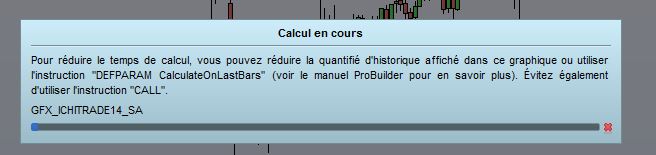
Kijunsen MTF very slow to calculate

Viewing 10 posts - 1 through 10 (of 10 total)
  • Author
    Posts
  • #162549 quote
    gfx
    Participant
    Average

    Hi all,

    I wanted to play around with the instruction timeframe()

    DEFPARAM CALCULATEONLASTBARS = 200
    
    inpS =   9  
    inpM =  26  
    inpL = 52   
    
    timeframe(default)
    // Compute 
    KjS  = KijunSen[inpS,inpM,inpL]
    
    return KjS

    This is immediately displayed on screen


    DEFPARAM CALCULATEONLASTBARS = 200 
    
    inpS = 9 
    inpM = 26 
    inpL = 52 
    
    timeframe(default) 
    
    KjS = KijunSen[inpS,inpM,inpL] 
    
    timeframe(30 minutes, updateonclose)
    
    htfKjS  = KijunSen[inpS,inpM,inpL]
    
    return KjS, htfKjS
    

    Still calcultating after  5 minutes

    #162550 quote
    gfx
    Participant
    Average

    any idea why ?

    #162552 quote
    robertogozzi
    Moderator
    Master

    It calculates every 5 minutes if your default TF is 5 minutes.

    But what’s inside the 30-minute TF should remain unchanged for 30 minutes.

    #162556 quote
    Vonasi
    Moderator
    Master

    gfx – Topic moved to ProBuilder forum as it is an indicator question and not a platform issue.

    Have you read this?

    https://www.prorealcode.com/blog/learning/approach-multi-timeframe-trading-prorealtime/

    #162560 quote
    gfx
    Participant
    Average

    thks. I did read the post. When I say it is still calculating, I mean … (see attached)

    On a 15 minutes Dax chart.

    Indeed, I do not expect an update of values every 15 minutes for the 30 minutes TF calculation.

    But I would expect the indicator to be displayed on chart immediately for previous bars.

    Have you tried it on a live account ?

    c2.jpg c2.jpg
    #162565 quote
    robertogozzi
    Moderator
    Master

    You mean calculating time!?

    Since there was no pic attached, I thought you were talking about the different TF’s timing.

    On my PC it works like a charm, even increasing 200 to 2000 did not make any difference, just 20000 caused some slight delay.

    #162566 quote
    gfx
    Participant
    Average

    ok. Thanks for testing. I did close PRT and reboot PC. Much better now.

    Certainly memory issue.

    #162567 quote
    Vonasi
    Moderator
    Master

    OK – so what you are actually saying is that just a 15 minute Kijunsen calculates quickly on a DAX 15 minute chart but a 30 minute Kijunsen along with a 15 minute Kijunsen calculates extremely slowly on a DAX 15 minute chart.

    I’ll change your topic title as it is a little confusing and hopefully others can test and see if they have the same issue. Until then I’m off to bed as it is a bit late/early here in Greece!

    #162568 quote
    Vonasi
    Moderator
    Master

    You and Roberto fixed the issue by testing and then turning off and on again while I was posting! A fix is a fix. Night night.

    #162583 quote
    gfx
    Participant
    Average

    Thks to all for helping. Indeed, when it is getting late… oubvious  solution seem so far away. Have a good day

Viewing 10 posts - 1 through 10 (of 10 total)

  • You must be logged in to reply to this topic.

Kijunsen MTF very slow to calculate


ProBuilder: Indicators & Custom Tools

New Reply
Author
author-avatar
gfx @gfx Participant
Summary

This topic contains 9 replies,
has 3 voices, and was last updated by gfx

4 years, 11 months ago.

Topic Details
Forum: ProBuilder: Indicators & Custom Tools
Language: English
Started: 02/24/2021
Status: Active
Attachments: 1 files
Logo Logo
Loading...