Moving Stop Loss once based on condition

Viewing 5 posts - 1 through 5 (of 5 total)
  • Author
    Posts
  • #238717 quote
    Crazzycameel
    Participant
    New

    Hello, first post on this forum so hopefully I have not misinterpreted any rules. I have for many hours tried to create a moving stop loss that should only move once and based on a condition. But with all my tries it mostly just exit price at the opening of the candle rather than moving the stop loss. What I want is: if a fractal low is created after the opening of my trade, I want to trail my stoploss to that low, thus tightening the Stoploss. But I only want it to be done once.

    //BARINDEX-TRADEINDEX(1)>1 = to make sure price doesn't look back a signal ahead of the entry
    //cp1 and CB1H1 = variables for recognizing a fractal
    //close > MoveSL = gives the signal that a fractal low has been created
    
    
    stoploss = abs(close - (lowest[5](low))-5*pipsize)
    IF longonmarket then
    if BARINDEX-TRADEINDEX(1)>1 and cp1 and CB1H1 and close > MoveSL THEN
    set stop loss stoploss
    endif
    endif


    when running this it just closes at the open of the next candle when the signal is given instead of moving the stop loss to the lowest low (-5 pips) of the last five candles. the code is essentially just as this snippet:

    IF longonmarket then
    if BARINDEX-TRADEINDEX(1)>1 and cp1 and CB1H1 and close > MoveSL THEN
    sell at market
    endif
    endif


    Anyone who has any advice would be greatly appreciated.
    Regards
    Jonathan

    #238732 quote
    robertogozzi
    Moderator
    Master

    Try this one:

    IF Not OnMarket THEN
       SetStop = 1
    ENDIF
    stoploss = abs(close - (lowest[5](low))-5*pipsize)
    IF longonmarket and SetStop then
       if BARINDEX-TRADEINDEX(1)>1 and cp1 and CB1H1 and close > MoveSL THEN
          set stop loss stoploss
          SetStop = 0
       endif
    endif
    Iván González and Crazzycameel thanked this post
    #238735 quote
    Crazzycameel
    Participant
    New

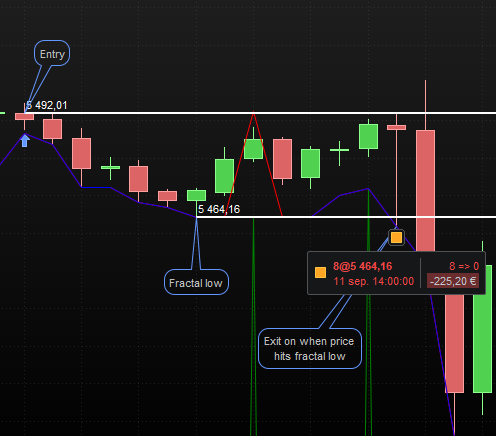
    thanks roberto, its unfortunately reacting in the same manner and closes upon the opening of the next candle

    i have added a printscreen below from my PRT just visually describing the issue if its any help

    if you have any other suggestions i would appreciate it very much

    prntscreen-fractal.png prntscreen-fractal.png
    #238750 quote
    Iván González
    Moderator
    Master

    Roberto’s code seems correct. Maybe you should check CP1, CB1H1 or moveSL.
    i suggest work with graphonprice and graph in order to check exactly what is going on.
    Here you have an example of code with StopLoss changing to breakeven.

    ema1=average[10,1](close)
    ema2=average[50,1](close)
    
    lmin=lowest[20](low)
    
    rr=2
    bk=1
    
    if not onmarket and ema1 crosses over ema2 then
    
    closeprice=close
    stopLong=lmin
    riskLong=close-lmin
    tpLong=close+rr*riskLong
    breakEvenLevel=close+bk*riskLong
    
    buy 1 contract at market
    set stop price stopLong
    set target price tpLong
    endif
    
    if onmarket and high crosses over breakEvenLevel then
    stopLong=tradeprice
    set stop breakeven
    endif
    graphonprice ema1 coloured("blue")
    graphonprice ema2 coloured("purple")
    graphonprice tpLong coloured("green")
    graphonprice stopLong coloured("red")
    graphonprice breakEvenLevel coloured("fuchsia")
    
    Crazzycameel thanked this post
    #238826 quote
    Crazzycameel
    Participant
    New

    Hey Ivan

    Thanks for the advice of graphing the indicators, I have found a solution, I am not entirely sure of the logic of the solution though haha

    //MOVING SL ONCE IF A FRACTAL IS CREATED
    
    IF Not OnMarket THEN
    SetStop = 1
    ENDIF
    
    stoploss = (lowest[5](low))
    stoploss1 = (lowest[5](low))
    
    IF longonmarket and SetStop = 1 then
    if BARINDEX-TRADEINDEX(1)>1 and CB1H and close > entry1 THEN
    stoploss=tradeprice
    NEWSL = stoploss-stoploss1
    set stop loss NEWSL
    SetStop = 0
    endif
    endif
    
    graphonprice CB1H coloured("green")
    graphonprice stoploss coloured("red")
    graphonprice stoploss1 coloured("blue")

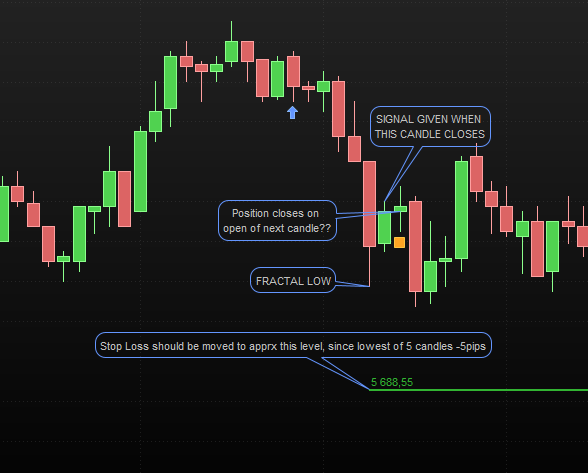
    The CB1H indicator only returns a value in one candle(green spikes in the picture added), which seems to affect the stoploss function to return a value (just speculating). If you have any insight for me to learn, that would be greatly appreciated

    //Also Robertos code does also work I when the signal occurs I noticed, but only when I write it a flat value in the stoploss, like this:


    IF Not OnMarket THEN
    SetStop = 1
    ENDIF

    IF longonmarket and SetStop then
    if BARINDEX-TRADEINDEX(1)>1 and CB1H and close > entry1 THEN
    set stop loss 30
    SetStop = 0
    endif
    endif

    //cannot manage to write this part as code here for some reason, sorry haha

    entry-nearest-low.png entry-nearest-low.png
Viewing 5 posts - 1 through 5 (of 5 total)
  • You must be logged in to reply to this topic.

Moving Stop Loss once based on condition


ProOrder: Automated Strategies & Backtesting

New Reply
Author
Summary

This topic contains 4 replies,
has 3 voices, and was last updated by Crazzycameel
1 year, 4 months ago.

Topic Details
Forum: ProOrder: Automated Strategies & Backtesting
Language: English
Started: 10/08/2024
Status: Active
Attachments: 2 files
Logo Logo
Loading...