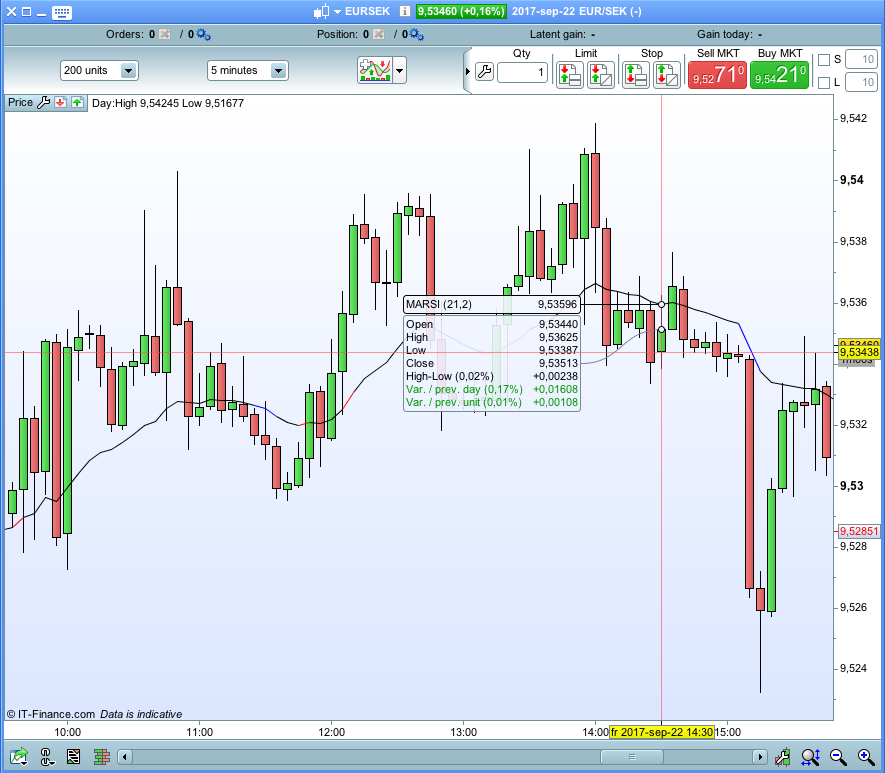
Good Day
I only recently started playing around coding and more specifically graphing indicators.
I am looking to create a simple indicator that works and functions exactly like a standard moving average line except the color of the line is dependent on the position of the RSI2 period.
Variables should be as follows:
RSI Period: i.e. 2
Moving Average Period: i.e. 21
Moving Average Type: i.e. 2 (Exponential)
RSI Top Threshold: 90
RSI Bottom Threshold: 10
Thus as long as the RSI Period is within the threshold, the moving average line is black.
If the RSI is above the threshold the line is red and if below blue.
I think it is only possible to have two different colours but not three.
Guess I would need two lines then right on top of each other, one changing color from black to blue if below the RSI threshold and another changing black to red if above the threshold.
You can do it with just your one line, just use an if statement to define the 3 variables r, g, b according to your various rsi thresholds so that each set of r,g,b defines each of the 3 colours you want, and then use them in the color definitions in your return line “return myma coloured (r,g,b)”
Sthg like:
r=0
g=0
b=0
myrsi=RSI[2](close)
myma=ExponentialAverage[21](close)
if myrsi>90 then
r=255
g=30
b=30
elsif myrsi<10 then
r=30
g=144
b=255
endif
return myma coloured(r,g,b) as "my ma"
Excellent idea Noobywan. A little related problem I had 2 days ago. If i use drawhline to draw a line and then I want it to disappear again. How can this be done? Just painting over with white doesn’t work since the background of PRT is not white. :-S
In the context of being able to keep some graphic objects drawn on previous bars while deleting some others, I haven’t found a way to selectively make lines disappear because of background as you said, however if keeping previous graphic elements doesn’t matter, then adding at the beginning of the code the line:
defparam drawonlastbaronly=true
will allow you to keep only the horizontal line you’ve defined on the last bar (and so it needs to be defined at each bar even if it doesn’t move), but it will delete anything else drawn on previous bars
Here is the MARSI indicator you described @juanj.
Edit: Now I see Noobywan posted the same already above. .-)
Thanks, Guys, implemented it as follows:
//variables to add:
//RSIPeriod (Default: 2)
//MAPeriod (Default: 21)
//MAType (Default: 2)
//RSIUpperThreshold (Default: 95)
//RSILowerThreshold (Default: 5)
myrsi=RSI[RSIPeriod](close)
myma=Average[MAPeriod,MAType](close)
if myrsi>RSIUpperThreshold then
r=255
g=0
b=0
Elsif myrsi<=RSIUpperThreshold and myrsi > 50 then
r=0//255
g=0//145
b=0//164
elsif myrsi<RSILowerThreshold then
r=0
g=255
b=0
Elsif myrsi>RSILowerThreshold and myrsi < 50 then
r=0//173
g=0//255
b=0//47
Elsif myrsi = 50 then
r=0
g=0
b=0
endif
return myma coloured(r,g,b) as "Hybrid MA"