


Mise à jour affichage en temps réel

Viewing 2 posts - 1 through 2 (of 2 total)

  • Author
    Posts
  • #210991 quote
    JokeJoke
    Participant
    New

    Bonjour,

    est-ce que vous seriez s’il y a une instruction pour faire une mise à jour des affichages graphiques fait précédemment lors d’une nouvelle barre ?

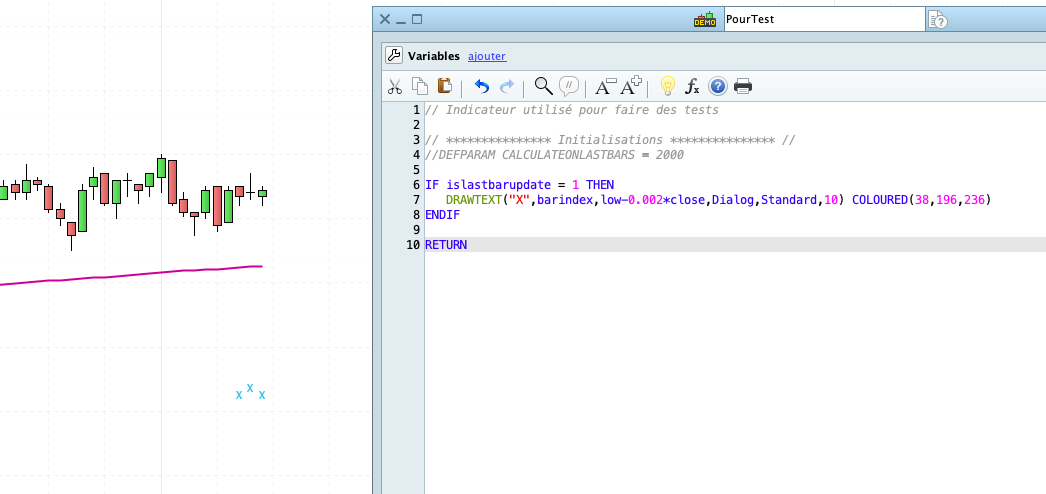
    En effet le code suivant me retourne un “X” à chaque nouvelle barre. Hors si je ne me trompe pas je devrais avoir le “X” que sur la dernière barre ?

    IF islastbarupdate = 1 THEN
    DRAWTEXT("X",barindex,low-0.002*close,Dialog,Standard,10) COLOURED(38,196,236)
    ENDIF
    
    RETURN


    Merci

    Bonne journée
    JoKE

    Capture-decran-2023-03-06-a-15.09.34.png Capture-decran-2023-03-06-a-15.09.34.png
    #210994 quote
    JC_BywanJC_Bywan
    Moderator
    Master

    Bjr,

    defparam drawonlastbaronly=true

    DrawOnLastBarOnly

Viewing 2 posts - 1 through 2 (of 2 total)
  • You must be logged in to reply to this topic.

ProRealAI ProRealAI New

Stuck on this ProBuilder code?

Describe what this topic is trying to build, in plain English, and ProRealAI writes the ProRealTime™ indicator, screener or system for you.

Available in 7 languages
Try ProRealAI

Mise à jour affichage en temps réel


ProBuilder : Indicateurs & Outils Personnalisés

New Reply
Author
author-avatar
Joke @joke Participant
Summary

This topic contains 1 reply,
has 2 voices, and was last updated by JC_BywanJC_Bywan

3 years, 6 months ago.

Topic Details
Forum: ProBuilder : Indicateurs & Outils Personnalisés
Language: French
Started: 03/06/2023
Status: Active
Attachments: 1 files
ProRealCode ProRealCode
Loading...

