


Affichage des Tailles

Viewing 2 posts - 1 through 2 (of 2 total)
  • Author
    Posts
  • #253963 quote
    Bernard13Bernard13
    Participant
    Senior

    Bonjour,
    On peut utiliser les variables de Tailles des instruments, mais comment peut-on les afficher ?

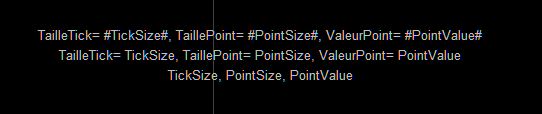
    DrawText(“TailleTick= #TickSize#, TaillePoint= #PointSize#, ValeurPoint= #PointValue#”, 0, -50) Anchor(Top)
    DrawText(“TailleTick= TickSize, TaillePoint= PointSize, ValeurPoint= PointValue”, 0, -70) Anchor(Top)
    DrawText(“TickSize, PointSize, PointValue”, 0, -90) Anchor(Top)
    RETURN

    a retourné la capture d’écran ci-dessous.
    Merci par avance.

    Tailles-Capture-decran-2025-11-25-165736.png Tailles-Capture-decran-2025-11-25-165736.png
    #253965 quote
    JC_BywanJC_Bywan
    Moderator
    Master

    Bonjour, en passant par des noms de variable qui ne sont pas des mots réservés du langage:

    mavariable1=TickSize
    mavariable2=PointSize
    mavariable3=PointValue
    
    DrawText("TailleTick= #mavariable1#, TaillePoint= #mavariable2#, ValeurPoint= #mavariable3#", 0, -50) Anchor(Top)
    
    RETURN
    Bernard13, robertogozzi and Iván González thanked this post
Viewing 2 posts - 1 through 2 (of 2 total)
  • You must be logged in to reply to this topic.

ProRealAI ProRealAI New

Stuck on this ProBuilder code?

Describe what this topic is trying to build, in plain English, and ProRealAI writes the ProRealTime™ indicator, screener or system for you.

Available in 7 languages
Try ProRealAI

Affichage des Tailles


ProBuilder : Indicateurs & Outils Personnalisés

New Reply
Author
author-avatar
Bernard13 @bernard13 Participant
Summary

This topic contains 1 reply,
has 2 voices, and was last updated by JC_BywanJC_Bywan

9 months, 3 weeks ago.

Topic Details
Forum: ProBuilder : Indicateurs & Outils Personnalisés
Language: French
Started: 11/25/2025
Status: Active
Attachments: 1 files
ProRealCode ProRealCode
Loading...

