Max number of orders

Viewing 6 posts - 1 through 6 (of 6 total)

  • Author
    Posts
  • #190365 quote
    Gaby
    Participant
    Average

    Hi all,

    seeking confirmation if my understanding how the setting of max number of orders allowed per trading day (from 00:00 GMT) works (part of Automatic Trading settings).

    Example: limit sets to = 4

    When the first trade is executed the Position opened counts for 1

    Then if the order is amended with Stop loss and take profit the count goes up to 3 (but still < 4 limit).

    Then if the first order is closed, then the counter is then updated to 2 (two orders executed but zero left running).

    ==========

    Second trade, same day:

    Position is opened = counter goes up to 3

    Position is amended with stop loss and take profit = counter goes up to 5 and therefore > the limit therefore the strategy quits and the order is forced to close.

    In conclusion: in order to allow 2 trades per each day, I need to set this parameter to minimum 6 if my trades include stop loss and take profit levels.

    Is my understanding correct, in your view?

    Many thanks, Gaby

    #190382 quote
    Nicolas
    Keymaster
    Master

    It depends mainly on how you count your orders, if you use TRADEINDEX with pending orders, then in this case each of your order (takeprofit/stoploss) change the TRADEINDEX.

    #190397 quote
    PeterSt
    Participant
    Master

    But Nicolas, how would you count the “real” orders ? Like Entry and Exit (= 2 orders) or In+Out (= 1 order) ? Both would suffice (for what Gaby wants to know, but for me actually the same), but for both I would not readily have a solution. There’s finicky stuff with StrategyProfit <> StrategyProfit[1] but this is not really reliable (IIRC this relates to Spread being added after the Exit(-bar) and that changing StrategyProfit *again*.

    ?

    #190419 quote
    Nicolas
    Keymaster
    Master

    We are all used to count the market orders if you buy/sellshort at market with a variable increase.

    Or use this snippet:

    ( (not onmarket and onmarket[1] and not onmarket[2]) or (tradeindex(1)=tradeindex(2) and tradeindex(1)=barindex[1] and tradeindex(1)>0) )

    New keywords will come in the weeks to come:
    ShortTriggered[N] / LongTriggered[N]
    Allows to know if a Short / Long position has been opened on the candlestick N (optional default N is 0)

    #190423 quote
    Gaby
    Participant
    Average

    Apologies Nicolas, I did not understand your answer.

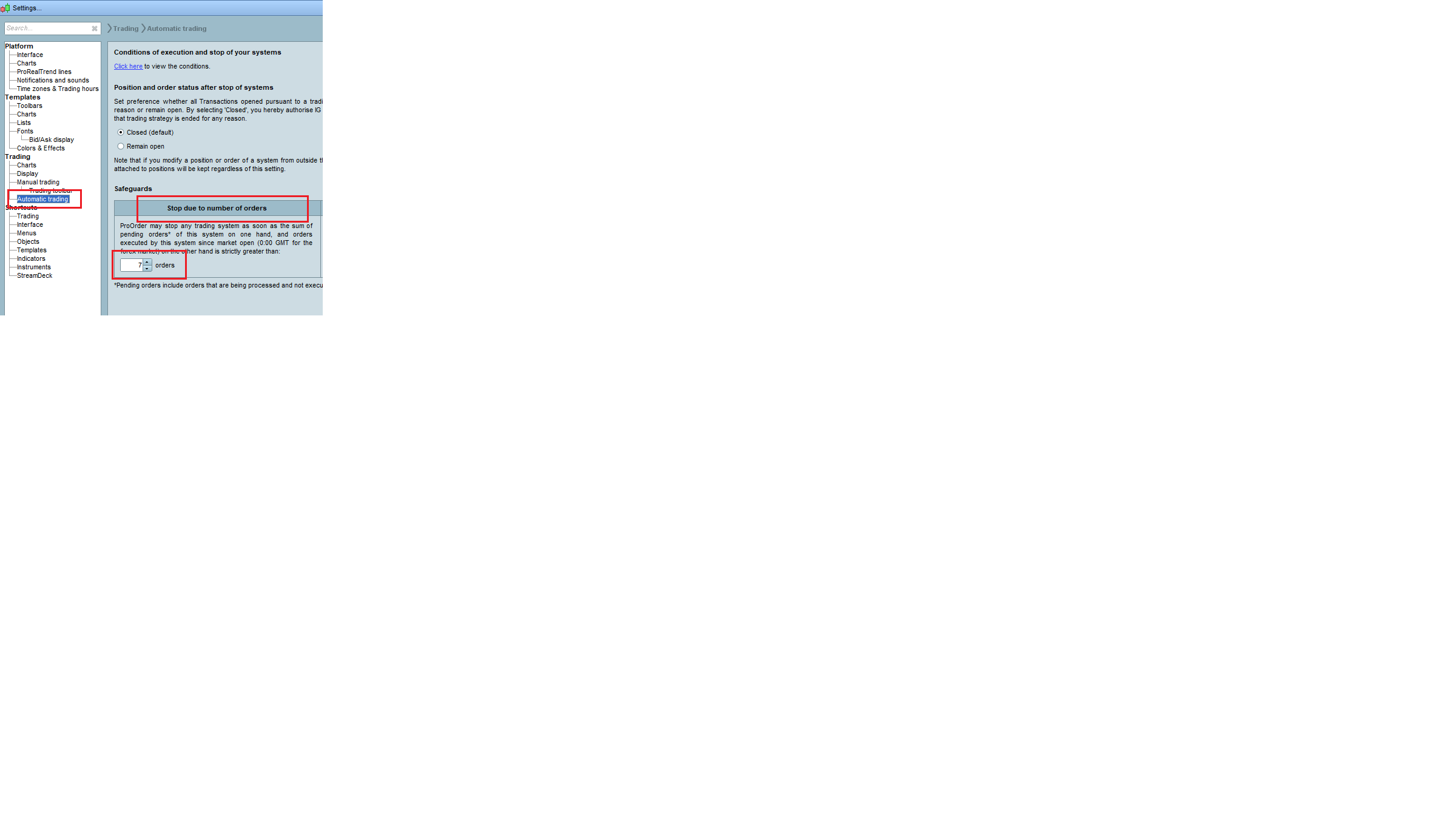
    I do not count orders in my code; it is Prorealcode that counts the orders and then check the configuration of the parameter called”stop due to number of orders”.

    I have attached a picture of the configuration, hoping it is more clear.

    Again, what it is not clear to me from the description is: what orders ProrealCode is counting, to then compare the parameter level that in the meantime I have increased to 7 to avoid unwanted order closing.

    Thanks. Bye, Gaby

    Stop-Due-to-number-of-orders.png Stop-Due-to-number-of-orders.png
    #190436 quote
    PeterSt
    Participant
    Master
    ( (not onmarket and onmarket[1] and not onmarket[2])

    That does not work with two (or more) trades within one bar. 😉

    tradeindex(1)=tradeindex(2)

    What does that do in normal (English) language ? :-]

Viewing 6 posts - 1 through 6 (of 6 total)

  • You must be logged in to reply to this topic.

Max number of orders


ProOrder: Automated Strategies & Backtesting

New Reply
Author
author-avatar
Gaby @gaby Participant
Summary

This topic contains 5 replies,
has 3 voices, and was last updated by PeterSt

3 years, 11 months ago.

Topic Details
Forum: ProOrder: Automated Strategies & Backtesting
Language: English
Started: 03/23/2022
Status: Active
Attachments: 1 files
Logo Logo
Loading...