Marking highs and lows based on opening and closing prices.

Viewing 7 posts - 1 through 7 (of 7 total)
  • Author
    Posts
  • #254719 quote
    theunpredictable
    Participant
    New

    Hi,

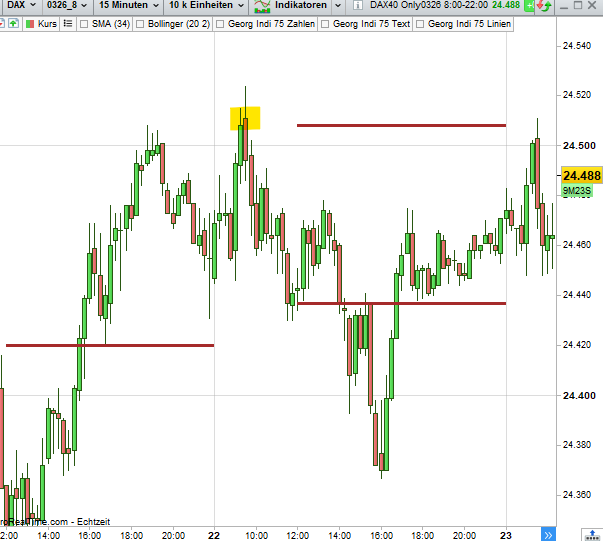
    Do you have any ideas on how to mark the high and low of a time range, e.g., 8 a.m. to 12 p.m., on the chart?

    It is important that the highs and lows are marked only on the basis of the candle bodies, i.e., without wicks and shadows. I wrote it once on a closing price basis. However, it is sometimes the case that the opening prices mark the lower or upper end, and then the line is not correct.


    // Dailyreset
    IF Day <> Day[1] THEN
    hiClose = Close
    loClose = Close
    ENDIF

    // Collecting only between 08:00 and 14:30
    IF Time >= 080000 AND Time <= 143000 THEN
    hiClose = MAX(hiClose, Close)
    loClose = MIN(loClose, Close)
    ENDIF

    // Drawing Line from 14:30
    IF Time >= 143000 THEN
    DRAWSEGMENT(barindex, hiClose, barindex + 1, hiClose) COLOURED(165,42,42)style(dottedline, 3)
    DRAWSEGMENT(barindex, loClose, barindex + 1, loClose) COLOURED(165,42,42)style(dottedline, 3)
    ENDIF

    #254720 quote
    robertogozzi
    Moderator
    Master

    There you go:

    // Dailyreset
    //IF Day <> Day[1] THEN
    //hiClose = Close
    //loClose = Close
    //ENDIF
    
    // Collecting only between 08:00 and 12:00
    IF OpenTime >= 080000 AND OpenTime <= 120000 THEN
       if OpenTime = 080000 THEN
          hiClose = Close
          loClose = Close
       endif
       hiClose = MAX(hiClose, Close)
       loClose = MIN(loClose, Close)
    ENDIF
    
    // Drawing Line from 12:00
    IF OpenTime >= 120000 THEN
       DRAWSEGMENT(barindex, hiClose, barindex + 1, hiClose) COLOURED(165,42,42)style(dottedline, 3)
       DRAWSEGMENT(barindex, loClose, barindex + 1, loClose) COLOURED(165,42,42)style(dottedline, 3)
    ENDIF
    return
    theunpredictable and Iván González thanked this post
    #254722 quote
    robertogozzi
    Moderator
    Master

    Please select the correct language. I moved it from the German forum. Thanks 🙂

    #254723 quote
    theunpredictable
    Participant
    New

    Hi Roberto,

    I probably didn’t express myself clearly.

    However, the formula you showed only depicts the range in the period shown on a close basis.

    In the image, you can see that the range would be higher if you also wanted to use the open (high, low).

    In other words, I want to see the lowest price and the highest price of all candlesticks in the period. I don’t know how to include the open price in the calculation.

    #254725 quote
    theunpredictable
    Participant
    New

    i mean, highest and lowest price on basis of candelstick-bodies.

    #254726 quote
    LaMaille
    Participant
    Junior
    
    
    // Dailyreset
    //IF Day <> Day[1] THEN
    //hiClose = Close
    //loClose = Close
    //ENDIF
     
    // Collecting only between 08:00 and 12:00
    IF OpenTime >= 080000 AND OpenTime <= 120000 THEN
       if OpenTime = 080000 THEN
          hiClose = MAX(Close,Open)
          loClose = Min(Close,open)
       endif
       hiClose = MAX(hiClose, MAX(Close,Open))
       loClose = MIN(loClose, Min(Close,open))
    ENDIF
     
    // Drawing Line from 12:00
    IF OpenTime >= 120000 THEN
       DRAWSEGMENT(barindex, hiClose, barindex + 1, hiClose) COLOURED(165,42,42)style(dottedline, 3)
       DRAWSEGMENT(barindex, loClose, barindex + 1, loClose) COLOURED(165,42,42)style(dottedline, 3)
    ENDIF
    return
    
    robertogozzi and Iván González thanked this post
    #254727 quote
    theunpredictable
    Participant
    New

    That’s it – many thanks Roberto 🙂

Viewing 7 posts - 1 through 7 (of 7 total)
  • You must be logged in to reply to this topic.

Marking highs and lows based on opening and closing prices.


ProBuilder: Indicators & Custom Tools

New Reply
Author
Summary

This topic contains 6 replies,
has 3 voices, and was last updated by theunpredictable
1 month, 2 weeks ago.

Topic Details
Forum: ProBuilder: Indicators & Custom Tools
Language: English
Started: 12/23/2025
Status: Active
Attachments: 1 files
Logo Logo
Loading...