Marking highs and lows based on opening and closing prices.

Viewing 7 posts - 1 through 7 (of 7 total)
  • Author
    Posts
  • #254719 quote
    theunpredictabletheunpredictable
    Participant
    New

    Hi,

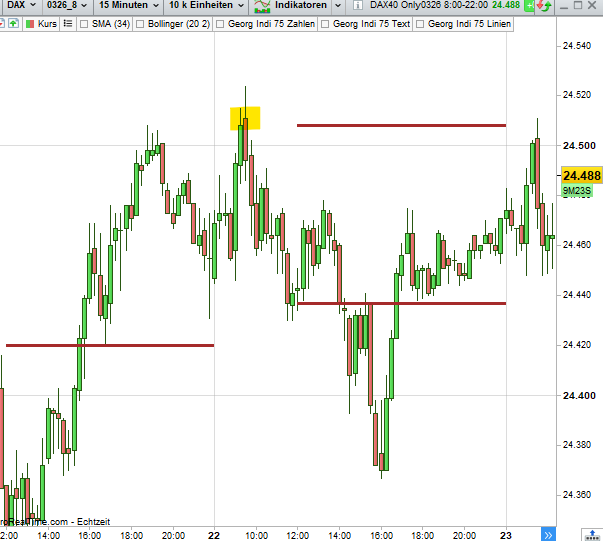
    Do you have any ideas on how to mark the high and low of a time range, e.g., 8 a.m. to 12 p.m., on the chart?

    It is important that the highs and lows are marked only on the basis of the candle bodies, i.e., without wicks and shadows. I wrote it once on a closing price basis. However, it is sometimes the case that the opening prices mark the lower or upper end, and then the line is not correct.


    // Dailyreset
    IF Day <> Day[1] THEN
    hiClose = Close
    loClose = Close
    ENDIF

    // Collecting only between 08:00 and 14:30
    IF Time >= 080000 AND Time <= 143000 THEN
    hiClose = MAX(hiClose, Close)
    loClose = MIN(loClose, Close)
    ENDIF

    // Drawing Line from 14:30
    IF Time >= 143000 THEN
    DRAWSEGMENT(barindex, hiClose, barindex + 1, hiClose) COLOURED(165,42,42)style(dottedline, 3)
    DRAWSEGMENT(barindex, loClose, barindex + 1, loClose) COLOURED(165,42,42)style(dottedline, 3)
    ENDIF

    #254720 quote
    robertogozzirobertogozzi
    Moderator
    Legend

    There you go:

    // Dailyreset
    //IF Day <> Day[1] THEN
    //hiClose = Close
    //loClose = Close
    //ENDIF
    
    // Collecting only between 08:00 and 12:00
    IF OpenTime >= 080000 AND OpenTime <= 120000 THEN
       if OpenTime = 080000 THEN
          hiClose = Close
          loClose = Close
       endif
       hiClose = MAX(hiClose, Close)
       loClose = MIN(loClose, Close)
    ENDIF
    
    // Drawing Line from 12:00
    IF OpenTime >= 120000 THEN
       DRAWSEGMENT(barindex, hiClose, barindex + 1, hiClose) COLOURED(165,42,42)style(dottedline, 3)
       DRAWSEGMENT(barindex, loClose, barindex + 1, loClose) COLOURED(165,42,42)style(dottedline, 3)
    ENDIF
    return
    #254722 quote
    robertogozzirobertogozzi
    Moderator
    Legend

    Please select the correct language. I moved it from the German forum. Thanks šŸ™‚

    #254723 quote
    theunpredictabletheunpredictable
    Participant
    New

    Hi Roberto,

    I probably didn’t express myself clearly.

    However, the formula you showed only depicts the range in the period shown on a close basis.

    In the image, you can see that the range would be higher if you also wanted to use the open (high, low).

    In other words, I want to see the lowest price and the highest price of all candlesticks in the period. I don’t know how to include the open price in the calculation.

    Screenshot-2025-12-23-121031.png Screenshot-2025-12-23-121031.png
    #254725 quote
    theunpredictabletheunpredictable
    Participant
    New

    i mean, highest and lowest price on basis of candelstick-bodies.

    #254726 quote
    LaMailleLaMaille
    Participant
    Junior
    
    
    // Dailyreset
    //IF Day <> Day[1] THEN
    //hiClose = Close
    //loClose = Close
    //ENDIF
     
    // Collecting only between 08:00 and 12:00
    IF OpenTime >= 080000 AND OpenTime <= 120000 THEN
       if OpenTime = 080000 THEN
          hiClose = MAX(Close,Open)
          loClose = Min(Close,open)
       endif
       hiClose = MAX(hiClose, MAX(Close,Open))
       loClose = MIN(loClose, Min(Close,open))
    ENDIF
     
    // Drawing Line from 12:00
    IF OpenTime >= 120000 THEN
       DRAWSEGMENT(barindex, hiClose, barindex + 1, hiClose) COLOURED(165,42,42)style(dottedline, 3)
       DRAWSEGMENT(barindex, loClose, barindex + 1, loClose) COLOURED(165,42,42)style(dottedline, 3)
    ENDIF
    return
    
    robertogozzi and IvƔn GonzƔlez thanked this post
    #254727 quote
    theunpredictabletheunpredictable
    Participant
    New

    That’s it – many thanks Roberto šŸ™‚

Viewing 7 posts - 1 through 7 (of 7 total)
  • You must be logged in to reply to this topic.

ProRealAI ProRealAI New

Stuck on this ProBuilder code?

Describe what this topic is trying to build, in plain English, and ProRealAI writes the ProRealTimeā„¢ indicator, screener or system for you.

Available in 7 languages
Try ProRealAI

Marking highs and lows based on opening and closing prices.


ProBuilder: Indicators & Custom Tools

New Reply
Author
Summary

This topic contains 6 replies,
has 3 voices, and was last updated by theunpredictabletheunpredictable
9 months ago.

Topic Details
Forum: ProBuilder: Indicators & Custom Tools
Language: English
Started: 12/23/2025
Status: Active
Attachments: 1 files
ProRealCode ProRealCode
Loading...