MACD ON PRICE

Viewing 7 posts - 1 through 7 (of 7 total)

  • Author
    Posts
  • #131471 quote
    segiesegie
    Participant
    Senior

    Hi,

    Can the dot for the above code be displayed on the price chart? On the corresponding candle?

    Regards,

    Segie

    //PRC_MACD Platinum | indicator
    //29.09.2016
    //Nicolas @ www.prorealcode.com
    //Sharing ProRealTime knowledge
    
    // --- settings
    //short = 12
    //long = 26
    //signal = 9
    // --- end of settings
    
    EMAshort1 = exponentialaverage[short](close)
    EMAshort2 = exponentialaverage[short](EMAshort1)
    DifferenceShort = EMAshort1 - EMAshort2
    ZeroLagShort = EMAshort1 + DifferenceShort
    
    EMAlong1 = exponentialaverage[long](close)
    EMAlong2 = exponentialaverage[long](EMAlong1)
    DifferenceLong = EMAlong1 - EMAlong2
    ZeroLagLong = EMAlong1 + DifferenceLong
    
    ZeroLagMACD = ZeroLagShort - ZeroLagLong
    
    signal1=ExponentialAverage[signal](ZEROLAGMACD)
    signal2=ExponentialAverage[signal](signal1)
    DIFFERENCE2=signal1-signal2
    
    SignalMACD=signal1+DIFFERENCE2
    
    if signalMACD>=zerolagMACD then
    r=255
    g=69
    b=0
    else
    r=54
    g=224
    b=208
    endif
    
    drawbarchart(signalMACD,zerolagMACD,signalMACD,zerolagMACD) coloured(r,g,b)
    
    if zerolagMACD crosses over signalMACD or zerolagMACD crosses under signalMACD then
    drawtext("●",barindex,signalMACD,Dialog,Bold,12) coloured(r,g,b)
    endif
    
    
    RETURN ZeroLagMACD coloured(54,224,208) style(dottedline,1 ) as "Zero Lag MACD", SignalMACD coloured(255,69,0) style(line,2) as "Signal MACD", 0 coloured(100,100,100)
    #131476 quote
    VonasiVonasi
    Moderator
    Master

    Try this:

    //PRC_MACD Platinum | indicator (dot only on price chart)
    //29.09.2016
    //Nicolas @ www.prorealcode.com
    //Sharing ProRealTime knowledge
    
    // --- settings
    //short = 12
    //long = 26
    //signal = 9
    // --- end of settings
    
    EMAshort1 = exponentialaverage[short](close)
    EMAshort2 = exponentialaverage[short](EMAshort1)
    DifferenceShort = EMAshort1 - EMAshort2
    ZeroLagShort = EMAshort1 + DifferenceShort
    
    EMAlong1 = exponentialaverage[long](close)
    EMAlong2 = exponentialaverage[long](EMAlong1)
    DifferenceLong = EMAlong1 - EMAlong2
    ZeroLagLong = EMAlong1 + DifferenceLong
    
    ZeroLagMACD = ZeroLagShort - ZeroLagLong
    
    signal1=ExponentialAverage[signal](ZEROLAGMACD)
    signal2=ExponentialAverage[signal](signal1)
    DIFFERENCE2=signal1-signal2
    
    SignalMACD=signal1+DIFFERENCE2
    
    if signalMACD>=zerolagMACD then
    r=255
    g=69
    b=0
    else
    r=54
    g=224
    b=208
    endif
    
    if zerolagMACD crosses over signalMACD then
    drawtext("●",barindex,low,Dialog,Bold,12) coloured(r,g,b)
    endif
    if zerolagMACD crosses under signalMACD then
    drawtext("●",barindex,high,Dialog,Bold,12) coloured(r,g,b)
    endif
    
    RETURN
    segie thanked this post
    #131669 quote
    segiesegie
    Participant
    Senior

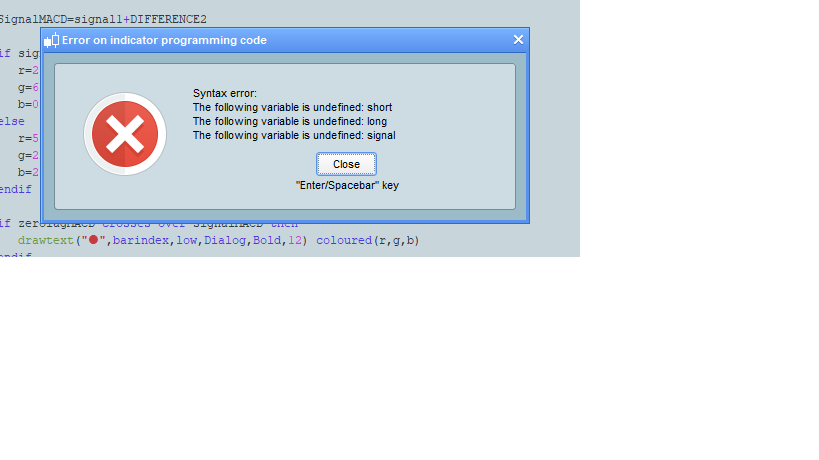
    Receiving this attached error

    MACDPRICE.png MACDPRICE.png
    #131674 quote
    robertogozzirobertogozzi
    Moderator
    Legend

    Remove initial //’s from lines 7,8 and 9.

    segie thanked this post
    #131700 quote
    segiesegie
    Participant
    Senior

    Perfect. Thank you!

    #131704 quote
    VonasiVonasi
    Moderator
    Master

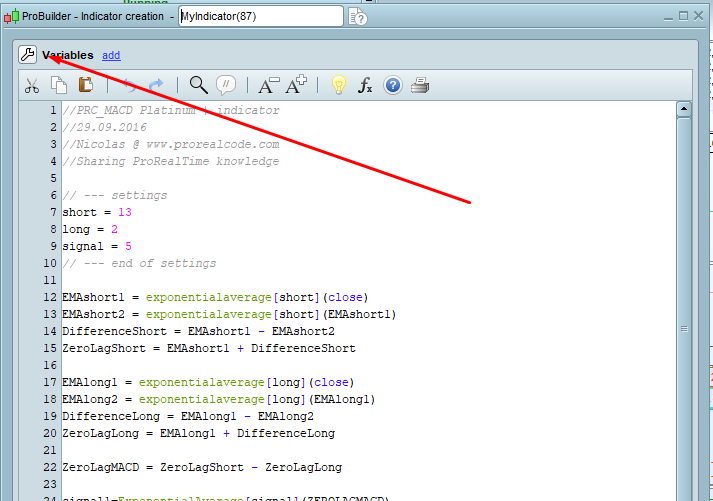
    Alternatively click on the spanner and add them as variables that can be changed in the indicator configure window which is what I assumed you would want to do.

    segie thanked this post
    Screenshot_1-2.png Screenshot_1-2.png
    #131859 quote
    segiesegie
    Participant
    Senior

    That helps as well.

    Thanks

Viewing 7 posts - 1 through 7 (of 7 total)
  • You must be logged in to reply to this topic.

ProRealAI ProRealAI New

Stuck on this ProBuilder code?

Describe what this topic is trying to build, in plain English, and ProRealAI writes the ProRealTime™ indicator, screener or system for you.

Available in 7 languages
Try ProRealAI

MACD ON PRICE


ProBuilder: Indicators & Custom Tools

New Reply
Author
author-avatar
segie @segie Participant
Summary

This topic contains 6 replies,
has 3 voices, and was last updated by segiesegie

6 years, 4 months ago.

Topic Details
Forum: ProBuilder: Indicators & Custom Tools
Language: English
Started: 05/13/2020
Status: Active
Attachments: 2 files
ProRealCode ProRealCode
Loading...