MACD ON PRICE

Viewing 7 posts - 1 through 7 (of 7 total)

  • Author
    Posts
  • #131471 quote
    segie
    Participant
    Senior

    Hi,

    Can the dot for the above code be displayed on the price chart? On the corresponding candle?

    Regards,

    Segie

    //PRC_MACD Platinum | indicator
    //29.09.2016
    //Nicolas @ www.prorealcode.com
    //Sharing ProRealTime knowledge
    
    // --- settings
    //short = 12
    //long = 26
    //signal = 9
    // --- end of settings
    
    EMAshort1 = exponentialaverage[short](close)
    EMAshort2 = exponentialaverage[short](EMAshort1)
    DifferenceShort = EMAshort1 - EMAshort2
    ZeroLagShort = EMAshort1 + DifferenceShort
    
    EMAlong1 = exponentialaverage[long](close)
    EMAlong2 = exponentialaverage[long](EMAlong1)
    DifferenceLong = EMAlong1 - EMAlong2
    ZeroLagLong = EMAlong1 + DifferenceLong
    
    ZeroLagMACD = ZeroLagShort - ZeroLagLong
    
    signal1=ExponentialAverage[signal](ZEROLAGMACD)
    signal2=ExponentialAverage[signal](signal1)
    DIFFERENCE2=signal1-signal2
    
    SignalMACD=signal1+DIFFERENCE2
    
    if signalMACD>=zerolagMACD then
    r=255
    g=69
    b=0
    else
    r=54
    g=224
    b=208
    endif
    
    drawbarchart(signalMACD,zerolagMACD,signalMACD,zerolagMACD) coloured(r,g,b)
    
    if zerolagMACD crosses over signalMACD or zerolagMACD crosses under signalMACD then
    drawtext("●",barindex,signalMACD,Dialog,Bold,12) coloured(r,g,b)
    endif
    
    
    RETURN ZeroLagMACD coloured(54,224,208) style(dottedline,1 ) as "Zero Lag MACD", SignalMACD coloured(255,69,0) style(line,2) as "Signal MACD", 0 coloured(100,100,100)
    #131476 quote
    Vonasi
    Moderator
    Master

    Try this:

    //PRC_MACD Platinum | indicator (dot only on price chart)
    //29.09.2016
    //Nicolas @ www.prorealcode.com
    //Sharing ProRealTime knowledge
    
    // --- settings
    //short = 12
    //long = 26
    //signal = 9
    // --- end of settings
    
    EMAshort1 = exponentialaverage[short](close)
    EMAshort2 = exponentialaverage[short](EMAshort1)
    DifferenceShort = EMAshort1 - EMAshort2
    ZeroLagShort = EMAshort1 + DifferenceShort
    
    EMAlong1 = exponentialaverage[long](close)
    EMAlong2 = exponentialaverage[long](EMAlong1)
    DifferenceLong = EMAlong1 - EMAlong2
    ZeroLagLong = EMAlong1 + DifferenceLong
    
    ZeroLagMACD = ZeroLagShort - ZeroLagLong
    
    signal1=ExponentialAverage[signal](ZEROLAGMACD)
    signal2=ExponentialAverage[signal](signal1)
    DIFFERENCE2=signal1-signal2
    
    SignalMACD=signal1+DIFFERENCE2
    
    if signalMACD>=zerolagMACD then
    r=255
    g=69
    b=0
    else
    r=54
    g=224
    b=208
    endif
    
    if zerolagMACD crosses over signalMACD then
    drawtext("●",barindex,low,Dialog,Bold,12) coloured(r,g,b)
    endif
    if zerolagMACD crosses under signalMACD then
    drawtext("●",barindex,high,Dialog,Bold,12) coloured(r,g,b)
    endif
    
    RETURN
    segie thanked this post
    #131669 quote
    segie
    Participant
    Senior

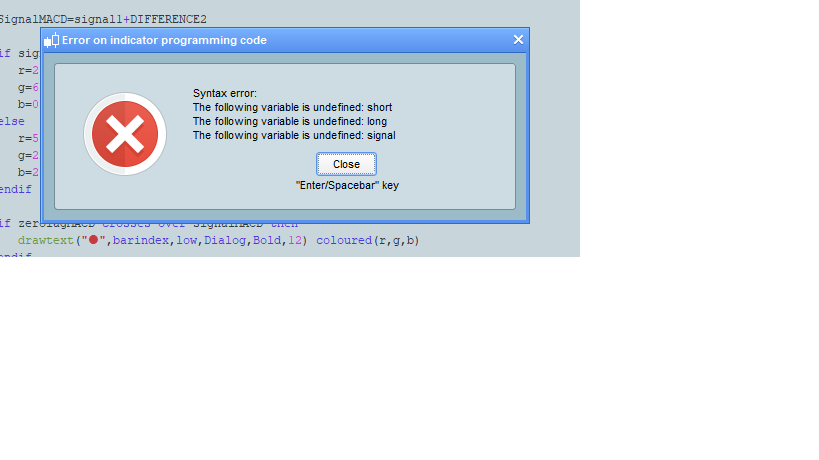
    Receiving this attached error

    MACDPRICE.png MACDPRICE.png
    #131674 quote
    robertogozzi
    Moderator
    Master

    Remove initial //’s from lines 7,8 and 9.

    segie thanked this post
    #131700 quote
    segie
    Participant
    Senior

    Perfect. Thank you!

    #131704 quote
    Vonasi
    Moderator
    Master

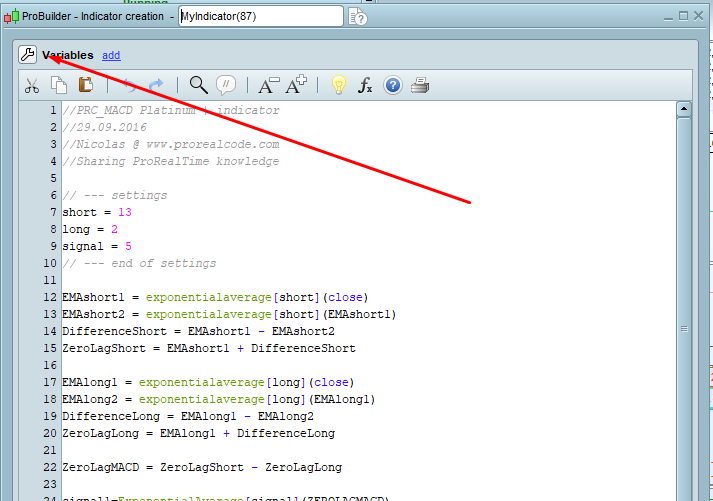
    Alternatively click on the spanner and add them as variables that can be changed in the indicator configure window which is what I assumed you would want to do.

    segie thanked this post
    Screenshot_1-2.png Screenshot_1-2.png
    #131859 quote
    segie
    Participant
    Senior

    That helps as well.

    Thanks

Viewing 7 posts - 1 through 7 (of 7 total)
  • You must be logged in to reply to this topic.

MACD ON PRICE


ProBuilder: Indicators & Custom Tools

New Reply
Author
author-avatar
segie @segie Participant
Summary

This topic contains 6 replies,
has 3 voices, and was last updated by segie

5 years, 9 months ago.

Topic Details
Forum: ProBuilder: Indicators & Custom Tools
Language: English
Started: 05/13/2020
Status: Active
Attachments: 2 files
Logo Logo
Loading...