Kijun Cross Over

Viewing 3 posts - 1 through 3 (of 3 total)
  • Author
    Posts
  • #39830 quote
    grimweasel47
    Participant
    Senior

    Hi folks.

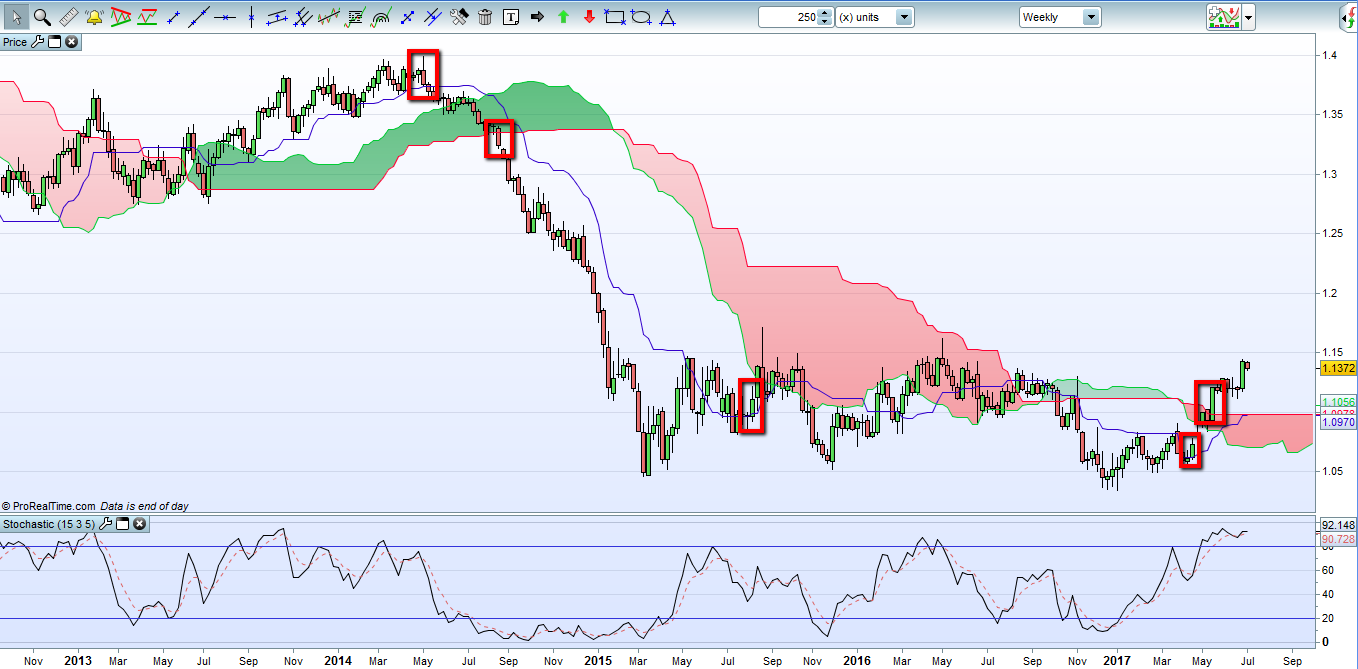
    I’m after some help with a simple scanner using Ichimoku

    I’m looking for when price on daily charts first crosses above the Kijun (21 period not 26) when price has been trending below(ie below the cloud)  and then opposite for when price has been trending above the cloud.

    The second part of the scanner is to look for when those prices meeting condition 1 above first break and close above/below the cloud

    My basic code is such, but it’s not showing up all the pairs that meet the conditions when eyeballing the chart?


    Any help appreciated.


    timeframe (daily)
    p1=9
    p2=21
    //p3=63
    p4=21
    tenkan=(highest[p1](high)+lowest[p1](low))/2
    kijun=(highest[p2](high)+lowest[p2](low))/2
    
    SpanA=(tenkan[p4]+kijun[p4])/2
    //SpanB=(highest[p3](high[p4])+lowest[p3](low[p4]))/2
    
    //c3=close[0] crosses over spana and close[0] crosses over spanb
    //c4=close[0] crosses over kijun and close[0]>open[0]
    x=close[0] > kijun
    x1=close crosses over SpanA
    
    timeframe (daily)
    p1=9
    p2=21
    //p3=63
    p4=21
    tenkan=(highest[p1](high)+lowest[p1](low))/2
    kijun=(highest[p2](high)+lowest[p2](low))/2
    
    SpanA=(tenkan[p4]+kijun[p4])/2
    //SpanB=(highest[p3](high[p4])+lowest[p3](low[p4]))/2
    
    //c5=close[0] crosses under spana and close[0] crosses under spanb
    //c6=close[0]crosses under kijun and close[0]<open[0]
    y=close[0] < kijun
    y1=close[0] crosses over SpanA
    
    finalcondition1=x and x1
    finalcondition2=y and y1
    screener[finalcondition1 and finalcondition2]


    Edited by moderator to make code appear with PRT format. Please use the “<>” button (insert PRT code) at the right end of the text editor toolbar when adding code inside your message next time, thanks.

    2017-07-04_eu_ichi.png 2017-07-04_eu_ichi.png
    #39847 quote
    Nicolas
    Keymaster
    Master

    >> For clarity of messages on ProRealCode’s forums, please use the “insert code PRT” button to separate the text of the code part! Thank you! <<

    Your conditions named “finalcondition1” and “finalcondition2” will never be met at the same time and that’s what you want to be found by ProScreener because you used “and” in the screener instruction. You should have used “OR”:

    screener[finalcondition1 OR finalcondition2]

    There are maybe other errors, this is only the first thing I saw.

    #40302 quote
    grimweasel47
    Participant
    Senior

    Thanks Nicolas. I missed that! Will report back soon! Thanks again

    Grim

Viewing 3 posts - 1 through 3 (of 3 total)

  • You must be logged in to reply to this topic.

Kijun Cross Over


ProScreener: Market Scanners & Detection

New Reply
Author
Summary

This topic contains 2 replies,
has 2 voices, and was last updated by grimweasel47
8 years, 7 months ago.

Topic Details
Forum: ProScreener: Market Scanners & Detection
Language: English
Started: 07/04/2017
Status: Active
Attachments: 1 files
Logo Logo
Loading...