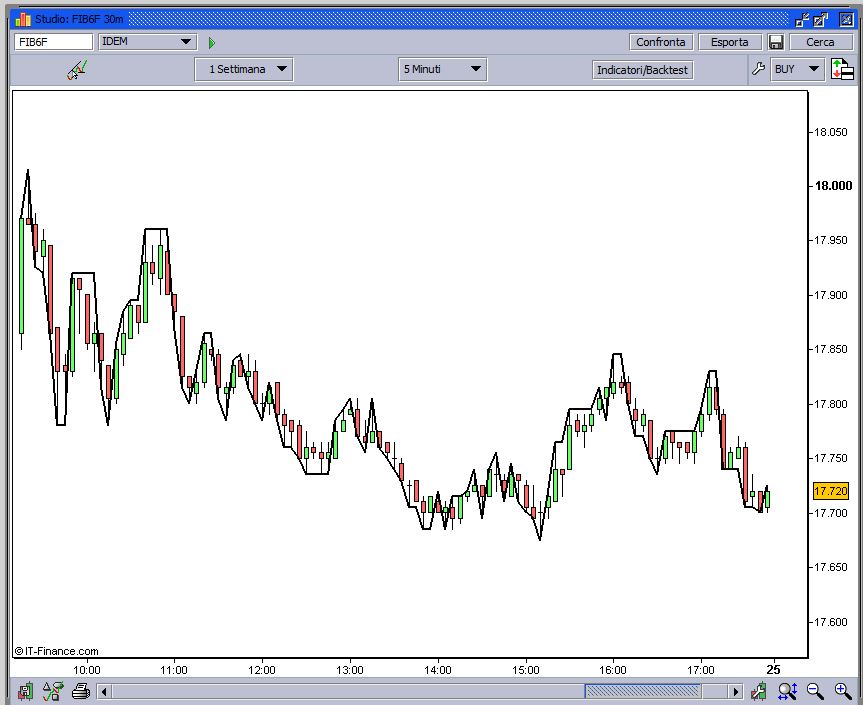
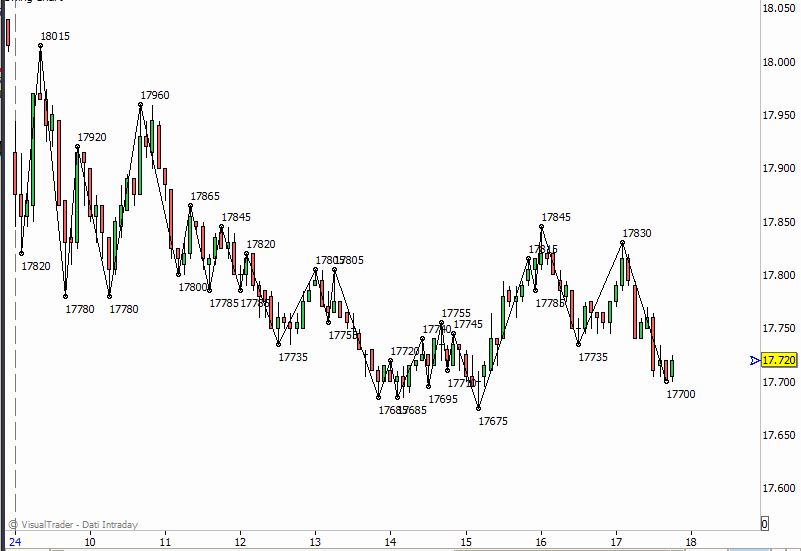
Salve avrei bisogno di un aiuto. Posseggo questo indicatore di swing che si comporta come nella foto n.1 ma vorrei modificarlo sella sua grafica in modo che si comporti come nella foto n.2.
E’ possibile modificarlo in tal senso?
Grazie anticipatamente.
// Swing di GANN

if barindex=0 then
	lasthigh=high
	lastlow=low
	oldrv=high
endif

// calcola le barre che hanno massimo e minimo piu' alto della precedente
if (high > lasthigh) AND (low >= lastlow) then
	rv = High[0]
	lasthigh=rv
	lastlow=low
	lastrv=1
	// Poi calcola le barre che hanno massimo e minimo piu' basso della precedente
elsif (high <= lasthigh) AND (low < lastlow) then
	rv = low[0]
	lastlow=rv
	lasthigh=high
	lastrv=2
else

	// nel caso di inside o outside, controlla la barra precedente,
	// se era High prende il valore high, se era Low prende il valore Low

	if lastrv=1 and high>lasthigh then
		rv=high
		lasthigh=high
		lastlow= low
	elsif lastrv=2 and low<lastlow then
		rv=low
		lasthigh=high
		lastlow= low
	else
		rv=oldrv
	endif

endif

// Solo nel caso della prima barra, si parte dall'High del giorno
oldrv=rv
return rv as "Swing"
In pratica vorrei che la linea dell’indicatore non seguisse i massimi (o i minimi) delle candele, ma andasse direttamente da un punto di swing all’altro, facendo apparire sul punto di swing il relativo valore di prezzo.
Ciao, questo purtroppo non è possibile. ProBuilder c’è ciclo dei prezzi del passato, quindi non può sapere in qualsiasi momento se la parte superiore è il più alto o più basso è la più bassa. L’indicatore è che si ha la migliore che si può ottenere. Questo potrebbe essere parte di un successivo aggiornamento della piattaforma.
Ciao Nicolas, spero che questo aggiornamento avvenga presto, perché l’indicatore della foto n.2 è molto efficace.
Gracias a Luca De Florio !!!!
Ciao
l’indicatore nella foto due interessava anche a me
Siete riusciti a trovarlo?
Cioè praticamente l’indicatore della foto 2 fa un’analisi retrospettiva dei dati? Se così quale potrebbe essere l’utilità in caso di utilizzo in Real Time?
Grazie infinite!!!
Mi è utile per lavorare sugli swing point per individuare i cambiamenti di trend
sei in grado di scrivere un codice o mi puoi indicare una fonte
Massimo purtroppo, come giustamente ti ha detto Nicolas, non è possibile. Il mio era una precisazione tecnica. In reale quella informazione non potrai mai ottenerla.
Buona Domenica!
Ciao
buona domenica
non riusciamo nemmeno a convertire il codice qualora lo dovessi trovare in easy language?
grazie
Ciao, prova a recuperare il codice in Easy language.
forse l’ ho rtrovato
inputs: filter(2), stats(0);
vars  : xBar(0) , xHigh(0), xLow(0), xCount(0), xSwitch(0);
vars  : xSkip(0), xConfirm(0);
vars  : pBar(0) , pHigh(0), pLow(0);
vars  : bFirst(1);

if xSwitch = 0  then
 begin
  if High >= xHigh then
   begin
    xHigh  = High;
    xLow   = Low;
    xBar   = BarNumber;
    xSkip  = 0;
   end
  else
   begin
    xSkip  = xSkip + 1;
    if xSkip      >= filter then
     begin
       xConfirm    = 1;
       xCount      = 1;
       while xCount < filter
        begin
         if (Low[xCount] <= Low[xCount-1]) or (xLow <= Low[filter-1])
then
           begin
            xCount   = filter;
            xConfirm = 0;
           end;
         xCount      = xCount + 1;
        end;
       if xConfirm   = 1 then
        begin
          xSwitch = 1;
          if stats = 0 then
             plot1[BarNumber-xBar](xHigh,"Swing")
          else
           begin
            if bFirst = 0 then
             begin
               plot2[BarNumber-xBar](xHigh-pLow,"Range");
               plot3[BarNumber-xBar](xBar -pBar,"Duration");
             end;
             bFirst = 0;
           end;
          pHigh   = xHigh;
          pLow    = xLow;
          pBar    = xBar;
          xHigh   = High;
          xLow    = Low;
          xBar    = BarNumber;
          xSkip   = 0;
        end;
     end;
   end;
 end
else
 begin
  if Low <= xLow then
   begin
    xHigh = High;
    xLow  = Low;
    xBar  = BarNumber;
    xSkip = 0;
   end
  else
   begin
    xSkip = xSkip + 1;
    if xSkip >= filter then
     begin
      xConfirm = 1;
      xCount   = 1;
      while xCount < filter
        begin
         if (High[xCount] >= High[xCount-1]) or (xHigh >=
High[filter-1]) then
          begin
           xCount   = filter;
           xConfirm = 0;
          end;
         xCount   = xCount + 1;
        end;
      if xConfirm = 1 then
       begin
         xSwitch = 0;
         if stats = 0 then
           plot1[BarNumber-xBar](xLow,"Swing")
         else
          begin
           plot2[BarNumber-xBar](pHigh-xLow,"Range");
           plot3[BarNumber-xBar](xBar -pBar,"Duration");
          end;
         pHigh   = xHigh;
         pLow    = xLow;
         pBar    = xBar;
         xLow    = Low;
         xHigh   = High;
         xBar    = BarNumber;
         xSkip   = 0;
       end;
     end;
   end;
 end;

if ((date = lastcalcdate) and (time = lastcalctime)) then
 begin
  if xSwitch = 0 then
   begin
     if stats = 0 then
       plot1[BarNumber-xBar](xHigh,"Swing")
     else
       begin
         plot2[BarNumber-xBar](xHigh-pLow,"Range");
         plot3[BarNumber-xBar](xBar -pBar,"Duration");
       end;
   end
  else
   begin
     if stats = 0 then
       plot1[BarNumber-xBar](xLow,"Swing")
     else
       begin
         plot2[BarNumber-xBar](pHigh-xLow,"Range");
         plot3[BarNumber-xBar](xBar -pBar,"Duration");
       end;
   end;
 end;
si puo fare qualcosa?
Buonasera ragazzi, se non erro questo codice l’ho visto in un altro topic.
Ciao
ho provato ad aggiungere l’indicatore con il codice come scritto ma mi da numerosi errori anche con le correzioni che avete suggerito.
voi avete novità ?
di quale topic parli?
grazie
Ci puoi caricare il file modificato. Così proviamo a darci un’occhiata.