


Imbalance with Rectangle

Viewing 2 posts - 1 through 2 (of 2 total)

  • Author
    Posts
  • #213400 quote
    Alex72
    Participant
    New

    Hi, i just found this code For Imbalance in the Forum, i just changed it because i need to change drawcandle with drawrectangle, i put in it some segment but i need to color between them.

    Can someone help me to change it?

    Thank you

    TopImbalance = low[2] <= open[1] and high[0] >= close[1]
    TopImbalancesize = low[2] - high[0]
    if TopImbalance and TopImbalancesize > 0 then
    drawcandle(low[2], low[2], high[0], high[0]) coloured(255,255,0)
    DrawSegment(BarIndex[2],low[2],BarIndex + 10,low[2]) coloured(5,5,0)
    DrawSegment(BarIndex[2],high[0],BarIndex + 10,high[0]) coloured(5,5,0)
    endif
     
    BottomInbalance = high[2] >= open[1] and low[0] <= close[1]
    BottomInbalancesize = low[0] - high[2]
    if BottomInbalance and BottomInbalancesize > 0 then
    drawcandle(low[0], low[0], high[2], high[2]) coloured(255,255,0)
    DrawSegment(BarIndex[2],high[2],BarIndex + 10,high[2]) coloured(0,0,255)
    DrawSegment(BarIndex[2],low[0],BarIndex + 10,low[0]) coloured(0,0,255)
    endif
     
    return
    //COLORBETWEEN(open,close,"RED")
    imbalance-2.itf
    #213518 quote
    Nicolas
    Keymaster
    Master

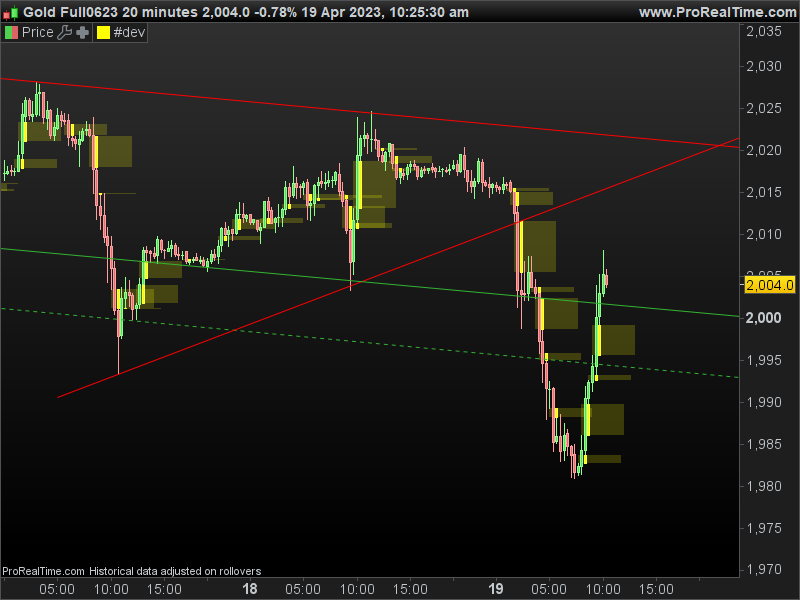
    Here is the code modified with draw rectangle instead of the two segments:

    TopImbalance = low[2] <= open[1] and high[0] >= close[1]
    TopImbalancesize = low[2] - high[0]
    if TopImbalance and TopImbalancesize > 0 then
    drawcandle(low[2], low[2], high[0], high[0]) coloured(255,255,0)
    //DrawSegment(BarIndex[2],low[2],BarIndex + 10,low[2]) coloured(5,5,0)
    //DrawSegment(BarIndex[2],high[0],BarIndex + 10,high[0]) coloured(5,5,0)
    drawrectangle(BarIndex[2],low[2],BarIndex + 10,high[0]) coloured(255,255,0,50) bordercolor(0,0,0,0)
    endif
     
    BottomInbalance = high[2] >= open[1] and low[0] <= close[1]
    BottomInbalancesize = low[0] - high[2]
    if BottomInbalance and BottomInbalancesize > 0 then
    drawcandle(low[0], low[0], high[2], high[2]) coloured(255,255,0)
    //DrawSegment(BarIndex[2],high[2],BarIndex + 10,high[2]) coloured(0,0,255)
    //DrawSegment(BarIndex[2],low[0],BarIndex + 10,low[0]) coloured(0,0,255)
    drawrectangle(BarIndex[2],high[2],BarIndex + 10,low[0]) coloured(255,255,0,50) bordercolor(0,0,0,0)
    endif
     
    return
    //COLORBETWEEN(open,close,"RED")

    In order to plot a plain rectangle, just set the bordercolor to an invisible color so that the instruction know that the “coloured” is to fill the rectangle with.

    imbalance-rectangles.png imbalance-rectangles.png
Viewing 2 posts - 1 through 2 (of 2 total)
  • You must be logged in to reply to this topic.

Imbalance with Rectangle


ProBuilder: Indicators & Custom Tools

New Reply
Author
author-avatar
Alex72 @alex72 Participant
Summary

This topic contains 1 reply,
has 2 voices, and was last updated by Nicolas

2 years, 11 months ago.

Topic Details
Forum: ProBuilder: Indicators & Custom Tools
Language: English
Started: 04/17/2023
Status: Active
Attachments: 2 files
Logo Logo
Loading...
