


Imbalance with Rectangle

Viewing 2 posts - 1 through 2 (of 2 total)

  • Author
    Posts
  • #213400 quote
    Alex72Alex72
    Participant
    New

    Hi, i just found this code For Imbalance in the Forum, i just changed it because i need to change drawcandle with drawrectangle, i put in it some segment but i need to color between them.

    Can someone help me to change it?

    Thank you

    TopImbalance = low[2] <= open[1] and high[0] >= close[1]
    TopImbalancesize = low[2] - high[0]
    if TopImbalance and TopImbalancesize > 0 then
    drawcandle(low[2], low[2], high[0], high[0]) coloured(255,255,0)
    DrawSegment(BarIndex[2],low[2],BarIndex + 10,low[2]) coloured(5,5,0)
    DrawSegment(BarIndex[2],high[0],BarIndex + 10,high[0]) coloured(5,5,0)
    endif
     
    BottomInbalance = high[2] >= open[1] and low[0] <= close[1]
    BottomInbalancesize = low[0] - high[2]
    if BottomInbalance and BottomInbalancesize > 0 then
    drawcandle(low[0], low[0], high[2], high[2]) coloured(255,255,0)
    DrawSegment(BarIndex[2],high[2],BarIndex + 10,high[2]) coloured(0,0,255)
    DrawSegment(BarIndex[2],low[0],BarIndex + 10,low[0]) coloured(0,0,255)
    endif
     
    return
    //COLORBETWEEN(open,close,"RED")
    imbalance-2.itf
    #213518 quote
    NicolasNicolas
    Keymaster
    Legend

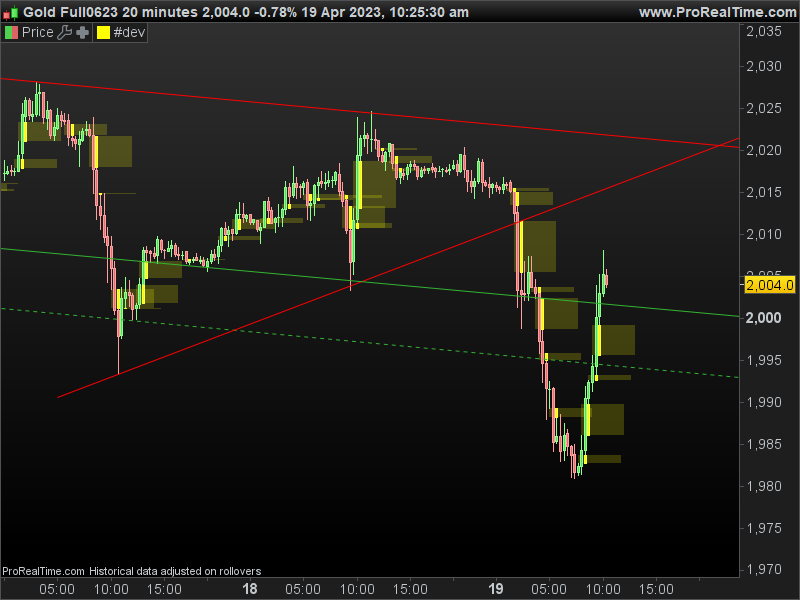
    Here is the code modified with draw rectangle instead of the two segments:

    TopImbalance = low[2] <= open[1] and high[0] >= close[1]
    TopImbalancesize = low[2] - high[0]
    if TopImbalance and TopImbalancesize > 0 then
    drawcandle(low[2], low[2], high[0], high[0]) coloured(255,255,0)
    //DrawSegment(BarIndex[2],low[2],BarIndex + 10,low[2]) coloured(5,5,0)
    //DrawSegment(BarIndex[2],high[0],BarIndex + 10,high[0]) coloured(5,5,0)
    drawrectangle(BarIndex[2],low[2],BarIndex + 10,high[0]) coloured(255,255,0,50) bordercolor(0,0,0,0)
    endif
     
    BottomInbalance = high[2] >= open[1] and low[0] <= close[1]
    BottomInbalancesize = low[0] - high[2]
    if BottomInbalance and BottomInbalancesize > 0 then
    drawcandle(low[0], low[0], high[2], high[2]) coloured(255,255,0)
    //DrawSegment(BarIndex[2],high[2],BarIndex + 10,high[2]) coloured(0,0,255)
    //DrawSegment(BarIndex[2],low[0],BarIndex + 10,low[0]) coloured(0,0,255)
    drawrectangle(BarIndex[2],high[2],BarIndex + 10,low[0]) coloured(255,255,0,50) bordercolor(0,0,0,0)
    endif
     
    return
    //COLORBETWEEN(open,close,"RED")

    In order to plot a plain rectangle, just set the bordercolor to an invisible color so that the instruction know that the “coloured” is to fill the rectangle with.

    imbalance-rectangles.png imbalance-rectangles.png
Viewing 2 posts - 1 through 2 (of 2 total)
  • You must be logged in to reply to this topic.

ProRealAI ProRealAI New

Stuck on this ProBuilder code?

Describe what this topic is trying to build, in plain English, and ProRealAI writes the ProRealTime™ indicator, screener or system for you.

Available in 7 languages
Try ProRealAI

Imbalance with Rectangle


ProBuilder: Indicators & Custom Tools

New Reply
Author
author-avatar
Alex72 @alex72 Participant
Summary

This topic contains 1 reply,
has 2 voices, and was last updated by NicolasNicolas

3 years, 5 months ago.

Topic Details
Forum: ProBuilder: Indicators & Custom Tools
Language: English
Started: 04/17/2023
Status: Active
Attachments: 2 files
ProRealCode ProRealCode
Loading...

