Hi Folks
I am trying to achieve the following:
BaseNumber = 2
Exp1 = (BaseNumber)^1 (i.e. 2)
Exp2 = (BaseNumber)^2 (i.e. 4)
Exp3 = (BaseNumber)^3 (i.e. 8)
How do I code it using the EXP() function in ProOrder???
I don’t really understand what you try to do. EXP() gives you e^(the number in the brackets). So your base number (from your example) is not 2 but e=2.178….
AVTParticipant
Senior
This formula is used like
exp(2) : is 2×2 = 4
exp(3) : is 3×3 = 9
exp(a) can only do ^2, for your example you would idealy have a math formula syntax exp(b,e) which accepts b=base and e=exponent.
But you could try whether exp( exp(2) ) works.
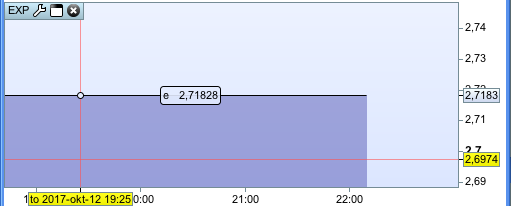
I’m sorry but what you describe is just the square of a number. EXP() gives you the exponential function! It is e^(x) and this is approx 2.178^(x). Look at the pic attached. Here you see e^1=e=2.178…
basenumber=2
a1=exp(1*log(basenumber))
a2=exp(2*log(basenumber))
a3=exp(3*log(basenumber))
return a1, a2, a3
(PS: added the return line just to display it in ProBuilder, but obviously if this is to include in a ProOrder piece of code you’d get rid of the return line)
AVTParticipant
Senior
@Despair that’s the Euler number (DE: die Eulersche Zahl, sowas wie Pi für Logarithmus) and that’s why Noobywan has log(basenumber).
That’s what I was saying… 🙂