


How to include Include horizontal lines in custom indicator

Viewing 2 posts - 1 through 2 (of 2 total)

  • Author
    Posts
  • #165708 quote
    dbl007dbl007
    Participant
    Junior

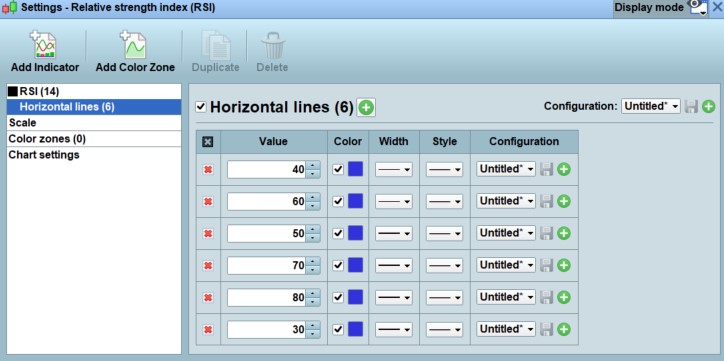
    Some of the built-in oscillator indicator (such as RSI) has options for adding horizontal lines. In the configuration panel, one can add horizontal lines into the chart. See attached screenshot.

    How do I include this feature in the custom indicator I build?

    Thks.

    horiz.jpg horiz.jpg
    #165713 quote
    JC_BywanJC_Bywan
    Moderator
    Master

    You can add a horizontal line either with a variable added for that purpose to those in the “return” line of your custom indicator (then you can access it in the properties window), or if you don’t need to access it later on in the properties window, with the drawHline command: https://www.prorealcode.com/documentation/drawhline/

Viewing 2 posts - 1 through 2 (of 2 total)
  • You must be logged in to reply to this topic.

ProRealAI ProRealAI New

Stuck on this ProBuilder code?

Describe what this topic is trying to build, in plain English, and ProRealAI writes the ProRealTime™ indicator, screener or system for you.

Available in 7 languages
Try ProRealAI

How to include Include horizontal lines in custom indicator


ProBuilder: Indicators & Custom Tools

New Reply
Author
author-avatar
dbl007 @dbl007 Participant
Summary

This topic contains 1 reply,
has 2 voices, and was last updated by JC_BywanJC_Bywan

5 years, 6 months ago.

Topic Details
Forum: ProBuilder: Indicators & Custom Tools
Language: English
Started: 03/30/2021
Status: Active
Attachments: 1 files
ProRealCode ProRealCode
Loading...

