How to give a tradeing signal a name?

Viewing 6 posts - 1 through 6 (of 6 total)
  • Author
    Posts
  • #173521 quote
    robinhopkrrobinhopkr
    Participant
    New

    Hello,

    i am new at prorealtime and actually i translate my code from tradesignal terminal to prorealtime. I would like to know if it is possible to give a trade a name.

    For example: I got a lot of different mathematical formula in my trading system and would like to see directly which formula is responsible for a new trading signal.

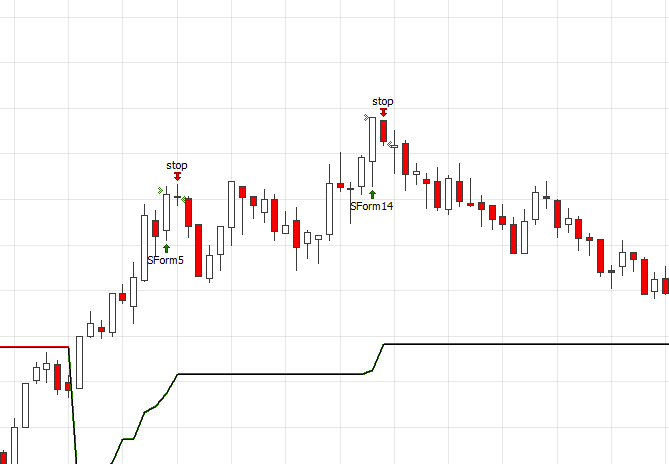
    I attached you an example from tradesignal. There you can see that the system has given me two short signals, but the code put out the number of the formula too (SForm5 and SForm14).

    This is one of the formula for example:

    If SForm5 (Timelimit, Sizefunction) and Close[2] > vOut[2] and Close[2] > Schnitt[2] and Close > vOut
    and Close > Schnitt
    then buy (“SForm5”) at this bar at market;

    Thanks for your help.

    Best regards,

    Robin

    12.07.2021_16.51.40_REC.png 12.07.2021_16.51.40_REC.png
    #173529 quote
    robertogozzirobertogozzi
    Moderator
    Legend

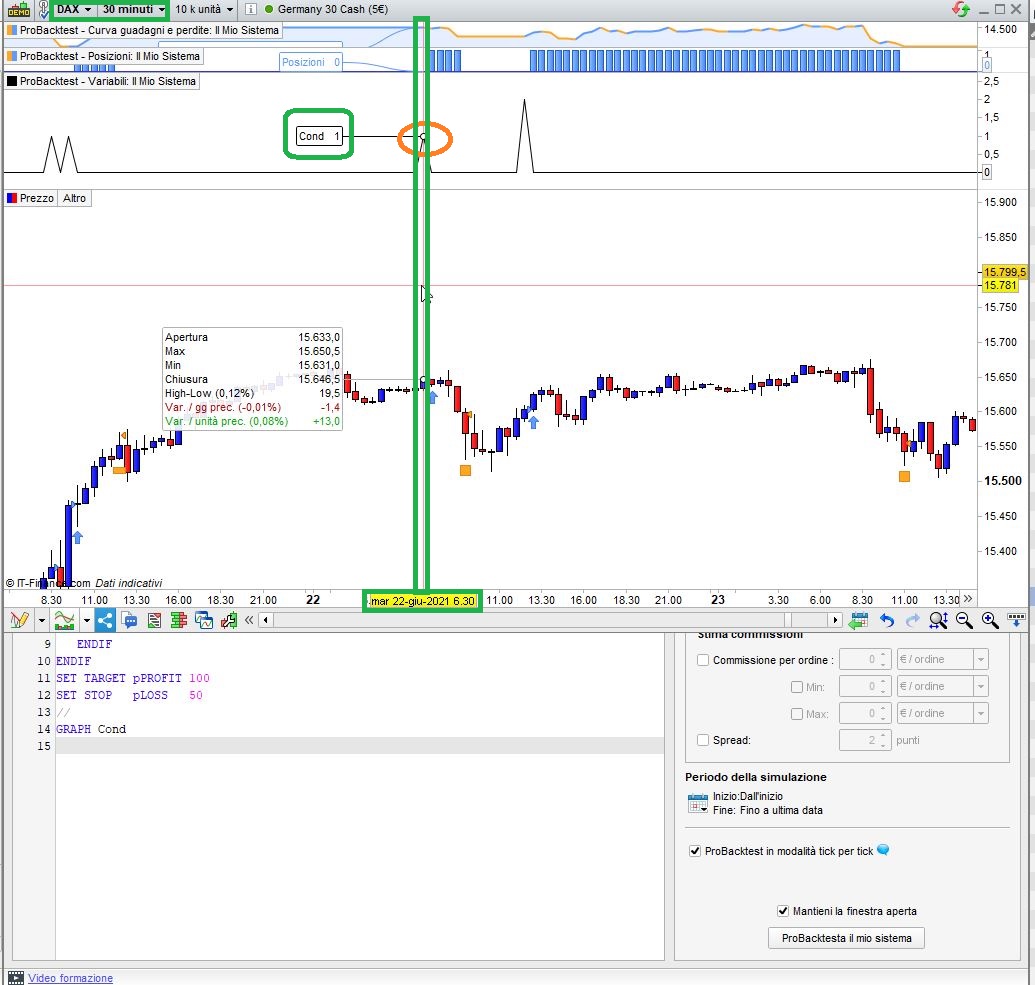
    Yes, you can certainly do that and plot it with GRAPH.

    Example with two different conditions:

    Cond = 0
    IF Not OnMarket THEN
       IF close CROSSES OVER average[20] then
          Cond = 1
          BUY at market
       ELSIF Rsi[14] CROSSES OVER 50 then
          Cond = 2
          BUY at market
       ENDIF
    ENDIF
    SET TARGET pPROFIT 100
    SET STOP   pLOSS   50
    //
    GRAPH Cond
    x-4.jpg x-4.jpg
    #173533 quote
    robertogozzirobertogozzi
    Moderator
    Legend

    Post your topic in the correct forum:
    _ ProRealTime Platform Support: only platform related issues.
    _ ProOrder: only strategy topics.
    _ ProBuilder: only indicator topics.
    _ ProScreener: only screener topics
    _ General Discussion: any other topics.
    _ Welcome New Members: for new forum members to introduce themselves.

    Thank you 🙂

    I moved it from ProRealTime platform support.

    #173535 quote
    robinhopkrrobinhopkr
    Participant
    New

    great, thanks for you help! That worked for me 🙂

    #173544 quote
    robinhopkrrobinhopkr
    Participant
    New

    Roberto, one more question.

    I tried to set an alert on the Cond, but it is not possible. Do you have any idea or solution for this?

    Best regards,

    Robin

    #173556 quote
    robertogozzirobertogozzi
    Moderator
    Legend

    This is not an indicator, it’s a strategy.

    Alerts can only be set on indicators.

Viewing 6 posts - 1 through 6 (of 6 total)
  • You must be logged in to reply to this topic.

ProRealAI ProRealAI New

Stuck on this ProBuilder code?

Describe what this topic is trying to build, in plain English, and ProRealAI writes the ProRealTime™ indicator, screener or system for you.

Available in 7 languages
Try ProRealAI

How to give a tradeing signal a name?


ProOrder: Automated Strategies & Backtesting

New Reply
Author
author-avatar
robinhopkr @robinhopkr Participant
Summary

This topic contains 5 replies,
has 2 voices, and was last updated by robertogozzirobertogozzi
5 years, 2 months ago.

Topic Details
Forum: ProOrder: Automated Strategies & Backtesting
Language: English
Started: 07/12/2021
Status: Active
Attachments: 2 files
ProRealCode ProRealCode
Loading...