 Matt
MattParticipant
Junior
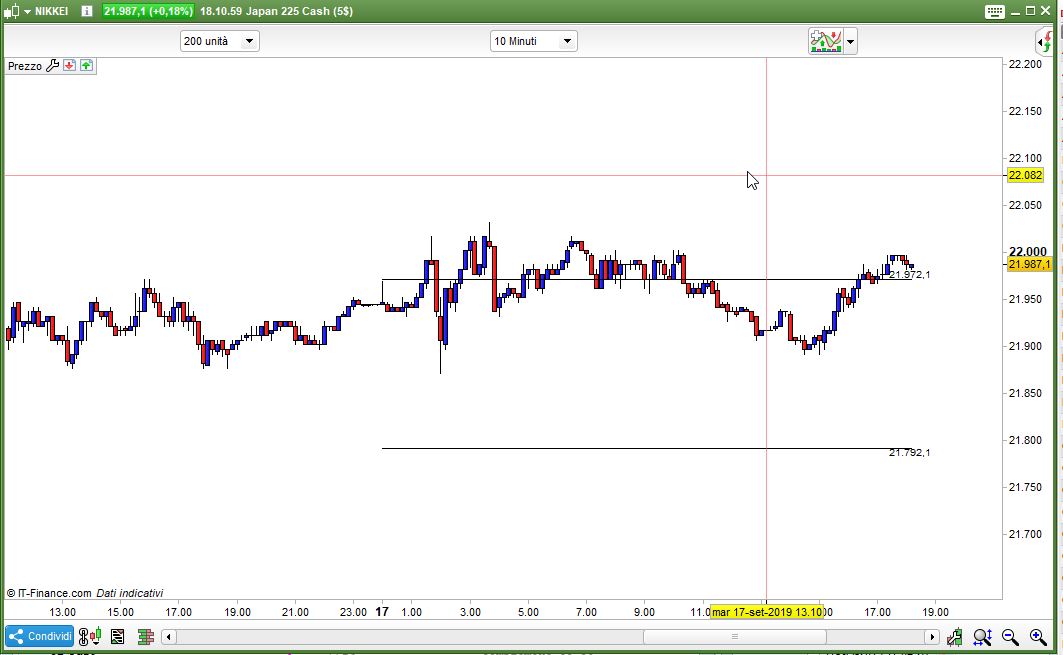
How do we use the DRAWTEXT command without having to always reference a BarIndex, so we can permanently right-justify the text?
I need to place text on the right-hand-side of the chart, up against the Y-Axis, exactly like we see on the PRT Pivot Points indicator (eg. “S1 D”), as well as the numerical value for Horizontal Lines.
This way when we scroll back in time through the chart, the DRAWTEXT value remains right-aligned and is therefore always visible (rather than only visible when we’re looking at the most recent bar).
Thanks in advance!
You can only add leading spaces to your text, such as ” #close#” instead of “#close#”.
MattParticipant
Junior
Ok yeah thx, I figured that out, but there’s no way to move the text once you start scrolling back through the chart.
There must be a way to Right Justify! After all, the functionality is on the platform for the two indicators I mentioned above. How have the developers implemented this feature?
Surely it’s quite simple… someone must know…..
No, there is no way to keep the text at right border of the screen when you scroll back with a custom code, sorry.
There must be a way to Right Justify! After all, the functionality is on the platform for the two indicators I mentioned above. How have the developers implemented this feature?
It is surprising and frustrating how features that seem straightforward to implement never get implemented by PRT no matter how many times we suggest and give reasons required!? 🙁
I guess what we think is important, PRT don’t or they are max’d out on other Issues?
MattParticipant
Junior
Couldn’t agree more. Especially given there would already be code to do this.
I can’t even think of a way round the issue… if there were a function to return the numerical range of bars currently displayed, then we could dynamically build the space-padded text item to be right-justified, but I don’t see any viable options…. how bout you?
Can you post an example of what you need the first bar and the how it should be after, say, 5 or 10 bars?
Problem is simple: coordinates are not in pixels but in bars/price format, so we can’t anchor objects for a computer screener, but only for a price chart!
While it would be possible to know what is the last bar of history, it is not possible to know what is the last bar displayed on your own screen.
I agree that it is not the way it should be because it makes simple things harder or impossible to be made (such as anchor objects like the way you want)…
MattParticipant
Junior
Can you post an example of what you need the first bar and the how it should be after, say, 5 or 10 bars?
I’m not sure I understand your question…. do you mean the string that displays the text?
The text value wouldn’t change obviously – let’s say it says “12000” – but as we scroll back thru the data we would need a way to display it near the visible bars on the screen, as opposed to the most recent bar (BarIndex) which would be far off to the right and not visible. Is there any way to know which bar we’ve scrolled back to and place the text there?
Thanks
MattParticipant
Junior
Problem is simple: coordinates are not in pixels but in bars/price format, so we can’t anchor objects for a computer screener, but only for a price chart!
While it would be possible to know what is the last bar of history, it is not possible to know what is the last bar displayed on your own screen.
I agree that it is not the way it should be because it makes simple things harder or impossible to be made (such as anchor objects like the way you want)…
I understand… but you’re a smart man Nicolas, how can we hack our way around this limitation? 🙂
I can only think that instead of placing a text value, I could just draw a horizontal line… the problem with this is that the chart gets far too messy 🙁
I’m not sure I understand your question
I guess Roberto was asking if you could do a mock up (using snagit or some drawing sw) to show what you would like to see on the screen? Picture tells a thousand words etc? 🙂
If you need to plot something like a channel between the highest and lowest price of the day before, and you don’t need the previous lines, you can write:
DEFPARAM CalculateOnLastBars = 3000
DEFPARAM DrawOnLastBarOnly   = true
IF barindex = 0 THEN
   PreviousHI = high
   PreviousLO = low
   HH         = high
   LL         = low
   StartFrom  = 0
   Offset     = 5 * pipsize
ENDIF
IF IntraDayBarIndex = 0 THEN
   PreviousHI = HH
   PreviousLO = LL
   HH         = high
   LL         = low
   StartFrom  = barindex
ENDIF
HH            = max(HH,high)
LL            = min(LL,low)
IF StartFrom > 0 THEN
   DRAWSEGMENT(StartFrom,PreviousHI,barindex,PreviousHI)
   DRAWTEXT("#PreviousHI#",barindex,PreviousHI + Offset)
   DRAWSEGMENT(StartFrom,PreviousLO,barindex,PreviousLO)
   DRAWTEXT("#PreviousLO#",barindex,PreviousLO - Offset)
ENDIF
RETURN
still this cannot keep track of you scrolling the chart leftwards or rightwards.
How do we use the DRAWTEXT command without having to always reference a BarIndex, so we can permanently right-justify the text?
I need to place text on the right-hand-side of the chart, up against the Y-Axis, exactly like we see on the PRT Pivot Points indicator (eg. “S1 D”), as well as the numerical value for Horizontal Lines.
This way when we scroll back in time through the chart, the DRAWTEXT value remains right-aligned and is therefore always visible (rather than only visible when we’re looking at the most recent bar).
Thanks in advance!
Did you ever figure this out? I need the same functionality.
This is not possible in PRT. You can draw something at any x, y point on a chart or indicator but it cannot know what the last bar on any window you choose to zoom in or out on is.
You can send this as a suggestion to PRT via this forum topic:
Centralization of queries and suggestions on ProRealTime
GraHal will be along soon with a more direct link for suggestions to PRT! 🙂