how to code multiple consecutive conditions with MACD?

Viewing 15 posts - 1 through 15 (of 18 total)
  • Author
    Posts
  • #189073 quote
    ZeroCafeine
    Participant
    Senior

    hi everyone,

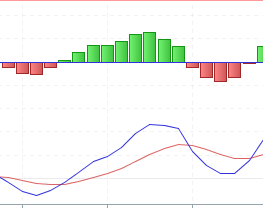
    I’m trying to turn this image into code, could you help me or is there something similar that is already coded?

    how to detect :
    – X bar red
    – X bars green
    – finaly X bars red

    or in the same idea how to detect :
    – MACD > S-Line on X bars
    – MACD < S-Line on X bars
    – finaly MACD > S-Line on X bars

    his-123.png his-123.png
    #189088 quote
    robertogozzi
    Moderator
    Master

    #1

    p1         = 3
    p2         = 2
    p3         = 2
    MyHisto    = MACD[12,26,9](close)                              //Histogram
    //MySignal = ExponentialAverage[9](MACDline[12,26,9](close))   //Signal
    //MyMACD   = MACDline[12,26,9](close)                          //Macd
    //
    RedHisto   = MyHisto < 0
    GreenHisto = MyHisto > 0
    Red1       = summation[p1](RedHisto[p2 + p3]) = p1
    Green1     = summation[p2](GreenHisto[p3])    = p2
    Red2       = summation[p3](RedHisto)          = p3
    //
    Cond       = Red1 AND Green1 AND Red2
    RETURN Cond

    #2

    p1           = 3
    p2           = 2
    p3           = 2
    //MyHisto    = MACD[12,26,9](close)                              //Histogram
    MySignal     = ExponentialAverage[9](MACDline[12,26,9](close))   //Signal
    MyMACD       = MACDline[12,26,9](close)                          //Macd
    //
    RedPattern   = MyMACD < MySignal
    GreenPattern = MyMACD > MySignal
    Green1       = summation[p1](GreenPattern[p2 + p3]) = p1
    Red1         = summation[p2](RedPattern[p3])        = p2
    Green2       = summation[p3](GreenPattern)          = p3
    //
    Cond         = Green1 AND Red1 AND Green2
    RETURN Cond
    ZeroCafeine thanked this post
    #189091 quote
    ZeroCafeine
    Participant
    Senior

    tks you so much, in addition I just bought Nicolas’ training ;-), and tks agin 🙂

    robertogozzi thanked this post
    #189092 quote
    ZeroCafeine
    Participant
    Senior

    I tryed the both code and get all the time 0, it’s mean the condition is never reached, but it’s will help me for my home work,

    what is mean using the summation here ? and why Px :

    p1           = 3
    p2           = 2
    p3           = 2

    not easy for me to understand

    #189096 quote
    robertogozzi
    Moderator
    Master

    p1 is the first periods, p2 is the second period and p3 is the last period (the latest bars).

    I was returned many items on shares.

    You can test it as a screener replacing the last line with

    Screener[Cond]
    ZeroCafeine thanked this post
    #189419 quote
    ZeroCafeine
    Participant
    Senior

    Big tks to your answere, I do to much time to understand the logic, I’m to old :-), how to detect the lowest Red2 and Red1 persiode pls ?

    p1         = 3
    p2         = 6
    p3         = 2
    MyHisto    = MACD[12,26,9](close)                              //Histogram
    //MySignal   = ExponentialAverage[9](MACDline[12,26,9](close))   //Signal
    //MyMACD     = MACDline[12,26,9](close)                          //Macd
    //
    RedHisto   = MyHisto < 0
    GreenHisto = MyHisto > 0
    Red1       = summation[p1](RedHisto[p2 + p3]) = p1
    Green1     = summation[p2](GreenHisto[p3])    = p2
    Red2       = summation[p3](RedHisto)          = p3
    
    LowestRed2 = lowest[P3]
    LowestRed1 = lowest[P2+P3]
    
    Div        = LowestRed2 < LowestRed1
    
    Cond       = Red1 AND Green1 AND Red2 AND Div
    
    Screener[Cond]

    tks in advance

    #189437 quote
    robertogozzi
    Moderator
    Master

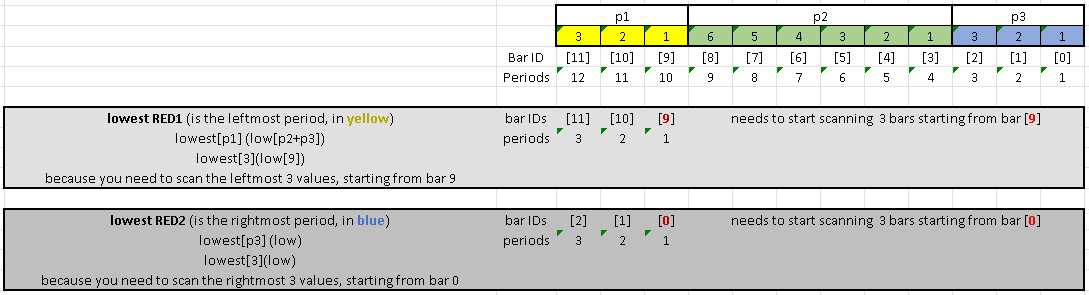
    I am attaching a diagram, both as a Pic and eXcel file.

    I hope it’s clear.

    ZeroCafeine thanked this post
    x-1.jpg x-1.jpg Cartel1.xlsx
    #189455 quote
    ZeroCafeine
    Participant
    Senior

    Hi Roberto,

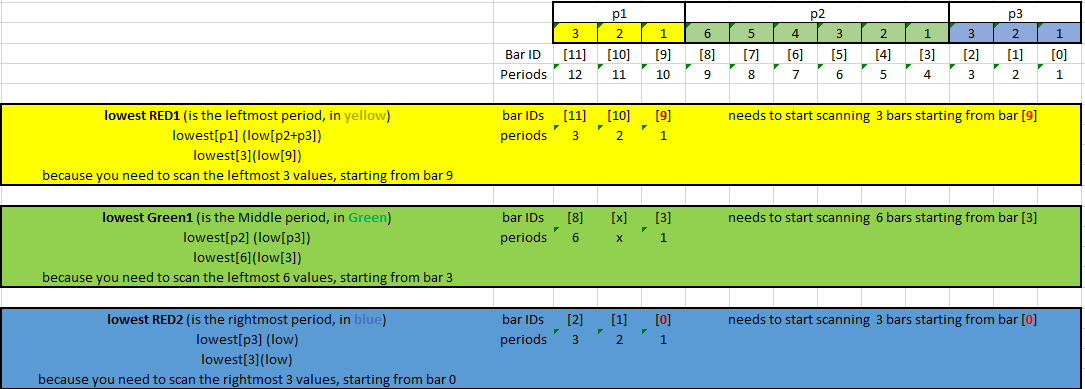
    Your explanations are not clear but Very Clear, so that is the code and the photo of Excel files :

    p1         = 3
    p2         = 6
    p3         = 2
    MyHisto    = MACD[12,26,9](close)                              //Histogram
    //MySignal   = ExponentialAverage[9](MACDline[12,26,9](close))   //Signal
    //MyMACD     = MACDline[12,26,9](close)                          //Macd
    //
    RedHisto   = MyHisto < 0
    GreenHisto = MyHisto > 0
    Red1       = summation[p1](RedHisto[p2 + p3]) = p1
    Green1     = summation[p2](GreenHisto[p3])    = p2
    Red2       = summation[p3](RedHisto)          = p3
    
    LowestRed2 = lowest[P3](Low)
    LowestRed1 = lowest[P1](Low[P2+P3])
    
    Div        = LowestRed2 < LowestRed1
    
    Cond       = Red1 AND Green1 AND Red2 AND Div
    
    Screener[Cond]


    now the question is how to use Px as a variable, I mean for exemple the P2 it’s was maybe 3 or 6 or 10 ?, you can also give me just a link if you have and I will work on it, and tks again for your help

    PX-Roberto.png PX-Roberto.png
    #189471 quote
    Nicolas
    Keymaster
    Master

    I modified the title of the topic, please try to

    • Give your topic a meaningful title. Describe your question or your subject in your title. Do not use meaningless titles such as ‘Coding Help Needed’.
    ZeroCafeine thanked this post
    #189498 quote
    robertogozzi
    Moderator
    Master

    You can simply use several constants, p1, p2 and p3, like I did in the code above, or you can use arrays to store as many values you need:

    $p[1] = 3
    $p[2] = 6
    $p[3] = 3
      .
      .
    ZeroCafeine thanked this post
    #189502 quote
    ZeroCafeine
    Participant
    Senior

    ok tks you, I don’t understand what is mean the $p ?, about array I don’t know because I never learn about it but I can imagine the idea you want to tell me,

    so I hope this is my last question for this thread, do you think it will be beter to make this screener with a FOR boucle condition to detect what I need in like this exemple :

    //Somethink like this
    FOR Y = 0 To 10 DO
       IF ConditionRed THEN
          EndRed2 = Y 
          RED2 = 1
          Break
       ELSE
          RED2 = 0
       ENDIF
    NEXT
    
    IF RED2 THEN 
      FOR X = EndRed2 To EndRed2+10
         IF ConditionGreen THEN
            EndGreen1 = X
            Green1 = 1
            Break
         ELSE
            Green1 = 0
         ENDIF
      NEXT
    ENDIF
    .
    .
    .
    

    Best Reguards

    #189505 quote
    robertogozzi
    Moderator
    Master

    $p[] is an array. You can find info at https://www.prorealcode.com/topic/array-variables-availability-in-prorealtime/.

    No, your example is not correct.

    If you can explain your idea with more details I may try to help you. If you mean to apply arrays to the code above, then my answer is no, you can’t, because of the logic behind that code.

    ZeroCafeine thanked this post
    #189515 quote
    ZeroCafeine
    Participant
    Senior

    tks again for your answers, I will get time and make somethink as an indicator or as a screener and try if my idea and what I have in my head can work or not and put the result here, maybe 2 or 3 days I hope no more, tks again roberto for all your help

    #189572 quote
    ZeroCafeine
    Participant
    Senior

    hi all

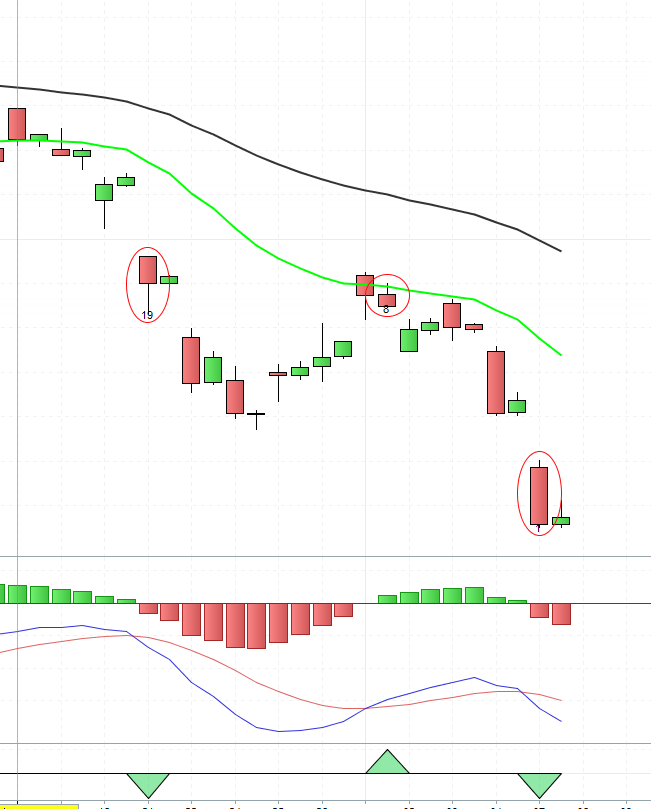
    I think I found what I want as an indicator, I will try to change it as a screener, I have a problem to code directly a screener because I can’t draw on it, or maybe they have solution, so I made this () code can detect what I want, like you to in your exemple
    P3 = Red2 (from bar IDs 0 to 10)
    P2 = Green1 (from bar IDs X3 to X3+10)
    P1 = Red1 (from bar IDs X2 to X2+50)

    and I think we can change the first 10 to a variable and the 50 to a variable too, that is the code :

    Defparam drawonlastbaronly = true
    // Attribu :
    MyMACD = MACDline[12,26,9](close)
    MySLine = MACDSignal[12,26,9](close)
    MyHis = MACD[12,26,9](close)
    
    // (。♥‿♥。) Block Start
    // Block End (。♥‿♥。)
    
    IF MyMACD < 0 AND MySLine < 0 THEN
    
    // (。♥‿♥。) Block Start P3
    //BACKGROUNDCOLOR (0, 155, 10, 25)
    FOR X3 = 0 To 10 Do
    //IF MyMACD[Y] Crosses Under MySLine[Y] AND MyMACD[Y] < 0 AND MySLine[Y] < 0 THEN
    IF MyMACD[X3] Crosses Under MySLine[X3] THEN
    AbscisseP3 = X3
    BarP3 = Barindex[X3]
    CP3 = 1
    Drawtext("#X3#", Barindex[X3], Low[X3]-1)
    DRAWELLIPSE(BarP3-1,LOW[X3]-10,BarP3+1,HIGH[X3]+10)coloured(255,10,10)
    Break
    ELSE
    CP3 = 0
    ENDIF
    Next
    // Block End (。♥‿♥。)P3
    
    // (。♥‿♥。) Block Start P2
    IF CP3 THEN
    FOR X2 = X3 To X3+10 Do
    //IF MyMACD[Y] Crosses Under MySLine[Y] AND MyMACD[Y] < 0 AND MySLine[Y] < 0 THEN
    IF MyMACD[X2] Crosses Over MySLine[X2] THEN
    AbscisseP2 = X2
    BarP2 = Barindex[X2]
    CP2 = 1
    Drawtext("#X2#", Barindex[X2], Low[X2]-1)
    DRAWELLIPSE(BarP2-1,LOW[X2]-10,BarP2+1,HIGH[X2]+10)coloured(255,10,10)
    Break
    ELSE
    CP2 = 0
    ENDIF
    Next
    ENDIF
    // Block End (。♥‿♥。)P2
    
    // (。♥‿♥。) Block Start P1
    IF CP2 THEN
    FOR X1 = X2 To X2+50 Do
    //IF MyMACD[Y] Crosses Under MySLine[Y] AND MyMACD[Y] < 0 AND MySLine[Y] < 0 THEN
    IF MyMACD[X1] Crosses Under MySLine[X1] THEN
    AbscisseP1 = X1
    BarP1 = Barindex[X1]
    CP1 = 1
    Drawtext("#X1#", Barindex[X1], Low[X1]-1)
    DRAWELLIPSE(BarP1-1,LOW[X1]-10,BarP1+1,HIGH[X1]+10)coloured(255,10,10)
    Break
    ELSE
    CP1 = 0
    ENDIF
    Next
    ENDIF
    // Block End (。♥‿♥。)P1
    
    ENDIF
    // tks to the Nisola's Cours ;-)
    Return

    and I also add a photo for the understanding

    d

    detectx3.png detectx3.png
    #189802 quote
    robertogozzi
    Moderator
    Master

    This is the code that I modified to:

    • use PipSize, otherwise it will plot correctly only on instruments with a pip ratio of 1
    • replace the offset of graphic objects with a variable named OFFSET
    • replace 10 and 50 periods, with variables P1 and P2:
    Defparam drawonlastbaronly = true
    // Attribu :
    MyMACD = MACDline[12,26,9](close)
    MySLine = MACDSignal[12,26,9](close)
    MyHis = MACD[12,26,9](close)
    Offset = 10 * pipsize
    p1     = 10
    p2     = 50
    // (。♥‿♥。) Block Start
    // Block End (。♥‿♥。)
     
    IF MyMACD < 0 AND MySLine < 0 THEN
     
    // (。♥‿♥。) Block Start P3
    //BACKGROUNDCOLOR (0, 155, 10, 25)
    FOR X3 = 0 To p1 Do
    //IF MyMACD[Y] Crosses Under MySLine[Y] AND MyMACD[Y] < 0 AND MySLine[Y] < 0 THEN
    IF MyMACD[X3] Crosses Under MySLine[X3] THEN
    AbscisseP3 = X3
    BarP3 = Barindex[X3]
    CP3 = 1
    Drawtext("#X3#", Barindex[X3], Low[X3]-1)
    DRAWELLIPSE(BarP3-1,LOW[X3]-Offset,BarP3+1,HIGH[X3]+Offset)coloured(255,10,10)
    Break
    ELSE
    CP3 = 0
    ENDIF
    Next
    // Block End (。♥‿♥。)P3
     
    // (。♥‿♥。) Block Start P2
    IF CP3 THEN
    FOR X2 = X3 To X3+p1 Do
    //IF MyMACD[Y] Crosses Under MySLine[Y] AND MyMACD[Y] < 0 AND MySLine[Y] < 0 THEN
    IF MyMACD[X2] Crosses Over MySLine[X2] THEN
    AbscisseP2 = X2
    BarP2 = Barindex[X2]
    CP2 = 1
    Drawtext("#X2#", Barindex[X2], Low[X2]-1)
    DRAWELLIPSE(BarP2-1,LOW[X2]-Offset,BarP2+1,HIGH[X2]+Offset)coloured(255,10,10)
    Break
    ELSE
    CP2 = 0
    ENDIF
    Next
    ENDIF
    // Block End (。♥‿♥。)P2
     
    // (。♥‿♥。) Block Start P1
    IF CP2 THEN
    FOR X1 = X2 To X2+p2 Do
    //IF MyMACD[Y] Crosses Under MySLine[Y] AND MyMACD[Y] < 0 AND MySLine[Y] < 0 THEN
    IF MyMACD[X1] Crosses Under MySLine[X1] THEN
    AbscisseP1 = X1
    BarP1 = Barindex[X1]
    CP1 = 1
    Drawtext("#X1#", Barindex[X1], Low[X1]-1)
    DRAWELLIPSE(BarP1-1,LOW[X1]-Offset,BarP1+1,HIGH[X1]+Offset)coloured(255,10,10)
    Break
    ELSE
    CP1 = 0
    ENDIF
    Next
    ENDIF
    // Block End (。♥‿♥。)P1
     
    ENDIF
    // tks to the Nisola's Cours ;-)
    Return

    and this is the screener:

    //Defparam drawonlastbaronly = true
    MyMACD = MACDline[12,26,9](close)
    MySLine = MACDSignal[12,26,9](close)
    //MyHis = MACD[12,26,9](close)
    //Offset = 10 * pipsize
    p1     = 10
    p2     = 50
    // (。♥‿♥。) Block Start
    // Block End (。♥‿♥。)
     
    IF MyMACD < 0 AND MySLine < 0 THEN
     
    // (。♥‿♥。) Block Start P3
    //BACKGROUNDCOLOR (0, 155, 10, 25)
    FOR X3 = 0 To p1 Do
    //IF MyMACD[Y] Crosses Under MySLine[Y] AND MyMACD[Y] < 0 AND MySLine[Y] < 0 THEN
    IF MyMACD[X3] Crosses Under MySLine[X3] THEN
    //AbscisseP3 = X3
    //BarP3 = Barindex[X3]
    CP3 = 1
    //Drawtext("#X3#", Barindex[X3], Low[X3]-1)
    //DRAWELLIPSE(BarP3-1,LOW[X3]-Offset,BarP3+1,HIGH[X3]+Offset)coloured(255,10,10)
    Break
    ELSE
    CP3 = 0
    ENDIF
    Next
    // Block End (。♥‿♥。)P3
     
    // (。♥‿♥。) Block Start P2
    IF CP3 THEN
    FOR X2 = X3 To X3+p1 Do
    //IF MyMACD[Y] Crosses Under MySLine[Y] AND MyMACD[Y] < 0 AND MySLine[Y] < 0 THEN
    IF MyMACD[X2] Crosses Over MySLine[X2] THEN
    //AbscisseP2 = X2
    //BarP2 = Barindex[X2]
    CP2 = 1
    //Drawtext("#X2#", Barindex[X2], Low[X2]-1)
    //DRAWELLIPSE(BarP2-1,LOW[X2]-Offset,BarP2+1,HIGH[X2]+Offset)coloured(255,10,10)
    Break
    ELSE
    CP2 = 0
    ENDIF
    Next
    ENDIF
    // Block End (。♥‿♥。)P2
     
    // (。♥‿♥。) Block Start P1
    IF CP2 THEN
    FOR X1 = X2 To X2+p2 Do
    //IF MyMACD[Y] Crosses Under MySLine[Y] AND MyMACD[Y] < 0 AND MySLine[Y] < 0 THEN
    IF MyMACD[X1] Crosses Under MySLine[X1] THEN
    //AbscisseP1 = X1
    //BarP1 = Barindex[X1]
    CP1 = 1
    //Drawtext("#X1#", Barindex[X1], Low[X1]-1)
    //DRAWELLIPSE(BarP1-1,LOW[X1]-Offset,BarP1+1,HIGH[X1]+Offset)coloured(255,10,10)
    Break
    ELSE
    CP1 = 0
    ENDIF
    Next
    ENDIF
    // Block End (。♥‿♥。)P1
     
    ENDIF
    // tks to the Nisola's Cours ;-)
    Cond = CP1 AND CP2 AND CP3
    SCREENER[Cond]
    ZeroCafeine thanked this post
Viewing 15 posts - 1 through 15 (of 18 total)
  • You must be logged in to reply to this topic.

how to code multiple consecutive conditions with MACD?

ProBuilder: Indicators & Custom Tools

New Reply
Author
Summary

This topic contains 17 replies,
has 3 voices, and was last updated by robertogozzi
3 years, 10 months ago.

Topic Details
Forum: ProBuilder: Indicators & Custom Tools
Language: English
Started: 02/28/2022
Status: Active
Attachments: 5 files
Logo Logo
Loading...