


How do I reduce calculation time?

Viewing 8 posts - 1 through 8 (of 8 total)
  • Author
    Posts
  • #93642 quote
    Grantx
    Participant
    Average

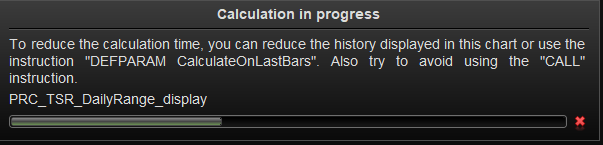
    See attached. I get this every time I change my indicator. I only want this to calculate on the current days data so the rest of the chart does not matter.


    Thanks.

    2019-03-14_14-15-08.png 2019-03-14_14-15-08.png
    #93644 quote
    Vonasi
    Moderator
    Master

    CalculateOnLastBars

    Grantx thanked this post
    #93670 quote
    Grantx
    Participant
    Average

    https://www.prorealcode.com/documentation/calculateonlastbars/

    Thanks for the answer. What if I only want to start calculating from the start of the day? That code specifies 200 bars but there might be more in my day profile.

    Thanks.

    #93709 quote
    Vonasi
    Moderator
    Master

    Maybe if you can provide a link to where I can find the code for the indicator in the library or the actual code of the indicator then it might be easier to see if your request is possible. It might be possible using MTF and GRAPHONPRICE using a dummy strategy but without the code it is difficult to be certain.

    The other option is to work out how many candles there are in a day for the time frame that you use and then only load the indicator for that number of bars so you have the last 24 hours only. As I don’t know the workings of the indicator or what time frame you use it on it is not possible to know if this will actually work or give accurate results.

    #93744 quote
    Grantx
    Participant
    Average

    Here is the code. I’m still learning so please excuse the poor coding skills.


    I basically pull statistics from a SQL database and then hard code them into the indicator (which I will update weekly.)


    //PRC_TSR_DailyRange_display | indicator
    //11.12.2018
    //Nicolas @ www.prorealcode.com
    //Sharing ProRealTime knowledge
    //translated from MT4 version
    
    defparam drawonlastbaronly=true
    
    if day<>day[1] then
    startbar=barindex
    endif
    
    
    HIDaily1 = dhigh(0)
    LOWDaily1 =dlow(0)
    TodayRange=dhigh(0)-dlow(0)
    
    
    if(Open[0]> 8000 AND  Open[0]< 14000) THEN //DAX
    avr = 126
    averagerangedown = HIDaily1 - avr
    averagerangeup = LOWDaily1 + avr
    tickbufferup = +5
    tickbufferdown = +5
    ELSIF(Open[0]> 18000 AND  Open[0]< 30000) THEN //YM Wall Street
    avr = 300
    averagerangedown = HIDaily1 - avr
    averagerangeup = LOWDaily1 + avr
    tickbufferup = +6
    tickbufferdown = +6
    ELSIF(Open[0]> 1000 AND  Open[0]< 4000) THEN //SP500
    avr = 30
    averagerangedown = HIDaily1 - avr
    averagerangeup = LOWDaily1 + avr
    tickbufferup = +2
    tickbufferdown = +2
    ELSIF(Open[0]> 5000 AND  Open[0]< 10000) THEN //nasdaq
    avr = 103
    averagerangedown = HIDaily1 - avr
    averagerangeup = LOWDaily1 + avr
    tickbufferup = +2
    tickbufferdown = +2
    ELSE
    result = result
    ENDIF
    
    //Line segments
    drawsegment(startbar,averagerangedown,barindex,averagerangedown) coloured(124,252,0)
    drawsegment(startbar,averagerangeup,barindex,averagerangeup) coloured(124,252,0)
    drawsegment(startbar,HIDaily1,barindex,HIDaily1) coloured(124,252,0)
    drawsegment(startbar,LOWDaily1,barindex,LOWDaily1) coloured(124,252,0)
    
    //Text on chart
    drawtext("Range #TodayRange#",barindex,LOWDaily1-tickbufferdown,Dialog,Bold,14) coloured(124,252,0)
    drawtext("Average range #avr#",barindex,averagerangedown - tickbufferdown,Dialog,Bold,14) coloured(124,252,0)
    drawtext("Average range #avr#",barindex,averagerangeup + tickbufferup,Dialog,Bold,14) coloured(124,252,0)


    RETURN
    
    #93771 quote
    Vonasi
    Moderator
    Master

    To be honest with you it isn’t what I would call a slow to draw indicator in the first place! However try this little modification that speeds it up a little:

    //PRC_TSR_DailyRange_display | indicator
    //11.12.2018
    //Nicolas @ www.prorealcode.com
    //Sharing ProRealTime knowledge
    //translated from MT4 version
    
    defparam drawonlastbaronly=true
    
    if day<>day[1] then
    startbar=barindex
    endif
    
    if date = today[0] then
    HIDaily1 = dhigh(0)
    LOWDaily1 =dlow(0)
    TodayRange=dhigh(0)-dlow(0)
    
    
    if(Open[0]> 8000 AND  Open[0]< 14000) THEN //DAX
    avr = 126
    averagerangedown = HIDaily1 - avr
    averagerangeup = LOWDaily1 + avr
    tickbufferup = +5
    tickbufferdown = +5
    ELSIF(Open[0]> 18000 AND  Open[0]< 30000) THEN //YM Wall Street
    avr = 300
    averagerangedown = HIDaily1 - avr
    averagerangeup = LOWDaily1 + avr
    tickbufferup = +6
    tickbufferdown = +6
    ELSIF(Open[0]> 1000 AND  Open[0]< 4000) THEN //SP500
    avr = 30
    averagerangedown = HIDaily1 - avr
    averagerangeup = LOWDaily1 + avr
    tickbufferup = +2
    tickbufferdown = +2
    ELSIF(Open[0]> 5000 AND  Open[0]< 10000) THEN //nasdaq
    avr = 103
    averagerangedown = HIDaily1 - avr
    averagerangeup = LOWDaily1 + avr
    tickbufferup = +2
    tickbufferdown = +2
    ELSE
    result = result
    ENDIF
    
    //Line segments
    drawsegment(startbar,averagerangedown,barindex,averagerangedown) coloured(124,252,0)
    drawsegment(startbar,averagerangeup,barindex,averagerangeup) coloured(124,252,0)
    drawsegment(startbar,HIDaily1,barindex,HIDaily1) coloured(124,252,0)
    drawsegment(startbar,LOWDaily1,barindex,LOWDaily1) coloured(124,252,0)
    
    //Text on chart
    drawtext("Range #TodayRange#",barindex,LOWDaily1-tickbufferdown,Dialog,Bold,14) coloured(124,252,0)
    drawtext("Average range #avr#",barindex,averagerangedown - tickbufferdown,Dialog,Bold,14) coloured(124,252,0)
    drawtext("Average range #avr#",barindex,averagerangeup + tickbufferup,Dialog,Bold,14) coloured(124,252,0)
    endif
    
    RETURN
    Grantx thanked this post
    #93778 quote
    GraHal
    Participant
    Master

    @Grantx are you doing a load of other stuff (games maybe?) on your PC at the same time as you get the Caculating message?

    If Yes or I could be, then maybe not enough CPU power left to do a fast Calc (without screen message) while loading Indicators??

    Just thoughts / ideas anyway.

    #93818 quote
    Grantx
    Participant
    Average

    @Vonasi thanks. That made the difference. I am not seeing that message anymore.

    @GraHal nothing else besides Chrome and the PC is well specced so it should handle this simple code with ease.


    Thanks for the help.

    GraHal thanked this post
Viewing 8 posts - 1 through 8 (of 8 total)

  • You must be logged in to reply to this topic.

How do I reduce calculation time?


ProBuilder: Indicators & Custom Tools

New Reply
Author
author-avatar
Grantx @grantx Participant
Summary

This topic contains 7 replies,
has 3 voices, and was last updated by Grantx

6 years, 11 months ago.

Topic Details
Forum: ProBuilder: Indicators & Custom Tools
Language: English
Started: 03/14/2019
Status: Active
Attachments: 1 files
Logo Logo
Loading...

