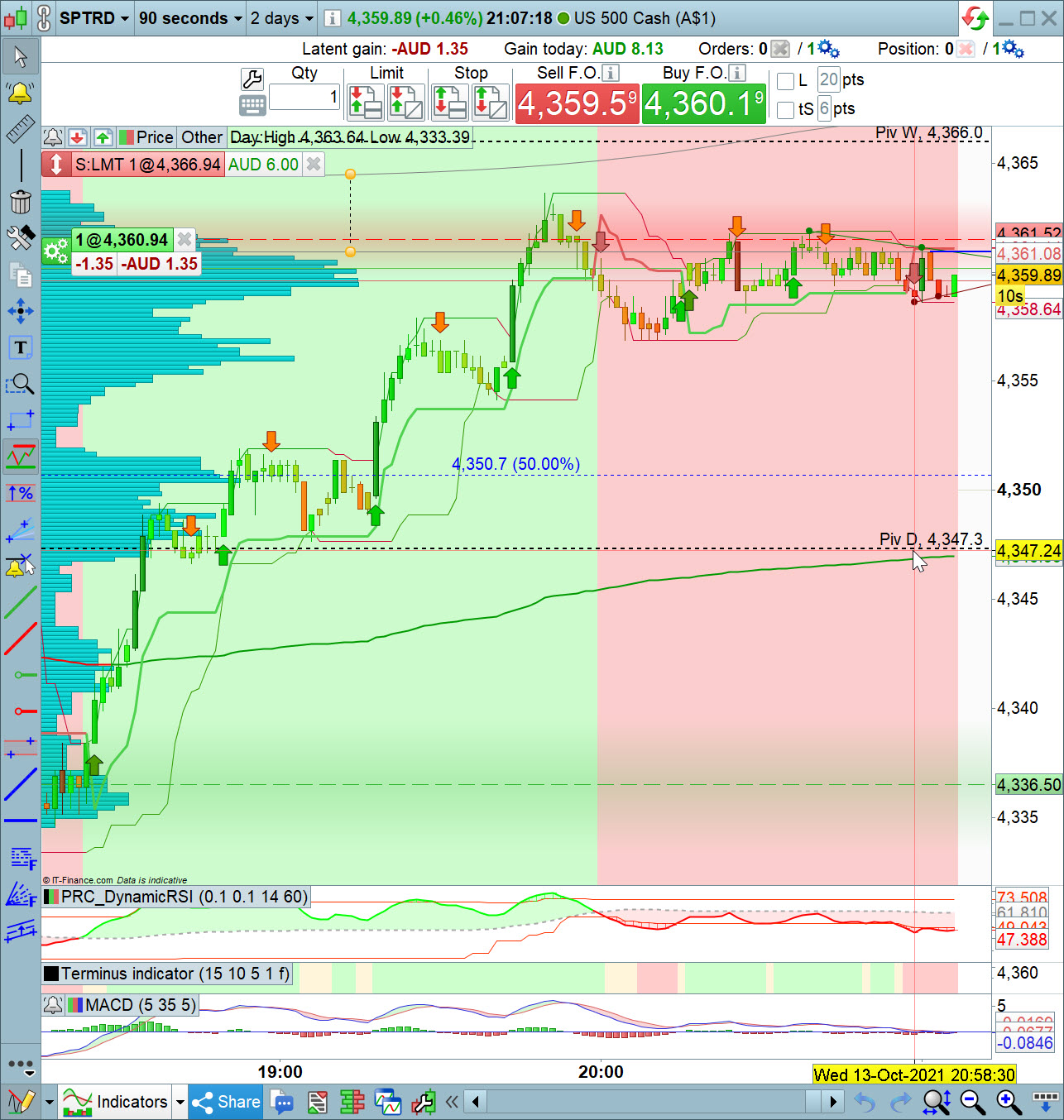
// Definition of code parameters
DEFPARAM CumulateOrders = FALSE // Cumulating positions deactivated
timeframe(DEFAULT)
positionsize = 1
// Conditions to enter long positions
myPRCDynamicRSI, myPRCDynamicRSI2, myPRCDynamicRSI3, myPRCDynamicRSI4 = CALL "PRC_DynamicRSI"[0.1, 0.1, 14, 60]
c1 = (myPRCDynamicRSI > myPRCDynamicRSI2)
indicator1, indicator2, ignored = CALL "Terminus indicator"[9, 6, 3, 1, 0]
c2 = (indicator1 CROSSES OVER indicator2)
ignored, indicator3, indicator4 = CALL "Terminus indicator"[9, 6, 3, 1, 0]
c3 = (indicator3 CROSSES OVER indicator4)
IF c1 AND c2 AND C3 THEN
BUY positionsize CONTRACT AT MARKET
SET STOP pTRAILING 4.0
SET TARGET pPROFIT 3.0
ENDIF
C4 = (indicator1 > indicator2)
C5 = (indicator3 > indicator4)
C6 = (myPRCDynamicRSI CROSSES OVER myPRCDynamicRSI2)
IF C4 AND C5 AND C6 THEN
BUY positionsize CONTRACT AT MARKET
SET STOP pTRAILING 4.0
SET TARGET pPROFIT 3.0
ENDIF
// EXIT LONG CONDITIONS
IF LONGONMARKET AND (myPRCDynamicRSI CROSSES UNDER myPRCDynamicRSI2)THEN
SELL AT MARKET
ENDIF
//******************************************************************************************************
//
//     trailing stop function
trailingstep      = 5     //5    trailing step to move the "stoploss" after BreakEven
startBreakeven    = 5     //5    pips in gain to activate the breakeven function
PointsToKeep      = 3     //3    pips to keep in profit above/below entry price when the breakeven is activated
//
//reset the stoploss value
IF NOT ONMARKET THEN
newSL          = 0
breakevenLevel = 0
ENDIF
//******************************************************************************************************
// ----- BREAKEVEN code
//
//reset the breakevenLevel when no trade are on market
// --- LONG  side
IF LONGONMARKET AND (close - tradeprice(1)) >= (startBreakeven * pipsize) AND breakevenlevel = 0 THEN
breakevenLevel = tradeprice(1) + (PointsToKeep * pipsize)                         //calculate the breakevenLevel
ENDIF
// --- SHORT side
IF SHORTONMARKET AND (tradeprice(1) - close) >= (startBreakeven * pipsize) AND breakevenlevel = 0 THEN
breakevenLevel = tradeprice(1) + (PointsToKeep * pipsize)                         //calculate the breakevenLevel
ENDIF
//Set new Stop Loss
IF breakevenLevel > 0 THEN
newSL = BreakEvenLevel
ENDIF
//******************************************************************************************************
// ----- TRAILING STOP code
//
//manage long positions
IF LONGONMARKET AND BreakEvenLevel THEN
//next moves after BreakEven
IF newSL > 0 AND ((close - newSL) >= (trailingstep * pipsize)) THEN
newSL = newSL + (trailingstep * pipsize)
ENDIF
ENDIF
//manage short positions
IF SHORTONMARKET AND BreakEvenLevel THEN
//next moves after BreakEven
IF newSL > 0 AND ((newSL - close) >= (trailingstep * pipsize)) THEN
newSL = newSL - (trailingstep * pipsize)
ENDIF
ENDIF
//stop order to exit the positions
IF newSL > 0 THEN
SELL      AT newSL STOP
EXITSHORT AT newSL STOP
ENDIF
//******************************************************************************************************
Even if I understand what you want ask to us with your title, please describe it in your post content next time.
You have to remove all SET STOP TRAILING of your initial code and copy/paste Roberto’s code at the end. It should operate correctly this way.
Is the Terminus Indicator available anywhere please?
I’ve searched in the Library on here and on MarketPlace, no success.
[attachment file=”Terminus-indicator.itf”]
I have done as you said but it opened the position without setting any stop loss as you can see, how I can fix that please.
@efahmy
Do not embed files of any kind in your post, as this slows down loading the pages.
Use the attach button only.
Thank you 🙂
When any code is not really huge (hundreds of lines), it’s advisable to copy and paste the code (along with the ITF file, if available). Thank you 🙂
This your indicator:
// Author: Tom's - Leofi
// Name: Terminus indicator
// Description: Trend average indicator

// Var indicator
emaSlow = Average[slow, type](close)
emaNormal = Average[normal, type](close)
emaFast = Average[fast, type](close)

// Logic
if (emaFast > emaNormal and emaNormal > emaSlow) then
backgroundcolor(0,250,0)
elsif (emaFast < emaNormal and emaNormal < emaSlow) then
backgroundcolor(250,0,0)
else
backgroundcolor(250,165,0)
endif

// Boolean draw indicator
if (drawIndicator) then
indicatorAlpha = 250
else
indicatorAlpha = 0
endif

return emaFast coloured(200, 200, 200, indicatorAlpha) STYLE(line, 2) as "Fast Average 0", emaNormal coloured(80, 80, 80, indicatorAlpha) STYLE(line, 2) as "Normal Average 1", emaSlow coloured(0, 0, 0, indicatorAlpha) STYLE(line, 2) as "Slow Average 2"
Hi Roberto,
I’m not after the Terminus indicator, I’m after your dynamic stop loss, it doesn’t work with my code as shown in the figure attached, could you please advice.
Yes, but to test it we needed the code.
It may work while backtesting, not in autotrading, as the trailing stop seems too tight.
Post details about any issues you have experienced with the above code.
Hi Roberto,
It seems that this dynamic stop loss works only when the price is above breakeven level, but it doesn’t provide protection initial stop loss and and then trail, is there a chance to add protection stop loss and then work as dynamic??
This is not a STOP LOSS, your strategy needs to take care of that.
It’s a trailing stop, so it starts working AFTER having gained at least trailingstep pips (at the closing of the bar).
Keep SET TARGET pPROFIT and replace SET STOP pTRAILING with SET STOP pLOSS (usually TP is at least 1.5+ times the SL).