Horizontally shifting a MA in an indicator

Viewing 7 posts - 1 through 7 (of 7 total)
  • Author
    Posts
  • #35501 quote
    denmardenmar
    Participant
    Veteran

    Hi Everybody

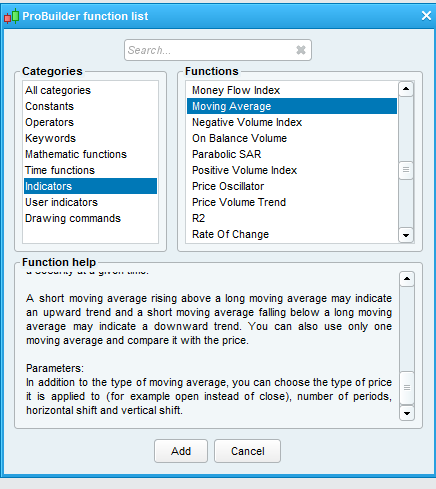
    I wish to include a MA horizontally displaced by n bars  in an indicator.  I have scoured the manual but it does not include an example that includes this, nor is this option included in the syntax at the end of the manual.  If one reads the function help option whilst trying to construct the indicator reference is made to this,again with no example (see attached screen capture). Any help/suggestions greatly appreciated.  Thank you.

    ma.png ma.png
    #35527 quote
    NicolasNicolas
    Keymaster
    Legend

    If you want to draw it on the right of the chart (in the “future”), then it is not possible with code sorry.

    If you want to get the value from the moving average from X bars ago, you can, use this kind of code:

    X = 10 //you'll get the value of the SMA from 10 bars ago 
    
    sma20 = average[20](close)[X]
    
    RETURN sma20
    #35533 quote
    denmardenmar
    Participant
    Veteran

    Thanks Nicholas.  I realize that PRT cannot plot “into the future”.  Will try what you suggest and see if it works.

    #35549 quote
    JC_BywanJC_Bywan
    Moderator
    Master

    Just in case it’s ok for you to include your shifted MA on your indicator without coding, it might be worth adding that you may also shift horizontally your MA by hand in the property window of the added MA (top right of the property window, in the box just below the period number), that’s what the function help was refering to without giving example.

    #35552 quote
    denmardenmar
    Participant
    Veteran

    Hi Noobywan, yes I am aware of that.  Thanks.

    #35648 quote
    DerekDerek
    Participant
    Veteran

    What exactly is it that you are looking for? Because a simple linear extrapolation should be possible, at least.

    Ind1=ma [20]<br>
    Ind2=Roc [10](ind1)
    Ind3=ind1+ind2
    If close crosses ind3 [10] then…

    I hope you get the idea.

    #35670 quote
    denmardenmar
    Participant
    Veteran

    Hi Derek

    The solution suggested by Nicolas was exactly what I was looking for.

    Thanks

Viewing 7 posts - 1 through 7 (of 7 total)

  • You must be logged in to reply to this topic.

ProRealAI ProRealAI New

Stuck on this ProBuilder code?

Describe what this topic is trying to build, in plain English, and ProRealAI writes the ProRealTime™ indicator, screener or system for you.

Available in 7 languages
Try ProRealAI

Horizontally shifting a MA in an indicator


ProBuilder: Indicators & Custom Tools

New Reply
Author
author-avatar
denmar @denmar Participant
Summary

This topic contains 6 replies,
has 4 voices, and was last updated by denmardenmar

9 years, 4 months ago.

Topic Details
Forum: ProBuilder: Indicators & Custom Tools
Language: English
Started: 05/14/2017
Status: Active
Attachments: 1 files
ProRealCode ProRealCode
Loading...