"Highest" function won't work with this code

Viewing 15 posts - 1 through 15 (of 15 total)

  • Author
    Posts
  • #113791 quote
    FinningFinning
    Participant
    Veteran

    Was trying to get this to work:

    tradedollars = ((close/pipsize)*countofposition*pipvalue)-((tradeprice/pipsize)*countofposition*pipvalue)
    
    graph highest[barindex](tradedollars)

    Tradedollars works on its own – and I can graph it and it does what it should – but it won’t seem to graph the HIGHEST of this function.

    Any clues why?


    Thanks,


    Finning

    #113793 quote
    NicolasNicolas
    Keymaster
    Legend

    You should try with:

    graph highest[max(1,barindex)](tradedollars)

    or with:

    hh = max(hh,tradedollars)
    graph hh
    #113795 quote
    VonasiVonasi
    Moderator
    Master

    This sort of thing often happens to me – it is probably due to trying to find HIGHEST[0] when BARINDEX = 0.

    Try this instead – not tested:

    tradedollars = ((close/pipsize)*countofposition*pipvalue)-((tradeprice/pipsize)*countofposition*pipvalue)
    
    maxtradedollars = max(tradedollars,maxtradedollars)
    
    graph maxtradedollars
    #113796 quote
    FinningFinning
    Participant
    Veteran

    Hi Nicolas,

    thanks for your reply.

    I just tried both codes, and both don’t return/graph anything.

    #113798 quote
    VonasiVonasi
    Moderator
    Master

    Try this (not tested):

    tradedollars = ((close/pipsize)*countofposition*pipvalue)-((tradeprice/pipsize)*countofposition*pipvalue)
    
    if barindex > 0 then
    maxtradedollars = max(tradedollars,maxtradedollars)
    endif
    
    graph maxtradedollars
    #113799 quote
    NicolasNicolas
    Keymaster
    Legend

    Which Prorealtime version please?

    #113802 quote
    FinningFinning
    Participant
    Veteran

    Hi Vonasi,

    thanks for your reply.

    I just tried your code, and it didn’t work either.

    Putting the “graph” right at the bottom of the code too with nothing under it.

    Just not returning anything, not even a zero.

    A graph value line doesn’t even com up in the cursor details box.

    #113804 quote
    FinningFinning
    Participant
    Veteran

    Hi Vonasi,

    just read your second code and tried it – the second code comes up in the cursor window as maxtradedollars – however the value doesn’t change from zero at any stage.

    Nicolas,

    I am currently running v 10.3 – 1.8.0_45

    Thanks

    Capture28.jpg Capture28.jpg
    #113806 quote
    NicolasNicolas
    Keymaster
    Legend

    But it should work! Proceed in order:

    1. use one of our snippet in another code (basic one) on the same instrument
    2. if 1/ doesnt work, try another instrument and timeframe
    3. if 2/ doesnt work, relaunch platform
    4. retry
    5. give feedback here
    #113808 quote
    FinningFinning
    Participant
    Veteran

    Hi Nicolas,

    I can’t do everything right now – but I’ll give you some quick feedback:

    I have been working on AUDUSD $1 weekly timeframe – where I have had my initial problem.

    Just retried the complete code from #113798 on my initial code and I can confirm that it didn’t work – it only showed a zero the whole time.

    So as for point #1

    I tried this code below on my target market the AUDUSD $1 weekly timeframe

    If date = 20000102 then
    buy 1 contract at market
    endif
    
    If date = 2000131 then
    sell at market
    endif
    
    
    tradedollars = ((close/pipsize)*countofposition*pipvalue)-((tradeprice/pipsize)*countofposition*pipvalue)
     
    if barindex > 0 then
    maxtradedollars = max(tradedollars,maxtradedollars)
    endif
     
    graph maxtradedollars

    and I still got a constant zero value from the maxtradedollars graph – see attached picture.

    I’ll work my way through the other points ASAP and get back to you.

    Thanks,

    Finning

    tradedollarsAUDUSDWeekly.jpg tradedollarsAUDUSDWeekly.jpg
    #113811 quote
    NicolasNicolas
    Keymaster
    Legend

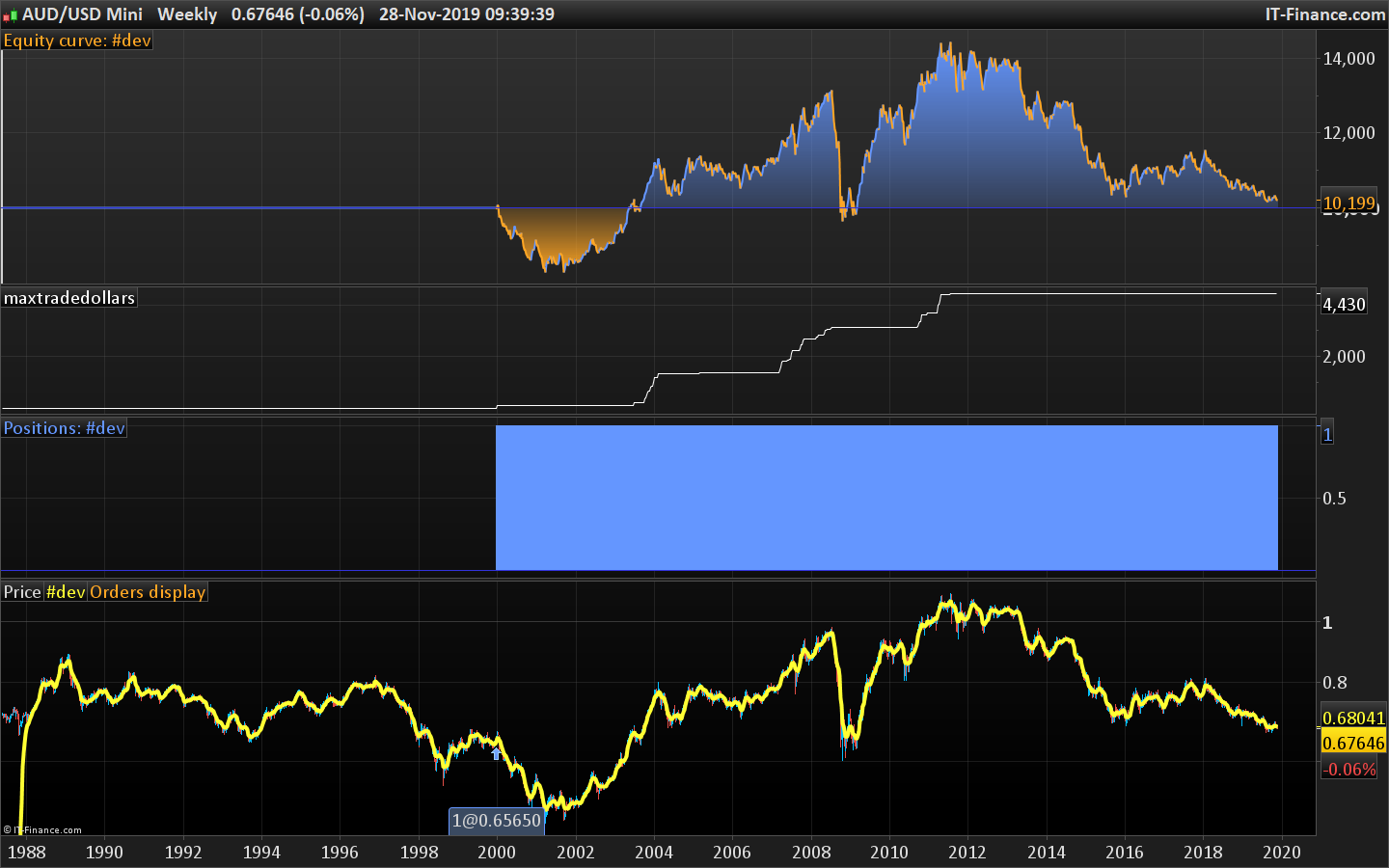
    It works for me for AUDUSD mini, not with AUDUSD .. with this code:

    If date >= 20020102 and not longonmarket then
    buy 1 contract at market
    endif
    
    //If date = 2000131 then
    //sell at market
    //endif
    
    tradedollars = ((close/pipsize)*countofposition*pipvalue)-((tradeprice/pipsize)*countofposition*pipvalue)
     
    if barindex > 0 then
    maxtradedollars = max(tradedollars,maxtradedollars)
    endif
     
    graph maxtradedollars

    I’ll make a report.

    AUDUSD-Weekly.png AUDUSD-Weekly.png
    #113813 quote
    FinningFinning
    Participant
    Veteran

    Hi Nicolas,

    yes I was using the mini market/$1 market too.

    I’ll restart my platform just to check that its not the problem either.


    Thanks,


    Finning

    #113814 quote
    FinningFinning
    Participant
    Veteran

    PS – restart didn’t help.

    #113870 quote
    NicolasNicolas
    Keymaster
    Legend

    The problem is identified and will be fixed. In the meantime, you can change the code with:

    If date >= 20020102 and not longonmarket then
    buy 1 contract at market
    endif
    
    //If date = 2000131 then
    //sell at market
    //endif
    
    tradedollars = ((close/pipsize)*countofposition*pipvalue)-((tradeprice/pipsize)*countofposition*pipvalue)
     
    if tradeindex > 0 then
     maxtradedollars = max(tradedollars,maxtradedollars)
    endif
     
    graph maxtradedollars

    It should work.

    Finning thanked this post
    #113889 quote
    FinningFinning
    Participant
    Veteran

    Hi Nicolas,

    thanks for chasing that up!

    Yes the last bit of code that you wrote with the tradeindex>0 did work – so I have something that I can use now.

    Thanks for getting this to work,

    Finning

Viewing 15 posts - 1 through 15 (of 15 total)

  • You must be logged in to reply to this topic.

ProRealAI ProRealAI New

Stuck on this ProBuilder code?

Describe what this topic is trying to build, in plain English, and ProRealAI writes the ProRealTime™ indicator, screener or system for you.

Available in 7 languages
Try ProRealAI

"Highest" function won't work with this code


ProOrder: Automated Strategies & Backtesting

New Reply
Author
author-avatar
Finning @finning Participant
Summary

This topic contains 14 replies,
has 3 voices, and was last updated by FinningFinning

6 years, 10 months ago.

Topic Details
Forum: ProOrder: Automated Strategies & Backtesting
Language: English
Started: 11/28/2019
Status: Active
Attachments: 3 files
ProRealCode ProRealCode
Loading...