LinkParticipant
Senior
A step-by-step guide to hide indicators, please?
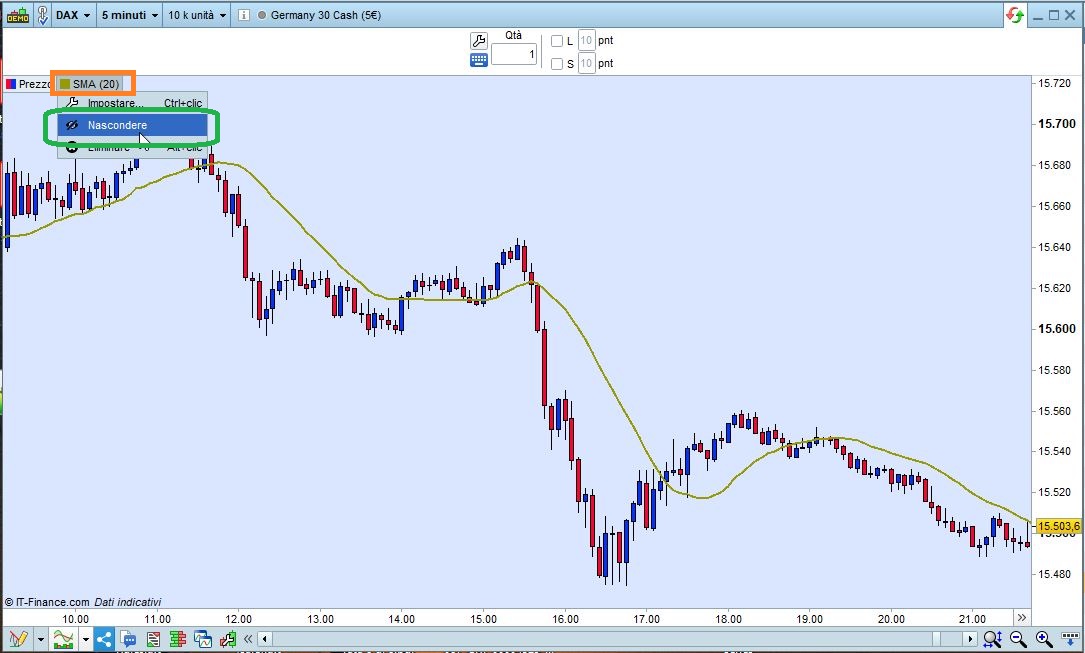
Just click the indicator tag, the select HIDE, no matter if it is on or below your price chart.
You will be able to reverse it anytime.
You have certainly read the basic rules highlighted in yellow, make sure you abide by them.
- Post your topic in the correct forum:
_ ProRealTime Platform Support: only platform related issues.
_ ProOrder: only strategy topics.
_ ProBuilder: only indicator topics.
_ ProScreener: only screener topics
_ General Discussion: any other topics.
_ Welcome New Members: for new forum members to introduce themselves.
.
- Use the ‘Insert PRT Code’ button when putting code in your posts to make it easier for others to read, NOT for text.
Thank you 🙂
LinkParticipant
Senior
Sorry…
Hide indicators with “call” function, please.
You can’t do it with CALL.
When you call an indicator from code it’s not necessary that it is on your chart and CALLing it won’t add it to your chart.
LinkParticipant
Senior
Hide the Code with “call” function… Please
Use // to comment it out.
Mr. Perchas or whoever you are, you have to explain better what you really want, if you want to be helped. I’ve had enough of your 1-line questions in incorrect English!
Use the Spanish forum and write correct Spanish language. Google Translator will do a much better job!
What is HIDING an indicator in a CALL? Where did you hear about it and what use is that?
Moreover DO NOT talk about jokes, I am spending some time on a Sunday to try to help you, for free! It’s not a joke.
You either change your attitude and your language or you won’t get much further help from me!