


HELP WITH coding a SCREENER with MACD and Stochastic PLEASE

Viewing 11 posts - 1 through 11 (of 11 total)

  • Author
    Posts
  • #173989 quote
    nealhart
    Participant
    Junior

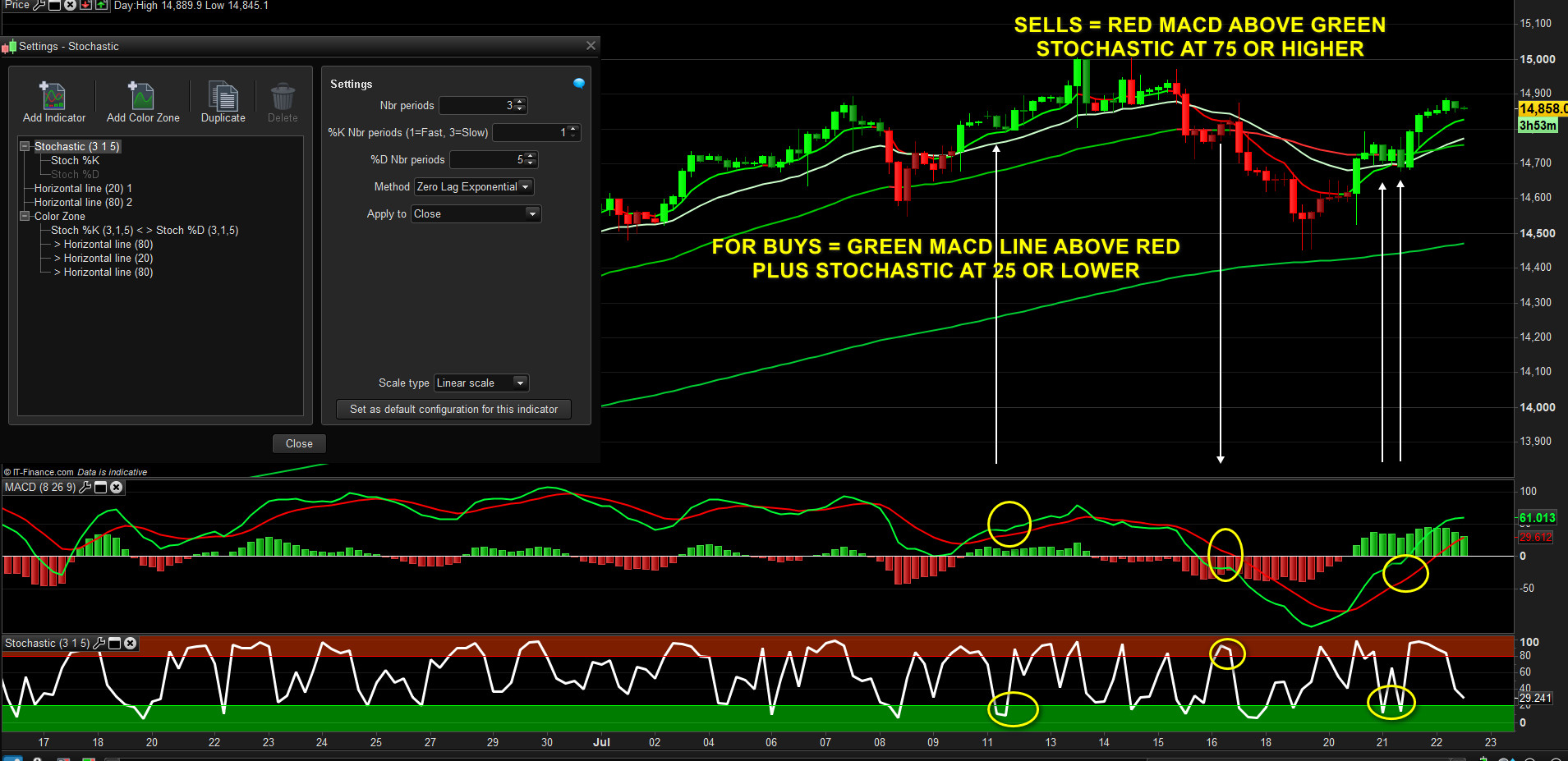
    Please see attached screenshot…it’s and over bought or over sold setups using MACD and Stochastic ( settings in screenshot) and will use it mainly on 4 hour, daily, weekly timeframes.

    Thanks very much in advance

    OVER-BOUGHT-OR-SOLD-SCREENER-CRITERIA.jpg OVER-BOUGHT-OR-SOLD-SCREENER-CRITERIA.jpg
    #173995 quote
    robertogozzi
    Moderator
    Master

    Thank you for sharing your idea.

    #173999 quote
    robertogozzi
    Moderator
    Master

    Give your topic a meaningful title. Describe your question or your subject in your title. Do not use meaningless titles such as ‘Coding Help Needed’.

    Thank you 🙂

    #174000 quote
    nealhart
    Participant
    Junior

    Noted for next time.. I’m travelling at the moment 🙂

    #174007 quote
    robertogozzi
    Moderator
    Master

    There you go:

    Kline   = Stochastic[11,4](close)
    //Dline = Average[3](Kline)
    L1      = Kline <= 25
    S1      = Kline >= 75
    //
    MyMACD  = MACDline[12,26,9](close)
    Signal  = MACDSignal[12,26,9](close)
    L2      = MyMACD > Signal
    S2      = MyMACD < Signal
    //
    CondL   = L1 AND L2
    CondS   = S1 AND S2
    //
    Result  = 0
    IF CondL THEN
       Result = 1
    ELSIF CondS THEN
       Result = 2
    ENDIF
    SCREENER[Result](Result AS "1=↑, 2=↓")
    #174009 quote
    nealhart
    Participant
    Junior

    Hi, I pasted the code, but got “syntax errors” line 7,8?

    #174010 quote
    robertogozzi
    Moderator
    Master

    I tried to paste it and didn’t get any error.

    What version are you currently using?

    #174012 quote
    nealhart
    Participant
    Junior
    Ah, it’s the older 10.3 because some of my indicators don’t work so good on the newest version.
    #174013 quote
    robertogozzi
    Moderator
    Master

    I got it, MACDSignal is a new instruction added in v11.

    Use this code (this works with both versions):

    Kline   = Stochastic[11,4](close)
    //Dline = Average[3](Kline)
    L1      = Kline <= 25
    S1      = Kline >= 75
    //
    MyMACD  = ExponentialAverage[12](close) - ExponentialAverage[26](close)
    Signal  = ExponentialAverage[9](MyMACD)
    L2      = MyMACD > Signal
    S2      = MyMACD < Signal
    //
    CondL   = L1 AND L2
    CondS   = S1 AND S2
    //
    Result  = 0
    IF CondL THEN
       Result = 1
    ELSIF CondS THEN
       Result = 2
    ENDIF
    SCREENER[Result](Result AS "1=↑, 2=↓")
    #174737 quote
    nealhart
    Participant
    Junior

    Hi, sorry for the delay. I’ve been travelling…

    I’ve tried a few times, but I can’t get the screener to show up any trades. ..although there are no errors now.

    Is something wrong that I need to change?

    thanks

    Neal

    #174739 quote
    robertogozzi
    Moderator
    Master

    It works fine for me (tested on US shares, both 4h and 2min).

    Try several lists or try changing some settings for indicators.

    I am attaching the ITF file, in case you made some errors copying & pasting.

    Il-Mio-ProScreener9.itf
Viewing 11 posts - 1 through 11 (of 11 total)
  • You must be logged in to reply to this topic.

HELP WITH coding a SCREENER with MACD and Stochastic PLEASE


ProScreener: Market Scanners & Detection

New Reply
Author
author-avatar
nealhart @nealhart Participant
Summary

This topic contains 10 replies,
has 2 voices, and was last updated by robertogozzi
4 years, 7 months ago.

Topic Details
Forum: ProScreener: Market Scanners & Detection
Language: English
Started: 07/22/2021
Status: Active
Attachments: 2 files
Logo Logo
Loading...
