Help with drawing daily lines

Viewing 7 posts - 1 through 7 (of 7 total)
  • Author
    Posts
  • #61116 quote
    Juan SalasJuan Salas
    Participant
    Master

    Hi all,

    I am trying to create a very basic indicator, to help me visualise a strategy. I would like that everyday horizontal lines will be drawn to visualise some parameters.

    I have been reading the instructions to draw and create indicators and I am missing something. Right now, I can just see lines from today, and I would like to see different lines for everyday’s values.

    I am attaching the indicator:

    // GRID20 Indicator
    // LevelZERO and Levels 1up/1down
    
    defparam drawonlastbaronly = true
     
    // GRID distance
    disgrid1 = 10
    disgrid2 = 30
    
    // Defining GRID levels
    IF time=010000 THEN
    levelZERO=close
    ENDIF
     
    level1up = levelZERO + disgrid1*pipsize
    level2up = levelZERO + disgrid2*pipsize
     
    level1down = levelZERO - disgrid1*pipsize
    level2down = levelZERO - disgrid2*pipsize
    
    //Drawing text and lines
    DRAWTEXT("level2UP",barindex-1,level2up,SansSerif,Bold,14)coloured(200,200,0)
    DRAWTEXT("level1UP",barindex-1,level1up,SansSerif,Bold,14)coloured(0,0,153)
    DRAWTEXT("levelZERO",barindex-1,levelZERO,SansSerif,Bold,14)coloured(200,153,0)
    DRAWTEXT("level1DOWN",barindex-1,level1down,SansSerif,Bold,14)coloured(0,0,153)
    DRAWTEXT("level2DOWN",barindex-1,level2down,SansSerif,Bold,14)coloured(200,200,0)
    
    
    DRAWHLINE(level2up) coloured(0,200,0)
    DRAWHLINE(level1up) coloured(0,0,150)
    DRAWHLINE(levelZERO)coloured(0,200,0)
    DRAWHLINE(level1down)coloured(0,0,150)
    DRAWHLINE(level2down) coloured(0,200,0)
    
    RETURN


    Thanks,

    Juan

    #61122 quote
    LeoLeo
    Participant
    Veteran

    why draw on last bar only?

    then you should test the code exactly at 1:00am….

    ;p

    #61142 quote
    Juan SalasJuan Salas
    Participant
    Master

    Hi Leo,

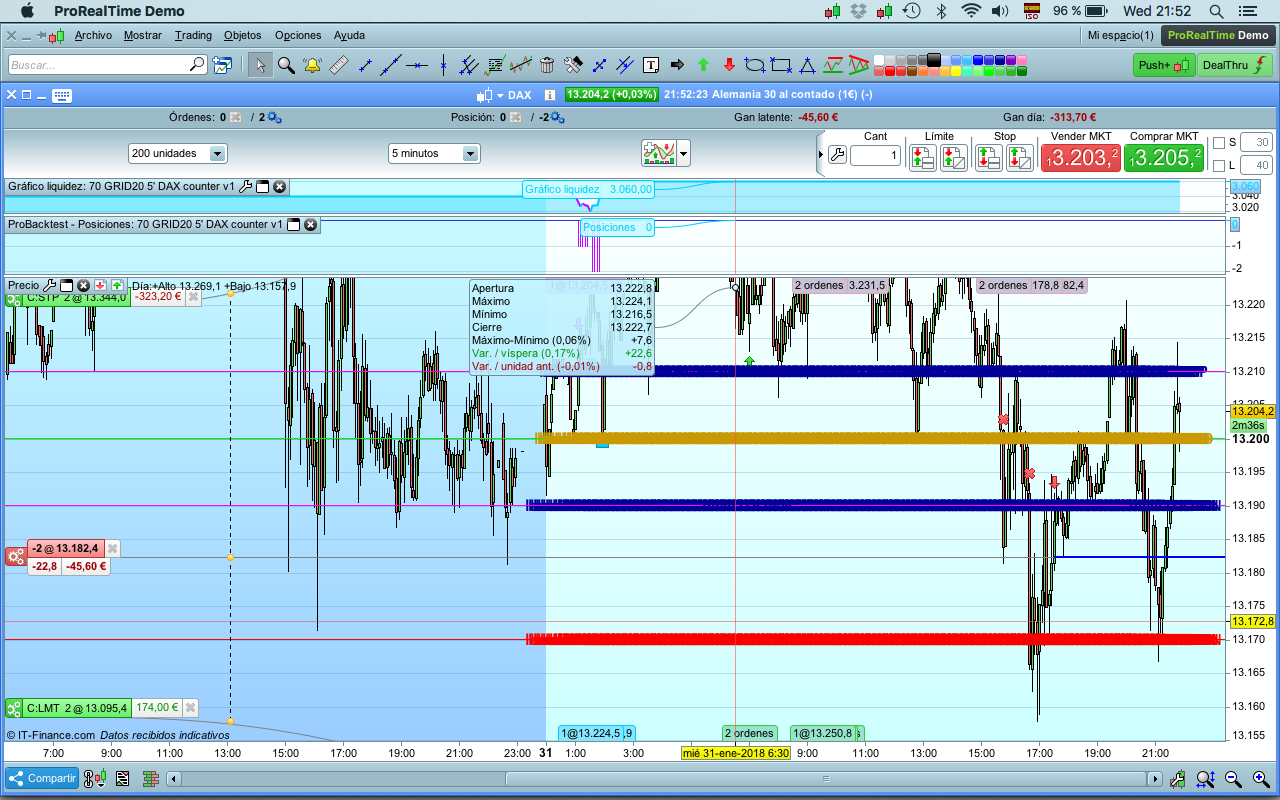
    I don’t understand. If I change/remove/deactivate defparam drawonlastbaronly to false, as you can see in the attached screenshot I still got the same lines from today back in the past, plus the text multiplied by every single bar.

    What I want is everyday draw lines at 010000 for that day. It is suppose to be different lines everyday, but now I just got the lines from today all the way to the past.

    Thanks

    Juan

    Screen-Shot-2018-01-31-at-21.52.24.png Screen-Shot-2018-01-31-at-21.52.24.png
    #61148 quote
    Juan SalasJuan Salas
    Participant
    Master

    Hi all,

    I got it. It is solved. I have checked some of the indicators of the library and they show how to do it.

    Thanks anyway,

    Juan

    #61161 quote
    LeoLeo
    Participant
    Veteran

    Can you please post it? then we all learn how to do it.

    thanks i a

    #61178 quote
    Juan SalasJuan Salas
    Participant
    Master

    Sure,

    Actually, I have copied it from one of your indicators.

    // GRID20 Indicator
    // LevelZERO and Levels 1up/1down
    
    defparam drawonlastbaronly = true
     
    // Distancia GRID
    disgrid1 = 10
    disgrid2 = 30
    
    // Determinición niveles GRID
    IF time=010000 THEN
    levelZERO=close
    ENDIF
     
    level1up = levelZERO + disgrid1*pipsize
    level2up = levelZERO + disgrid2*pipsize
     
    level1down = levelZERO - disgrid1*pipsize
    level2down = levelZERO - disgrid2*pipsize
    
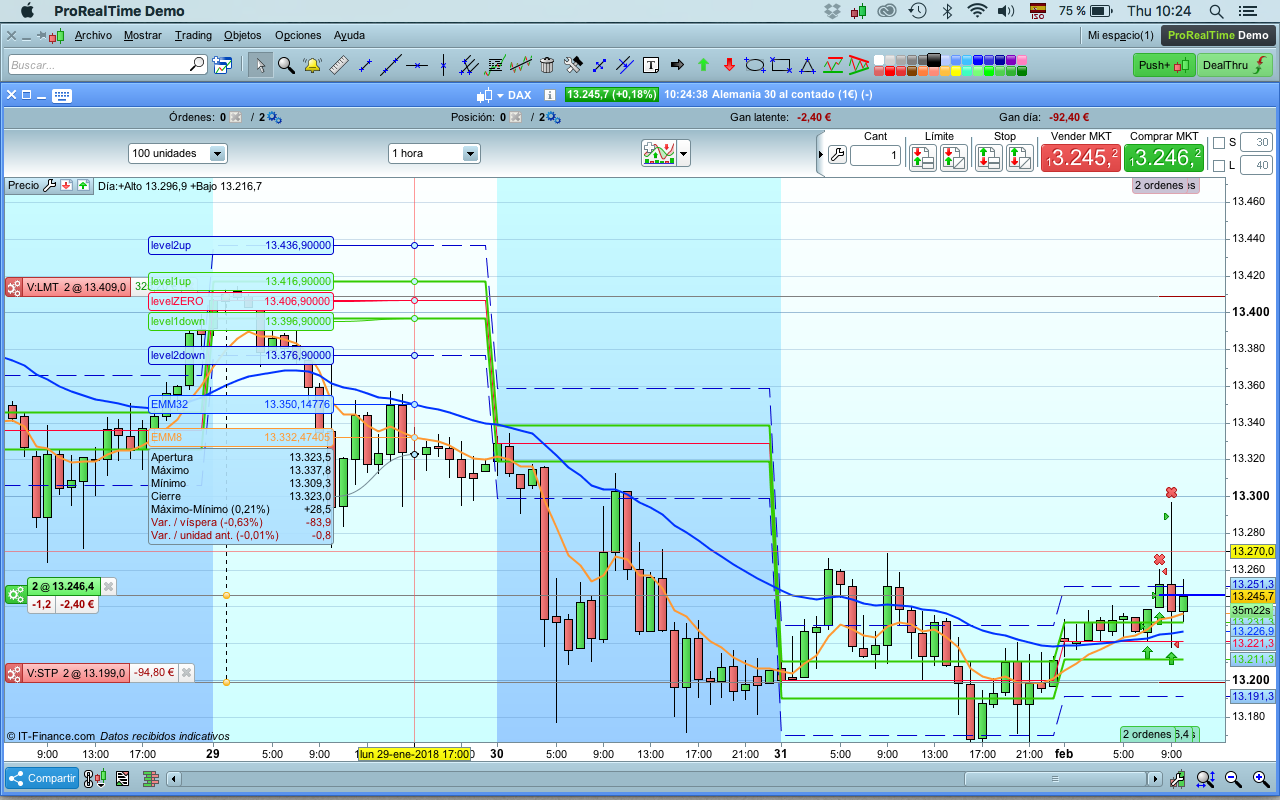
    RETURN LevelZERO as "levelZERO", level1up as "level1up", level2up as "level2up", level1down as "level1down", level2down as "level2down"


    I just replaced the drawing lines. The command RETURN and the description of the parameters did it.

    Regards,

    Juan

    Screen-Shot-2018-02-01-at-10.24.39.png Screen-Shot-2018-02-01-at-10.24.39.png
    #61231 quote
    LeoLeo
    Participant
    Veteran

    Hahaha, cool!

    nice, thanks for sharing

Viewing 7 posts - 1 through 7 (of 7 total)
  • You must be logged in to reply to this topic.

ProRealAI ProRealAI New

Stuck on this ProBuilder code?

Describe what this topic is trying to build, in plain English, and ProRealAI writes the ProRealTime™ indicator, screener or system for you.

Available in 7 languages
Try ProRealAI

Help with drawing daily lines


ProBuilder: Indicators & Custom Tools

New Reply
Author
author-avatar
Juan Salas @juan-salas Participant
Summary

This topic contains 6 replies,
has 2 voices, and was last updated by LeoLeo

8 years, 8 months ago.

Topic Details
Forum: ProBuilder: Indicators & Custom Tools
Language: English
Started: 01/31/2018
Status: Active
Attachments: 2 files
ProRealCode ProRealCode
Loading...