ProRealCode - Trading & Coding with ProRealTime™
Hi
I was studying Bulkowki’s Candlestick Patterns: https://www.prorealcode.com/topic/8-high-probability-bulkowski-candlestick-patterns/
And wanted to make an indicator that would really define a Bull (and Bear) Market so that his percentage probabilities (eg there’s an 84% chance of a Bullish Reversal with a Bearish 3 Line Strike Up in a Bull Market) could be traded upon.
Bulkowski defined a Bull and Bear as:
I define a bear market as when an index or average (I prefer the S & P 500 Index) declines by more than 20%. Similarly, a bull market occurs when the index or average rises by at least 20%. Based on this definition, you will not know you are in a bull or bear market until well after they have begun. The definition does not matter because the words bull and bear are just labels. Following the current market or stock trend is more important than a label.
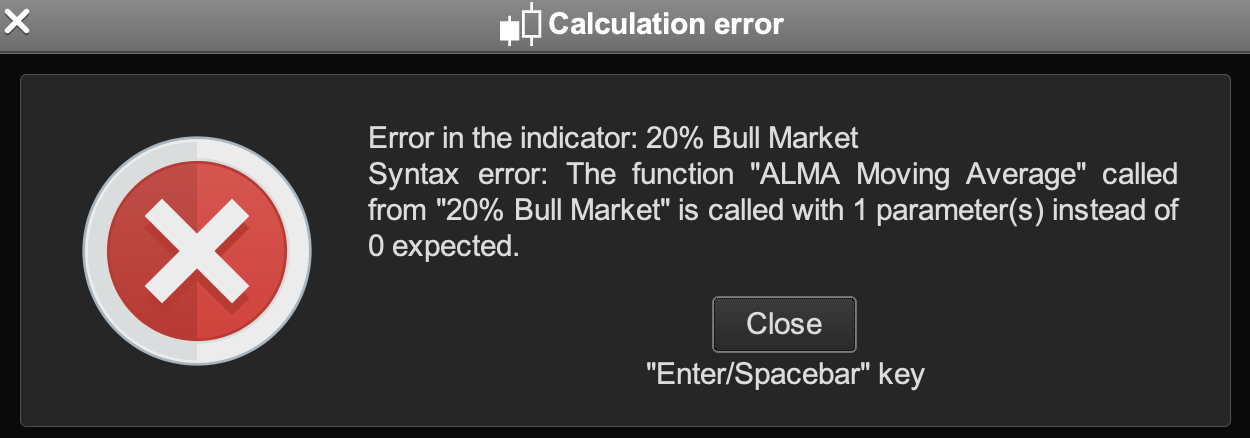
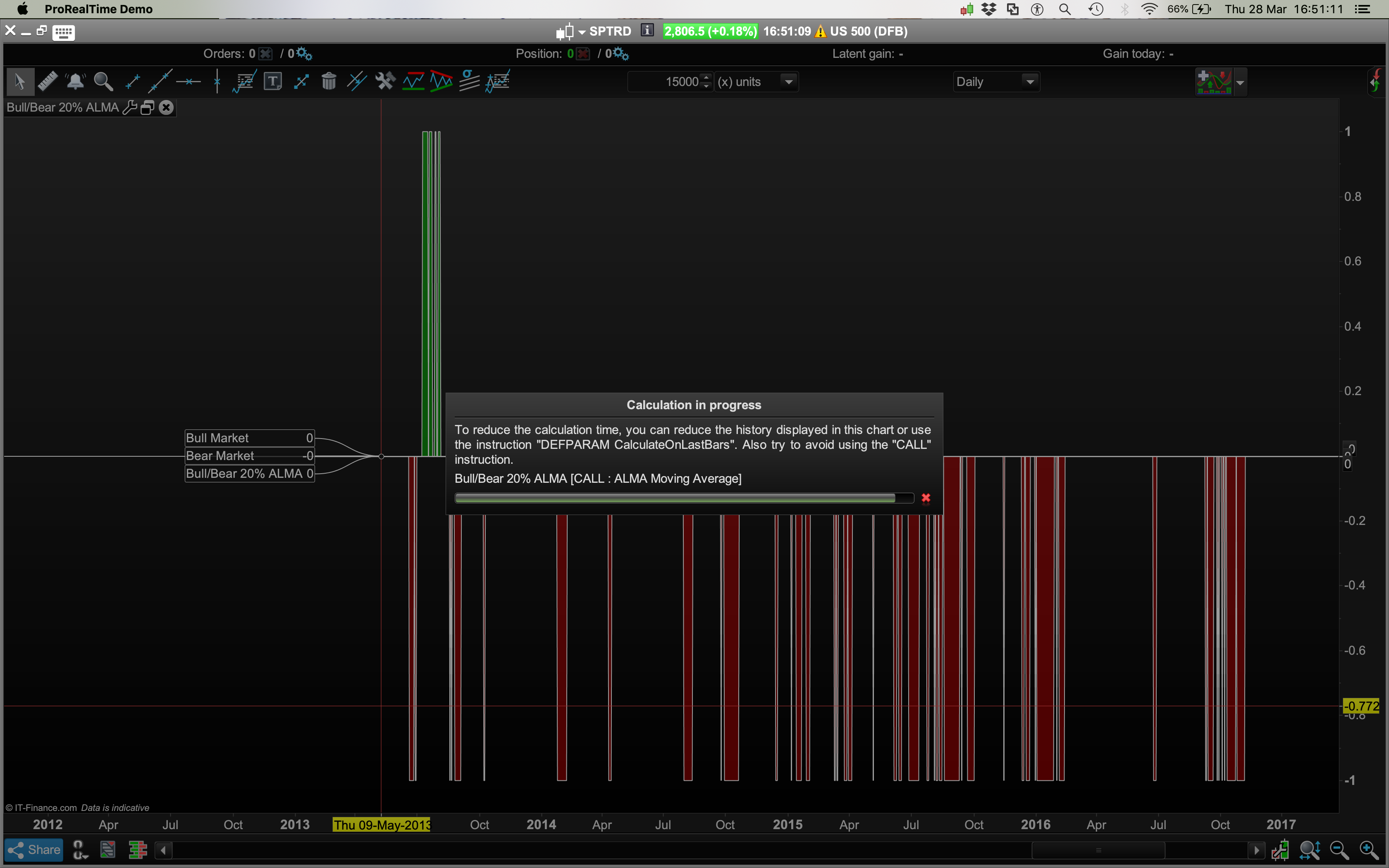
I added the moving averages condition (prices above the 50, 100 and 200 day moving averages) and this worked with a simple moving average but when I added the ALMA moving average I got a warning about the number of parameters called, pls see screenshot:
Not sure how to solve that – tried adding variables for 50, 100 and 200 etc but that didn’t fix it.
// 20% Bull Market increase in Prices
ShortMA = CALL "ALMA Moving Average"[50]
MediumMA = CALL "ALMA Moving Average"[100]
LongMA = CALL "ALMA Moving Average"[200]
BullC1 = Close[0] > ShortMA
BullC2 = Close[0] > MediumMA
BullC3 = Close[0] > LongMA
BullC4 = Close[0] >= (Close[200] * 1.2)
Return BullC1 and BullC2 and BullC3 and BullC4 as "BullMarket"
Also happy to hear of any other ideas how to make a better Bull / Bear indicator?
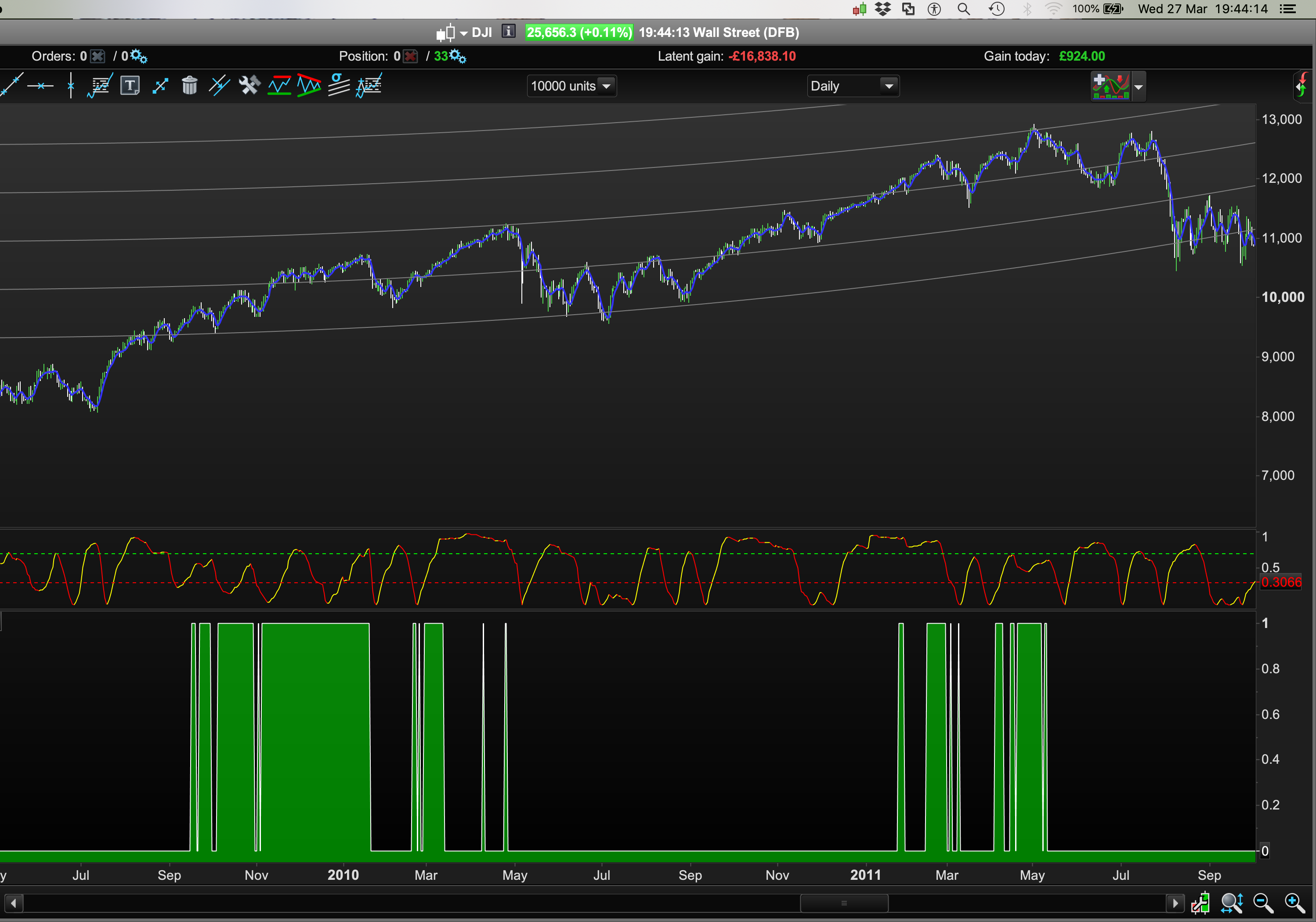
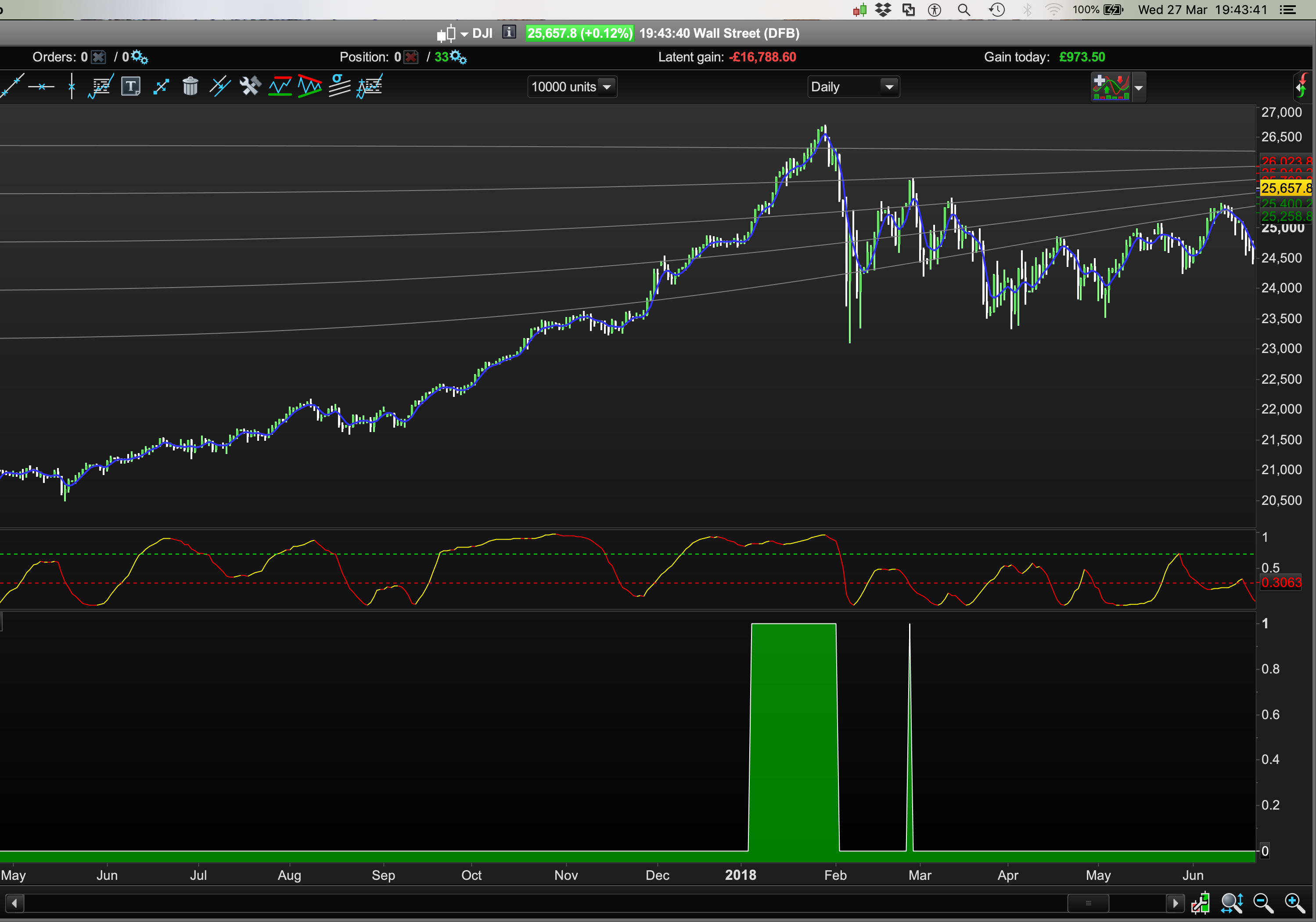
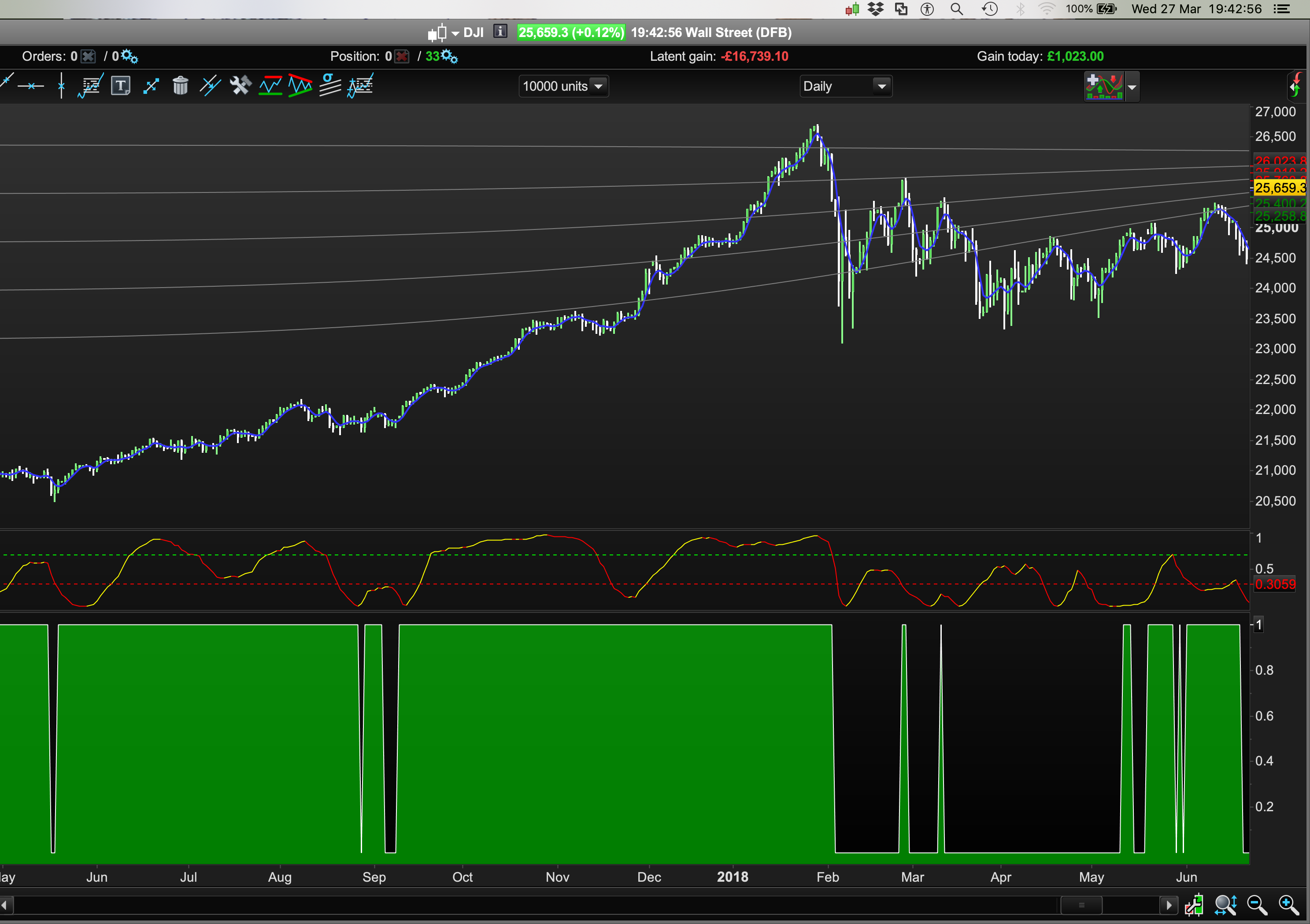
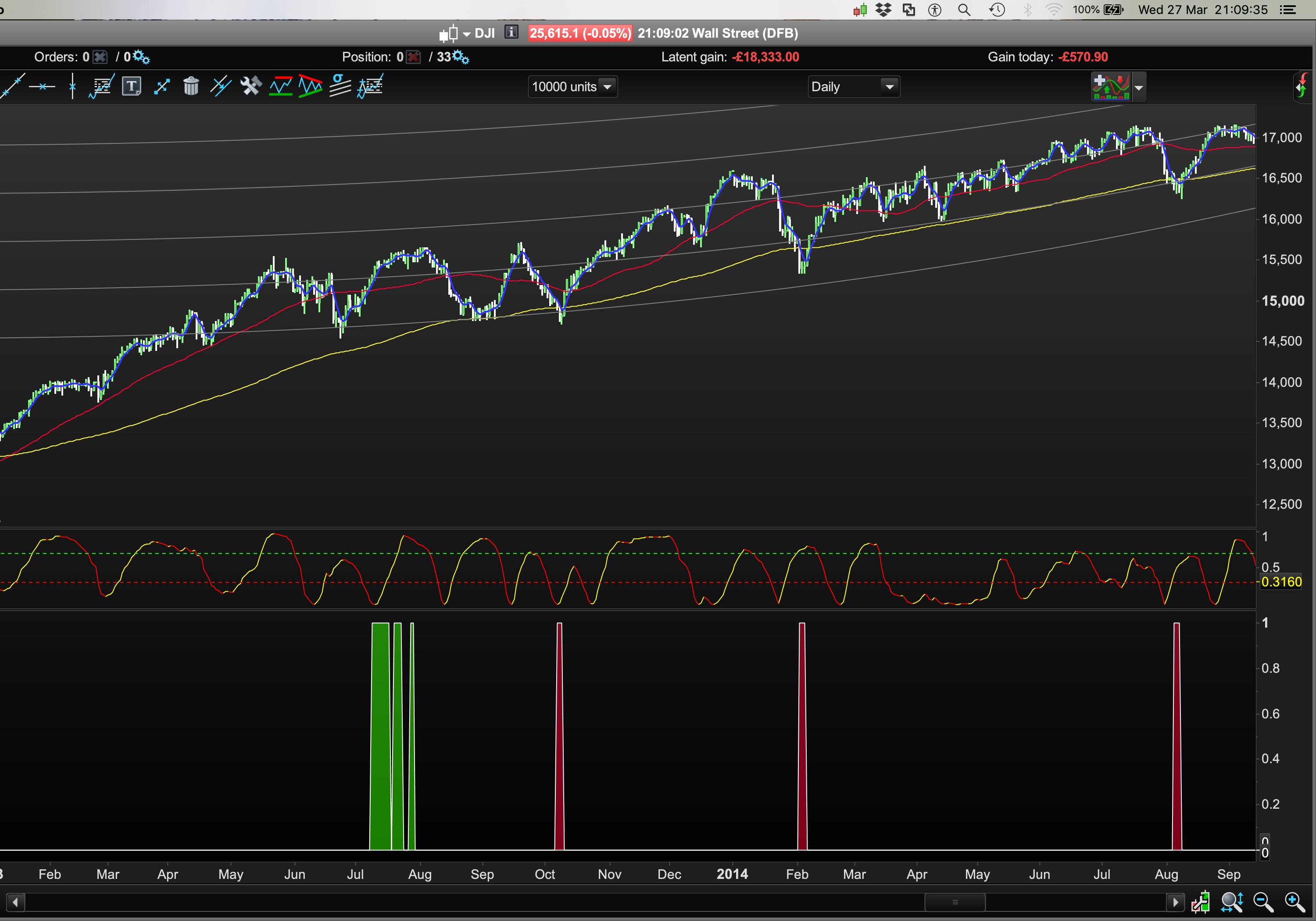
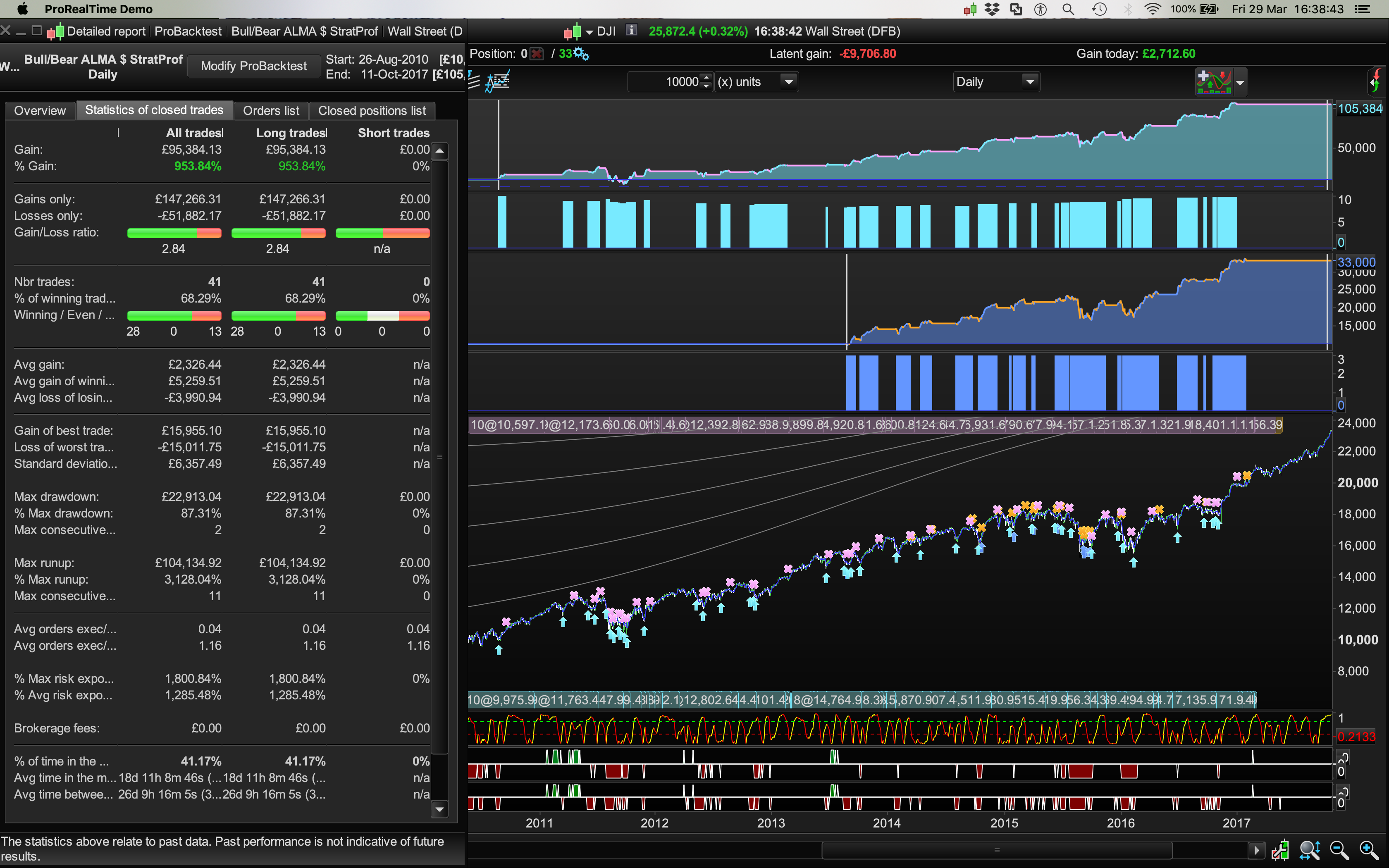
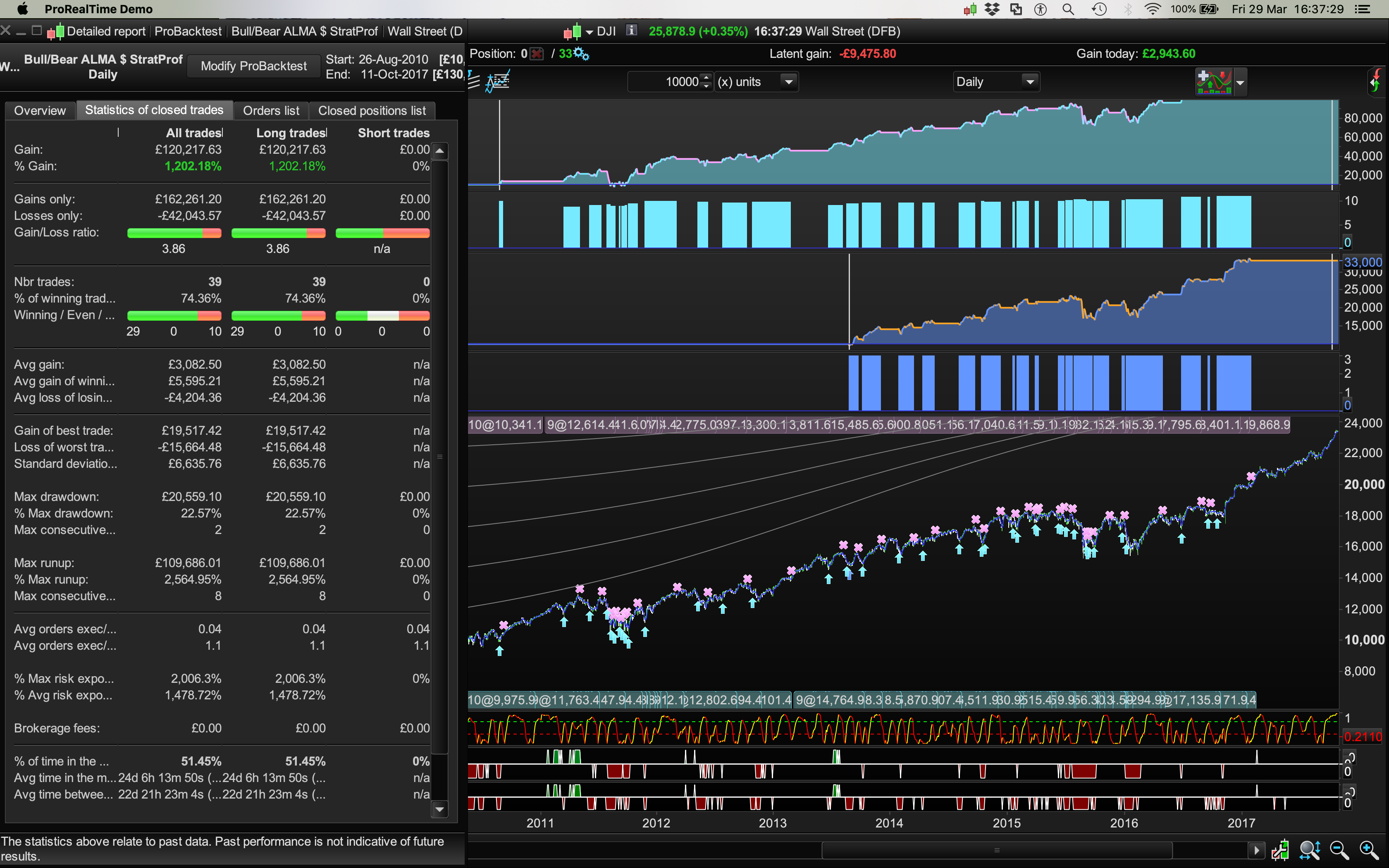
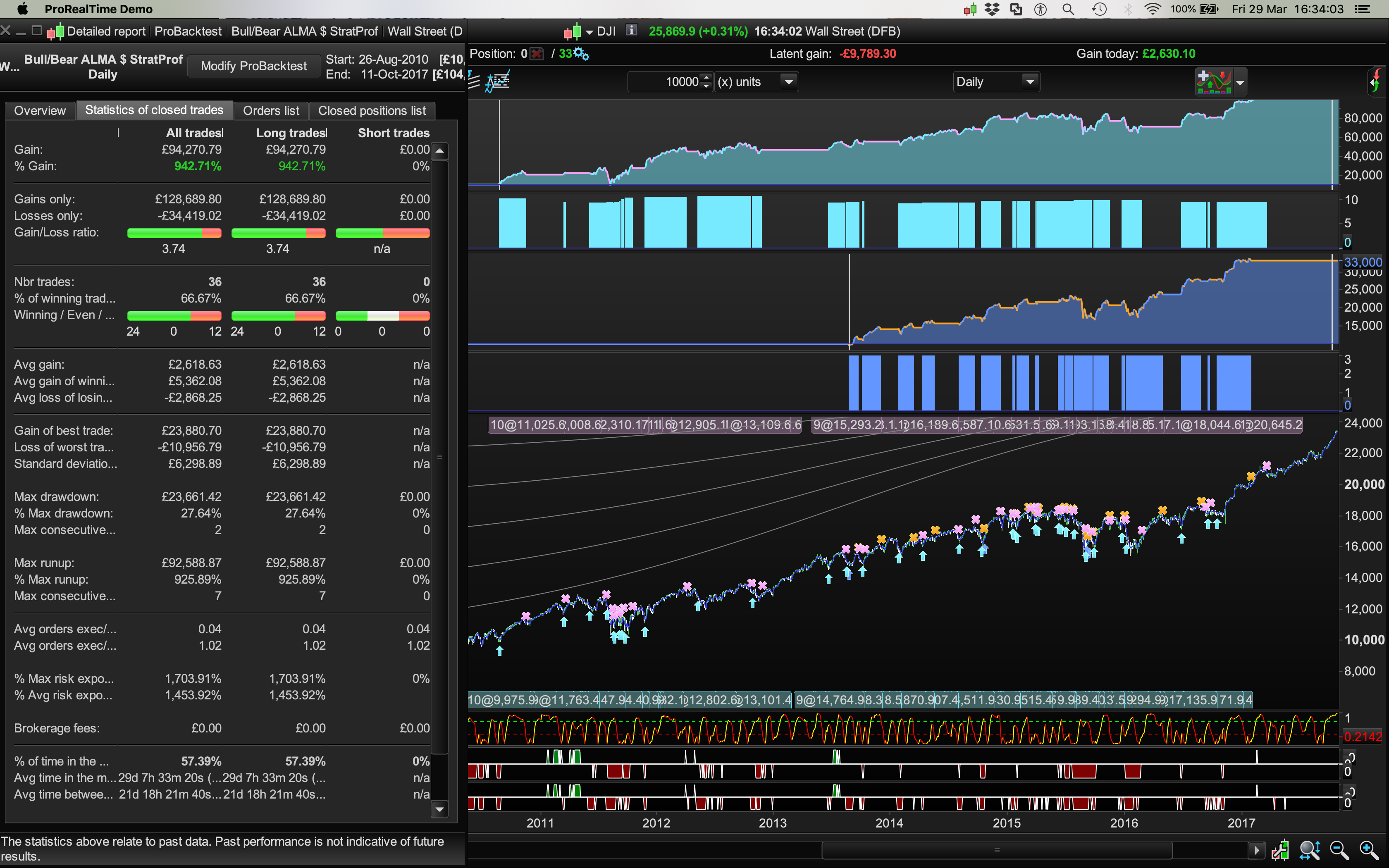
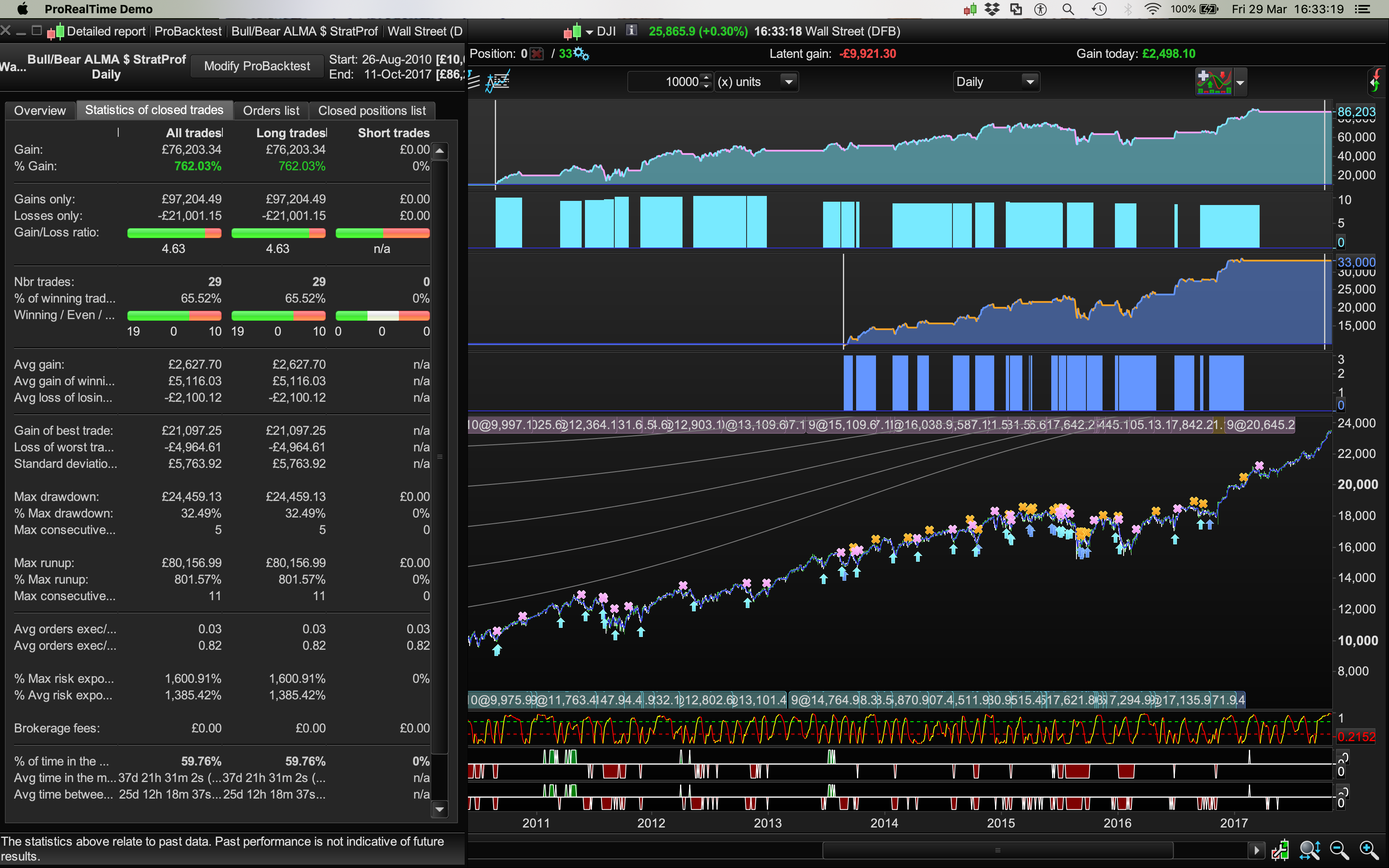
Using simple moving averages it looked like this: Screens with 20% rule = images 1 & 2 and without (and just using moving averages), screen #3:
“Interestingly” the indicator acts at times as a good contrarian signal of the end of Bull and Bear markets too:
// 20% Bull Market increase in Prices
ShortMA = Average[50]
MediumMA = Average[100]
LongMA = Average[200]
BullC1 = Close[0] > ShortMA
BullC2 = Close[0] > MediumMA
BullC3 = Close[0] > LongMA
BullC4 = Close[0] >= (Close[200] * 1.2)
// 20% Bear Market decrease in Prices
BearC5 = Close[0] < ShortMA
BearC6 = Close[0] < MediumMA
BearC7 = Close[0] < LongMA
BearC8 = Close[0] <= (Close[200] * 1.2)
Return BullC1 and BullC2 and BullC3 and BullC4 as "Bull Market", BearC5 and BearC6 and BearC7 and BearC8 as "Bear Market"
Does anyone know how to make it have a “zero line axis” so it’s green on the top half and red on the bottom half of the indicator panel?
Cheers
Add “,0” to line 20:
Return BullC1 and BullC2 and BullC3 and BullC4 as "Bull Market", BearC5 and BearC6 and BearC7 and BearC8 as "Bear Market",0
Though this is not enough, by itself, to plot above/below the zero line. Values above/below 0 must be returned, I think the same line 20 should be replaced by (not tested) so that it returns either 1 or -1:
Return BullC1 and BullC2 and BullC3 and BullC4 as "Bull Market", -(BearC5 and BearC6 and BearC7 and BearC8) as "Bear Market",0
Roberto
is no good probleme
Because your “ALMA Moving Average” indicator doesn’t have any external setting, such as the period. I’m sure the settings are embedded directly in the code and not as external variables. Thought you were now perfectly trained for that newbie error Bard! (just joking) 😆
Thanks for sorting that out, thing is I’m not sure how to program it to buy when the Bear conditions end?
For example after those (short period) red spikes have ended and the indicator has returned to neutral (zero), I would like the system to take a long trade at that point? (Pls see last screenshot). Because there are no “crossovers” I can’t make it do that. I’d also probably program the Buy rules to define a Bear spike as any Bear condition that lasts for less than 5 or maybe 10 days, (depending on backtests), it (the pull backs) appears – at least on observation – to be a great place to enter Long. Similar in concept to what Nicolas coded for me here: https://www.prorealcode.com/topic/how-would-you-create-a-mov-ave-distribution-histogram/#post-92863
Cheers
Tbh, I didn’t spend too much time looking “under the hood” of the ALMA! And I certainly didn’t see “Period” because: “Fenetre…” sigh… 😄
If I add “Fenetre” as a variable and strike it out in the original ALMA indicator code and my indicator “works,” well, it loaded okay even without adding //Fenetre in my code below (although I have just added it)… but is my code now referring to the new 50, 100, & 200 periods of this indicator code? I think it is.
// 20% Bull Market increase in Prices
DEFPARAM CalculateOnLastBars = 2000
//Fenetre
ShortPeriod = 50
MediumPeriod = 100
LongPeriod = 200
ShortMA = CALL "ALMA Moving Average"[ShortPeriod]
MediumMA = CALL "ALMA Moving Average"[MediumPeriod]
LongMA = CALL "ALMA Moving Average"[LongPeriod]
BullC1 = Close[0] > ShortMA
BullC2 = Close[0] > MediumMA
BullC3 = Close[0] > LongMA
BullC4 = Close[0] >= (Close[200] * 1.2)
// 20% Bear Market decrease in Prices
BearC5 = Close[0] < ShortMA
BearC6 = Close[0] < MediumMA
BearC7 = Close[0] < LongMA
BearC8 = Close[0] <= (Close[200] * 1.2)
Return BullC1 and BullC2 and BullC3 and BullC4 as "Bull Market", -(BearC5 and BearC6 and BearC7 and BearC8) as "Bear Market",0
Also it doesn’t like “CALL” as it keeps re-calculating on my 15000 unit chart, even though I added DEFPARAM CalculateOnLastBars = 2000?
Cheers
I always embed indicators in my code, to avoid CALLing them, whenever possible. You may try, despite you have to embed it three times or use a FOR…NEXT loop to calulate all of them (just in this case, since each MA is twice the previous one):
Period = 50 //start with 50 periods
Series = customclose
FOR j = 1 TO 3
Sigma = 6
Offset = 0.85
m = ROUND(Offset * (Period - 1))
s = Period / Sigma
WtdSum = 0
CumWt = 0
FOR k = 0 TO Period - 1 DO
Wtd = EXP(-((k - m) * (k - m)) / (2 * s * s))
WtdSum = WtdSum + Wtd * Series[Period - 1 - k]
CumWt = CumWt + Wtd
NEXT
IF CumWt <= 0 THEN
AFR = Series
ELSE
AFR = WtdSum / CumWt
ENDIF
IF j = 1 THEN
ShortMA = AFR
ELSIF j = 2 THEN
MediumMA = AFR
ELSE
LongMA = AFR
ENDIF
Period = Period * 2 //double periods
NEXT
Your full code would be (not tested):
//Bear 20% w. ALMA
// 20% Bull Market increase in Prices
DEFPARAM CalculateOnLastBars = 2000
//Fenetre
Period = 50 //start with 50 periods
Series = customclose
FOR j = 1 TO 3
Sigma = 6
Offset = 0.85
m = ROUND(Offset * (Period - 1))
s = Period / Sigma
WtdSum = 0
CumWt = 0
FOR k = 0 TO Period - 1 DO
Wtd = EXP(-((k - m) * (k - m)) / (2 * s * s))
WtdSum = WtdSum + Wtd * Series[Period - 1 - k]
CumWt = CumWt + Wtd
NEXT
IF CumWt <= 0 THEN
AFR = Series
ELSE
AFR = WtdSum / CumWt
ENDIF
IF j = 1 THEN
ShortMA = AFR
ELSIF j = 2 THEN
MediumMA = AFR
ELSE
LongMA = AFR
ENDIF
Period = Period * 2 //double periods
NEXT
BullC1 = Close[0] > ShortMA
BullC2 = Close[0] > MediumMA
BullC3 = Close[0] > LongMA
BullC4 = Close[0] >= (Close[200] * 1.2)
// 20% Bear Market decrease in Prices
BearC5 = Close[0] < ShortMA
BearC6 = Close[0] < MediumMA
BearC7 = Close[0] < LongMA
BearC8 = Close[0] <= (Close[200] * 1.2)
Return BullC1 and BullC2 and BullC3 and BullC4 as "Bull Market", -(BearC5 and BearC6 and BearC7 and BearC8) as "Bear Market",0
Ps// To stop the indicator from constantly reloading I also tried to speed up the code with:
MyALMA = CALL "ALMA Moving Average"
ShortPeriod = 50
MediumPeriod = 100
LongPeriod = 200
ShortMA = CALL "MyALMA"[ShortPeriod]
MediumMA = CALL "MyALMA"[MediumPeriod]
LongMA = CALL "MyALMA"[LongPeriod]
but it says the variable myalma is not used in the code? I borrowed an example from the PRT manual: myindic = CALL “My Function” from p24 of : https://www.prorealtime.com/nl/pdf/probacktest_c1504281788c.pdf
So I added the ALMA to the Bull/Bear indicator:
// 20% Bull/Bear Market increase/decrease in Prices
//DEFPARAM CalculateOnLastBars = 3000
// Parameters
// Fenetre = 9
Sigma = 6
Offset = 0.85
Price = Close
m = (Offset * (Fenetre - 1))
s = Fenetre/Sigma
WtdSum = 0
CumWt = 0
for k = 0 to Fenetre - 1 do
Wtd = Exp(-((k-m)*(k-m))/(2*s*s))
WtdSum = WtdSum + Wtd * Price[Fenetre - 1 - k]
CumWt = CumWt + Wtd
next
ALAverage = WtdSum / CumWt
ShortPeriod = 50
MediumPeriod = 100
LongPeriod = 200
ShortMA = ALAverage[ShortPeriod]
MediumMA = ALAverage[MediumPeriod]
LongMA = ALAverage[LongPeriod]
BullC1 = Close[0] > ShortMA
BullC2 = Close[0] > MediumMA
BullC3 = Close[0] > LongMA
BullC4 = Close[0] >= (Close[200] * 1.2)
// 20% Bear Market decrease in Prices
BearC5 = Close[0] < ShortMA
BearC6 = Close[0] < MediumMA
BearC7 = Close[0] < LongMA
BearC8 = Close[0] <= (Close[200] * 1.2)
Return BullC1 and BullC2 and BullC3 and BullC4 as "Bull Market", -(BearC5 and BearC6 and BearC7 and BearC8) as "Bear Market",0
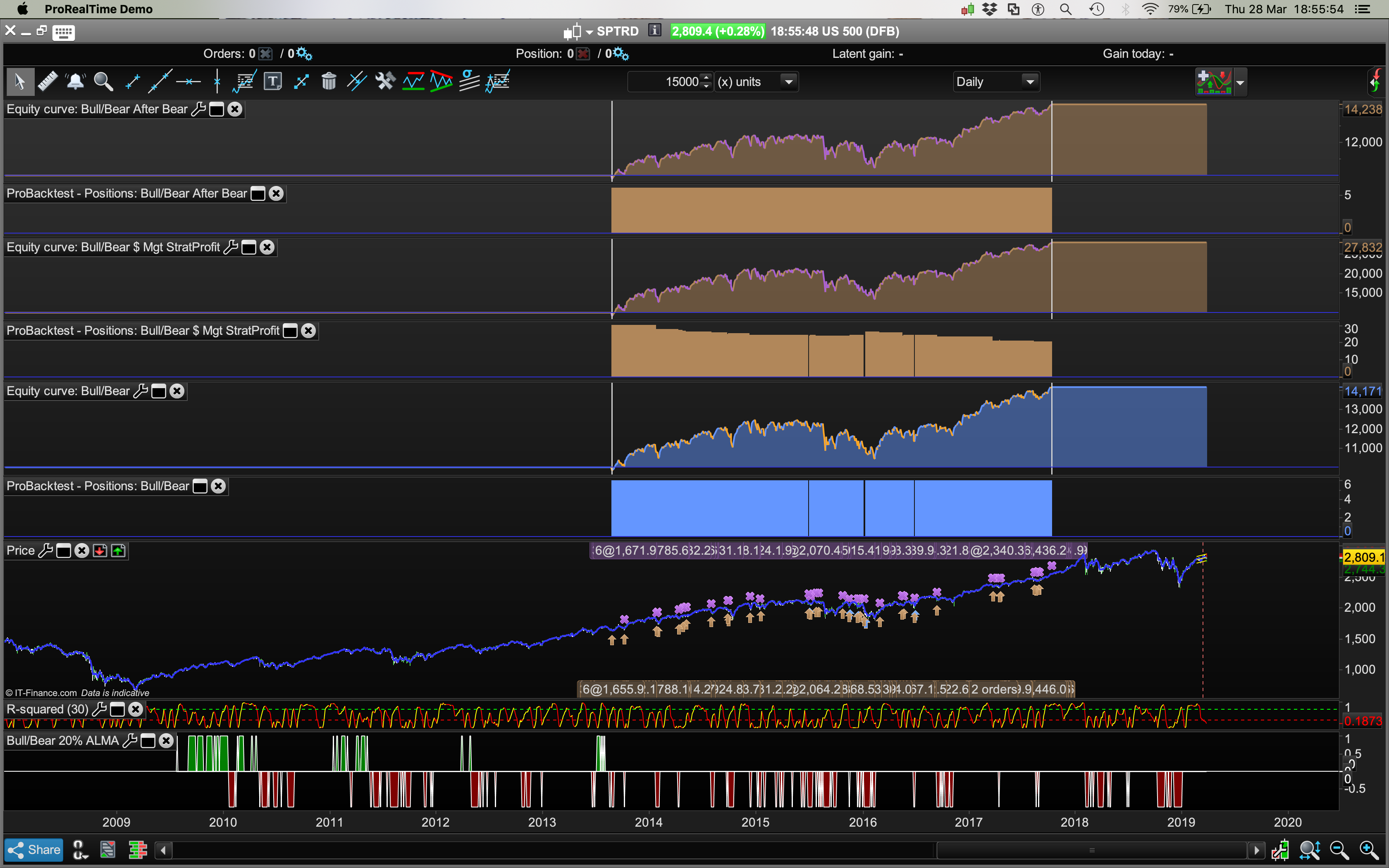
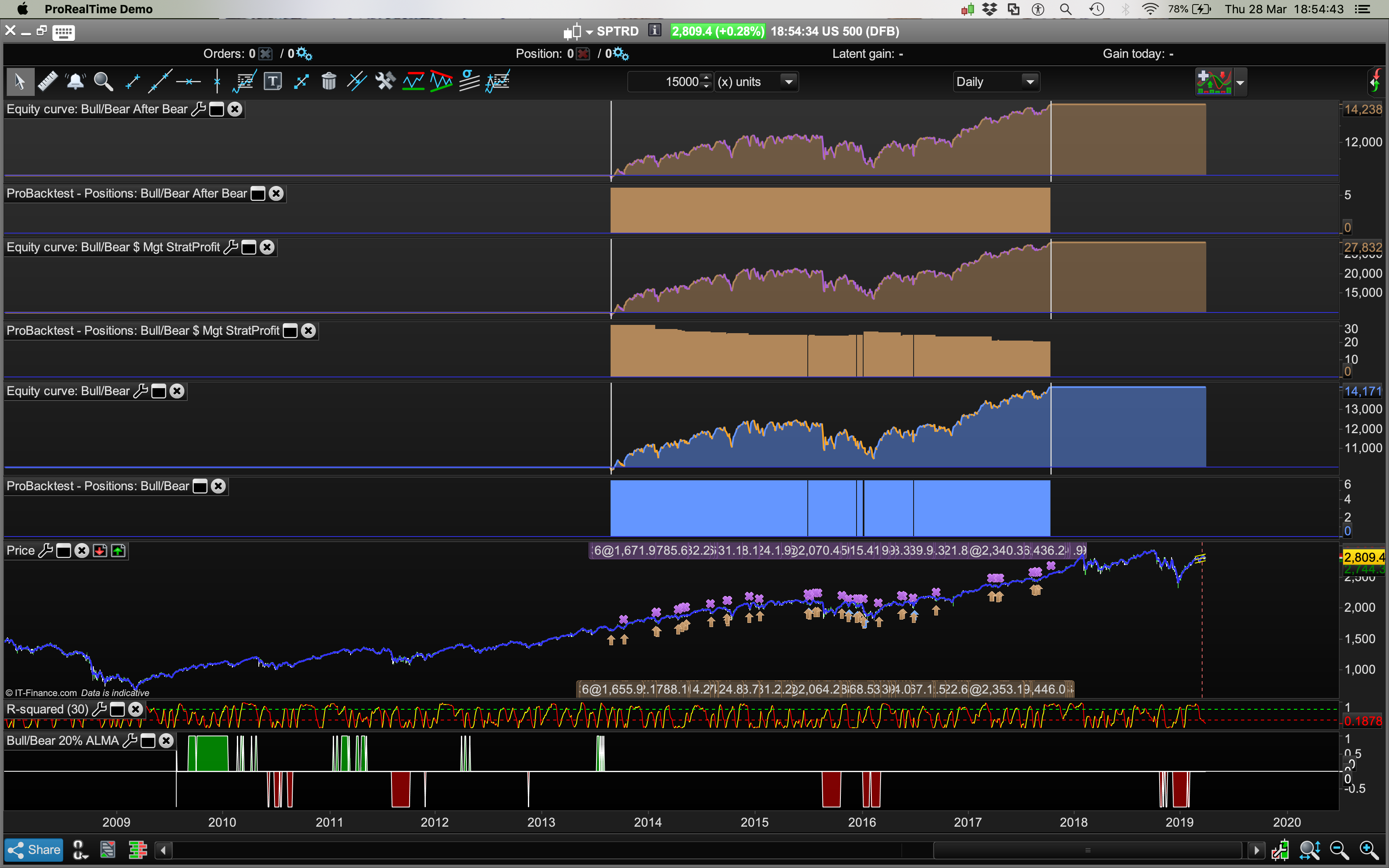
I’m not sure why there are more Bull and Bear Spikes when the ALMA was being CALLED compared to embedded? Adding the ALMA into the Bull/Bear indicator produces a different set of Bear Bull Spikes compared to the original code where ALMA is CALLED in the code (the one I posted directly above in post #94914)?
Pls see two screenshots below — one with the ALMA average not embedded and being CALLED and the other with the ALMA code imbedded directly IN the indicator to avoid the CALL issue. The issue for me is how to get it to work using 3 different moving averages and whether I’ve achieved that or not.
Cheers
Veteran “Newbie” 😀
In line 1 you assign a value to MyAlma, you cannot later CALL it, since it is not an indicator and ProBuilder reports (correctly) that you are not using that variable. You should remove line 1 and replace “MyAlma” with “ALMA Moving Average” throughout the code when CALLing it.
The way you embedded and use the code for the ALMA Average is wrong.
You need to embed it three times (once for each average) using different names for variables, or use a FOR..NEXT loop. There’s no workaround.
Lines 30-33 are absolutely wrong. Line 30 will assign ShortMA the value ALAaverage retained 50 periods ago! That has nothing to do to with computing the average of the last 50 periods!
Moreover, you are ALWAYS using FENETRE as the number of periods, instead of the three different periods you would like to use.
My code (https://www.prorealcode.com/topic/help-creating-bull-market-indicator-with-a-custom-indicator/#post-94934) will work the same as your code at https://www.prorealcode.com/topic/help-creating-bull-market-indicator-with-a-custom-indicator/#post-94914.
Thanks very much @RobertoGozzi and @Nicolas, works very well. Better than Standard Deviation variances and Moving Average Distributions entries.
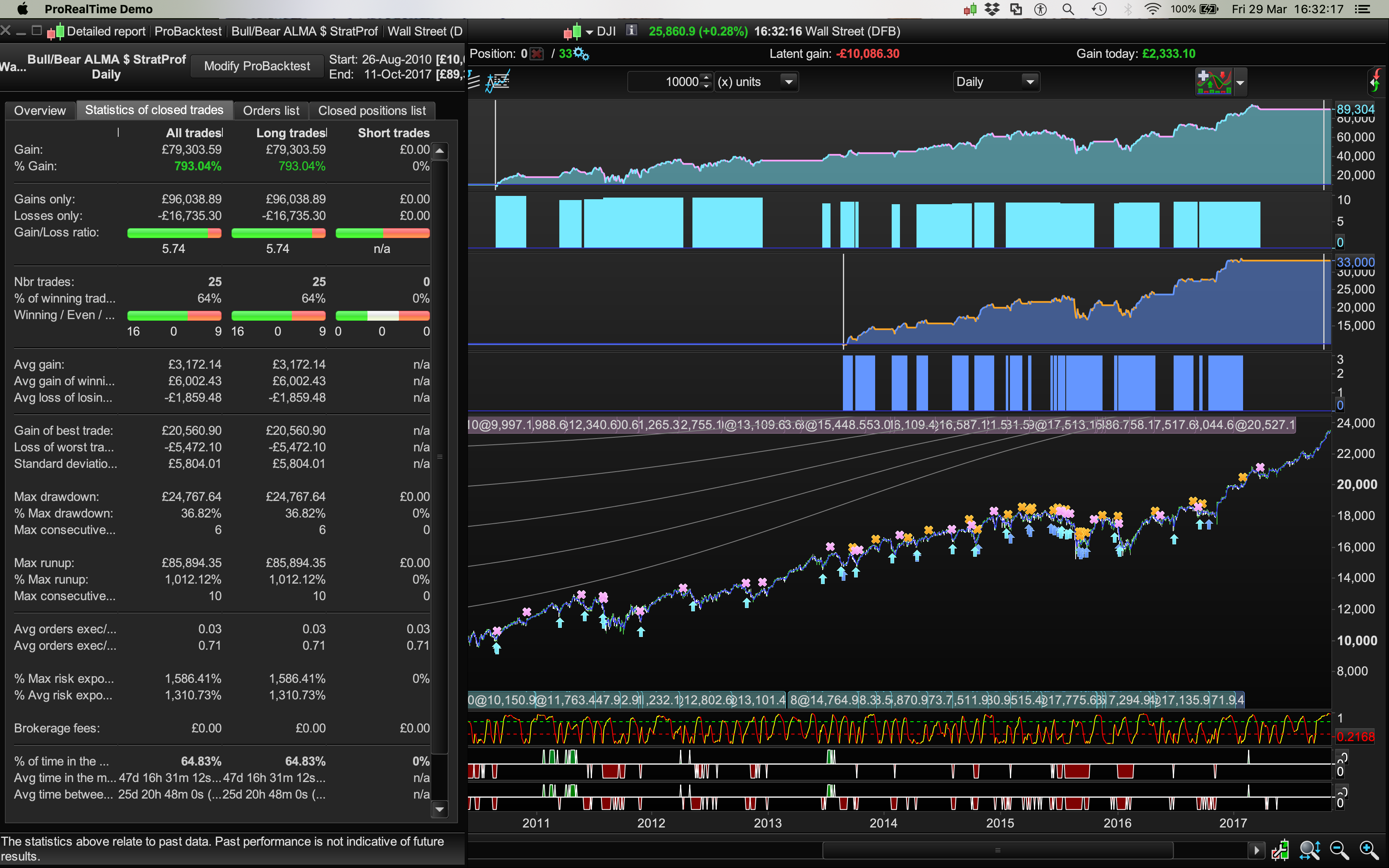
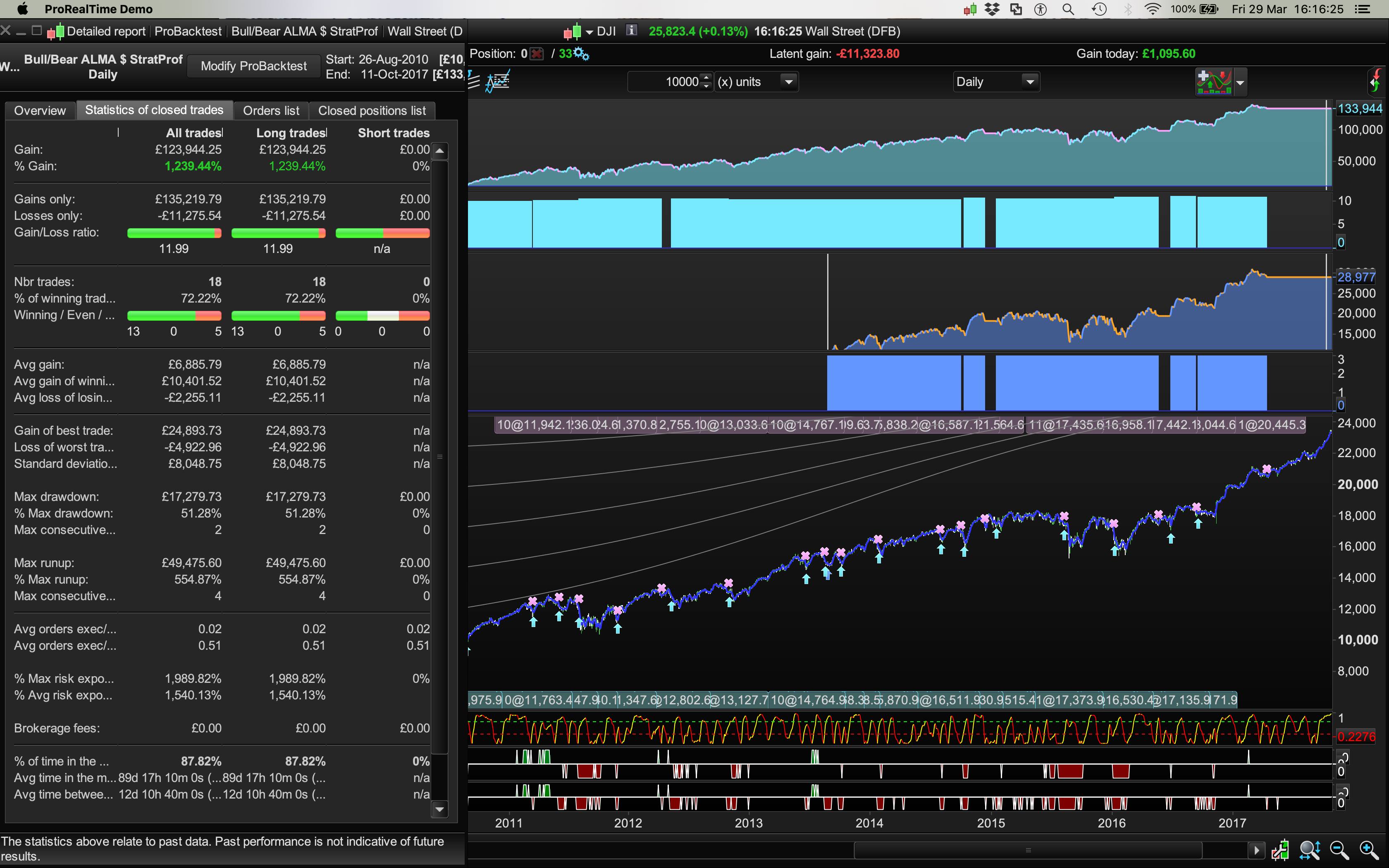
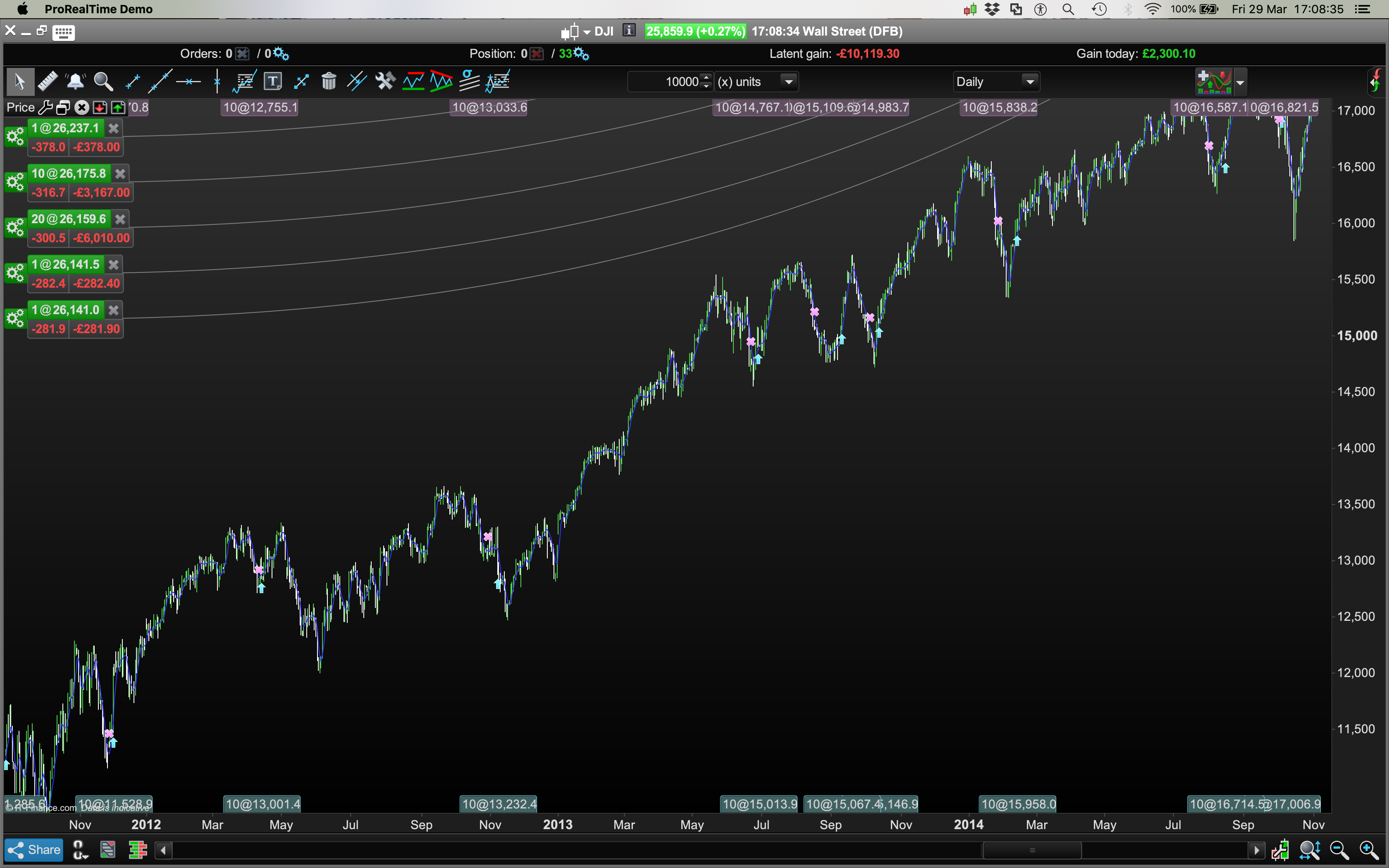
It acts as a good contrarian indicator if you use those short term (couple of days) Bear Spikes as long entries: Dow Jones
Pls see images (this indicator is the bottom of the two Bull/Bear indicators being used, the top one is just a regular 50, 100, 200 SMA).
Dow Jones Daily/3.8 Spread/Random Dates: 26th Aug 2010 – 12 Oct 2017.
Dev Stop 6.0 worked “best.” Everyones risk/drowdown profile is different.
// Definition of code parameters
DEFPARAM CumulateOrders = False // Cumulating positions deactivated
capital = 100000 + strategyprofit //Current profit made by the closed trades of the running strategy.
n = capital / close
// Conditions to enter long positions
ignored, indicator1, ignored = CALL "Bull/Bear 20% ALMA"(close)
c1 = (indicator1 = -1)
ignored, indicator2, ignored = CALL "Bull/Bear 20% ALMA"(close)
c2 = (indicator2[1] = -1)
ignored, indicator3, ignored = CALL "Bull/Bear 20% ALMA"(close)
c3 = (indicator3[2] = -1)
IF c1 AND c2 AND c3 THEN
BUY n PERPOINT AT MARKET
ENDIF
// Conditions to exit long positions
ignored, ignored, ignored, ignored, ignored, DEV = CALL "Kase Dev Stop Lisse+SAR+4.5/6"
c4 = (close CROSSES UNDER DEV)
IF c4 THEN
SELL AT MARKET
ENDIF
//Voici le code en version SAR : plus WITH DEV STOP 4.5 + 6.0
//Settings
n=30
p1=1.0
p2=2.2
p3=3.6
p4=4.5
p5=6.0
difference=0
Hg=highest[2](high)
Lw=lowest[2](low)
DTR=max(max(Hg-Lw,abs(Hg-close[2])),abs(Lw-close[2]))
aDTR=average[n](DTR)
for i=0 to n-1 do
difference=difference+square(DTR[i]-aDTR)
next
difference=difference/n
sdev=sqrt(difference)
dev0=close-aDTR
dev1=close-aDTR-p1*sdev
dev2=close-aDTR-p2*sdev
dev3=close-aDTR-p3*sdev
dev4=close-aDTR-p4*sdev
dev5=close-aDTR-p5*sdev
if dev0<dev0[1] and close>dev5[1] then
dev0=dev0[1]
endif
if dev1<dev1[1] and close>dev5[1] then
dev1=dev1[1]
endif
if dev2<dev2[1] and close>dev5[1] then
dev2=dev2[1]
endif
if dev3<dev3[1] and close>dev5[1] then
dev3=dev3[1]
endif
if dev4<dev4[1] and close>dev5[1] then
dev4=dev4[1]
endif
if dev5<dev5[1] and close>dev5[1] then
dev5=dev5[1]
endif
dev6=close+aDTR
dev7=close+aDTR+p1*sdev
dev8=close+aDTR+p2*sdev
dev9=close+aDTR+p3*sdev
dev10=close+aDTR+p4*sdev
dev11=close+aDTR+p5*sdev
if dev6>dev6[1] and close<dev11[1] then
dev6=dev6[1]
endif
if dev7>dev7[1] and close<dev11[1] then
dev7=dev7[1]
endif
if dev8>dev8[1] and close<dev11[1] then
dev8=dev8[1]
endif
if dev9>dev9[1] and close<dev11[1] then
dev9=dev9[1]
endif
if dev10>dev10[1] and close<dev11[1] then
dev10=dev10[1]
endif
if dev11>dev11[1] and close<dev11[1] then
dev11=dev11[1]
endif
if close>dev11[1] then
flag=-1
else
if close<dev5[1] then
flag=1
endif
endif
if flag=-1 then
ind0=dev0
ind1=dev1
ind2=dev2
ind3=dev3
ind4=dev4
ind5=dev5
//k=1 Blue
r=0
g=191
b=255
else
ind0=dev6
ind1=dev7
ind2=dev8
ind3=dev9
ind4=dev10
ind5=dev11
//k=-1 Orange
r=255
g=128
b=0
endif
//ORIG return ind0 COLOURED BY k,ind1 coloured by k,ind2 coloured by k,ind3 coloured by k//
//ORANGE AND LIGHT BLUE
return ind0 coloured(r,g,b) style(dottedline,2) as "Warning Line", ind1 coloured(r,g,b) style(dottedline,2) as "Dev Stop 1.0", ind2 coloured(r,g,b) style(dottedline,2) as "Dev Stop 2.2", ind3 coloured(r,g,b) style(line,2) as "Dev Stop 3.6", ind4 coloured(r,g,b) style(dottedline,2) as "Dev Stop 4.5", ind5 coloured(r,g,b) style(line,2) as "Dev Stop 6.0"
//NO CHANGE OF COLOUR FOR TREND CHANGE return ind0 coloured(2, 118, 253) style(dottedline,2) as "Warning Line" ,ind1 coloured(2, 118, 253) style(dottedline,2) as "Dev Stop 1.0", ind2 coloured(2, 118, 253) style(dottedline,2) as "Dev Stop 2.2", ind3 coloured(2, 118, 253) style(line,2) as "Dev Stop 3.6", ind4 coloured(2, 118, 253) style(dottedline,2) as "Dev Stop 4.5", ind5 coloured(2, 118, 253) style(line,2) as "Dev Stop 6.0"
//Bear 20% w. ALMA
// 20% Bull Market increase in Prices
//DEFPARAM CalculateOnLastBars = 5000
Period = 50 //start with 50 periods
Series = customclose
FOR j = 1 TO 3
Sigma = 6
Offset = 0.85
m = ROUND(Offset * (Period - 1))
s = Period / Sigma
WtdSum = 0
CumWt = 0
FOR k = 0 TO Period - 1 DO
Wtd = EXP(-((k - m) * (k - m)) / (2 * s * s))
WtdSum = WtdSum + Wtd * Series[Period - 1 - k]
CumWt = CumWt + Wtd
NEXT
IF CumWt <= 0 THEN
AFR = Series
ELSE
AFR = WtdSum / CumWt
ENDIF
IF j = 1 THEN
ShortMA = AFR
ELSIF j = 2 THEN
MediumMA = AFR
ELSE
LongMA = AFR
ENDIF
Period = Period * 2 //double periods
NEXT
BullC1 = Close[0] > ShortMA
BullC2 = Close[0] > MediumMA
BullC3 = Close[0] > LongMA
BullC4 = Close[0] >= (Close[200] * 1.2)
// 20% Bear Market decrease in Prices
BearC5 = Close[0] < ShortMA
BearC6 = Close[0] < MediumMA
BearC7 = Close[0] < LongMA
BearC8 = Close[0] <= (Close[200] * 1.2)
Return BullC1 and BullC2 and BullC3 and BullC4 as "Bull Market", -(BearC5 and BearC6 and BearC7 and BearC8) as "Bear Market",0
I was actually trying to enter Long AFTER a 3 day Bear Spike Pullback ENDS. The code above is a random accident in an attempt to code it as just described.
Instinctively that’s where I feel the drawdowns can be reduced more through better entry timing. Hooking onto the price after it has plummeted and is already safe and returning back north not heading for possibly more falls as per the system as it currently stands.
So now look at the Drawdown with a wild Dev Stop 6.0 and how it maintains the profits when using this entry:
// Conditions to enter long positions
ignored, indicator1, ignored = CALL "Bull/Bear 20% ALMA"(close)
c1 = (indicator1 = 0) // Bear = -1
ignored, indicator2, ignored = CALL "Bull/Bear 20% ALMA"(close)
c2 = (indicator2[1] = -1)
ignored, indicator3, ignored = CALL "Bull/Bear 20% ALMA"(close)
c3 = (indicator3[2] = -1)
Cheers
Bard

Logged out and back in and there’s definitely a few images didn’t post, 2nd attempt..
Caveat: Wide Dev Stops like 6.0 are always late in catching quick adverse market turns. There is no one size fits all algo system. Different dates work better than others (even with the “genius” of John Ehler’s indcators), different setting work better than others. This example above is just illustrative of the search for better entries.. and it’s original intent: To define a Bull or Bear market for the purposes of Bulkowski’s Candlestick patterns.
Help Creating Bull Market Indicator with a Custom Indicator
This topic contains 12 replies,
has 4 voices, and was last updated by Bard
6 years, 10 months ago.
| Forum: | ProBuilder: Indicators & Custom Tools |
| Language: | English |
| Started: | 03/27/2019 |
| Status: | Active |
| Attachments: | 15 files |
The information collected on this form is stored in a computer file by ProRealCode to create and access your ProRealCode profile. This data is kept in a secure database for the duration of the member's membership. They will be kept as long as you use our services and will be automatically deleted after 3 years of inactivity. Your personal data is used to create your private profile on ProRealCode. This data is maintained by SAS ProRealCode, 407 rue Freycinet, 59151 Arleux, France. If you subscribe to our newsletters, your email address is provided to our service provider "MailChimp" located in the United States, with whom we have signed a confidentiality agreement. This company is also compliant with the EU/Swiss Privacy Shield, and the GDPR. For any request for correction or deletion concerning your data, you can directly contact the ProRealCode team by email at privacy@prorealcode.com If you would like to lodge a complaint regarding the use of your personal data, you can contact your data protection supervisory authority.