Help converting indicator VolumeStop to screener

Viewing 5 posts - 1 through 5 (of 5 total)

  • Author
    Posts
  • #64874 quote
    Bos.
    Participant
    Veteran

    Hi folks,

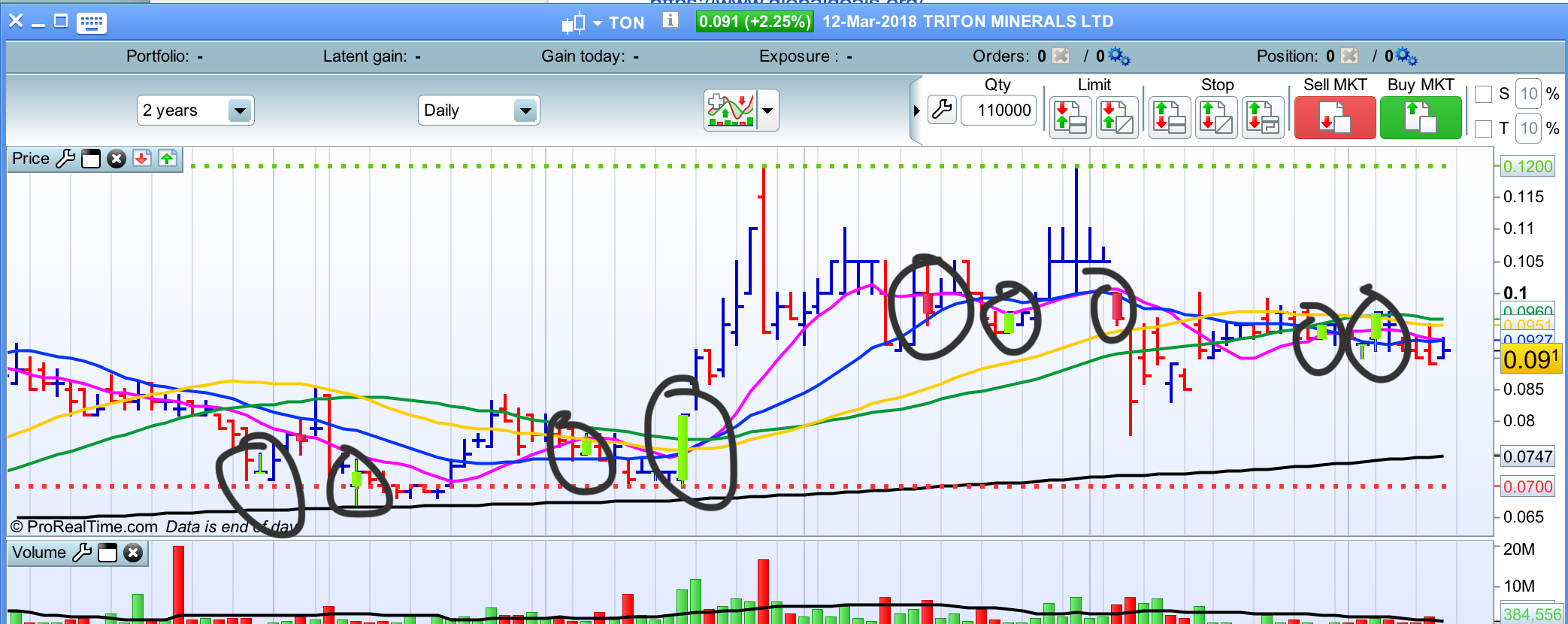
    I’ve found the indicator on this forum called ‘Volume Stops’ quite a useful tool and am hoping someone might be able to assist in turning it into a screener if possible.

    Although the indicator is from this forum, i’ve attached it here.

    volume-stops.itf
    #64880 quote
    Nicolas
    Keymaster
    Master

    >> Please update your country flag in your profile. Thank you 🙂 <<

    What are the conditions to be found by the screener please? Add screenshots if you found it necessary for a better explanation.
    #65162 quote
    Bos.
    Participant
    Veteran
    Hi there Nicolas, Thanks for the reply. The Volume Stops indi is based on the increase or decrease of volume in relation to the opening and closing of the last 3 bars or candles. Green candles are bullish signs and red candles are bearish signs. (screenshot attached for reference) I’m hoping to turn this into a bull screener and an additional bear screener whereby instruments/sectors are screened as to whether the indicator’s conditions are met at the close of the current candle. I hope this helps clarify.   Thanks, Aus.
    Screen-Shot-2018-03-13-at-12.55.39-pm.png Screen-Shot-2018-03-13-at-12.55.39-pm.png
    #65174 quote
    Nicolas
    Keymaster
    Master
    Here is the code of the stock screener. It will sort the results with a 1 or -1 score. 1 = long conditions detected, -1 = short conditions detected. All in one screener only.
    redbar=open>=close
    greenbar=open<=close
    long1=volume[2]<volume[1] and volume[1]<volume[0] and redbar[2] and redbar[1] and greenbar[0]
    short1=volume[2]<volume[1] and volume[1]<volume[0] and greenbar[2] and greenbar[1] and redbar[0]
    long2=volume[2]>volume[1] and volume[1]>volume[0] and redbar[2] and redbar[1] and greenbar[0]
    short2=volume[2]>volume[2] and volume[1]>volume[0] and greenbar[2] and greenbar[1] and redbar[0]
    
    long = long1 or long2
    short = short1 or short2
    
    if long then
    direction=1
    else
    direction=-1
    endif
    
    screener[long or short] (direction)
    #65269 quote
    Bos.
    Participant
    Veteran
    Fantastic, thanks Nicolas 🙂
Viewing 5 posts - 1 through 5 (of 5 total)
  • You must be logged in to reply to this topic.

Help converting indicator VolumeStop to screener


ProScreener: Market Scanners & Detection

New Reply
Author
Summary

This topic contains 4 replies,
has 2 voices, and was last updated by Bos.
8 years ago.

Topic Details
Forum: ProScreener: Market Scanners & Detection
Language: English
Started: 03/09/2018
Status: Active
Attachments: 2 files
Logo Logo
Loading...