Hi all,
Need some help here!
It would be nice if the Heikin-Ashi-Long-Setup-Correction ( https://www.prorealcode.com/prorealtime-market-screeners/heikin-ashi-long-setup-correction/) by Odin could also scan potentials for short opportunities in a bear market.
Recently I tried to get this to code but………. without result, the screener does not work at all (The ‘long’ part in the screener is also not working, while seperately it does). I included the code below.
Could someone please check for me for the errors in the added code and why the long part is not working anymore?
Thank you for helping me out ……………….
Best regards,
Marcel van Vliet
// Heikin Ashi Long or Short after correction
// Original by Odin
// Short parameters by Marcel van Vliet
// 08/08/2020

MinPrice=10 // The minimum price of each security.
MaxPrice=1000 // The maximum price of each security.
DailyVolume = volume>1000000

//Long
c1 = Average[8](close) > Average[21](close)
c2 = Average[21](close)> Average[50](close)

n = 0

if barindex = 0 then
haOpen = open
haClose = close

elsif N = 0 then
haClose =(Open+High+Low+Close)/4
haOpen =(haOpen[1]+haClose[1])/2

elsif (barindex MOD N) = 0 then
haClose =(Open[N]+Highest[N](high)+Lowest[N](low)+Close)/4
haOpen =(haOpen[1]+haClose[1])/2
endif

c3 = haclose > haopen
c4 = haclose[1] < haopen[1]
c5 = haclose[2] < haopen[2]
c6 = haclose[3] < haopen[3]

ResultLong= c1 and c2 and c3 and c4 and c5 and c6

//Short
c7 = Average[8](close) < Average[21](close)
c8 = Average[21](close)< Average[50](close)

n = 0

if barindex = 0 then
haOpen = open
haClose = close

elsif N = 0 then
haClose =(Open+High+Low+Close)/4
haOpen =(haOpen[1]+haClose[1])/2

elsif (barindex MOD N) = 0 then
haClose =(Open[N]+Highest[N](high)-Lowest[N](low)+Close)/4
haOpen =(haOpen[1]+haClose[1])/2
endif

c9 = haclose < haopen
c10 = haclose[1] > haopen[1]
c11 = haclose[2] > haopen[2]
c12 = haclose[3] > haopen[3]

ResultShort= c7 and c8 and c9 and c10 and c11 and c12

SCREENER[ResultLong and ResultShort and DailyVolume and haopen>MinPrice and haclose<MaxPrice](volume*close as "traded volume")
Firstly you should not dulicate variables and instructions that are common to both directions, so you should remove lines 40-53.
Secondly, you can’t use AND (last line) with the first two conditions, as they cannot be met simultaneously, use OR instead:
SCREENER[(ResultLong OR ResultShort) and DailyVolume and haopen>MinPrice and haclose<MaxPrice](volume*close as "traded volume")
Moreover, your filters in lines 6-8 seem quite strict; setting them to 1, 1000 and 10000 returned over 20 results (with ALL list selected).
Thank you #robertogozzi,
So far so good, a little stupid of me to overlook the ‘or’ mistake.
I have removed the lines you suggested, but the screener does still not work as wanted. How to change the rules 40-53 into a short code, if I copy/paste them back?
Do I have to adjust the second ‘elsif’ part or the whole line 40-53 section?
The lines 6-8 are part of the strategy were I use the screener for, so more results is not what I am looking for.
The haopen and low should be equal for the long ‘trigger’ candles and the haopen and high should be equal for the short ‘trigger’ candles. How to write the code for this?
I hope you will help me further with this screener.
I will add it to the library as soon it works wel and it is tested.
Best regards,
Marcel van Vliet
Lines 40-53 do not affect the direction, in any case you should use different names other then those in lines 14-27.
It may depend on the last line. I think it should be:
SCREENER[(ResultLong or ResultShort) and DailyVolume and haclose>MinPrice and haclose<MaxPrice](volume*close as "traded volume")
as the price is usually identified by the CLOSING price.
I can’t figure out what line 51 is all about. When N=0 it’s not used, otherwise it is executed only every N candles, which is what I don’t understand. In any case line 51 should be the same for both Long and Short trades.
The author might be of help.
Hi…
It appears, the 2nd ‘ELSE’ statement is only executed when, manually set, ‘N’ > 0, and it’s corresponding condition is true. It calculates ‘haClose’ and ‘haOpen’ from, and over an ‘N’ number of bars. It’s updates, are delayed till the true condition. This looks similar to a candle on a higher timeframe which updates on it’s close and not the default timeframes close. Also because of the ‘closed’ candles, the thresholds, hold position for ‘N’ periods.
That’s my understanding, however it doesn’t answer why!
This appears to work with all of Roberto’s comments incorporated. Reducing the ‘DailyVolume’ and what chosen ‘period’ give more results.
// Heikin Ashi Long or Short after correction
// Original by Odin
// Short parameters by Marcel van Vliet
// 08/08/2020

//----------------------------------------------------- price and volume thresholds
MinPrice=10 // The minimum price of each security.
MaxPrice=1000 // The maximum price of each security.
DailyVolume = volume>1000000

//----------------------------------------------------- set up haOpen and haClose
N = 0 // set a calculation range, 'n' over a number of candles.

if barindex = 0 then
haOpen = open
haClose = close

elsif N = 0 then
haClose =(Open+High+Low+Close)/4
haOpen =(haOpen[1]+haClose[1])/2

elsif (barindex MOD N) = 0 then
haClose =(Open[N]+Highest[N](high)+Lowest[N](low)+Close)/4
haOpen =(haOpen[1]+haClose[1])/2
endif

//----------------------------------------------------- long conditions/result
//Long
c1 = Average[8](close) > Average[21](close)
c2 = Average[21](close)> Average[50](close)

c3 = haclose > haopen
c4 = haclose[1] < haopen[1]
c5 = haclose[2] < haopen[2]
c6 = haclose[3] < haopen[3]

ResultLong= c1 and c2 and c3 and c4 and c5 and c6

//----------------------------------------------------- short conditions/result
//Short
c7 = Average[8](close) < Average[21](close)
c8 = Average[21](close)< Average[50](close)

c9 = haclose < haopen
c10 = haclose[1] > haopen[1]
c11 = haclose[2] > haopen[2]
c12 = haclose[3] > haopen[3]

ResultShort= c7 and c8 and c9 and c10 and c11 and c12

//----------------------------------------------------- output variable list

p0 = volume*close

p1 = DailyVolume
p2 = haopen>MinPrice
p3 = haclose<MaxPrice

p20 = ResultLong
p21 = ResultShort

SCREENER[ (p20 or p21)  and p1 and p2 and p3 ]( p0 as "Traded Volume")
Dear #robertogozzi and #druby,
Thanks a lot for your efforts. As simple as it seemed in the first place to add a short section to a long only screener it still does not work.
I guess I strip the whole screener down and rebuild it up from scratch with code lines even I understand. 🙂
I will share my attempt here and I hope you will give it a view with a critical eye.
Best Regards,
Marcel van Vliet
hi marcel…
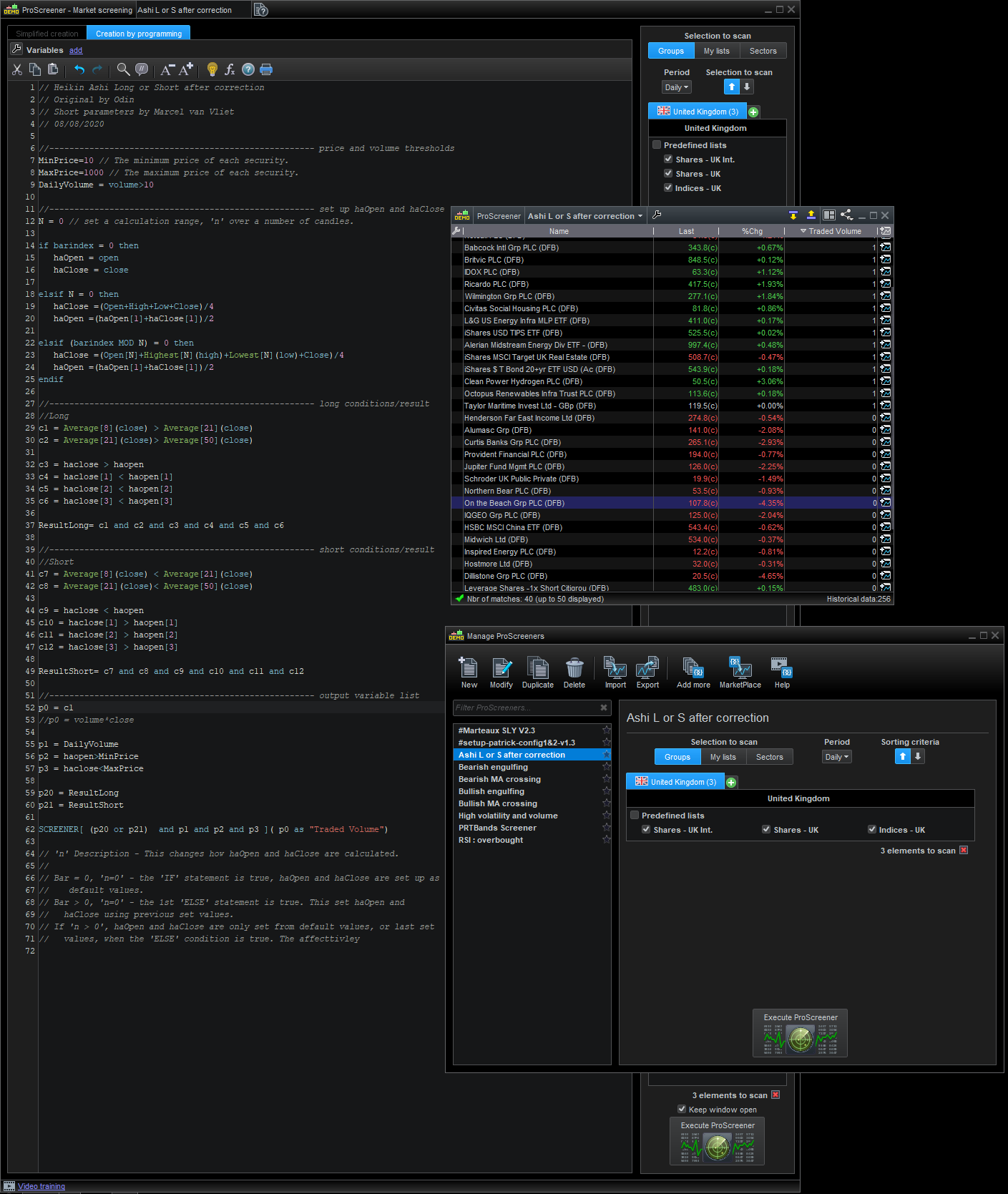
When you say it doesn’t work, what do you mean. When I tried the corrected code, initial I had to set ‘DailyVolume = volume>10′ in code, and it still didn’t give results till I set the period to ‘Daily’ and made sure there were entries in the list I was running the screener on.
In the image I’ve added line 52 and commented out line 53, this displays whether the results found are from the long ‘1’or short ‘0’ result logic.
If its giving you results that you deem wrong, then that another problem all together.
If its the former, then I would assume that the problem lies somewhere else.
As a rule of thumb, I’ve found with coding with the ‘Probuilder’ and ‘PRT’ is:
If you have a problem, don’t assume it’s only one, there could be several, but at the time you don’t know that. And when you find a solution, don’t assume it solves all of the those problems.
Programming or back engineering you own is the best way. You’ll have a better understanding on the code and what its doing. That makes it easier to identify when wrong results are presented. We’ll, at least gives you a better chance.
All the best.
My correct example in post https://www.prorealcode.com/topic/heikin-ashi-long-short-after-correction/#post-198786 was changed to:
SCREENER[(ResultLong or ResultShort) and DailyVolume and haclose>MinPrice and haclose<MaxPrice](volume*close as "traded volume")