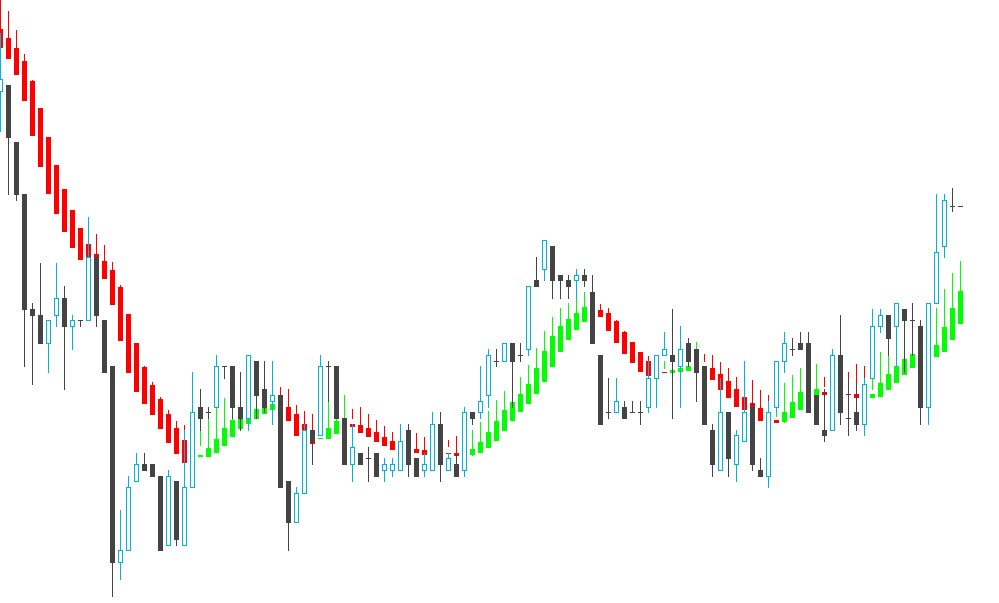
Hi there. Thank you for the code that was posted on this website on 25 Apr 2017 to plot the Heiken Ashi Smoothed indicator. I however noticed that down candles don’t display wicks at the bottom of the candle bodies, for all time frames, for all the stocks that I trade. Is this normal? Please see attached. Thank you, Attie
Hi there,
I neglected to add the programming code to the output example so here it is. Any help will be very welcome. Thank you, Attie
You can find another version of the Heikin Ashi Smoothed candlesticks in this Italian topic: https://www.prorealcode.com/topic/heikin-ashi-smoothed-candle/
and there are also many other topics that deal with this kind of price representation in the forums, you’ll find them easily by using the website search engine (sometimes people wrote “heiken” instead of “heikin”).
Hi Nicolas, thank you for your response.
I could not find any references on the site to double-smoothed Heiken indicators. The double smoothed indicator which you created for PRT is an amazing indicator as it really reduces a lot of noise. I have asked the programming team to investigate and give me a quote to see why the downtrend doesn’t form any wicks to the bottom. If I get a solution, I will share it with the forum. Thanks
This indicator is translated from another platform code. I just checked and the lows are also not drawn in the original one.
Thanks Nicolas. I will have another look in the code to see if I can spot the problem…limited skills at the moment 🙂
Thanks for taking time to assist
>> Please use the “insert code PRT” button to add code in a PRT formatted and line-numbered style rather than .doc attachment, thank you! <<
The “if (haOpen<haClose)” statement assigning colors to smoothed HA candles seem also to switch highs and lows in extmapbuffer7 and extmapbuffer8, don’t see why they should be switched… switching high and low for red candle compared with blue/green candle give trouble drawing the red candles…
Both ExtMapBuffer7 lines should be = HALow , and both ExtMapBuffer8 lines should be = HAHigh (…and so could be taken out of the if-endif statement and be written just once rather than twice)
Had to try it, drawing correctly highs and lows has knock on effect of messing with long and short signal at the very end. Don’t know what the original code was before translation or if there was any explanation going with it, but it seems either there’s further debugging to do in long/short signals, or the swap of HAhigh and HAlow was intentional by the author at the expense of candle drawing accuracy, and shouldn’t be fixed in the first place in order to generate the long/short signals via these intermediate extmapbuffer7 and 8 variables
Hi Noobywan, I amended the code in line with your suggestion and it works perfectly for my purpose. Thank you very much for coming to my rescue. Attached is the revised code.
Happy trading
Attie
//PRC_HPT Heikin Ashi Smoothed | indicator
//25.04.2017
//Nicolas @ www.prorealcode.com
//Sharing ProRealTime knowledge
//translated from MT4 indicator code

//---settings
MaPeriod=6
MaPeriod2=2
//---end of settings

once maOpen=Open
once maClose=Close
once maLow=Low
once maHigh=High

if barindex>0 then
maOpen=(maOpen[1]*(MAperiod-1)+Open)/MAPeriod
maClose=(maClose[1]*(MAperiod-1)+Close)/MAPeriod
maLow=(maLow[1]*(MAperiod-1)+Low)/MAPeriod
maHigh=(maHigh[1]*(MAperiod-1)+High)/MAPeriod

haOpen=(ExtMapBuffer5[1]+ExtMapBuffer6[1])/2
haClose=(maOpen+maHigh+maLow+maClose)/4
haHigh=Max(maHigh, Max(haOpen, haClose))
haLow=Min(maLow, Min(haOpen, haClose))
if (haOpen<haClose) then
r=0
g=191
b=255
ExtMapBuffer7=haLow
ExtMapBuffer8=haHigh
else
r=255
g=10
b=0
ExtMapBuffer7=haLow
ExtMapBuffer8=haHigh
endif
ExtMapBuffer5=haOpen
ExtMapBuffer6=haClose

ExtMapBuffer1=weightedaverage[MAperiod2](ExtMapBuffer7)
ExtMapBuffer2=weightedaverage[MAperiod2](ExtMapBuffer8)
ExtMapBuffer3=weightedaverage[MAperiod2](ExtMapBuffer5)
ExtMapBuffer4=weightedaverage[MAperiod2](ExtMapBuffer6)
endif
DRAWCANDLE(ExtMapBuffer3,ExtMapBuffer2,ExtMapBuffer1,ExtMapBuffer4) coloured(r,g,b)

short = ExtMapBuffer7[1]>ExtMapBuffer8[1] and ExtMapBuffer7[2]<ExtMapBuffer8[2] and ExtMapBuffer7[0]>ExtMapBuffer8[0]
long = ExtMapBuffer7[1]<ExtMapBuffer8[1] and ExtMapBuffer7[2]>ExtMapBuffer8[2] and ExtMapBuffer7[0]<ExtMapBuffer8[0]

RETURN long as "long signal", short as "short signal"