graphique ecrase

Viewing 3 posts - 1 through 3 (of 3 total)

  • Author
    Posts
  • #61362 quote
    primo1primo1
    Participant
    Average

    Bonjour,


    suite à l’insertion d’un indicateur à sur le graphique

    mon graphique s’ecrase


    et quand je l enlève celui ci revient normal


    Avez vous eu ce genre de problème


    bien cordialement

    #61363 quote
    NicolasNicolas
    Keymaster
    Legend

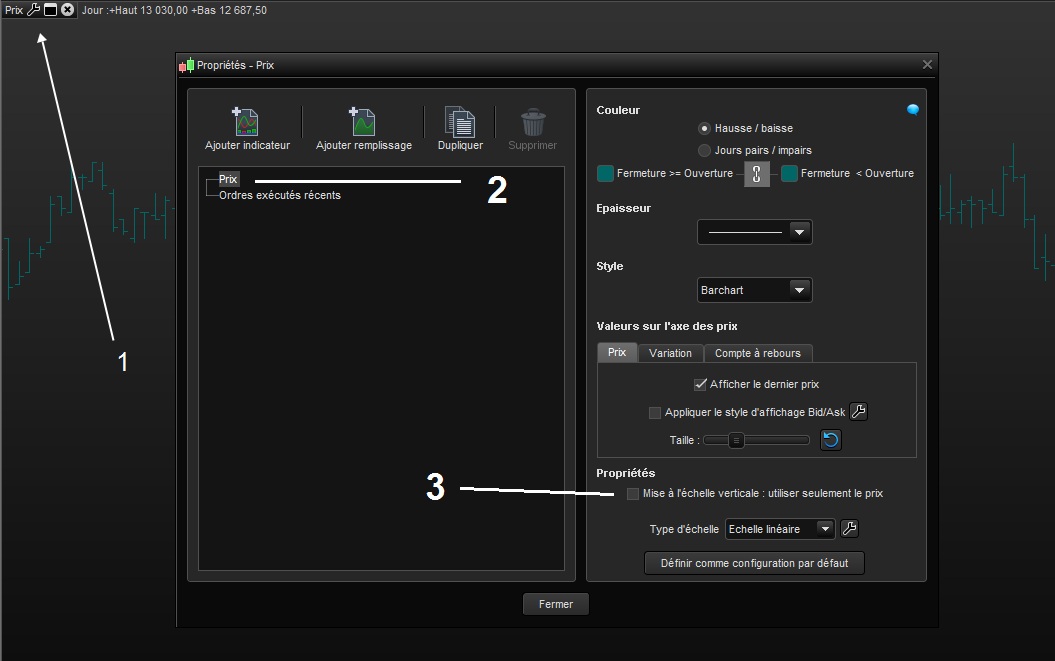
    Il faut adapter l’échelle pour n’utiliser que le prix. Tu trouveras cette option dans les paramètre du prix (clé à molette en haut à gauche du graphique).

    primo1 thanked this post
    #61364 quote
    Alai-nAlai-n
    Participant
    Veteran

    UP

    primo1 and Nicolas thanked this post
    Aide1.jpg Aide1.jpg
Viewing 3 posts - 1 through 3 (of 3 total)

  • You must be logged in to reply to this topic.

ProRealAI ProRealAI New

Stuck on this ProBuilder code?

Describe what this topic is trying to build, in plain English, and ProRealAI writes the ProRealTime™ indicator, screener or system for you.

Available in 7 languages
Try ProRealAI

graphique ecrase


ProBuilder : Indicateurs & Outils Personnalisés

New Reply
Author
author-avatar
primo1 @primo1 Participant
Summary

This topic contains 2 replies,
has 3 voices, and was last updated by Alai-nAlai-n

8 years, 7 months ago.

Topic Details
Forum: ProBuilder : Indicateurs & Outils Personnalisés
Language: French
Started: 02/03/2018
Status: Active
Attachments: 1 files
ProRealCode ProRealCode
Loading...