GRAB TIndicator from Pinescript to Prorealtime

Viewing 6 posts - 1 through 6 (of 6 total)
  • Author
    Posts
  • #206159 quote
    lorebruno
    Participant
    New

    Dear All,

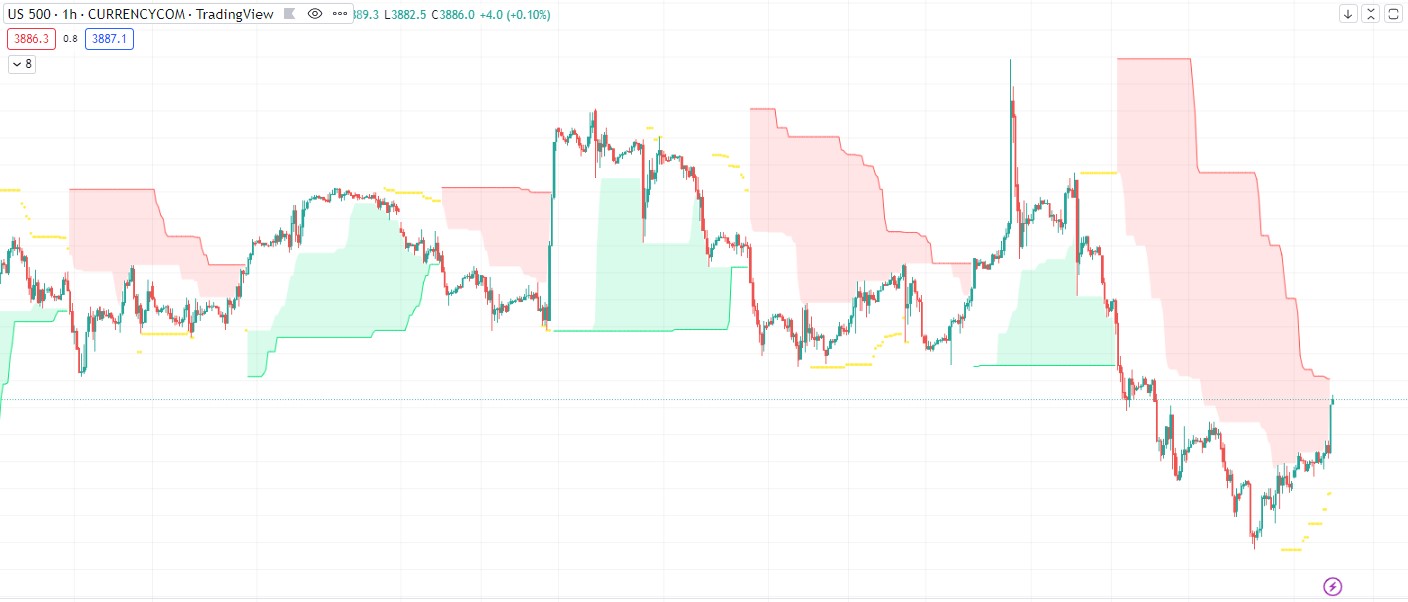
    I just found this indicator on Tradingview code (Pinescript) that I found interesting:

    https://www.tradingview.com/script/1HAKnNRc-Grab-Trading-System/

    I would be interested in evaluating the outcome of this indicator on Prorealtime.

    I attached the following files:

    1. file with the screenshot from Tradingview in which I applied this indicator to US500 Future (1 hour timeframe)
    2. file with the Pinescript script

    I would be interested in the indicator behind the trading system rather than the trading system itself.

    Thanks to anyone would like to take the chance of having a look to this request

    Best regards

    Lorenzo

    #206179 quote
    JS
    Participant
    Senior

    Hi @lorebruno

    Here is the indicator of the Grab system…

    I have set the “color fills” in the graph, the fills are not exactly the same, but this is the best I think is currently possible.

    Regards Jaap

    //Grab Trading Indicator
    
    Once Trend = 0
    
    flb = 80 //Longterm Period Max=80 Min=1
    slb = 21 //Shortterm Period Max=21 Min=1)
    
    MajorResistance = highest[flb]
    MajorSupport = lowest[flb]
    
    MinorResistance = highest[slb]
    MinorSupport = lowest[slb]
    
    If high > MajorResistance[1] then
    Trend=1
    EndIf
    
    If low < MajorSupport[1] then
    Trend=-1
    EndIf
    
    If Trend = 1 and low Crosses Over MinorSupport then
    xLong = 1
    EndIf
    
    If Trend = -1 and high Crosses Under MinorResistance then
    xShort = 1
    EndIf
    
    If xLong=1 and High Crosses Under MinorResistance then
    xLong=0
    EndIf
    
    If xShort =1 and Low Crosses Over MinorSupport then
    xShort=0//if strategy.position_size < 0
    EndIf
    
    If Trend=-1 and Trend[1]=-1 then
    MajRColor = 255
    else
    MajRColor=0
    EndIf
    
    If Trend=1 and Trend[1]=1 then
    MajSColor = 255
    else
    MajSColor=0
    EndIf
    
    If Trend = 1 and xLong=1 then
    MinRColorR=255
    MinRColorG=255
    Else
    MinRColorR=0
    MinRColorG=0
    EndIf
    
    If Trend=-1 and xShort=1 then
    MinSColorR=255
    MinSColorG=255
    Else
    MinSColorR=0
    MinSColorG=0
    EndIf
    
    Return MajorResistance as "MajorResistance" Coloured(MajRColor,0,0), MajorSupport as "MajorSupport" Coloured(0,MajSColor,0), MinorResistance as "MinorResistance" Coloured(MinRColorR,MinRColorG,0), MinorSupport as "MinorSupport" Coloured(MinSColorR,MinSColorG,0)
    #206195 quote
    lorebruno
    Participant
    New
    Thanks a lot for your reply JS! What do you mean with ““color fills” in the graph, the fills are not exactly the same”? You refer only to the colour or also to the indicator value?   Lorenzo
    #206196 quote
    JS
    Participant
    Senior

    Hi Lorenzo,

    The color filling between the different support and resistance lines can be processed in your code but you can also set it in the graph itself. I did the latter…

    The indicator values correspond to the original code, but the (color) fill between the different lines may differ slightly…

    Regards Jaap

    #206197 quote
    lorebruno
    Participant
    New
    Thanks for the prompt reply! If it is only about the colour it doesn’t matter, the important thing is the the “numeric value” output is the same!   Lorenzo
    #206316 quote
    Nicolas
    Keymaster
    Master
    You can use COLORBETWEEN to add color fill between 2 values.
    JS thanked this post
Viewing 6 posts - 1 through 6 (of 6 total)

  • You must be logged in to reply to this topic.

GRAB TIndicator from Pinescript to Prorealtime


ProBuilder: Indicators & Custom Tools

New Reply
Author
author-avatar
lorebruno @lorebruno Participant
Summary

This topic contains 5 replies,
has 3 voices, and was last updated by Nicolas

3 years, 1 month ago.

Topic Details
Forum: ProBuilder: Indicators & Custom Tools
Language: English
Started: 12/21/2022
Status: Active
Attachments: 3 files
Logo Logo
Loading...