Give us a Key for Search in Editor plus ^ for Previous Search

Viewing 4 posts - 1 through 4 (of 4 total)

  • Author
    Posts
  • #158982 quote
    PeterSt
    Participant
    Master

    Let’s say that this one is for the support of the WANTS on the bugs list. But it is a serious one.

    1. Search can – as far as I can tell – only be done by means of clicking of the mouse. Come on … I do this I suppose a 1000+ times a day, and when this could be a key i would save me an hour or more on a day.
    2. Searching, for those familiar with coding / development, is something you don’t do for one term a day, but for 10 or so different in an hour and those 100+ times. And we can’t go back with e.g. uparrow to the previous term term searched ? again, come on. Where did you guys develop PRT with yourself. You should recognize this and you should understand that it is a sheer pestering how the Search function has been set up. This alone … very much more than an hour per day.

    Peter

    image_2021-01-23_111038.png image_2021-01-23_111038.png
    #158984 quote
    robertogozzi
    Moderator
    Master

    You can use arrows to easily move from one line to another.

    If you find it easier, just take advantage of it!

    #159111 quote
    PeterSt
    Participant
    Master

    You can use arrows to easily move from one line to another.

    Roberto, in the “line” of the 1st attachment you see ? (nah, but I’d hope so !)
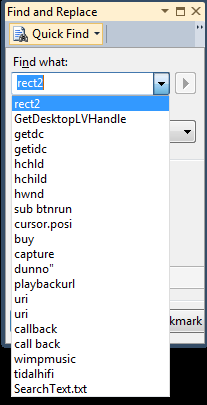
    I just searched f0r again a kazillion things. In a Notepad document I maintain the important search terms I just used. So in a (say) normal development environment I can scroll through my latest (e.g. 50) searches. This could happen with any key of course, but up-/down-arrow is common. Or see 2nd attachment for a Visual Studio example. I reckon that is not what you meant ?
    Anyway the data in there is maintained for even “ever” (but First-In First-Out). This is what I so eagerly miss.

    My codes are not 1 page large, you know.

    image_2021-01-23_175303.png image_2021-01-23_175303.png image_2021-01-23_175716.png image_2021-01-23_175716.png image_2021-01-23_175948.png image_2021-01-23_175948.png
    #159646 quote
    PeterSt
    Participant
    Master

    In addition, because it is super easy to make, please :
    A key to repeat the search. Common for this is F3. It would search for the next occurrence. As important is the backward search with a key. Here Shift-F3 is common (with that I mean : for 30 years).

    Then, please use it yourself in practice ans see for example that ctrl-f is fine in itself, but that this is counterproductive when the popup for the search term is already open. If I now am back in the code (say typing there) and want to apply a new search, ctrl-f will remove the popup.
    True, after doing this a 10.000 times you will get used to using ctrl-f two times subsequently (try it to see what I mean), but still, when I forget, I would by typing my search term in the program code.

    Thanks !

Viewing 4 posts - 1 through 4 (of 4 total)
  • You must be logged in to reply to this topic.

Give us a Key for Search in Editor plus ^ for Previous Search


Platform Support: Charts, Data & Broker Setup

New Reply
Author
author-avatar
PeterSt @peterst Participant
Summary

This topic contains 3 replies,
has 2 voices, and was last updated by PeterSt

5 years ago.

Topic Details
Forum: Platform Support: Charts, Data & Broker Setup
Language: English
Started: 01/23/2021
Status: Active
Attachments: 4 files
Logo Logo
Loading...