


get the SMA200 value of 20 days ago

Viewing 8 posts - 1 through 8 (of 8 total)

  • Author
    Posts
  • #221948 quote
    benkunz
    Participant
    New

    Hi,
    I’d like to know how I could get the value of SMA200 of 20 days ago ?
    the goal is to detect if the SMA200 has been going up over the last 20 days
    thanks

    #221950 quote
    robertogozzi
    Moderator
    Master

    There you go:

    Sma200 = average[200,0](close)
    UP     = Sma200 > Sma200[20]
    SCREENER[UP](Sma200 AS "Sma200")
    #221962 quote
    benkunz
    Participant
    New

    I’m confused…

    here is my original screener :


    TIMEFRAME(daily)
    SMA50  = average[50](close)
    SMA200 = average[200](close)
    NoDaysMaxForCrossing = 20
    xCrossing=0
    For i=1 to NoDaysMaxForCrossing
    If SMA50[i] crosses over SMA200[i] then
    xCrossing=i
    Break
    EndIf
    Next
    C1=xCrossing>=1 and xCrossing<=NoDaysMaxForCrossing
    
    
    SMA5enBaisse = close[5] > close[3] AND close[3] > close
    PrixAuDessusSMAs = close > SMA200 AND close > SMA50
    
    // DEFAULT CONDITIONS
    Timeframe(Yearly)
    minimumAge = barindex>=3
    TimeFrame(Monthly)
    p1 = lowest[36](close)>=3
    TimeFrame(Daily)
    p2 = (close<= 1000)
    v1 = Average[50](Volume) >= 50000
    defaultConditons = p1 AND p2 AND v1 and minimumAge
    // DEFAULT CONDITIONS
    
    
    Screener[C1 and SMA5enBaisse and PrixAuDessusSMAs and defaultConditons](xCrossing as "DaysBackCrossing")
    

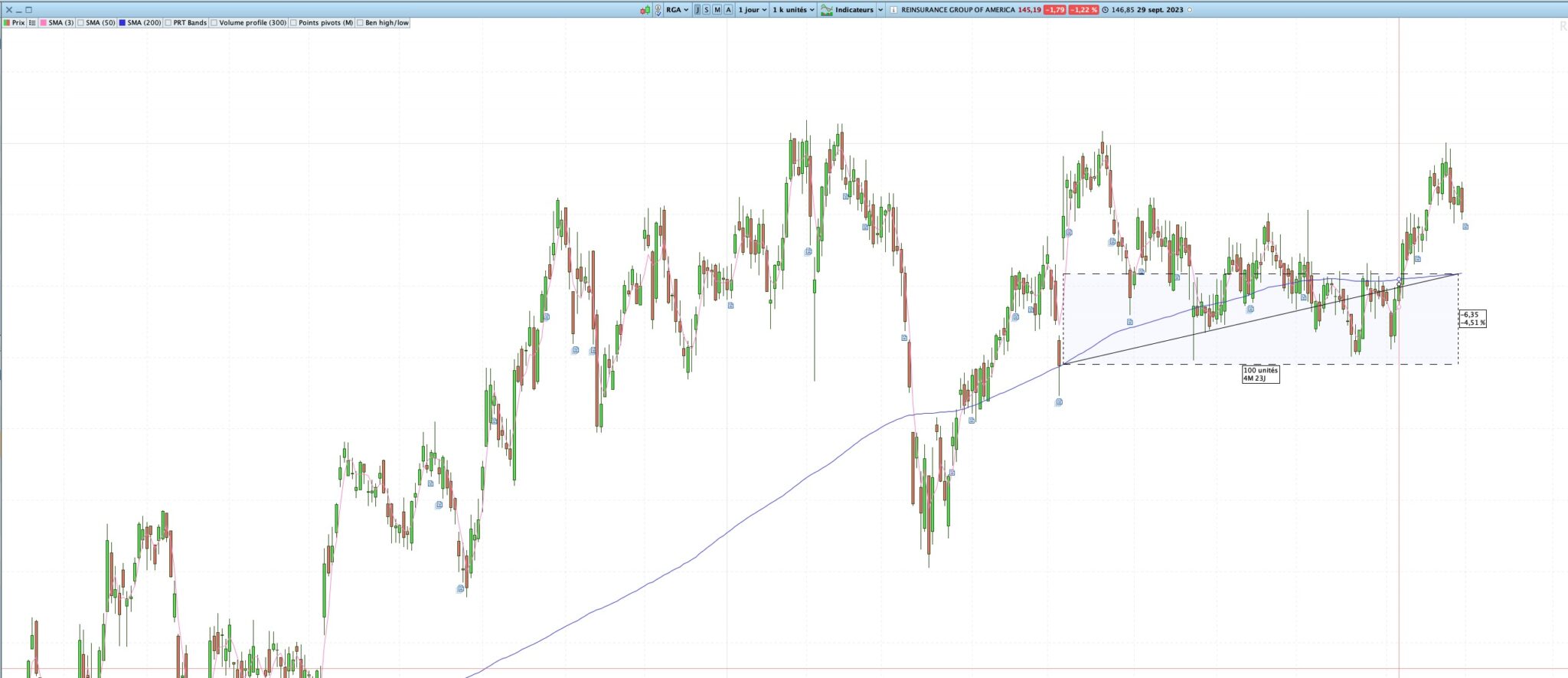
    If I run this screener on the “US NSYE Actions”, it returns 8 stocks including the one on the screenshot. On this screenshot, we can see that the SMA200 100 days ago was below today’s SMA.
    But if I add a new criteria based on what you told me, I get 0 result. I don’t get. What did I do wrong ? any idea ?


    TIMEFRAME(daily)
    SMA50  = average[50](close)
    SMA200 = average[200](close)
    NoDaysMaxForCrossing = 20
    xCrossing=0
    For i=1 to NoDaysMaxForCrossing
    If SMA50[i] crosses over SMA200[i] then
    xCrossing=i
    Break
    EndIf
    Next
    C1=xCrossing>=1 and xCrossing<=NoDaysMaxForCrossing
    
    
    SMA5enBaisse = close[5] > close[3] AND close[3] > close
    PrixAuDessusSMAs = close > SMA200 AND close > SMA50
    SMA200goingUp = SMA200 > SMA200[100]


    // DEFAULT CONDITIONS
    Timeframe(Yearly)
    minimumAge = barindex>=3
    TimeFrame(Monthly)
    p1 = lowest[36](close)>=3
    TimeFrame(Daily)
    p2 = (close<= 1000)
    v1 = Average[50](Volume) >= 50000
    defaultConditons = p1 AND p2 AND v1 and minimumAge
    // DEFAULT CONDITIONS
    
    
    Screener[C1 and SMA5enBaisse and PrixAuDessusSMAs and SMA200goingUp and defaultConditons](xCrossing as "DaysBackCrossing")
    Capture-decran-2023-10-02-a-21.32.55.jpg Capture-decran-2023-10-02-a-21.32.55.jpg
    #221967 quote
    robertogozzi
    Moderator
    Master

    SMA200goingUp = SMA200 > SMA200[100] is not allowed in screeners as 200+100 exceeds the 256-bar limit with IG. Only the premium version from PRT supports a 1024-bar limit.

    To make sure your conditions are all correct, analyze them separately, esch one of them, then combine them.

    #221968 quote
    benkunz
    Participant
    New

    Can you please elaborate the « analyze them separately, esch one of them, then combine them » ?

    Switching the timeframe with « timeframe(weekly) » might be easier ?

    #221981 quote
    robertogozzi
    Moderator
    Master

    All you need is to use test one condition at a time:

    1. Screener[C1]
    2. Screener[SMA5enBaisse]
    3. Screener[PrixAuDessusSMAs]
    4. Screener[SMA200goingUp]
    5. Screener[defaultConditons]

    when you are confident they all work, you can combine them in a single line.

    #222006 quote
    benkunz
    Participant
    New

    you lost me… to combine them in a single line, you’d do Screener[C1 AND C2 AND C3 ] ?

    and how would you do the testing one condition at a time ?

    #222008 quote
    robertogozzi
    Moderator
    Master

    One condition at a time like my example in my last post.

    You start with the first one, when it’s ok thrn you replace it with the second one (or even better, you add it to the first one), eyc… until all conditions return what you expect.

    Then you may combine them as you want, like you did in line 30 or 33.

Viewing 8 posts - 1 through 8 (of 8 total)
  • You must be logged in to reply to this topic.

get the SMA200 value of 20 days ago


ProScreener: Market Scanners & Detection

New Reply
Author
author-avatar
benkunz @benkunz Participant
Summary

This topic contains 7 replies,
has 2 voices, and was last updated by robertogozzi
2 years, 5 months ago.

Topic Details
Forum: ProScreener: Market Scanners & Detection
Language: English
Started: 10/02/2023
Status: Active
Attachments: 1 files
Logo Logo
Loading...
