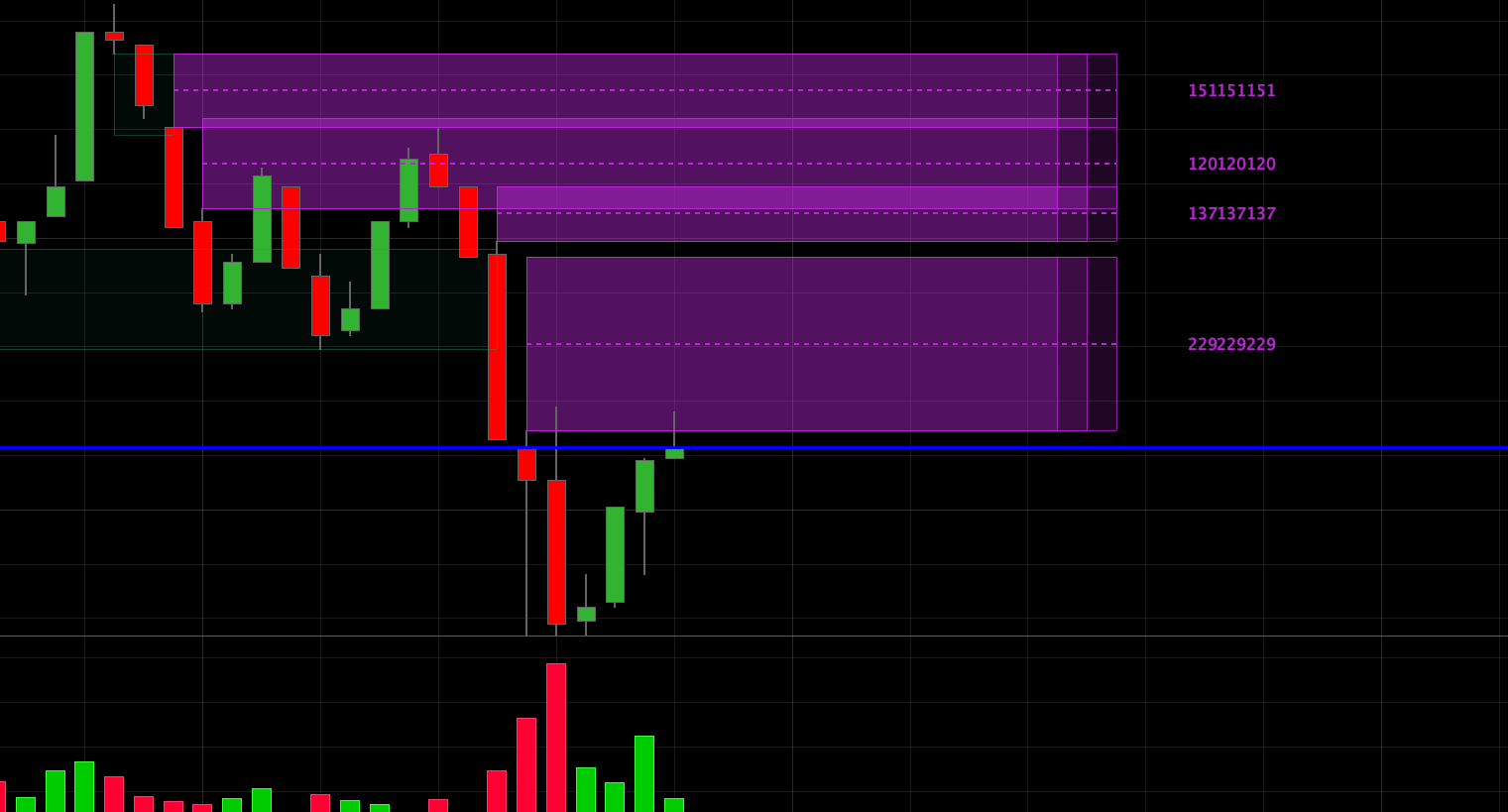
FVG con volume

Viewing 5 posts - 1 through 5 (of 5 total)

  • Author
    Posts
  • #252557 quote
    Ciccarelli Franco
    Participant
    Junior

    Ivan buona sera,

    qualche giorno fa ti ho chiesto la traduzione dell’indicatore Fair Value Gap MS , che gentilmente hai postato, però curiosando su Trading View ne ho trovato uno più completo, che mi sembra interessante.

    Puoi gentilmente tradurlo?

    Grazie

    https://it.tradingview.com/script/qujivabv-FVG-Volume-Profile-ChartPrime/

    #252665 quote
    Iván González
    Moderator
    Master

    Buongiorno, non è possibile rappresentare i gap in un timeframe superiore (ad esempio 1 ora) e calcolare il volume profile in un timeframe inferiore (ad esempio 1 minuto)…
    Ti passo una versione ridotta. Calcola i FVG e il volume delle 3 candele. Inoltre, calcola il punto medio del gap.

    // FVG and Volume
    // Versión 2.0 - 20241016
    // -----------------------------------------------
    // CONFIGURACIÓN DE USUARIO
    // -----------------------------------------------
    showBox = 20 // Número de últimos FVGs a mostrar
    extendBars = 50 // Extensión del dibujo hacia el futuro
    gapfilter = 0.5 // Filtro para el tamaño del gap
    // -- Colores y Estilos --
    bullColorR = 29
    bullColorG = 163
    bullColorB = 112
    bearColorR = 188
    bearColorG = 37
    bearColorB = 214
    fvgOpacity = 200
    // -----------------------------------------------
    // DETECCIÓN DE FVGS
    // -----------------------------------------------
    // Normalización del tamaño del gap
    stdevBullish = STD[200](low - high[2])
    IF stdevBullish > 0 THEN
       bullishgapsize = (low - high[2]) / stdevBullish
    ELSE
       bullishgapsize = 0
    ENDIF
    stdevBearish = STD[200](low[2] - high)
    IF stdevBearish > 0 THEN
       bearishgapsize = (low[2] - high) / stdevBearish
    ELSE
       bearishgapsize = 0
    ENDIF
    // Condiciones para detectar los FVGs
    bullishgapcondition = (low > high[2]) AND (high[1] > high[2]) AND (bullishgapsize > gapfilter)
    bearishgapcondition = (high < low[2]) AND (low[1] < low[2]) AND (bearishgapsize > gapfilter)
    // Almacenar FVG Alcista en arrays
    IF bullishgapcondition THEN
       m = m + 1
       $BoxTop[m] = low
       $BoxBottom[m] = high[2]
       $BoxBarLeft[m] = barindex
       $BoxBarRight[m] = barindex
       $BoxVol[m] = volume + volume[1] + volume[2]
       $BoxType[m] = 1
       $BoxMitigated[m] = 0
    ENDIF
    // Almacenar FVG Bajista en arrays
    IF bearishgapcondition THEN
       m = m + 1
       $BoxTop[m] = low[2]
       $BoxBottom[m] = high
       $BoxBarLeft[m] = barindex
       $BoxBarRight[m] = barindex
       $BoxVol[m] = volume + volume[1] + volume[2]
       $BoxType[m] = -1
       $BoxMitigated[m] = 0
    ENDIF
    // -----------------------------------------------
    // DIBUJO Y GESTIÓN (Solo en la última barra)
    // -----------------------------------------------
    IF islastbarupdate THEN
       // --- Procesar y dibujar FVGs Alcistas ---
       FOR i = m DOWNTO 1 DO
          // Comprobar si el FVG ha sido mitigado
          IF $BoxMitigated[i] = 0 and $BoxType[i]>0 THEN
             FOR j = $BoxBarLeft[i] + 1 TO barindex DO
                IF low[barindex-j] < $BoxBottom[i] THEN
                   $BoxMitigated[i] = 1
                   $BoxBarRight[i] = barindex[barindex-j]
                   BREAK
                ENDIF
             NEXT
          elsif $BoxMitigated[i] = 0 and $BoxType[i]<0 then
             FOR j = $BoxBarLeft[i] + 1 TO barindex DO
                IF high[barindex-j] > $BoxTop[i] THEN
                   $BoxMitigated[i] = 1
                   $BoxBarRight[i] = barindex[barindex-j]
                   BREAK
                ENDIF
             NEXT
          ENDIF
       next
       // Dibujar solo los FVGs solicitados por el usuario
       for i=m downto m-showBox do
          pocLevel = ($BoxTop[i] + $BoxBottom[i]) / 2
          vol = $BoxVol[i]
          if $BoxType[i]>0 then
             IF $BoxMitigated[i] = 0 THEN // No mitigado
                DRAWRECTANGLE($BoxBarLeft[i], $BoxTop[i], barindex + extendBars, $BoxBottom[i]) COLOURED(bullColorR, bullColorG, bullColorB, fvgOpacity)fillcolor(bullColorR, bullColorG, bullColorB, 45)
                DRAWSEGMENT($BoxBarLeft[i], pocLevel, barindex + extendBars, pocLevel) STYLE(DOTTEDLINE, 2) COLOURED(bullColorR, bullColorG, bullColorB)
                DRAWTEXT("#vol#", barindex + extendBars+5, pocLevel, Dialog, Standard, 10) COLOURED(bullColorR, bullColorG, bullColorB)
             ELSE // Mitigado
                DRAWRECTANGLE($BoxBarLeft[i], $BoxTop[i], $BoxBarRight[i], $BoxBottom[i]) COLOURED(bullColorR, bullColorG, bullColorB, fvgOpacity / 2)fillcolor(bullColorR, bullColorG, bullColorB, 15)
             ENDIF
          else
             IF $BoxMitigated[i] = 0 THEN // No mitigado
                DRAWRECTANGLE($BoxBarLeft[i], $BoxTop[i], barindex + extendBars, $BoxBottom[i]) COLOURED(bearColorR, bearColorG, bearColorB, fvgOpacity)fillcolor(bearColorR, bearColorG, bearColorB, 45)
                DRAWSEGMENT($BoxBarLeft[i], pocLevel, barindex + extendBars, pocLevel) STYLE(DOTTEDLINE, 2) COLOURED(bearColorR, bearColorG, bearColorB)
                DRAWTEXT("#vol#", barindex + extendBars+5, pocLevel, Dialog, Standard, 10) COLOURED(bearColorR, bearColorG, bearColorB)
             ELSE // Mitigado
                DRAWRECTANGLE($BoxBarLeft[i], $BoxTop[i], $BoxBarRight[i], $BoxBottom[i]) COLOURED(bearColorR, bearColorG, bearColorB, fvgOpacity / 2)fillcolor(bearColorR, bearColorG, bearColorB, 15)
             ENDIF
          endif
       next
    ENDIF
    
    RETURN
    
    robertogozzi thanked this post
    #253205 quote
    Copperwave
    Participant
    Veteran

    Hi Ivan – thanks for this indicator, just what I was after.

    However, it appears to have an annoying bug, whereby after each chart interval update, the FVG rectangles and drawtext values get duplicated with every new barindex. See the attachment. I am guessing the rectangle draw block is being looped but I don’t know enough about the code logic to work out how / why it is doing this. Can you correct this?

    Many thanks

    Hi Ivan – thanks for this indicator, just what I was after.

    However, it appears to have an annoying bug, whereby after each chart interval update, the FVG rectangles and drawtext values get duplicated with every new barindex. See the attachment. I am guessing the rectangle draw block is being looped but I don’t know enough about the code logic to work out how / why it is doing this. Can you correct this?

    Many thanks

    Copperwave

    #253208 quote
    Iván González
    Moderator
    Master

    Ciao. Scrivi questo sulla prima riga: defparam drawonlastbaronly=true

    #253251 quote
    robertogozzi
    Moderator
    Master

    @Copperwave

    Pubblica solo nella lingua del forum in cui stai postando. Ad esempio solo l’inglese nei forum di lingua inglese e il francese solo nei forum di lingua francese, come evidenziato in GIALLO qui sotto.

    Grazie 🙂

Viewing 5 posts - 1 through 5 (of 5 total)

  • You must be logged in to reply to this topic.

FVG con volume


ProBuilder: Indicatori & Strumenti Personalizzati

New Reply
Summary

This topic contains 4 replies,
has 4 voices, and was last updated by robertogozzi
3 months ago.

Topic Details
Forum: ProBuilder: Indicatori & Strumenti Personalizzati
Language: Italian
Started: 10/13/2025
Status: Active
Attachments: 1 files
Logo Logo
Loading...