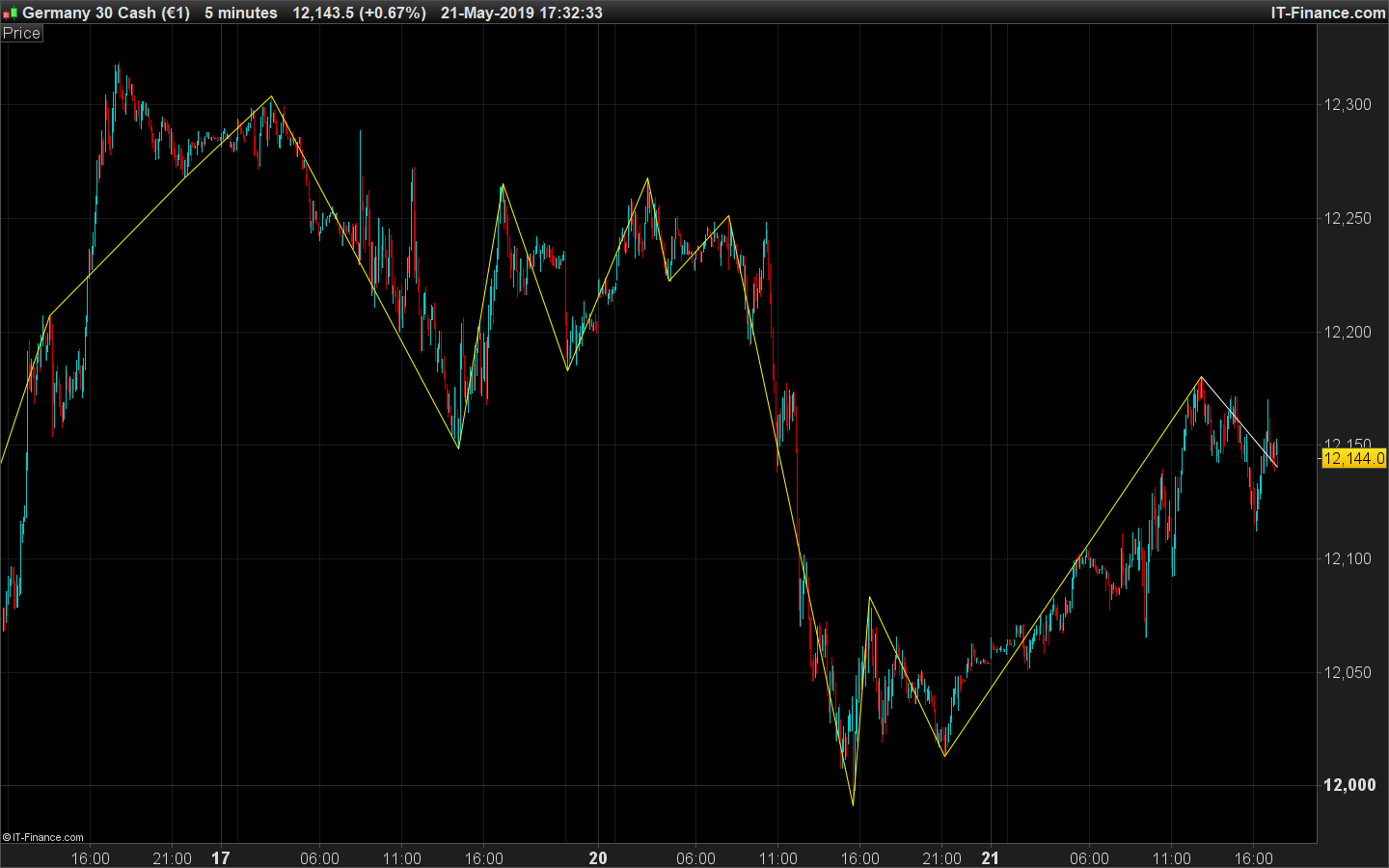
Per il codice in copia è possibile che oltre a disegnare il segmento dall’ultimo punto di inversione ne disegni anche uno che vada all’ultimo prezzo e si muova con esso.
Grazie
//—external parameters
cp = 26
once lastpoint = 0
if high[cp] >= highest[2*cp+1](high) then
LH = 1
else
LH = 0
endif
if low[cp] <= lowest[2*cp+1](low) then
LL = -1
else
LL = 0
endif
if LH = 1 then
TOPy = high[cp]
TOPx = barindex[cp]
endif
if LL = -1 then
BOTy = low[cp]
BOTx = barindex[cp]
endif
if LH>0 and (lastpoint=-1 or lastpoint=0) then
DRAWSEGMENT(lastX,lastY,TOPx,TOPy) COLOURED(255,255,0)
lastpoint = 1
lastX = TOPx
lastY = TOPy
endif
if LL<0 and (lastpoint=1 or lastpoint=0) then
DRAWSEGMENT(lastX,lastY,BOTx,BOTy) COLOURED(255,255,0)
lastpoint = -1
lastX = BOTx
lastY = BOTy
endif
RETURN
//—external parameters
cp = 26
once lastpoint = 0
if high[cp] >= highest[2*cp+1](high) then
LH = 1
else
LH = 0
endif
if low[cp] <= lowest[2*cp+1](low) then
LL = -1
else
LL = 0
endif
if LH = 1 then
TOPy = high[cp]
TOPx = barindex[cp]
endif
if LL = -1 then
BOTy = low[cp]
BOTx = barindex[cp]
endif
if LH>0 and (lastpoint=-1 or lastpoint=0) then
DrawSegment(lastX,lastY,TOPx,TOPy) coloured(255,255,0)
lastpoint = 1
lastX = TOPx
lastY = TOPy
endif
if LL<0 and (lastpoint=1 or lastpoint=0) then
DrawSegment(lastX,lastY,BOTx,BOTy) coloured(255,255,0)
lastpoint = -1
lastX = BOTx
lastY = BOTy
endif
return
Hello Hendrix, the button [Insert PRT code] is your friend 😉
Ho modificato il titolo dell'argomento, non stava descrivendo nulla … Quindi vuoi che l'ultimo punto sia esteso con un segmento all'attuale candelabro e al prezzo? e tracciato in tempo reale?
Si perfetto sarebbe utile grazie .
Poiché non è possibile eliminare tutti gli oggetti già tracciati sul grafico, è necessario creare un indicatore separato che rappresenti solo l'ultimo segmento collegato al prezzo corrente. Quindi per favore aggiungi questo indicatore come complemento del primo sul grafico per ottenere la versione completa:
defparam drawonlastbaronly=true
//—external parameters
cp = 26
once lastpoint = 0
if high[cp] >= highest[2*cp+1](high) then
LH = 1
else
LH = 0
endif
if low[cp] <= lowest[2*cp+1](low) then
LL = -1
else
LL = 0
endif
if LH = 1 then
TOPy = high[cp]
TOPx = barindex[cp]
endif
if LL = -1 then
BOTy = low[cp]
BOTx = barindex[cp]
endif
if LH>0 and (lastpoint=-1 or lastpoint=0) then
//DrawSegment(lastX,lastY,TOPx,TOPy) coloured(255,255,0)
lastpoint = 1
lastX = TOPx
lastY = TOPy
endif
if LL<0 and (lastpoint=1 or lastpoint=0) then
//DrawSegment(lastX,lastY,BOTx,BOTy) coloured(255,255,0)
lastpoint = -1
lastX = BOTx
lastY = BOTy
endif
if lastpoint>0 then
DrawSegment(lastX,lastY,barindex,low) coloured(55,55,50)
elsif lastpoint<0 then
DrawSegment(lastX,lastY,barindex,high) coloured(55,55,50)
endif
return
Buongiorno,
l’ultimo segmento è scritto correttamente, ma ora non vengono disegnati quelli precedenti in giallo (nella immagine che hai allegato).
Poi come faccio ad aumentare il loro spessore
rimuovere le 2 barre dalle (//) linee 32 e 39
Non si può aumentare lo spessore, né lo stile, di linee disegnate con i comandi DRAW.
Solo le linee disegnate con RETURN possono essere personalizzate.
Ho tolto le due barre // nella riga 32 e 39 ma non funziona
Non hai letto il mio ultimo post! DEVI AGGIUNGERE I 2 INDICATORI SULLA GRAFICA PER OTTENERE UNA VERSIONE COMPLETA. Aggiungi il primo indicatore che hai pubblicato, quindi aggiungi quello che ho creato, solo i 2 indicatori potrebbero fornire quello che ti serve.