Every Fractal indicator minor bug fix

Viewing 13 posts - 16 through 28 (of 28 total)
  • Author
    Posts
  • #124606 quote
    Vonasi
    Moderator
    Master

    The clues to my profile name are not hard to find on my profile page!

    GraHal thanked this post
    Vonasi.png Vonasi.png
    #133537 quote
    parthapersonal
    Participant
    Average

    Hello Vonasi,

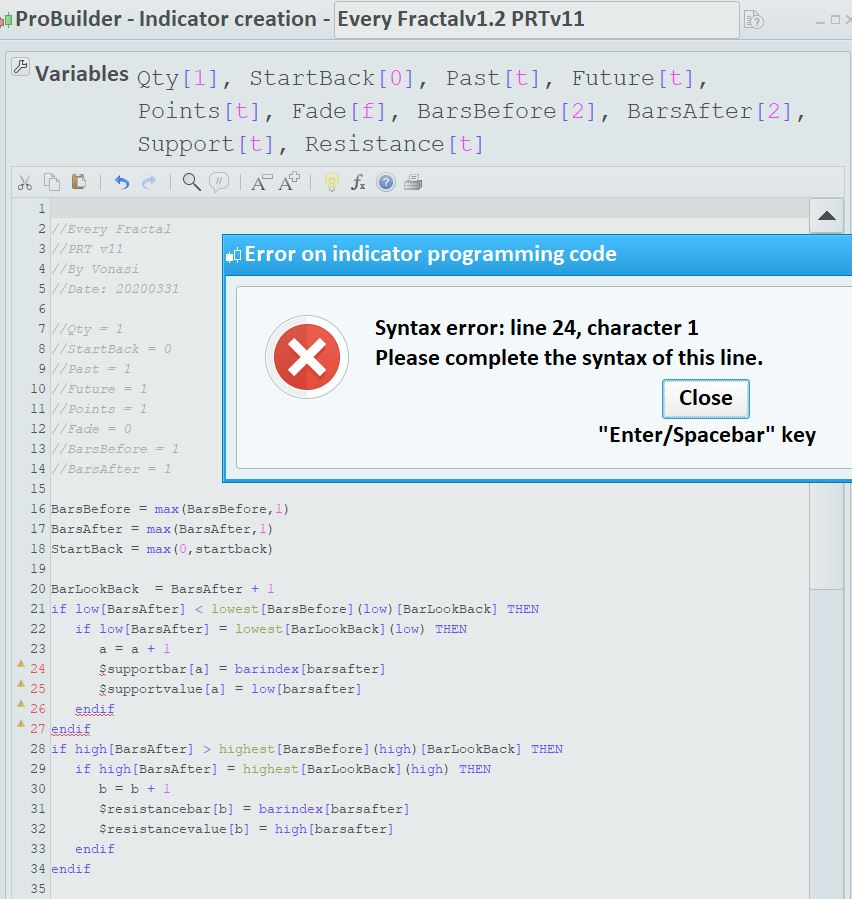
    Great work, however with IG Markets PRT (v10.3-1.8.0_45) it is not sensing the “$” and giving error as enslosed.

    Is there a possibility to fix this?

    Many thanks in advance.

    Every-Fractalv1.2-PRTv10.3-issue.jpg Every-Fractalv1.2-PRTv10.3-issue.jpg
    #133547 quote
    Vonasi
    Moderator
    Master

    As it says in the indicator description….. only works on v11 onwards.

    $ identifies an array variable and arrays are only available in v11.

    #133695 quote
    parthapersonal
    Participant
    Average

    Thank you Vonasi.

    #153775 quote
    jebus89
    Participant
    Master

    @Vonasi Hi thanks for this indicator. Im still working on understanding arrays and how to use them. I was wondering if you could walk me thorugh the code step by step with a little guide?

    Ive been reading up on Nicolas’ guide as well trying to code small projects by myself.

    For example im trying to count the number of new highs/low set by your indicator.

    #153797 quote
    Vonasi
    Moderator
    Master

    I coded this a while back so I’d have to remind myself of exactly what I coded and why!

    Arrays really are not complicated, especially one dimension arrays such as are available in ProRealCode. Just think of them as a street address and on that street are lots of houses and each house has a number to identify it. If you want to find out what is inside house no.6 on The High Street then you look in $TheHighStreet[6]

    Another analogy is to think of each array address as a big box and inside that box can be an endless number of smaller boxes. So if you want to put something in box number 82 then you would put it in $BigBox[82]

    Because we can put everything in one big box it means that within our code we can easily sort through what is in the smaller boxes by using $BigBox[x] rather than having to look in SmallBox1 and then in SmallBox2 and then in SmallBox3 etc.

    Hopefully soon we can get multi-dimensional arrays – these just have smaller boxes inside the smaller boxes and then even the possibility of smaller boxes inside those smaller boxes!

    GraHal thanked this post
    #153802 quote
    Vonasi
    Moderator
    Master

    I made some notes within the code…. hope this helps a little.

    //Every Fractal v1.4
    //PRT v11
    //By Vonasi
    //Date: 20200331
    
    //Settings
    //Qty = 1
    //StartBack = 0
    //Past = 1
    //Future = 1
    //Points = 1
    //Fade = 0
    //BarsBefore = 1
    //BarsAfter = 1
    
    //Make sure all settings are valid ones
    BarsBefore = max(BarsBefore,1)
    BarsAfter = max(BarsAfter,1)
    StartBack = max(0,startback)
    
    //Make sure we have enough bars
    if barindex >= barsbefore + barsafter then 
    
    //Look for a low fractal
    BarLookBack  = BarsAfter + 1
    if low[BarsAfter] < lowest[BarsBefore](low)[BarLookBack] THEN
    if low[BarsAfter] = lowest[BarLookBack](low) THEN
    
    //Set low fractal array location
    a = a + 1
    
    //Store bar number and low value in two arrays at location a
    $supportbar[a] = barindex[barsafter]
    $supportvalue[a] = low[barsafter]
    endif
    endif
    
    //Look for a high fractal
    if high[BarsAfter] > highest[BarsBefore](high)[BarLookBack] THEN
    if high[BarsAfter] = highest[BarLookBack](high) THEN
    
    //Set high fractal array location
    b = b + 1
    
    //Store bar number and high value in two arrays at location b
    $resistancebar[b] = barindex[barsafter]
    $resistancevalue[b] = high[barsafter]
    endif
    endif
    
    if islastbarupdate then
    
    myqty = min(min(b,a),qty)
    
    //Loop to draw correct number of lines
    for z = 0 to myqty-1
    e = (myqty)-z
    
    //Calculate colour contrast setting based on number of lines being drawn
    if fade then
    c = (255/myqty)*e
    else
    c = 255
    endif
    
    //If drawing support lines 
    if support then
    //Check that we have at least two low points stored
    if a >= 2 then
    if future then
    drawray($supportbar[a-z-1-startback],$supportvalue[a-z-1-startback],$supportbar[a-z-startback],$supportvalue[a-z-startback])coloured(128,0,0,c)
    endif
    if past then
    drawray($supportbar[a-z-startback],$supportvalue[a-z-startback],$supportbar[a-z-1-startback],$supportvalue[a-z-1-startback])coloured(128,0,0,c)
    endif 
    if points then
    drawpoint($supportbar[a-z-1-startback],$supportvalue[a-z-1-startback],2)coloured(128,0,0,c)
    drawpoint($supportbar[a-z-startback],$supportvalue[a-z-startback],2)coloured(128,0,0,c)
    endif
    endif
    endif
    
    //If drawing resistance lines
    if resistance then
    //Check that we have at least two high points stored
    if b >= 2 then
    if future then
    drawray($resistancebar[b-z-1-startback],$resistancevalue[b-z-1-startback],$resistancebar[b-z-startback],$resistancevalue[b-z-startback])coloured(0,128,0,c)
    endif
    if past then
    drawray($resistancebar[b-z-startback],$resistancevalue[b-z-startback],$resistancebar[b-z-1-startback],$resistancevalue[b-z-1-startback])coloured(0,128,0,c)
    endif
    if points then
    drawpoint($resistancebar[b-z-1-startback],$resistancevalue[b-z-1-startback],2)coloured(0,128,0,c)
    drawpoint($resistancebar[b-z-startback],$resistancevalue[b-z-startback],2)coloured(0,128,0,c)
    endif
    endif
    endif
    next
    endif
    endif
    
    return
    GraHal thanked this post
    #153948 quote
    parthapersonal
    Participant
    Average

    Great Job Vonasi. However upon execution it is throwing the error message as, “The following variable is undefined: resistance, support.

    What should be there initial values please?

    #153950 quote
    parthapersonal
    Participant
    Average

    I have set their initial values as 1. Is it correct?

    #153976 quote
    Vonasi
    Moderator
    Master

    You need to remove the // on lines 7 to 14.

    Lines 9 to 12 are just boolean switches to turn on and off options so should be set to 0 or 1.

    It is best if you download the original indicator from the library and then replace the code in it with the corrected code from this topic as that way all the indicator functionality is already set up with indicator options to change settings in the indicator window.

    #154067 quote
    parthapersonal
    Participant
    Average

    Many thanks dear Vonasi. Much appreciated. Any luck with my request as below:

    Hello Vonasi, Great news. I got the version 11 today and now only. Hence I am requesting you to please help me to automatically draw only 2 trend lines in the chart- one up trend line joining the last 2 swing lows (2nd swing low must be higher than 1st swing low) and one down trend line joining the last 2 swing highs (2nd swing high must be lower than 1st swing high). the line should be extended to the right only. If possible, I need to put alarm when price closes above or below this dynamic line.

    Can you help me on this please.

    Regards,

    #154246 quote
    Vonasi
    Moderator
    Master

    parthapersonal  – Please follow the forum rules and do not double post. You have asked the exact same question in another topic and I have answered the question there and provided two possible indicators that might meet your needs. Double posting just leads to confusion and wasted time. Ask your question in one place and one place only.

    #154274 quote
    parthapersonal
    Participant
    Average

    Sorry mate, it was a mistake. Regret.

Viewing 13 posts - 16 through 28 (of 28 total)
  • You must be logged in to reply to this topic.

Every Fractal indicator minor bug fix


ProBuilder: Indicators & Custom Tools

New Reply
Author
author-avatar
Vonasi @vonasi Moderator
Summary

This topic contains 27 replies,
has 6 voices, and was last updated by parthapersonal

5 years, 3 months ago.

Topic Details
Forum: ProBuilder: Indicators & Custom Tools
Language: English
Started: 03/31/2020
Status: Active
Attachments: 5 files
Logo Logo
Loading...