Ehlers' Sinewave Indicator

Viewing 15 posts - 1 through 15 (of 27 total)
  • Author
    Posts
  • #11864 quote
    Renato Di Lorenzo
    Participant
    Average

    Hi all.

    Is there somebody that can convert John Ehlers’ Sinewave Indicator forPRT usage? This is the EasyLanguage code:

    {*****************************************************
    Sinewave Indicator
    *****************************************************}
    Inputs: Price((H+L)/2),
    alpha(.07);
    Vars: Smooth(0),
    Cycle(0),
    I1(0),
    Q1(0),
    I2(0),
    Q2(0),
    DeltaPhase(0),
    MedianDelta(0),
    MaxAmp(0),
    AmpFix(0),
    Re(0),
    Im(0),
    DC(0),
    alpha1(0),
    InstPeriod(0),
    DCPeriod(0),
    count(0),
    SmoothCycle(0),
    RealPart(0),
    ImagPart(0),
    DCPhase(0);
    Smooth = (Price + 2*Price[1] + 2*Price[2]
    + Price[3])/6;Cycle = (1 – .5*alpha)*(1 – .5*alpha)*(Smooth
    -2*Smooth[1] + Smooth[2]) + 2*(1 – alpha)*Cycle[1]
    -(1 – alpha)*(1 – alpha)*Cycle[2];If currentbar < 7 then Cycle = (Price – 2*Price[1]
    + Price[2]) / 4;{Cycle = Price;}
    Q1 = (.0962*Cycle + .5769*Cycle[2] – .5769*Cycle[4]
    -.0962*Cycle[6])*(.5 + .08*InstPeriod[1]);I1 = Cycle[3];
    If Q1 <> 0 and Q1[1] <> 0 then DeltaPhase = (I1/Q1
    -I1[1]/Q1[1]) / (1 + I1*I1[1]/(Q1*Q1[1]));
    FIGURE 11.2 EasyLanguage Code to Compute the Sinewave Indicator
    The Sinewave Indicator 155
    If DeltaPhase < 0.1 then DeltaPhase = 0.1;
    If DeltaPhase > 1.1 then DeltaPhase = 1.1;
    MedianDelta = Median(DeltaPhase, 5);
    If MedianDelta = 0 then DC = 15 else DC = 6.28318 /
    MedianDelta + .5;
    InstPeriod = .33*DC + .67*InstPeriod[1];
    Value1 = .15*InstPeriod + .85*Value1[1];
    {Compute Dominant Cycle Phase}
    DCPeriod = IntPortion(Value1);
    RealPart = 0;
    ImagPart = 0;
    For count = 0 To DCPeriod – 1 begin
    RealPart = RealPart + Sine(360 * count
    / DCPeriod) * (Cycle[count]);
    ImagPart = ImagPart + Cosine(360 * count
    / DCPeriod) * (Cycle[count]);
    End;
    If AbsValue(ImagPart) > 0.001 then DCPhase
    = Arctangent(RealPart / ImagPart);
    If AbsValue(ImagPart) <= 0.001 then DCPhase = 90
    * Sign(RealPart);
    DCPhase = DCPhase + 90;
    If ImagPart < 0 then DCPhase = DCPhase + 180;
    If DCPhase > 315 then DCPhase = DCPhase – 360;
    Plot1(Sine(DCPhase), “Sine”);
    Plot2(Sine(DCPhase + 45), “LeadSine”);

    #11872 quote
    Nicolas
    Keymaster
    Master

    Hi Renato,

    Do this one the same? : http://www.prorealcode.com/prorealtime-indicators/even-better-sinewave/

    I believe not, but just to be sure? If not, I can of course convert it to prorealtime.

    #11884 quote
    Renato Di Lorenzo
    Participant
    Average

    Hi Nicholas

    No, I had already seen this one and it is not the same; the Ehlers’ script that I forwarded is much more complicated.

    Thanks for your dedication to the cause LOL.

    Renato

    #11887 quote
    Nicolas
    Keymaster
    Master

    I found a lot of Ehlers’ stuff on HK-Lisse website:

    MESA period indicator :

    REM TRENDLINE DE J. EHLERS
    REM Indicateur "MESA PERIODE"
    REM Calcul de la période du cycle dominant
    
    PRIX = (high + low) / 2
    
    IF Barindex <= 5 THEN
        PERIODE = 0
        V5 = 0
    ENDIf
    
    IF Barindex > 5 THEn
        REM Détermination de la phase de chaque tic
        V1 = PRIX - PRIX[6]
        V2 = V1[3]
        V3 = 0.75*(V1-V1[6])+0.25*(V1[2]-v1[4])
        ENPHASE = 0.33*V2+0.67*ENPHASE[1]
        ENQUADRATURE = 0.2*V3 + 0.8*ENQUADRATURE[1]
        IF ABS(ENPHASE + ENPHASE[1]) > 0 THEN
            A = ABS((ENQUADRATURE + ENQUADRATURE[1]) / (ENPHASE+ENPHASE[1]))
            PHASEDEG = ATAN(A)
        endif
       
        REM Correction si autres quadrants
        IF ENPHASE < 0 AND ENQUADRATURE > 0 THEN
            PHASEDEG = 180 - PHAsedeg
        endif
       
        IF ENPHASE < 0 AND ENQUADRATURE < 0 THEN
            PHASEDEG = 180 + PHASEDeg
        endif
       
        IF ENPHASE > 0 AND ENQUADRATURE < 0 THEN
            PHASEDEG = 360 - PHASedeg
        endif
       
        REM Phase différentielle et corrections éventuelles
        DELTAPHASE = PHASEDEg[1]-phasedeg
        IF PHASEDEG[1] < 90 AND PHASEDEG > 270 THEN
            DELTAPHASE = 360 + DELTaphase
        endif
       
        IF DELTAPHASE < 1 THEN
            DELTAPhase=1
        endif
       
        IF DELTAPHASE > 60 THEN
            DELTAphase=60
        endif
       
        REM Calcul de la période instantanée du cycle actuel
        REM et correction éventuelle
        PERIODEINSTANT = 0
        V4 = 0
        J = 0
        WHILE J<41
            V4 = V4 + DELTAPHASE[J]
            IF V4>360 AND PERIODEINSTANT=0 THEN
                PERIODEINSTANT =J
            ENDIF
            J=J+1
        WEND
       
        IF PERIODEINSTANT=0 THEN
            PERIODEINSTANT = PERIODEINSTANT[1]
        ENDIF
       
        REM Calcul de la PERIODE
        V5 = 0.25 * PERIODEINSTANT +0.75*V5[1]
        periode=v5
    ENDIF
    
    RETURN PERIODE as "PERIODE" , DELTAPHASE as "deltaphase" 


    MESA PHASE INDICATOR :

    REM TRENDLINE DE J. EHLERS
    REM Indicateur "MESA PHASE"
    REM Calcul de la phase du cycle dominant
    
    IF Barindex > 5 THEN
       
        PRIX = (high + low) / 2
        myPERIODE, myDELTAPHASE = CALL "MESA PERIODE"
       
        PERIODE = ROUND(myPERIODE)
       
        PARTIEREELLE = 0
        PARTIEIMAGINAIRE = 0
       
        K = 0
        REM Calcul en degrés
        WHILE K < PERIODE
            PARTIEREELLE = PARTIEREELLE + SIN(360*K/PERIODE)*PRIX[K]
            PARTIEIMAGINAIRE = PARTIEIMAGINAIRE + COS(360*K/PERIODE)*PRIX[K]
            K = K+1
        WEND
       
        IF ABS(PARTIEIMAGINAIRE) > 0.001 THEN
            DCPHASEDEG = ATAN(PARTIEREELLE/PARTIEIMAGINAIRE)
        ENDIF
       
        IF ABS(PARTIEIMAGINAIRE) <= 0.001 THEN
            IF PARTIEREELLE >= 0 THEN
                SIGNEPARTIEREELLE=1
            ELSE
                SIGNEPARTIEREELLE=-1
            ENDIF
            DCPHASEDEG = 90*SIGNEPARTIEREELLE
        ENDIF
       
        DCPHASEDEG = DCPHASEDEG + 90
       
        IF PARTIEIMAGINAIRE<0 THEN
            DCPHASEDEG = DCPHASEDEG + 180
        ENDIF
       
        IF DCPHASEDEG>315 AND DCPHASEDEG<=360 and myDELTAPHASE <> 500 THEN
            DCPHASEDEG = DCPHASEDEG - 360
        ENDIF
       
        PHASE = DCPHASEDEG
           
    ENDIF
    
    RETURN PHASE as "PHASE" 


    MESA RSB :

    REM Indicateur "MESA RSB"
    REM Calcul du rapport signal / bruit (RSB en dB)
    REM Ajout ligne horizontale = 6
    
    
    IF Barindex <= 8 THEN
        RSB = 0
        RANGERSB = 0
        ENPHASE = 0
        ENQUADRATURE = 0
    ENdif
    
    IF Barindex > 8 THEn
        PRIX = (high + low) /2
        REM Détermination des composantes en phase et en quadrature
        REM Transformation de Hilbert
        RANGERSB = 0.2*(high - low) + 0.8*RANGERSB[1]
        V1 = PRIX-PRIX[6]
        V2 = V1[3]
        V3 = 0.75*(V1-V1[6]) + 0.25*(V1[2]-V1[4])
        ENPHASE = 0.33*V2 + 0.67*ENPHASE[1]
        ENQUADRATURE = 0.2*V3 + 0.8*Enquadrature[1]
        REM Lissage du rapport signal/bruit
        V2 = 0.2*(square(ENPHASE) + square(ENQUADRATURE)) + 0.8*V2[1]
        REM Calcul du rapport signal/bruit lissé
        IF V2<0.001 THEN
            V2=0.001
        endif
       
        IF RANGE>0 THEN
            RSB = 0.25*(10* LOG(V2 / square(RANGERSB)) / LOG(10)+4.7) + 0.75*RSB[1]
        ENDif
    endif
    
    RETURN RSB as "Rapport Signal-Bruit" 


    MESA SINEWAVE INDICATOR :

    REM TRENDLINE DE J. EHLERS
    REM Indicateur "MESA SINEWAVE"
    REM Calcul du SINEWAVE et du LEAD_SINEWAVE
    REM Sinus de la phase et ce même sinus avancé de 45°
    
    myPHASE = CALL "MESA PHASE"
    
    IF Barindex > 5 THEN
        PHASE = myPHASE
        SINEWAVE = SIN(PHASE)
        LEADSINEWAVE = SIN(PHASE + 45)
    ENDif
    
    RETURN SINEWAVE as "SINEWAVE" , LEADSINEWAVE as "LEAD SINEWAVE"


    MESA TRENDLINE indicator :

    REM TRENDLINE DE J. EHLERS
    REM Indicateur "MESA TRENDLINE"
    REM Calcul de la TRENDLINE et du FILTRE DE KALMAN
    REM Utilisés comme 2 moyennes mobiles adaptatives en mode Tendance
    
    IF Barindex > 5 THEN
       
        PRIX = (high + low) /2
        myPERIODE, myDELTAPHASE = CALL "MESA PERIODE"
       
        PERIODE = ROUND(myPERIODE)
        TRENDLINE = 0
        J =0
        WHILE J < PERIODE+2
            TRENDLINE = TRENDLINE + PRIX[J]
            J = J+1
        wend
       
        IF PERIODE>0 THEN
            TRENDLINE = TRENDLINE / (PERIODE+2)
        endif
       
        REM Filtre de Kalman zero lag
        KALMAN = 0.33*(PRIX + 0.5*(PRIX - PRIX[3])) + 0.67*Kalman[1]
        IF Barindex<26 and myDELTAPHASE <> 500 THEN
            TRENDLINE = PRIX
            KALMAN =prix
        ENDIf
    endif
    
    RETURN TRENDLINE as "TRENDLINE" , KALMAN as "KALMan"


    MESA trend cycle :

    REM TRENDLINE DE J. EHLERS
    REM Indicateur "MESA CYCLE TENDANCE"
    REM Essai de détermination du mode cycle ou tendance
    REM Variable P1 = 0.3
    
    myPERIODE, myDELTAPHASE = CALL "MESA PERIODE"
    mySINEWAVE, myLEADSINEWAVE = CALL "MESA SINEWAVE"
    myTRENDLINE, myKALMAN = CALL "MESA TRENDLINE"
    myRapportSignalBruit = CALL "MESA RSB"
    
    P = myPERIODE
    DEL = myDELTAPHASE
    S = mySINEWAVE
    LS = myLEADSINEWAVE
    TL = myTRENDLINE
    K = myKALMAN
    RSB = myRapportSignalBruit
    
    TENDANCE=1
    CYCLES=0
    
    REM Détecter un croisement LS/S et initialiser le mode cycle si RSB suffisant
    IF LS crosses over S OR LS crosses under S AND RSB>6 THEN
        TENDANCE=0
        CYCLES=1
    ENDIf
    
    REM Vérifier progressivité de la variation de la phase
    IF P<>0 AND DEL>(1-P1)*360 / P AND DEL<(1+P1)*360 / P THEN
        TENDANCE=0
        CYCLES=1
    endif
    
    REM Détecter un croisement K/TL et initialiser le compteur de jours
    IF K crosses over TL OR K crosses under TL THEN
        NB=0
    endif
    REM Incrémenter compteur de jours
    NB=nb+1
    REM Confirmer mode cycle si compteur < une demi-période, sinon tendance
    IF NB<P/2 THEN
        CYCLES=1
        TENDANCE=0
    ELSE
        CYCLEs=0
        tendance=1
    endif
    
    RETURN CYCLES as "CYCLES", TENDANCE as "TENDANCE" 


    I haven’t test anything. Don’t really know if it’s personal work or original Ehlers indicators. If it’s not, please tell me and I’ll convert your given code.

    This is the URL where I found these prorealtime codes: http://hk-lisse.over-blog.com/article-16635860.html


    Despair thanked this post
    #11895 quote
    supertiti
    Participant
    Master
    REM TRENDLINE DE J. EHLERS
    REM Indicateur "MESA SINEWAVE"
    REM Calcul du SINEWAVE et du LEAD_SINEWAVE
    REM Sinus de la phase et ce même sinus avancé de 45°
    
    myPHASE = CALL "MESA PHASE"
    IF Barindex > 5 THEN
    PHASE = myPHASE
    SINEWAVE = SIN(PHASE)
    LEADSINEWAVE = SIN(PHASE + 45)
    ENDif
    MA = weightedaverage [4](LEADSINEWAVE)
    
    RETURN SINEWAVE as "SINEWAVE" , LEADSINEWAVE as "LEAD SINEWAVE" , 0 as " zero " , 0.8 as " 0.8 " , - 0.8 as " - 0.8 " , MA as " MA LEADSINEWAVE "
    
    // Elhers préconise une WMA p = 4
    
    #11934 quote
    Renato Di Lorenzo
    Participant
    Average

    Thanks Nicholas, thanks Supertiti.

    Very kind of you.

    Renato

    #24496 quote
    Tarquin
    Participant
    Junior

    Hi Renato,

    I am also very interested in the Hilbert Sine Wave indicator by John Ehler and I would like to be able to use this with PRT. There is the “Better Hilbert Sine Wave indicator” by emini-watch.com, which is only available for TradeStation. I expect you have seen this, but if not here is the link – http://emini-watch.com/trading-indicators/hilbert-sine-wave/

    It would be perfect to have a version of this for PRT. Have you tested the code that Nicolas very kindly provided? Did he manage to code the EasyLanguage code that you provided?

    Regards,

    Tony

    Bard thanked this post
    #50707 quote
    fredd81
    Participant
    Senior

    Found this ok eklablog but cant get it to work


    REM Computer InPhase & Quadrature Components
    v1=pri-pri[6]
    v2=v1[3]
    v3=0.75*(v1-v1[6])+0.25*(v1[2]-v1[4])
    
    InPhase=0.33*v2+0.67*InPhase[1]
    Quadrature=0.2*v3+0.8*Quadrature[1]
    
    REM Use Arc Tangent To Compute The Current Phase
    If ABS(InPhase+InPhase[1]) > 0 Then
    X=ABS((Quadrature+Quadrature[1])/(InPhase+InPhase[1]))
    Phase=ATAN(X)
    Endif
    
    REM Resolve Arc Tangent Ambiguity
    If InPhase < 0 And Quadrature > 0 Then
    Phase=180-Phase
    Endif
    
    If InPhase < 0 And Quadrature < 0 Then
    Phase=180+Phase
    Endif
    
    If InPhase > 0 And Quadrature < 0 Then
    Phase=360-Phase
    Endif
    
    REM Compute A Differential Phase
    DeltaPhase=Phase[1]-Phase
    
    If Phase[1] < 90 And Phase > 270 Then
    DeltaPhase=360+Phase[1]-Phase
    Endif
    
    If DeltaPhase < 1 Then
    DeltaPhase=1
    Endif
    
    If DeltaPhase > 60 Then
    DeltaPhase=60
    Endif
    
    REM Sum DeltaPhase To Reach 360 Degrees
    InstPeriod=0
    v4=0
    
    For count=0 To 40
    v4=v4+DeltaPhase[count]
    
    If v4 > 360 And InstPeriod=0 Then
    InstPeriod=count
    Endif
    Next
    
    REM Resolve InstPeriod Errors & Smooth
    If InstPeriod=0 Then
    InstPeriod=InstPeriod[1]
    Endif
    
    v5=0.25*InstPeriod+0.75*Period[1]
    
    REM Compute Dominant Cycle Phase
    Period=Round(v5)
    RealPart=0
    ImagPart=0
    
    For count=0 To Period-1
    RealPart=RealPart+Sin(360*count/Period)*(pri[count])
    ImagPart=ImagPart+Cos(360*count/Period)*(pri[count])
    Next
    
    If ABS(ImagPart) > 0.001 Then
    DCPhase=ATAN(RealPart/ImagPart)
    Endif
    
    If ABS(ImagPart) <= 0.001 Then
    DCPhase=90*SGN(RealPart)
    Endif
    
    DCPhase=DCPhase+90
    
    If ImagPart < 0 Then
    DCPhase=DCPhase+180
    Endif
    
    If DCPhase > 315 And DCPhase <=360 Then
    DCPhase=DCPhase-360
    Endif
    Sine=Sin(DCPhase)
    Lead=Sin(DCPhase+45)
    Endif
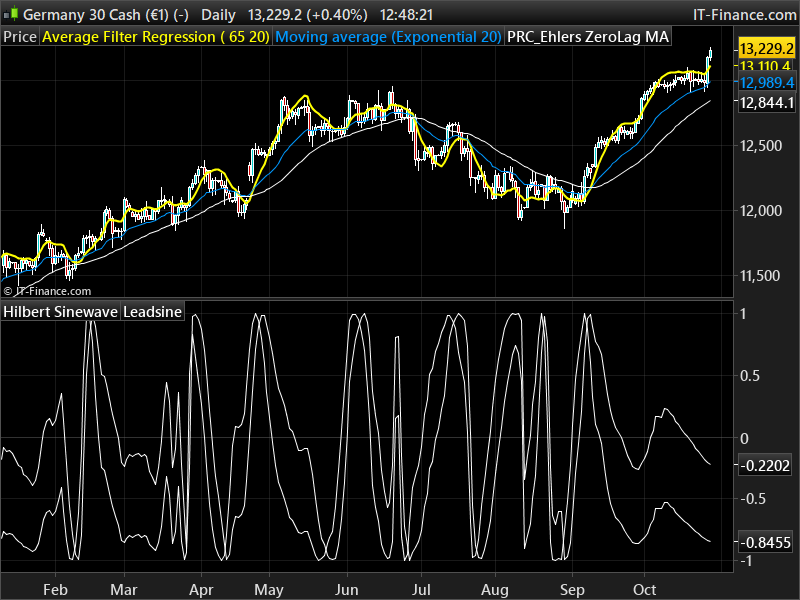
    Return Sine as "Hilbert Sinewave", Lead as "Leadsine"
    #50714 quote
    Nicolas
    Keymaster
    Master

    I don’t know if it should look like this, but this is a fixed code:

    pri=customclose
    
    if barindex>20 then 
    REM Computer InPhase & Quadrature Components
    v1=pri-pri[6]
    v2=v1[3]
    v3=0.75*(v1-v1[6])+0.25*(v1[2]-v1[4])
    
    InPhase=0.33*v2+0.67*InPhase[1]
    Quadrature=0.2*v3+0.8*Quadrature[1]
    
    REM Use Arc Tangent To Compute The Current Phase
    If ABS(InPhase+InPhase[1]) > 0 Then
    X=ABS((Quadrature+Quadrature[1])/(InPhase+InPhase[1]))
    Phase=ATAN(X)
    Endif
    
    REM Resolve Arc Tangent Ambiguity
    If InPhase < 0 And Quadrature > 0 Then
    Phase=180-Phase
    Endif
    
    If InPhase < 0 And Quadrature < 0 Then
    Phase=180+Phase
    Endif
    
    If InPhase > 0 And Quadrature < 0 Then
    Phase=360-Phase
    Endif
    
    REM Compute A Differential Phase
    DeltaPhase=Phase[1]-Phase
    
    If Phase[1] < 90 And Phase > 270 Then
    DeltaPhase=360+Phase[1]-Phase
    Endif
    
    If DeltaPhase < 1 Then
    DeltaPhase=1
    Endif
    
    If DeltaPhase > 60 Then
    DeltaPhase=60
    Endif
    
    REM Sum DeltaPhase To Reach 360 Degrees
    InstPeriod=0
    v4=0
    
    For count=0 To 40
    v4=v4+DeltaPhase[count]
    
    If v4 > 360 And InstPeriod=0 Then
    InstPeriod=count
    Endif
    Next
    
    REM Resolve InstPeriod Errors & Smooth
    If InstPeriod=0 Then
    InstPeriod=InstPeriod[1]
    Endif
    
    v5=0.25*InstPeriod+0.75*Period[1]
    
    REM Compute Dominant Cycle Phase
    Period=Round(v5)
    RealPart=0
    ImagPart=0
    
    For count=0 To Period-1
    RealPart=RealPart+Sin(360*count/Period)*(pri[count])
    ImagPart=ImagPart+Cos(360*count/Period)*(pri[count])
    Next
    
    If ABS(ImagPart) > 0.001 Then
    DCPhase=ATAN(RealPart/ImagPart)
    Endif
    
    If ABS(ImagPart) <= 0.001 Then
    DCPhase=90*SGN(RealPart)
    Endif
    
    DCPhase=DCPhase+90
    
    If ImagPart < 0 Then
    DCPhase=DCPhase+180
    Endif
    
    If DCPhase > 315 And DCPhase <=360 Then
    DCPhase=DCPhase-360
    Endif
    Sine=Sin(DCPhase)
    Lead=Sin(DCPhase+45)
    endif
    
    Return Sine as "Hilbert Sinewave", Lead as "Leadsine"
    #86147 quote
    Yannick
    Participant
    Veteran

    Hello

    I have found an interesting concept on this website  (it is not an advertising, just a link to the concept)

    https://www.pro-indicators.com/pro-indicators—sinewave—momentum-on-tradingview-en.html

    I am manually trading cycle of Elliot Waves

    The idea of trading sinewave cycles combined with other information is smart.

    I would like to build a screener based on

    -sinewave cycles

    -momentum (divergence)

    -price pattern : Demark count 9 /13 , or high volume , candlestick patterns, POC on market profile

    -fibonnaci retracement of previous trend

    Is there anybody who tried to code this kind of indicator / screener?


    Regards

    #87646 quote
    Yannick
    Participant
    Veteran

    I have worked on

    -cycle on adaptative stochastic

    -basic candle sticks : Low/High reversal, Extreme Reveral, Reversal

    It give some results


    I will try to add

    -better volume indicator

    -momentum filtration

    Bard thanked this post
    #122865 quote
    Bard
    Participant
    Master

    Hello Nicolas,

    I was attempting to improve/replace the conditions in Candle Reverse Sinewave and use a (fractal) reversal of this original line of code:

    if ScanBuyCondition then
    if low[1]<Low[2] and Low[1]<low[0] then  
    DRAWARROWUP(barindex[1],low[1])coloured(76,153,0)
    Endif

    using lines from this Fractal code:
    https://www.prorealcode.com/topic/calculating-diagonal-trend-lines-using-fractals-and-trigonometry/page/2/#post-59358

    defparam calculateonlastbars=10000
     
    //Calculate Fractal (Swing Point)
     
    once FracH = 0 //initialize fractal count
    once FracL = 0 //initialize fractal count
     
    For i = 0 to 4 Do
    
    If high[2] > high[i] Then //look for high fractal with 2 lower highs on either side
    FracH = FracH + 1
    EndIf
    
    If low[2] < low[i] Then //look for low fractal with 2 higher lows on either side
    FracL = FracL + 1
    EndIf
    Next
     
    If FracH = 4 Then //High Fractal Identified
    If Bear = 0 and Bull = 0 Then
    Bear = 1 //Initialize first trend direction
    EndIf
    
    FractalH = high[2] //High Fractal Price Level
    FractalP = barindex - 2 //High Fractal Bar Position
    EndIf
    
    If FracL = 4 Then //Low Fractal Identified
    If Bear = 0 and Bull = 0 Then
    Bull = 1 //Initialize first trend direction
    EndIf
    
    FractalL = low[2] //Low Fractal Price Level
    FractalP = barindex - 2 //Low Fractal Bar Position
    EndIf
     
    FracH = 0 //reset fractal count
    FracL = 0 //reset fractal count

    How do I correct the syntax below to get it to draw the green arrows when this line: FracL = FracL + 1 is used?

    //Calculate Fractal (Swing Point)
    
    once FracH = 0 //initialize fractal count
    once FracL = 0 //initialize fractal count
    
    For i = 0 to 4 Do
    
    if ScanBuyCondition then
    If low[2] < low[i] Then //look for low fractal with 2 higher lows on either side
    FracL = FracL + 1
    Endif
    
    if FracL then
    DRAWARROWUP(barindex[1],low[1])coloured(76,153,0)
    Endif


    I’m hoping that this newer coding will produce less false signals than the original, do you think this is the best reversal pattern to use (a 5 bar pattern)?

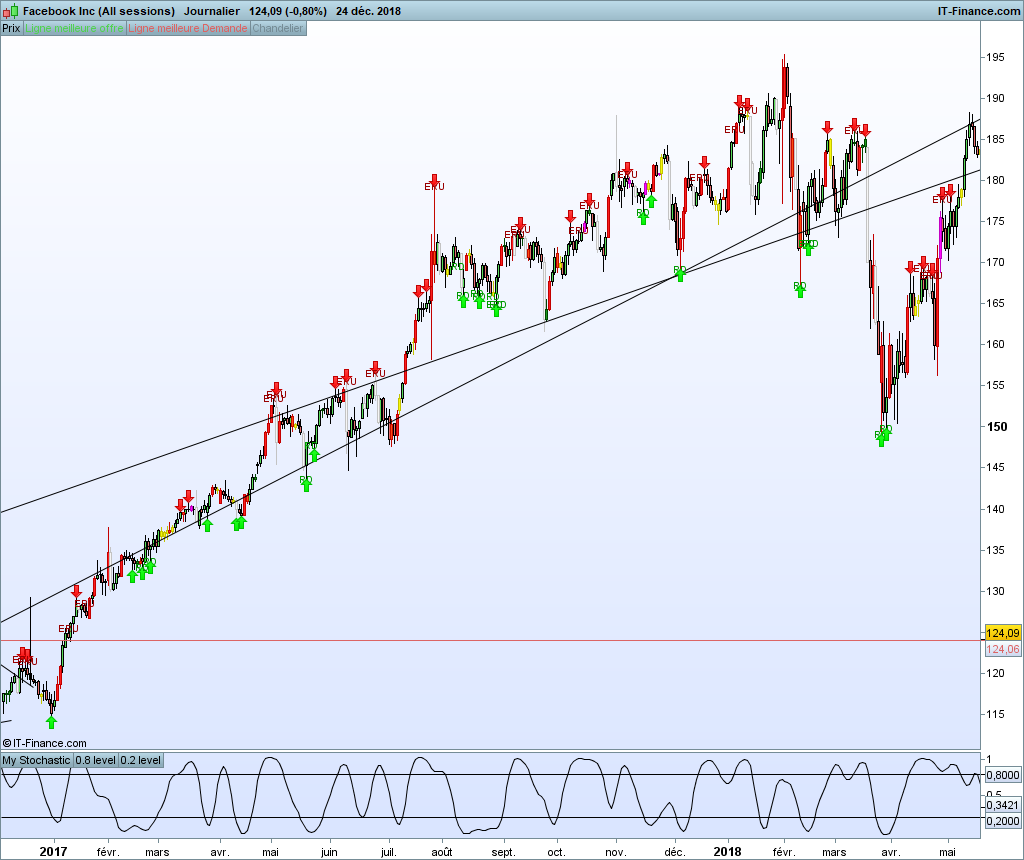
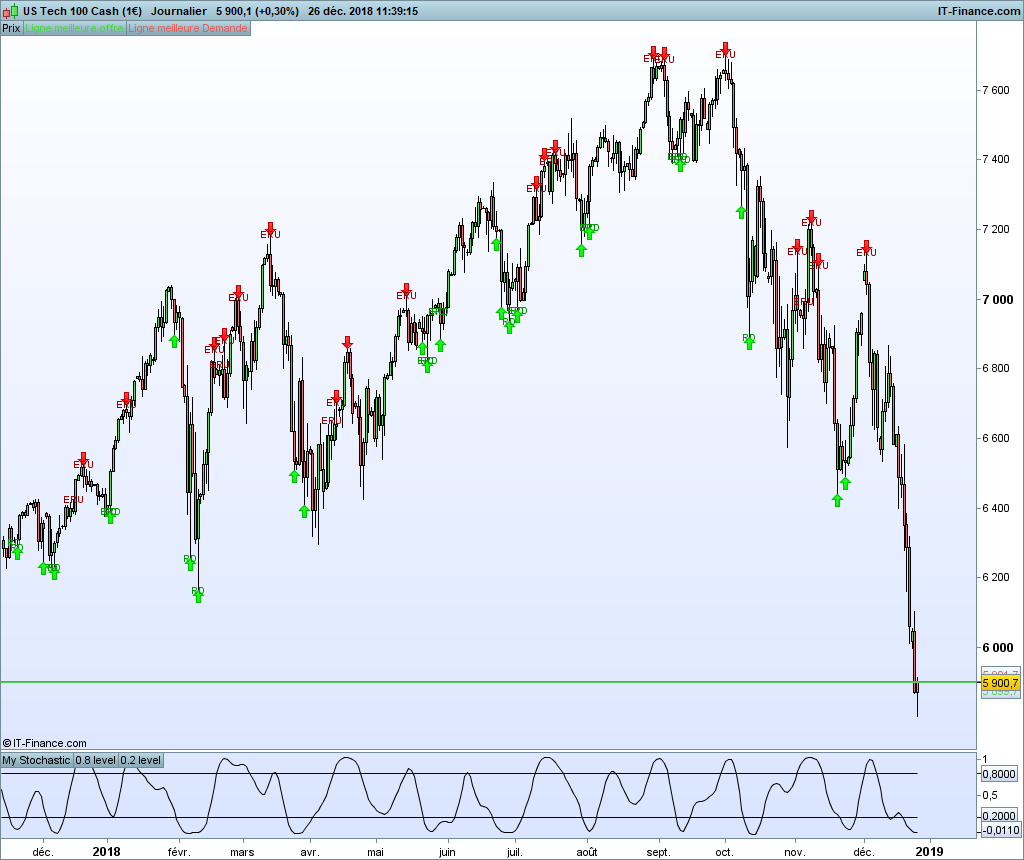
    I’ve have experimented a lot with different Ehler’s Stochastic periods and thresholds (0.01 up to 0.3) and although this is a great indicator (arrows literally on some turning points) there’s just too many false signals (eg, a few green arrows in a falling market) and it still misses some big turning points.

    Cheers!
    Bard

    #122866 quote
    Bard
    Participant
    Master

    * Not Williams Fractal Bottom code — I meant to write “Calculating Diagonal Trend Lines Using Fractals and Trigonometry” in code description field.

    #122956 quote
    juanj
    Participant
    Master

    Hi Bard, I literally just scanned through your request. But here is an updated version of the Fractal code above:

    //Shoulder = 3 //size of shoulders
    
    r = ShoulderSize*2
    
    once SwingH = 0
    once SwingL = 0
    once FractalD = 0
    
    For i = 0 to r Do
    If high[ShoulderSize] > high[i] or i = ShoulderSize Then
    SwingH = SwingH + 1
    EndIf
    If low[ShoulderSize] < low[i] or i = ShoulderSize Then
    SwingL = SwingL + 1
    EndIf
    Next
    
    atr = averagetruerange[r*2]
    
    If SwingH = (r+1) and (FractalD = 0 or FractalD = -1) Then
    FractalH = high[ShoulderSize]
    drawtext("▼",barindex[ShoulderSize],FractalH+atr*3,dialog,bold,20) coloured(25,25,112)
    FractalD = 1
    EndIf
    If SwingL = (r+1) and (FractalD = 0 or FractalD = 1) Then
    FractalL = low[ShoulderSize]
    drawtext("▲",barindex[ShoulderSize],FractalL-atr*3,dialog,bold,20) coloured(176,23,31)
    FractalD = -1
    EndIf
    
    SwingH = 0
    SwingL = 0
    
    return// FractalH coloured(0,255,0) as "High Fractal", FractalL coloured(255,0,0) as "Low Fractal"
    #123159 quote
    Bard
    Participant
    Master

    Wow! This is is amazing, thanks @Juanj,

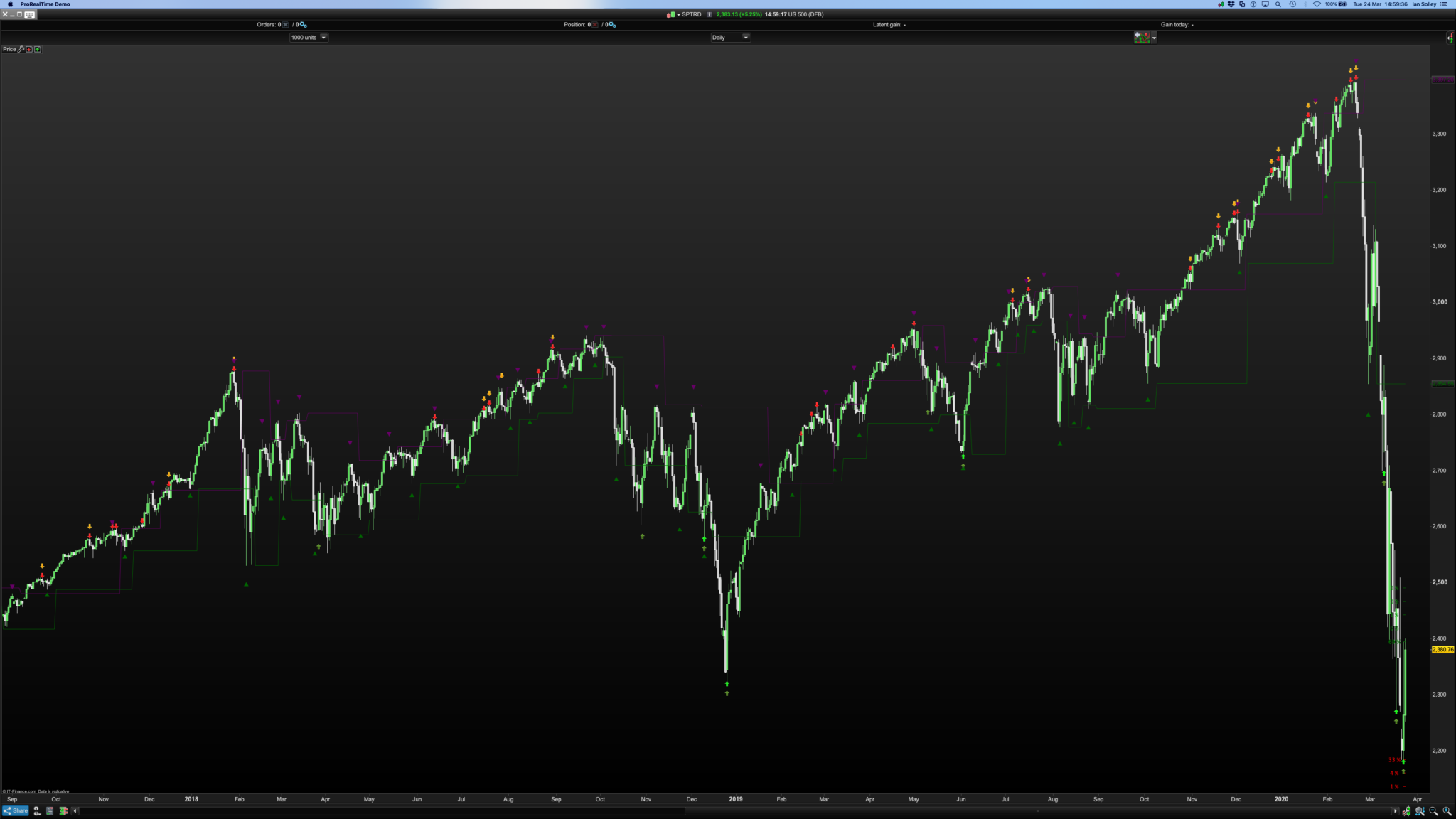
    I’ve compared your fractal indicator to the modified “reversal point indicator” and my modified version – pls see image 1 of daily S&P 500. Shouldersize =5

    The original indicators arrows are bright green and red. My Univ Osc modified indicator uses dark green and orange arrows and the fractal indicator uses green and purple triangles.

    I used a Call code for Ehler’s Universal Oscillator to replace the standard oscillator in the original “reversal point indicator” (my code at the bottom of the comments section of the indicator here: https://www.prorealcode.com/prorealtime-indicators/reversal-point-indicator/)

    I had a couple of questions though, I’m just not sure how to do a substitution using the fractal code for this old c3  = lowest[3](low)<lowest[LowestLow](low)[1] etc, line of the code?

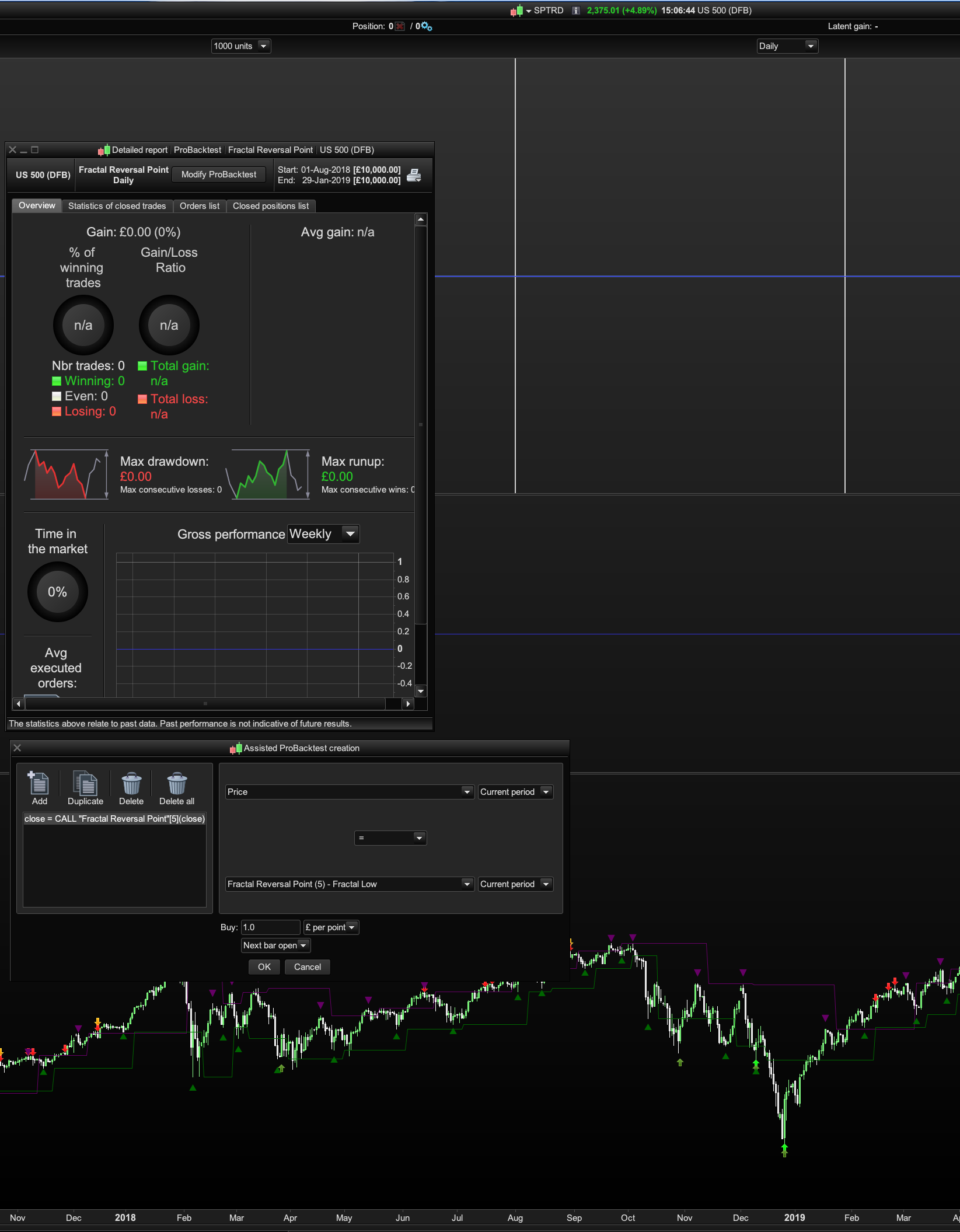
    And if you wanted to do a simplified creation I was wondering why I set it to Buy when Price = FractalL, it doesn’t produce any trades? Pls see second image.

    Also lastly why are the Return Fractal H and Fractal L lines a few bars to the right of the drawarrows on the price chart, i.e. not aligned with the drawarrows?

    Thanks again,

    Cheers, Stay safe!
Viewing 15 posts - 1 through 15 (of 27 total)
  • You must be logged in to reply to this topic.

Ehlers' Sinewave Indicator


ProBuilder: Indicators & Custom Tools

New Reply
Summary

This topic contains 26 replies,
has 1 voice, and was last updated by Suzu Yuk
4 years, 4 months ago.

Topic Details
Forum: ProBuilder: Indicators & Custom Tools
Language: English
Started: 08/19/2016
Status: Active
Attachments: 11 files
Logo Logo
Loading...