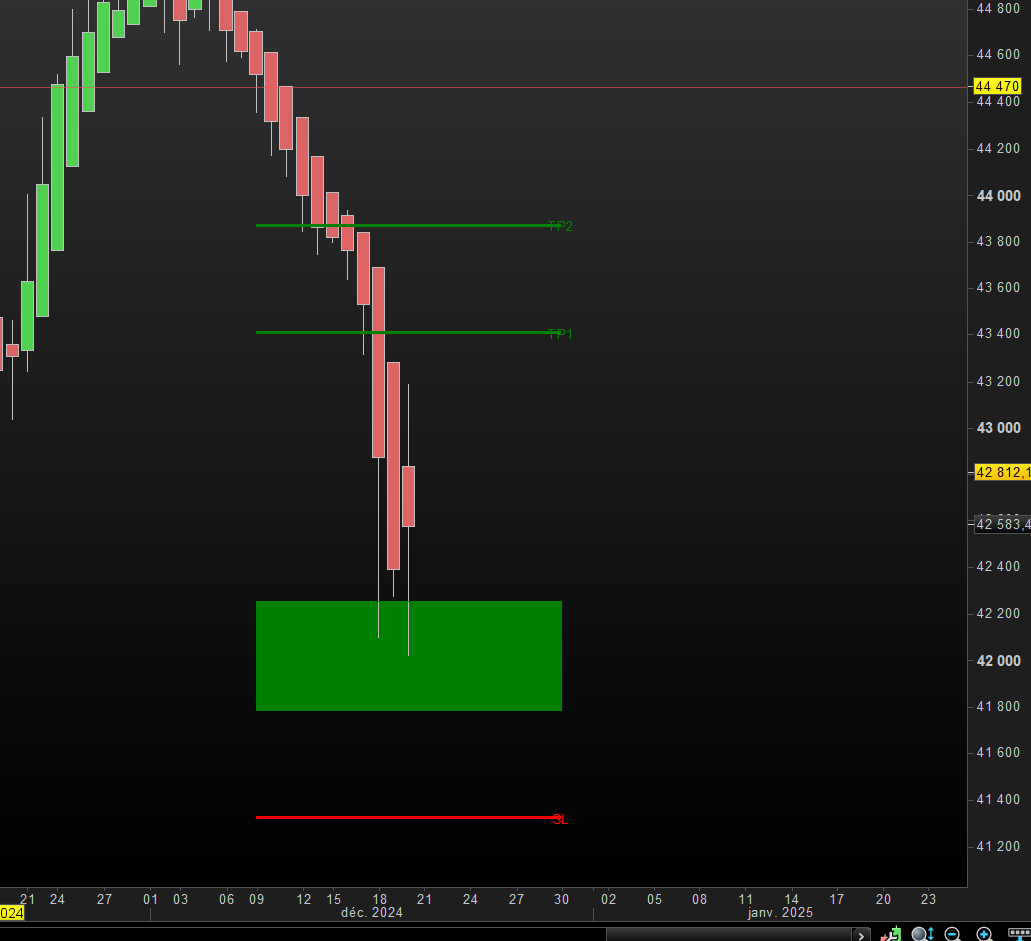
Dynamic Trading Strategy

Viewing 11 posts - 1 through 11 (of 11 total)
  • Author
    Posts
  • #241644 quote
    Poupouille
    Participant
    New

    Bonjour, je souhaiterais savoir s’il était possible de créer l’indicateur ci-dessous pour PRT ?

    https://www.tradingview.com/script/3O0jn6h9-Dynamic-Trading-Strategy-with-Key-Levels-Entry-Exit-Management/

    Je vous remercie

    Iván González thanked this post
    #241680 quote
    fifi743
    Participant
    Master

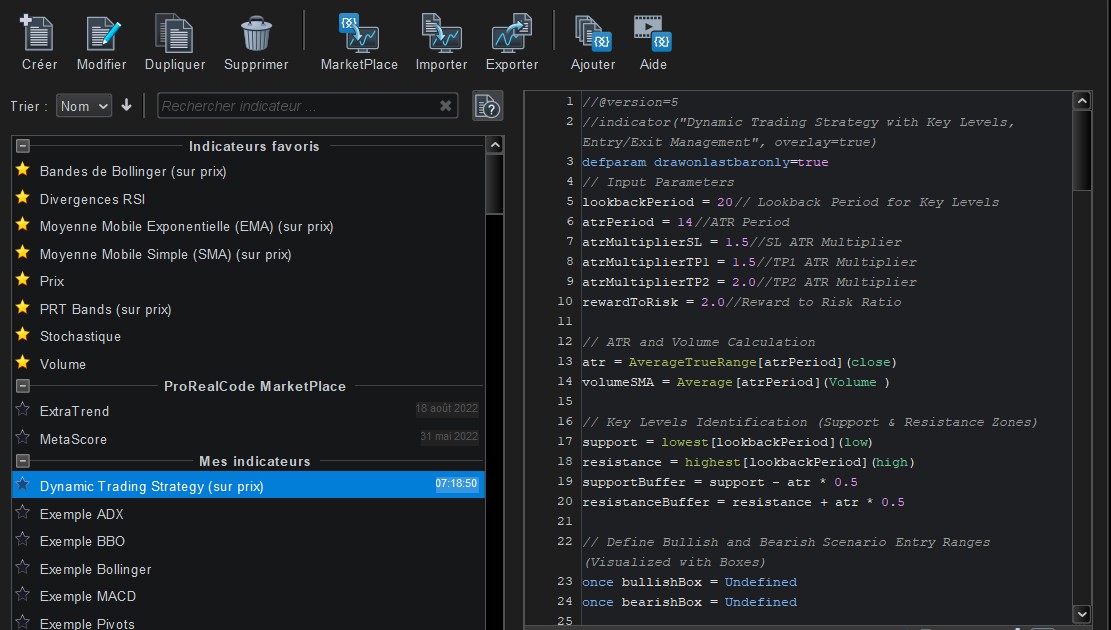
    voici la traduction du code a verifier quand meme

    //@version=5
    //indicator("Dynamic Trading Strategy with Key Levels, Entry/Exit Management", overlay=true)
    defparam drawonlastbaronly=true
    // Input Parameters
    lookbackPeriod = 20// Lookback Period for Key Levels
    atrPeriod = 14//ATR Period
    atrMultiplierSL = 1.5//SL ATR Multiplier
    atrMultiplierTP1 = 1.5//TP1 ATR Multiplier
    atrMultiplierTP2 = 2.0//TP2 ATR Multiplier
    rewardToRisk = 2.0//Reward to Risk Ratio
    
    // ATR and Volume Calculation
    atr = AverageTrueRange[atrPeriod](close)
    volumeSMA = Average[atrPeriod](Volume )
    
    // Key Levels Identification (Support & Resistance Zones)
    support = lowest[lookbackPeriod](low)
    resistance = highest[lookbackPeriod](high)
    supportBuffer = support - atr * 0.5
    resistanceBuffer = resistance + atr * 0.5
    
    // Define Bullish and Bearish Scenario Entry Ranges (Visualized with Boxes)
    once bullishBox = Undefined
    once bearishBox = Undefined
    
    // Bullish Scenario
    isBullishEntry = (close > supportBuffer) and (low <= support) and (volume > volumeSMA)
    if isBullishEntry then
    if bullishBox then
    DRAWRECTANGLE(barindex- 10, support + atr * 0.5 ,barindex+ 10, support - atr * 0.5) COLOURED("green") BORDERCOLOR("green")
    else
    DRAWRECTANGLE(barindex- 10, support + atr * 0.5 ,barindex+ 10, support - atr * 0.5) COLOURED("green")BORDERCOLOR("green")
    
    endif
    endif
    // Bearish Scenario
    isBearishEntry = (close < resistanceBuffer) and (high >= resistance) and (volume > volumeSMA)
    if isBearishEntry then
    if bearishBox then
    DRAWRECTANGLE(barindex- 10, resistance + atr * 0.5 ,barindex+ 10, resistance- atr * 0.5) COLOURED("red")BORDERCOLOR("red")
    
    else
    DRAWRECTANGLE(barindex- 10, resistance + atr * 0.5 ,barindex+ 10, resistance- atr * 0.5) COLOURED("red")BORDERCOLOR("red")
    endif
    endif
    // Stop Loss and Take Profit Calculations for Bullish and Bearish Scenarios
    bullishSL = support - atr * atrMultiplierSL
    bullishTP1 = support + atr * rewardToRisk * atrMultiplierTP1
    bullishTP2 = support + atr * rewardToRisk * atrMultiplierTP2
    
    bearishSL = resistance + atr * atrMultiplierSL
    bearishTP1 = resistance - atr * rewardToRisk * atrMultiplierTP1
    bearishTP2 = resistance - atr * rewardToRisk * atrMultiplierTP2
    
    // Visualization for Bullish Scenario (TP1, TP2, SL Lines with Labels)
    once bullishTP1Line = Undefined
    once bullishTP2Line = Undefined
    once bullishSLLine = Undefined
    once bullishTP1Label = Undefined
    once bullishTP2Label = Undefined
    once bullishSLLabel = Undefined
    
    if isBullishEntry then
    if bullishTP1Line then
    DRAWSEGMENT(barindex- 10, bullishTP1, barindex+ 10, bullishTP1) coloured("green")style(line,2)
    else
    DRAWSEGMENT(barindex- 10, bullishTP1, barindex+ 10, bullishTP1) coloured("green")style(line,2)
    endif
    if bullishTP1Label then
    DRAWTEXT("TP1", barindex+ 10, bullishTP1) coloured("green")
    
    else
    DRAWTEXT("TP1", barindex+ 10, bullishTP1) coloured("green")
    endif
    if bullishTP2Line then
    DRAWSEGMENT(barindex- 10, bullishTP2, barindex+ 10, bullishTP2) coloured("green")style(line,2)
    else
    DRAWSEGMENT(barindex- 10, bullishTP2, barindex+ 10, bullishTP2) coloured("green")style(line,2)
    endif
    if bullishTP2Label then
    DRAWTEXT("TP2", barindex+ 10, bullishTP2) coloured("green")
    else
    DRAWTEXT("TP2", barindex+ 10, bullishTP2) coloured("green")
    endif
    if bullishSLLine then
    DRAWSEGMENT(barindex- 10, bullishSL, barindex+ 10, bullishSL) coloured("red")style(line,2)
    
    else
    DRAWSEGMENT(barindex- 10, bullishSL, barindex+ 10, bullishSL) coloured("red")style(line,2)
    endif
    if bullishSLLabel then
    DRAWTEXT("SL", barindex+ 10, bullishSL) coloured("red")
    
    else
    DRAWTEXT("SL", barindex+ 10, bullishSL) coloured("red")
    endif
    endif
    // Visualization for Bearish Scenario (TP1, TP2, SL Lines with Labels)
    once bearishTP1Line = Undefined
    once bearishTP2Line = Undefined
    once bearishSLLine = Undefined
    once bearishTP1Label = Undefined
    once  bearishTP2Label = Undefined
    once bearishSLLabel = Undefined
    
    if isBearishEntry then
    if bearishTP1Line then
    DRAWSEGMENT(barindex- 10, bearishTP1, barindex+ 10, bearishTP1) coloured("red")style(line,2)
    
    else
    DRAWSEGMENT(barindex- 10, bearishTP1, barindex+ 10, bearishTP1) coloured("red")style(line,2)
    endif
    if bearishTP1Label then
    DRAWTEXT("TP1", barindex+ 10, bearishTP1) coloured("red")
    
    else
    DRAWTEXT("TP1", barindex+ 10, bearishTP1) coloured("red")
    endif
    if bearishTP2Line then
    DRAWSEGMENT(barindex- 10, bearishTP2, barindex+ 10, bearishTP2) coloured("red")style(line,2)
    
    else
    DRAWSEGMENT(barindex- 10, bearishTP2, barindex+ 10, bearishTP2) coloured("red")style(line,2)
    endif
    if bearishTP2Label then
    DRAWTEXT("TP1", barindex+ 10, bearishTP2) coloured("red")
    
    else
    DRAWTEXT("TP1", barindex+ 10, bearishTP2) coloured("red")
    endif
    if bearishSLLine then
    DRAWSEGMENT(barindex- 10, bearishSL, barindex+ 10, bearishSL) coloured("green")style(line,2)
    
    else
    DRAWSEGMENT(barindex- 10, bearishSL, barindex+ 10, bearishSL) coloured("green")style(line,2)
    endif
    if bearishSLLabel then
    DRAWTEXT("SL", barindex+ 10, bearishSL) coloured("green")
    
    else
    DRAWTEXT("SL", barindex+ 10, bearishSL) coloured("green")
    endif
    endif
    return
    
    robertogozzi, LucasBest and Iván González thanked this post
    #241699 quote
    LucasBest
    Participant
    Junior

    Merci pour la traduction.

    Encore un indicateur à ne surtout pas utiliser au vu des résultats (mettre la ligne 3 en commentaire, pour voir les trades proposés par l’indicateur sur tout l’historique) décevant…

    Poupouille thanked this post
    #241702 quote
    Poupouille
    Participant
    New

    voici la traduction du code a verifier quand meme

    Merci bcp pour la traduction.

    #241703 quote
    Poupouille
    Participant
    New

    Merci pour la traduction.

    Encore un indicateur à ne surtout pas utiliser au vu des résultats (mettre la ligne 3 en commentaire, pour voir les trades proposés par l’indicateur sur tout l’historique) décevant…

    Bjr,

    Je ne comprend pas quand vous dites mettre la ligne 3 en commentaire pour voir les trades proposés ? Pouvez-vous m’éclairer ? Je vous remercie.

    #241704 quote
    Atemi19
    Participant
    New

    Lucasbest

    Déjà si tu trades cfd c’est encore pire car pour trader un marché il faut le carnet d’ordre et une profondeur assez vaste du matché j’ai eu le commercial il m’a dit que bientôt prorealtime va pouvoir afficher 20 lignes au carnet d’ordre…..

    #241709 quote
    LucasBest
    Participant
    Junior

    Merci pour la traduction.

    Encore un indicateur à ne surtout pas utiliser au vu des résultats (mettre la ligne 3 en commentaire, pour voir les trades proposés par l’indicateur sur tout l’historique) décevant…

    Bjr,

    Je ne comprend pas quand vous dites mettre la ligne 3 en commentaire pour voir les trades proposés ? Pouvez-vous m’éclairer ? Je vous remercie.

    La ligne “defparam drawonlastbaronly=true” (3ème ligne) stipule que seules les signaux détectés lors de la dernière bougie vont être affichés… Du coup pour voir tous les signaux détectés par l’indicateur (dans le passé), il faut mettre la ligne 3 en commentaire.
    =>
    Il faut mettre “//” devant “defparam drawonlastbaronly=true” : tout ce qui suit les 2 “//” est considéré par prorealtime comme un commentaire…

    #241710 quote
    LucasBest
    Participant
    Junior

    Lucasbest

    Déjà si tu trades cfd c’est encore pire car pour trader un marché il faut le carnet d’ordre et une profondeur assez vaste du matché j’ai eu le commercial il m’a dit que bientôt prorealtime va pouvoir afficher 20 lignes au carnet d’ordre…..

    Ce qui m’embête le plus chez Prorealtime, c’est surtout le lag entre ce qui s’affiche sur le chart et les cours en temps réel… J’ai parfois 3 à 4 seconde de décalage ; ne serait ce qu’en regardant les cours sur le site d’Ig et ce de Prorealtime (via IG). J’ai littéralement 3 à 5 secondes de retard si ce n’est plus. Et je trouve ça beaucoup plus grave que de ne pas avoir le carnet d’ordre que je n’utilise pas perso…

    #241719 quote
    Atemi19
    Participant
    New

    Et pourtant je jette l’éponge sur tout le reste….je ne prend que le carnet d’ordre mais il faut payer pas loin de 40€ par mois pour avoir 10 lignes….et j’ai regarder il y a aussi un gros lag entre le graphique et le carnet d’ordre…..et j’ai étudier pas mal et ce que je peux te dire les ordres limites qui sont cachés c’est ça qui fait le marché et pas les ordres agressifs qui sont visibles par tout le monde….

    LucasBest thanked this post
    #241986 quote
    larouedegann
    Participant
    Master

    Quel miracle !!!!!!!

    cela fait 10 ans que je réclame un carnet d’ordre digne de ce nom avec la profondeur de marché.

    20 lignes c’est un début

    QUID du carnet entier

    Ca coute ?????

    #241987 quote
    Poupouille
    Participant
    New

    Merci énormément pour la traduction du code.
    Cependant, mais peut-être que je m’y prends mal (suis pas un spécialiste lol), lorsque j’essaye de le créer sur PRT, cela ne fonctionne pas !
    Je parviens à créer l’indicateur sur prix, le code s’affiche bien (à droite de la liste des indicateurs prédéfinis) mais rien ne s’affiche sur le graphique ?
    Sans vouloir abuser, pouvez-vous m’aider ?
    Mille mercis d’avance.

Viewing 11 posts - 1 through 11 (of 11 total)
  • You must be logged in to reply to this topic.

Dynamic Trading Strategy


ProBuilder : Indicateurs & Outils Personnalisés

New Reply
Author
author-avatar
Poupouille @poupouille Participant
Summary

This topic contains 10 replies,
has 5 voices, and was last updated by Poupouille
1 year, 1 month ago.

Topic Details
Forum: ProBuilder : Indicateurs & Outils Personnalisés
Language: French
Started: 12/20/2024
Status: Active
Attachments: 3 files
Logo Logo
Loading...