Drawing a horizontal line at the close of a H1 candle on the Dow

Viewing 15 posts - 1 through 15 (of 16 total)
  • Author
    Posts
  • #41051 quote
    Interceptor
    Participant
    New

    Hi

    Is there any code available for drawing a simple horizontal line across a chart, based upon the close of a candle at a set time each day? For example, a horizontal line at the close of the 1pm H1 candle  on the Dow? The line would need to ‘expire’ (delete itself) when the next days line is drawn.

    Many thanks

    #41053 quote
    Nicolas
    Keymaster
    Master

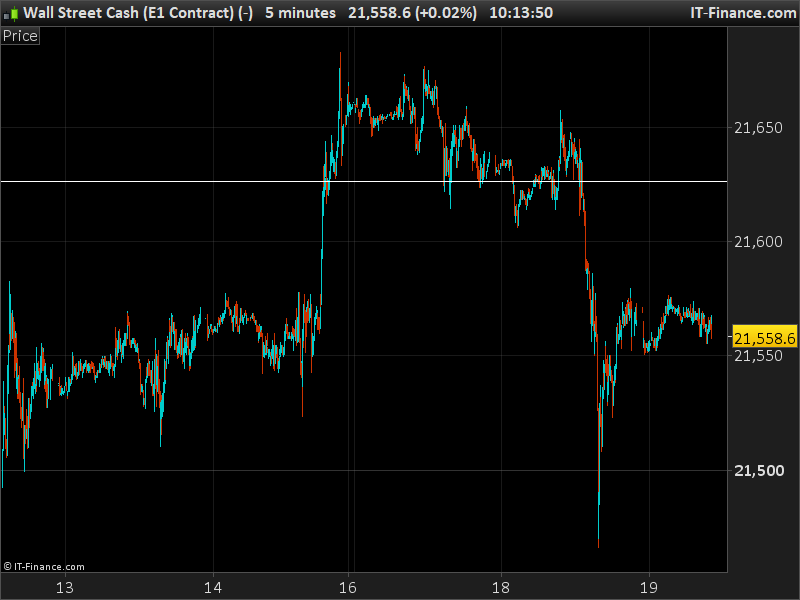
    I think this code should work correctly for this purpose:

    defparam drawonlastbaronly=true
    
    if time=130000 then 
    value=close
    endif
    
    drawhline(value)
    
    return
    draw-an-horizontal-line-on-dow-jones.png draw-an-horizontal-line-on-dow-jones.png
    #41188 quote
    Interceptor
    Participant
    New

    Thank you, Nicolas.

    Much appreciated.

    #41506 quote
    denmar
    Participant
    Veteran

    Hi

    When I try to plot this indicator on a separate pane it plots a 0, when plotted in main pane nothing appears.  Any suggestions?  Thank you.

    #41510 quote
    Nicolas
    Keymaster
    Master

    Because the separate don’t adapt automatically its scale with plotted object like horizontal line. If you change the last line of the code with:

    return value

    it should adapt itself automatically.

    Why it doesn’t show on the main pane? .. be sure the instrument has quote at time it saves the value (1 pm in the code).

    #41511 quote
    denmar
    Participant
    Veteran

    Thanks Nicolas. That works, just as the original one works.

    I wish to plot the Open, High and Low of the first 30 minutes of trading and want it to be displayed on a 5 or 10 min chart. Is this possible?

    Also, I wish to plot yesterday’s Open, High and Low on continuous data ie will have to be able to specify open hours and should also be able to display in various time frames.  Is this possible?

    I realize the requests are much more than the original topic – would it be preferable to start these requests as separate ?

    Thank you.

    #41514 quote
    Nicolas
    Keymaster
    Master

    Yes it’s possible, please open a specific topic for this new query.

    #59708 quote
    crolakstrading
    Participant
    Senior

    hi @nicolas,


    is it possible add a variable to this? where i can change the time adding a variable??

    #59709 quote
    crolakstrading
    Participant
    Senior

    i mean if i want to change the time easily 130000 to 150000

    #59712 quote
    Nicolas
    Keymaster
    Master

    Yes you can store a time in a variable, it’s nothing more than a number 🙂

    defparam drawonlastbaronly=true
    
    mytime = 150000
    
    if time=mytime then 
     value=close
    endif
    
    drawhline(value)
    
    return
    Nobody and Bel thanked this post
    #59732 quote
    crolakstrading
    Participant
    Senior

    hi @nicolas,

    thanks for getting back.. what i meant was.. adding two lines on the chart one at 130000 and one at 150000. and a way to switch those times (add on the variables- like tick or untick) so we can either see two lines on the chart or we can untick to see one?!?! tried below but its a big failure!!

    defparam drawonlastbaronly=true
    mytime = 150000 
    mytime1 = 130000
     
    if time=mytime and mytime1 then
    value=close
    endif
    drawhline(value)
    
    return
    #59783 quote
    Nicolas
    Keymaster
    Master

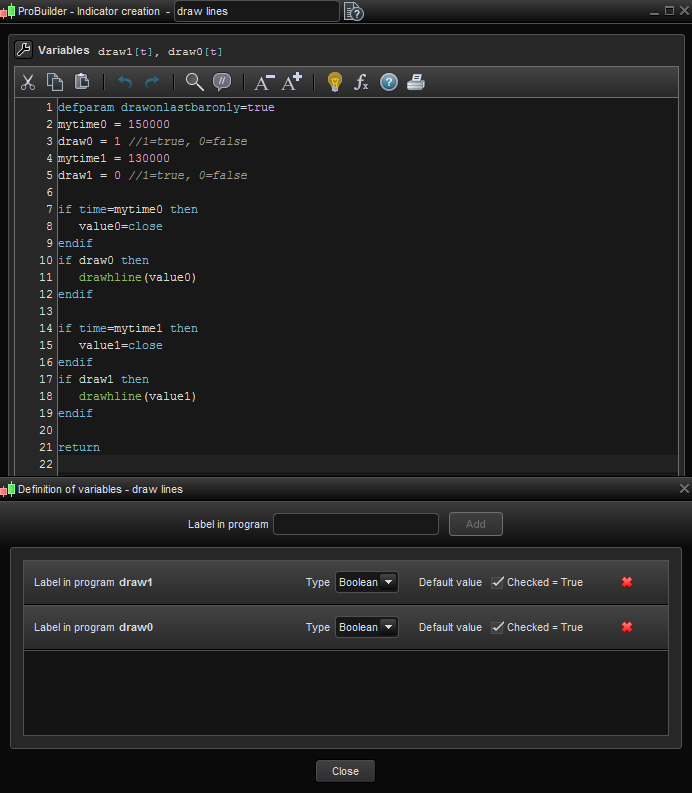
    Ok, here is the modified code for that purpose:(draw0 and draw1 boolean variables been introduced)

    defparam drawonlastbaronly=true
    mytime0 = 150000 
    draw0 = 1 //1=true, 0=false
    mytime1 = 130000
    draw1 = 0 //1=true, 0=false
     
    if time=mytime0 then
     value0=close
    endif
    if draw0 then 
     drawhline(value0)
    endif
    
    if time=mytime1 then
     value1=close
    endif
    if draw1 then 
     drawhline(value1)
    endif
    
    return
    crolakstrading thanked this post
    #59792 quote
    crolakstrading
    Participant
    Senior

    its only show one line.. not sure why. and boolean doesnt seem to work!

    #59802 quote
    Nicolas
    Keymaster
    Master
    draw0 = 1 //1=true, 0=false

    That means if you set “draw0” to 1, it will plot the line. Set to 0, it will plot nothing. Same for “draw1” to draw or not the second line.

    #60115 quote
    crolakstrading
    Participant
    Senior

    hi nicolas,

    still stuggling to get the two lines it only show mytime0 on the chart and mytime1 doesnt show..

    please cant you see attached pic? is that the correct way to add  boolean???

    Capture_2018_01_22_01_34_04_794.png Capture_2018_01_22_01_34_04_794.png
Viewing 15 posts - 1 through 15 (of 16 total)
  • You must be logged in to reply to this topic.

Drawing a horizontal line at the close of a H1 candle on the Dow

ProBuilder: Indicators & Custom Tools

New Reply
Author
Summary

This topic contains 15 replies,
has 4 voices, and was last updated by Nicolas

8 years, 1 month ago.

Topic Details
Forum: ProBuilder: Indicators & Custom Tools
Language: English
Started: 07/19/2017
Status: Active
Attachments: 2 files
Logo Logo
Loading...