Hi, can anyone help me building a code for drawing a rectangle and color it or just 2 lines with colored area in between?
Thank you in advance
Just made this one, can you help to Stop the last Rectangle when a new one is formed?
TopImbalance = low[2] <= open[1] and high[0] >= close[1]
TopImbalancesize = low[2] - high[0]
if TopImbalance and TopImbalancesize > 0 then
drawcandle(low[2], low[2], high[0], high[0]) coloured(255,255,0)
if Tracage then
drawrectangle(BarIndex[2],low[2],BarIndex + 10,high[0])coloured (255,204,204,255) bordercolor(204,0,0)
endif
endif
BottomInbalance = high[2] >= open[1] and low[0] <= close[1]
BottomInbalancesize = low[0] - high[2]
if BottomInbalance and BottomInbalancesize > 0 then
drawcandle(low[0], low[0], high[2], high[2]) coloured(255,255,0)
if Tracage then

drawrectangle(BarIndex[2],high[2],BarIndex + 10,low[0]) coloured(204,255,204,255) bordercolor(0,204,0)
endif
endif

return
Add this line at the very beginning of your code:
Defparam DrawOnLastBarOnly = True
Thank you
I have 2 questions:
- How to limite a nombre of rectangle drawing in the past instead of having only the last?
For example to have the last 10 rectangle only?
2) How can i display a rectangle for example of a 15 minutes time frame in a 2 minutes chart?
1/ Must use arrays for that: store each of the coordinates of the rectangle into different variables arrays and plot them in the past from the last candle.
(I’m looking for an example in the forum..)
2/ use TIMEFRAME instruction to store the values from that timeframe only.
So i have to declare the time frame
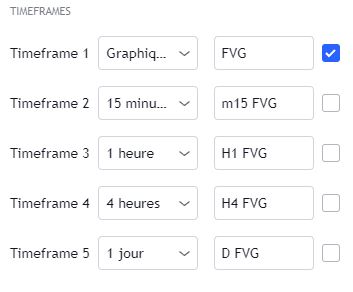
timeframe(1 hour) for example, i want to declare variables true or false for different time frame
for example in the picture below
There is no way to create a condition block that embed the TIMEFRAME instruction. However there is a workaround with CALL, see complete discussion here: https://www.prorealcode.com/topic/condition-et-timeframe/
Here is a draft version of the MTF indicator:
defparam drawonlastbaronly=true

timeframe(default) //!!DO NOT CHANGE TIMEFRAME HERE!!
ibar=max(1,barindex)

timeframe(15 minutes,updateonclose) //<=== CHANGE TIMEFRAME HERE (default is for the current timeframe of the chart)
//timeframe(default) //<== example with timeframe of the chart.
//timeframe(1 hour,updateonclose) //<== example with timeframe 1-hour.
//timemframe(1 day,updateonclose) //<== example with timeframe daily.

TopImbalance = low[2] <= open[1] and high[0] >= close[1]
TopImbalancesize = low[2] - high[0]
if TopImbalance and TopImbalancesize > 0 then
a=a+1
$y1[a]=low[2]
$y2[a]=high[0]
$dir[a] = 1
$x1[a]=ibar
$x2[a]=ibar+10
//drawrectangle(BarIndex[2],low[2],BarIndex + 10,high[0])coloured (255,204,204,255) bordercolor(204,0,0)
endif
BottomInbalance = high[2] >= open[1] and low[0] <= close[1]
BottomInbalancesize = low[0] - high[2]
if BottomInbalance and BottomInbalancesize > 0 then
a=a+1
$y1[a]=high[2]
$y2[a]=low[0]
$dir[a] = -1
$x1[a]=ibar
$x2[a]=ibar+10
//drawrectangle(BarIndex[2],high[2],BarIndex + 10,low[0]) coloured(204,255,204,255) bordercolor(0,204,0)
endif

timeframe(default)
if islastbarupdate and a>1 then
for i=a downto 1 do
if $dir[i]=1 then
drawrectangle($x1[i],$y1[i],$x2[i],$y2[i])coloured (255,204,204,255) bordercolor(204,0,0)
elsif $dir[i]=-1 then
drawrectangle($x1[i],$y1[i],$x2[i],$y2[i])coloured (204,255,204,255) bordercolor(0,204,0)
endif
next
endif

return
Thanks for the feedback, so I can't change line 6 by putting in place of the 15 minutes a variable that I can change manually? for example T
In order to change the timeframe, change it at line 6 with any other ones, as described with the examples in the code 🙂