Draw Candles with Color-Setting

Viewing 4 posts - 1 through 4 (of 4 total)
  • Author
    Posts
  • #187991 quote
    davidsheim
    Participant
    New

    I have in my code this

    EL = myE1E4 =1
    ES = myE1E4 =-1
    if EL then
    DRAWCANDLE(open, high, low, close) Coloured (80,210,80, 175)
    elsif ES then
    DRAWCANDLE(open, high, low, close) Coloured (220,100,100,175)

    and the candle color can only changed in the code.

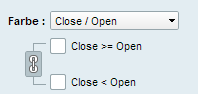
    How can i make a color change Setting like in the picture.

    Candle_Color_Setting.png Candle_Color_Setting.png
    #187993 quote
    robertogozzi
    Moderator
    Master

    Remove the COLOURED instruction:

    DRAWCANDLE(open, high, low, close)

    so you will be able to change their colour using the indicator’s settings.

    #187994 quote
    davidsheim
    Participant
    New

    Thanks


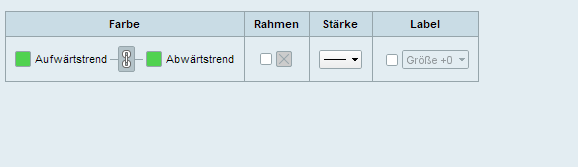
    Then i got this one.

    But i need 2 different colors.

    One for EL and One for ES.

    Can i fix it?

    Candle_Color_Setting-1.png Candle_Color_Setting-1.png
    #187996 quote
    robertogozzi
    Moderator
    Master

    If EL & ES mean Bullish and Bearish, you only have to click the chain link to make two colours available.

Viewing 4 posts - 1 through 4 (of 4 total)
  • You must be logged in to reply to this topic.

Draw Candles with Color-Setting


ProBuilder: Indicators & Custom Tools

New Reply
Author
author-avatar
davidsheim @davidsheim Participant
Summary

This topic contains 3 replies,
has 2 voices, and was last updated by robertogozzi
4 years ago.

Topic Details
Forum: ProBuilder: Indicators & Custom Tools
Language: English
Started: 02/10/2022
Status: Active
Attachments: 2 files
Logo Logo
Loading...