Draw Candles with Color-Setting

Viewing 4 posts - 1 through 4 (of 4 total)
  • Author
    Posts
  • #187991 quote
    davidsheimdavidsheim
    Participant
    New

    I have in my code this

    EL = myE1E4 =1
    ES = myE1E4 =-1
    if EL then
    DRAWCANDLE(open, high, low, close) Coloured (80,210,80, 175)
    elsif ES then
    DRAWCANDLE(open, high, low, close) Coloured (220,100,100,175)

    and the candle color can only changed in the code.

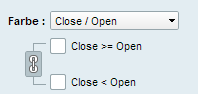
    How can i make a color change Setting like in the picture.

    Candle_Color_Setting.png Candle_Color_Setting.png
    #187993 quote
    robertogozzirobertogozzi
    Moderator
    Legend

    Remove the COLOURED instruction:

    DRAWCANDLE(open, high, low, close)

    so you will be able to change their colour using the indicator’s settings.

    #187994 quote
    davidsheimdavidsheim
    Participant
    New

    Thanks


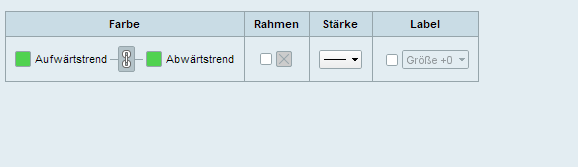
    Then i got this one.

    But i need 2 different colors.

    One for EL and One for ES.

    Can i fix it?

    Candle_Color_Setting-1.png Candle_Color_Setting-1.png
    #187996 quote
    robertogozzirobertogozzi
    Moderator
    Legend

    If EL & ES mean Bullish and Bearish, you only have to click the chain link to make two colours available.

Viewing 4 posts - 1 through 4 (of 4 total)
  • You must be logged in to reply to this topic.

ProRealAI ProRealAI New

Stuck on this ProBuilder code?

Describe what this topic is trying to build, in plain English, and ProRealAI writes the ProRealTime™ indicator, screener or system for you.

Available in 7 languages
Try ProRealAI

Draw Candles with Color-Setting


ProBuilder: Indicators & Custom Tools

New Reply
Author
author-avatar
davidsheim @davidsheim Participant
Summary

This topic contains 3 replies,
has 2 voices, and was last updated by robertogozzirobertogozzi
4 years, 7 months ago.

Topic Details
Forum: ProBuilder: Indicators & Custom Tools
Language: English
Started: 02/10/2022
Status: Active
Attachments: 2 files
ProRealCode ProRealCode
Loading...