Definitively, I don’t understand how work proscreener motor…

Viewing 9 posts - 1 through 9 (of 9 total)
  • Author
    Posts
  • #116558 quote
    enriquem
    Participant
    Average

    Good afternoon,
    Please, let me introduce my self, I am new in this world, and I am learning as much I can…
    But, I don’t understand how works proscreener search engine.
    Perhaps is because I came from another kind of programming,
    I was trying to study another screeners before to create my own screeners.
    I am using free proreal time V11 with values at end of day( soon I will update to realtime…)
    My doubts:

    Doubt 1:

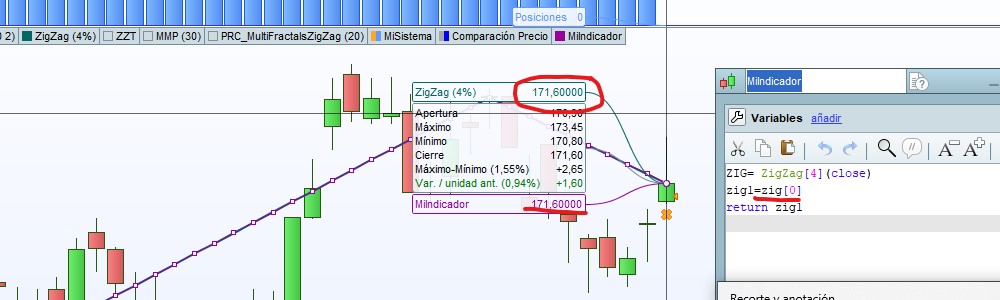
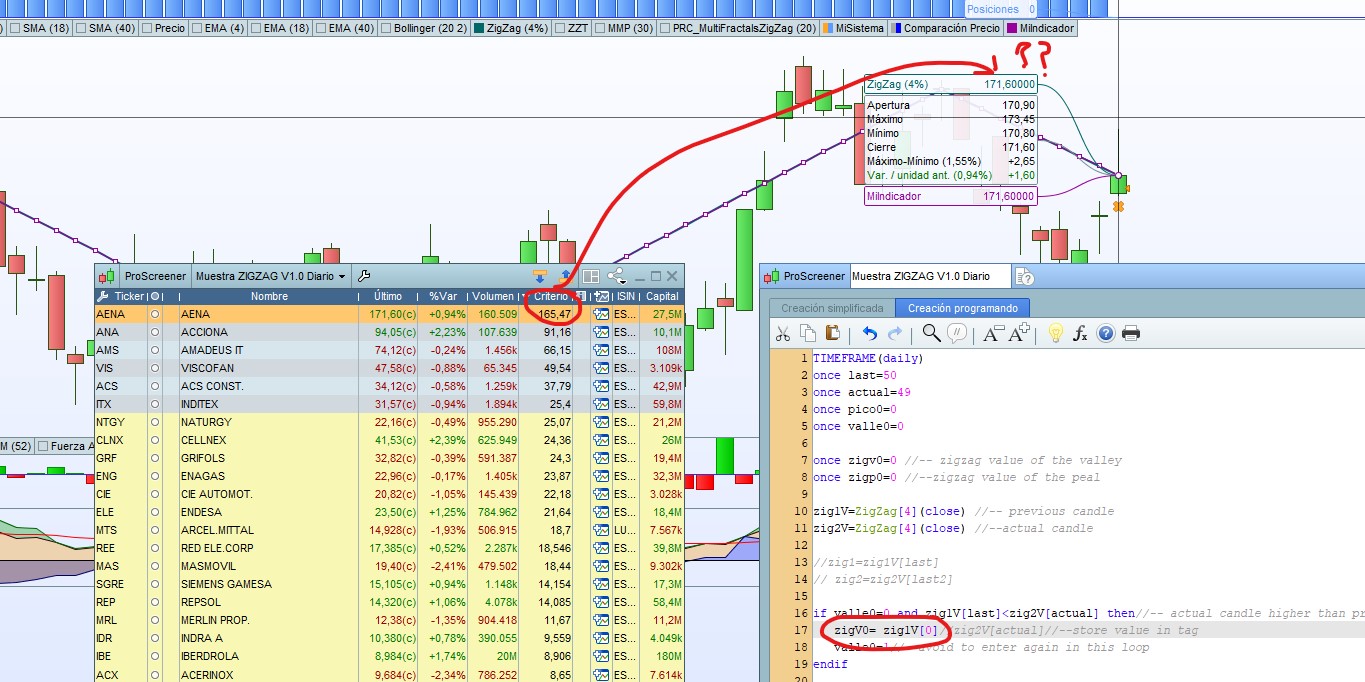
    For example, I use one indicator that shows last zigzag value, I see that returned value matches with chart (image001.jpg)

    ZIG= ZigZag[4](close)
    zig1=zig[0]
    return zig1

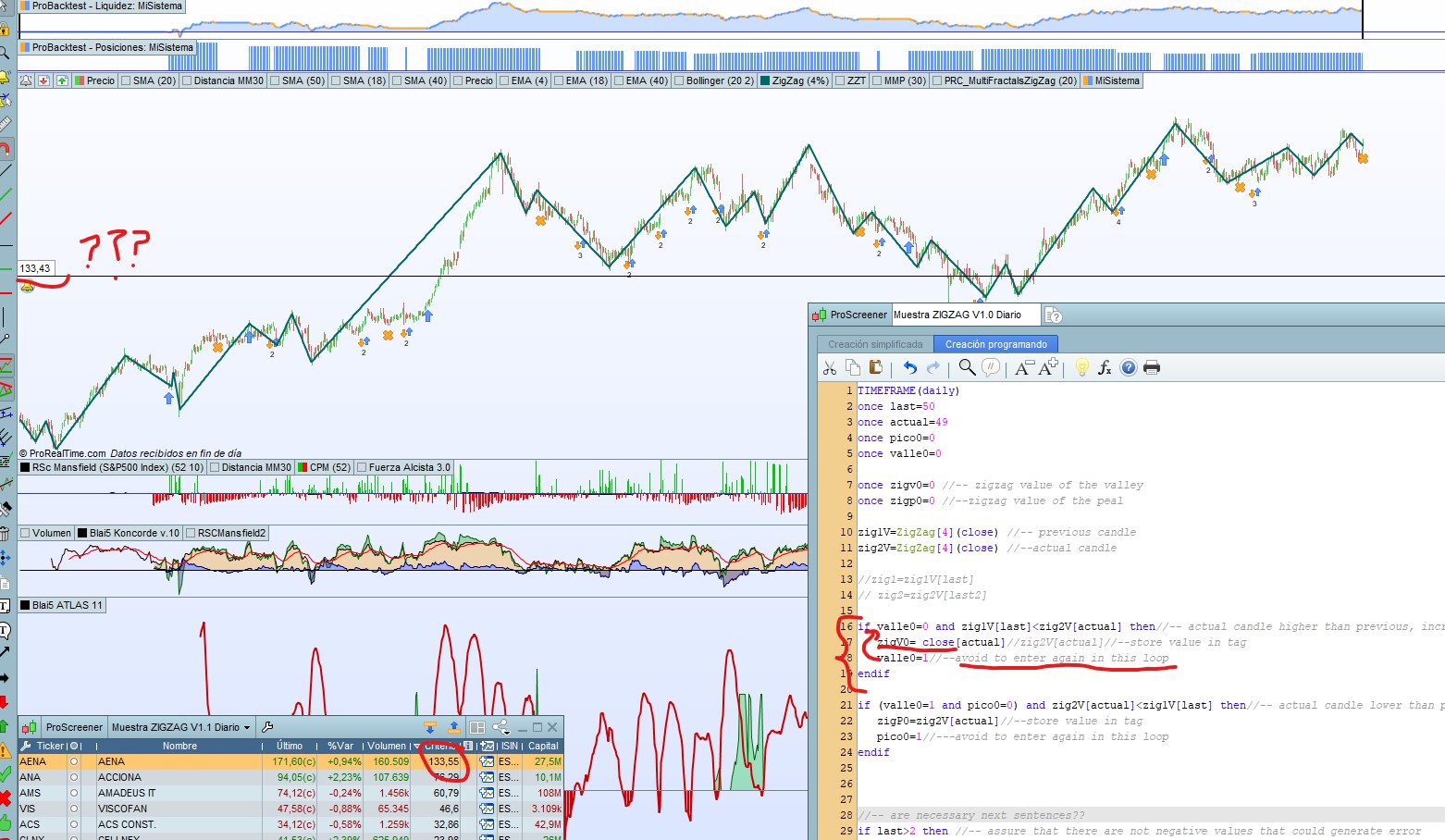
    But, same instruction in proscreener has different return(image002.jpg), why??

    if valle0=0 and zig1V[last]<zig2V[actual] then//-- actual candle higher than previous, increasing ramp
    zigV0= zig1V[0]//zig2V[actual]//--store value in tag
    valle0=1//--avoid to enter again in this loop
    endif

    This hasn’t a lot of sense, I know,.. i just to understand the program..

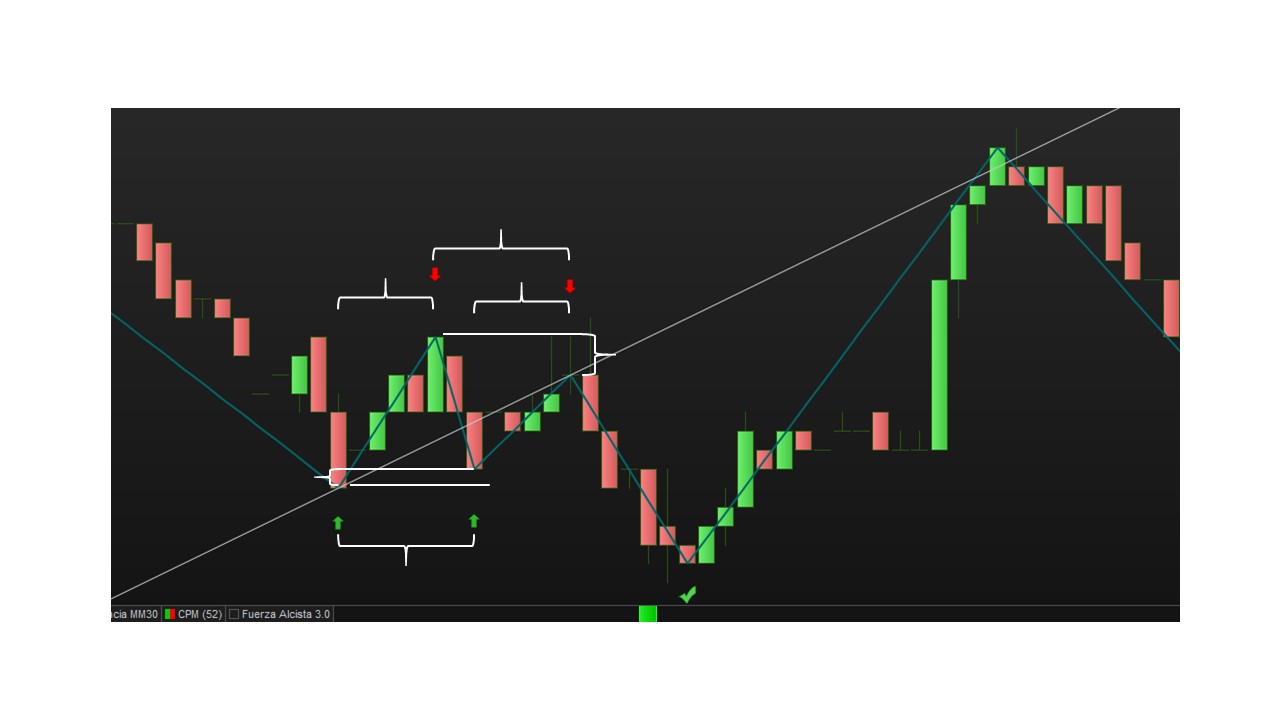
    In fact , the returned value is not matching with any peak or valley (image003.jpg); i added a line for better visualization.


    doubt 2:

    Why  I see in some screeners at the tag declaration the use of “once” instruction?? Does it means that the code is not executed only one time?
    What the the rules for code execution?
    Normally, in another worlds, to execute several times, it is used loops, FOR; WHILE….

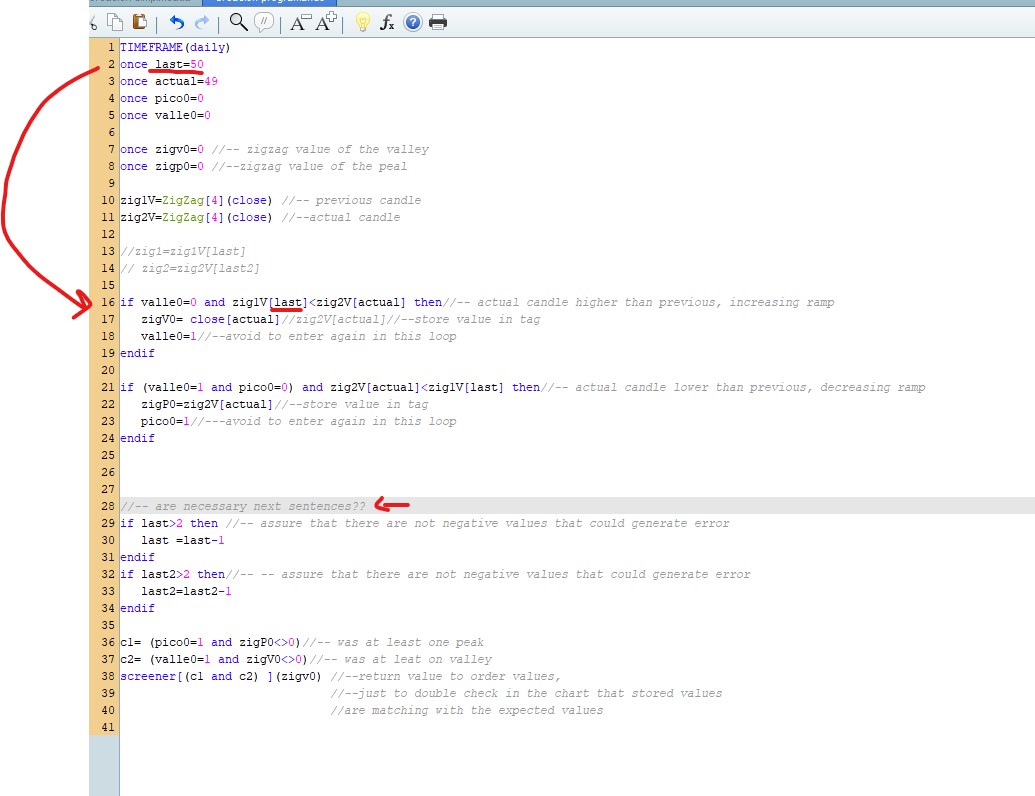
    All of this become because I have created a screener(image004.jpg), but it hasn’t the expected behaviour:

    What I want to do with this code:
    -Call zigzag function and detect changing trend(peak/valley), but only a number of periods before (with tag); not from very begining.
    -Store values of peaks and valleys in different tags…
    -Show results with recent peaks and valleys

    TIMEFRAME(daily)
    once last=50
    once actual=49
    once pico0=0
    once valle0=0
    
    once zigv0=0 //-- zigzag value of the valley
    once zigp0=0 //--zigzag value of the peal
    
    zig1V=ZigZag[4](close) //-- previous candle
    zig2V=ZigZag[4](close) //--actual candle
    
    //zig1=zig1V[last]
    // zig2=zig2V[last2]
    
    if valle0=0 and zig1V[last]<zig2V[actual] then//-- actual candle higher than previous, increasing ramp
    zigV0= close[actual]//zig2V[actual]//--store close value of the change in tag
    valle0=1//--avoid to enter again in this loop
    endif
    
    if (valle0=1 and pico0=0) and zig2V[actual]<zig1V[last] then//-- actual candle lower than previous, decreasing ramp
    zigP0=zig2V[actual]//--store close value of the change in tag
    pico0=1//---avoid to enter again in this loop
    endif


    //-- are necessary next sentences?? 
    if last>2 then //-- assure that there are not negative values that could generate error
    last =last-1
    endif
    if last2>2 then//-- -- assure that there are not negative values that could generate error
    last2=last2-1
    endif
    
    c1= (pico0=1 and zigP0<>0)//-- was at least one peak
    c2= (valle0=1 and zigV0<>0)//-- was at leat on valley
    screener[(c1 and c2) ](zigv0) //--return value to order values,
                                  //--just to double check in the chart that stored values
                                  //are matching with the expected values 
    

    -tags LAST and ACTUAL are discounted automatically? do  I need to decrease manually?
    If I not decrease them, comparision will be done with same values?

    I don’t know If I was really clear with my doubts…. (I tried believe me.. 🙂 )

    Thanks in advance for help…

    image001.jpg image001.jpg image002.jpg image002.jpg image003.jpg image003.jpg image004.jpg image004.jpg
    #116618 quote
    Nicolas
    Keymaster
    Master

    I might not understand the whole problem, but I think it comes from your own coding experience with other programming language.

    ProBuilder coding language has no array for personal variable (not yet but will come soon), and I think that you want your code to use it. A number in brackets [10] is just an offset of bars quantity on the chart, not the 10th value in an variable array.

    “once” instruction is used to give a variable a value only one time at the first read of the code.

    Have in mind, that ProScreener has a data history available of “only” 254 periods, so some discrepancies might occur between a chart and what ProScreener can read. ZigZag of 4 percent from peak to valley start at first bar available in history, and if the history is different, therefore the result can be different.

    #116695 quote
    enriquem
    Participant
    Average

    Hello

    First, to say thanks for fast reply and demonstrate interest… 🙂

    ProBuilder coding language has no array for personal variable (not yet but will come soon), and I think that you want your code to use it. A number in brackets [10] is just an offset of bars quantity on the chart, not the 10th value in an variable array.

    Yes, I see, but for me what is strange is from where is starting this offset… Does it means that the offset is for each candle? So, code is going trough every candle?… from the first one?

    In case of yes,  How to delimit it?

    What I want with my code is to have stored in tags:

    Valley0-> value of first zigzag change(from decrease to increase), no far than xxx candles
    Peak0->value of first zigzag change(from increase to decrease), no far than xxx candles

    Valley1-> value of second zigzag change(from decrease to increase), no far than xxx candles
    Peak1->value of second zigzag change(from increase to decrease), no far than xxx candles

    Valley2-> value of third zigzag change(from decrease to increase), no far than xxx candles
    Peak2->value of third zigzag change(from increase to decrease), no far than xxx candles

    But, I am not receiving expected returns…

    Thanks again for you sharing of knowledge  🙂

    #116742 quote
    Nicolas
    Keymaster
    Master

    Without arrays, you have 2 solutions:

    1. you know that you only want to store the last 3 zigzag points, so in this case, use 3 variables with 3 different names and change their values each time a new zigzag appear
    2. store all Valley in a variable “Valley” and make a loop through data to fetch all previous values of that variable and do what you want from there..

    Look at how I proceed in this indicator code example: https://www.prorealcode.com/prorealtime-indicators/zigzag-supdem-supply-and-demand-zones/

    I made loop through the lookback periods to compare variables “t” (valley) and “p” (peak) between them.

    Variables arrays will make our life easier! They will come very soon I hope!! 🙂

    #117243 quote
    enriquem
    Participant
    Average

    Hello,
    finally, I created that works… I still have doubts about how are manage some data types.but….. hahahah

    Is not perfect, and surely….could be improved.. but as I am beginner; I am more or less happy… 🙂

    I accept advices..

    //-----------------------------Configure screener
    TIMEFRAME(daily)
    //--analysis for value conditions
      // Maximum % allowed between peaks 1-3 and also for valley 2-4
      // Example: point 3 must not differ from point 1 more than this value 
    maxVgap=2
    
    //-- Analysis for timing conditions
      //-- in %, maximum diference between ramps
      //--Distance between points 1-3 and 2-4 must not exceed this value
      //--to assusre equitative ramps 
    MaxTiempoGap=15
    Lookback=80
    
    //------------------------------ Code
    zz = ZigZag[4](close)
    p = zz<zz[1] and zz[1]>zz[2]
    v = zz>zz[1] and zz[1]<zz[2]
    
    if p then
    top = zz[1]
    endif
    if v then
    bottom = zz[1]
    endif
    //------ Point 1 detection
    for i =lookback downto 1  do
    if v[i] then
    Vpunto1= bottom[i]
    punto1=1
    vela1=i
    break
    ENDIf
    next
    
    //--------Point 2 detection
    if punto1=1 then//-- Only in first point of waves is already detected
    for i =vela1-1 downto 1  do //--start to search from previous point
    if p[i] then
    Vpunto2= top[i]
    punto2=1
    vela2=i
    break
    ENDIf
    next
    endif
    
    //------Point 3 detection
    if punto2=1 then
    for i =vela2-1 downto 1  do//--start to search from previous point
    if v[i] then
    Vpunto3= bottom[i]
    punto3=1
    vela3=i
    break
    ENDIf
    next
    endif
    
    //-----------Point 4 detection
    if punto3=1 then
    for i =vela3-1 downto 1  do//--start to search from previous point
    if p[i] then
    Vpunto4= top[i]
    punto4=1
    vela4=i
    break
    ENDIf
    next
    endif
    
    //--------Point 5 detection
    if punto4=1 then
    for i =vela4-1 downto 1  do//--start to search from previous point
    if v[i] then
    Vpunto5= bottom[i]
    punto5=1
    vela5=i
    break
    ENDIf
    next
    endif
    
    //---------------------------------Analysis
    
    //-- Value Point 3 compared with point 1 must not exceed the configured delta
    Gap13=abs((Vpunto3*100)/Vpunto1)-100
    Gap13OK=Gap13 <maxVGap
    
    //-- Value Point 4 compared with point 2 must not exceed the configured delta
    Gap24=abs((Vpunto4*100)/Vpunto2)-100
    Gap24OK=abs(Gap24) <maxVGap
    
    //--Distance between candles of point 1-2 and 3-4 must not differ more than the percentage set at begin,assuring equitative ramps
    Tiempo12=abs(Vela2-Vela1)
    Tiempo34=abs(Vela4-Vela3)
    TiemposGap=abs(((tiempo34*100)/Tiempo12)-100)
    CT=TiemposGap<MaxTiempoGap
    
    //--Distance between points 1-3 and 2-4, must be lower than 3 candles
    //--may be used also percentage
    Tiempo13=abs(Vela3-Vela1)//23
    Tiempo24=abs(Vela2-Vela4)//4
    CD=abs(Tiempo13-Tiempo24)<3
    
    C1= (punto1=1) and (Vpunto1<>0)
    C2= (punto2=1) and (Vpunto2<>0)
    C3= (punto3=1) and (Vpunto3<>0) and (Vpunto3 > Vpunto1) and Gap13OK //--ramps are equitative
    C4= vela4<>0 and (punto4=1) and (Vpunto4<>0) and (Vpunto4 < Vpunto2) and Gap24OK
    C5= vela5<>0 and (punto5=1) and (Vpunto5<>0) and (Vpunto5 < Vpunto3) //-- Point 5 lowe than point 3
    
    screener[C1 and C2 and C3 and C4 and C5 and CT and CD ](Vpunto1)//- First point of WOLF WAVE, search for this valley


    Was created in Spanish.. sorry for that.

    Tiempo -> Time
    Vela-> Candle
    Punto->Point

    What does this code:
    With this code is detect Wolfe wave pattern, can be configured to stablish the quality of the wolfe waves, detecting delta between candles and values of points.

    What doesn’t does  this code:
    Detect if the last candle of chart is in buying area, wolfe pattern could be some candles before…

    In attachment there is an example of result…

    What will be great from code Suite:
    -Arrays.
    -Debug of tags, or a list with tag values at end of execute, I had to add returning 1 by 1 all the tags to be sure that were ok

    Thanks

    Wolfe-V0.1.jpg Wolfe-V0.1.jpg
    #117353 quote
    enriquem
    Participant
    Average

    Hi, new version,

    With this other type, are find values with current scenario in the point 5,

    //-----------------------------Configure screener
    TIMEFRAME(daily)
    //--analysis for value conditions
    // Maximum % allowed between peaks 1-3 and also for valley 2-4
    // Example: point 3 must not differ from point 1 more than this value
    maxVgap=2
    
    //-- Analysis for timing conditions
    //-- in %, maximum diference between ramps
    //--Distance between points 1-3 and 2-4 must not exceed this value
    //--to assusre equitative ramps
    MaxTiempoGap=30
    Lookback=80
    
    //------------------------------ Code
    zz = ZigZag[4](close)
    p = zz<zz[1] and zz[1]>zz[2]
    v = zz>zz[1] and zz[1]<zz[2]
    
    if p then
    top = zz[1]
    endif
    if v then
    bottom = zz[1]
    endif
    //------ Point 5 detection
    for i =1 to lookback  do
    if v[i] then
    Vpunto5= bottom[i]
    punto5=1
    vela5=i
    break
    ENDIf
    next
    
    //--------Point 4 detection
    if punto5=1 then//-- Only in first point of waves is already detected
    for i =vela5+1to lookback  do //--start to search from previous point
    if p[i] then
    Vpunto4= top[i]
    punto4=1
    vela4=i
    break
    ENDIf
    next
    endif
    
    //------Point 3 detection
    if punto4=1 then
    for i =vela4+1 to lookback  do//--start to search from previous point
    if v[i] then
    Vpunto3= bottom[i]
    punto3=1
    vela3=i
    break
    ENDIf
    next
    endif
    
    //-----------Point 2 detection
    if punto3=1 then
    for i =vela3+1to lookback  do//--start to search from previous point
    if p[i] then
    Vpunto2= top[i]
    punto2=1
    vela2=i
    break
    ENDIf
    next
    endif
    
    //--------Point 1 detection
    if punto2=1 then
    for i =vela2+1 to lookback  do//--start to search from previous point
    if v[i] then
    Vpunto1= bottom[i]
    punto1=1
    vela1=i
    break
    ENDIf
    next
    endif
    
    //-----------Point recent peak detection
    if punto5=1 then
    for i =1 to lookback  do//-
    if p[i] then
    //Vpunto2= top[i]
    Recentpeak=1
    Peakpos=i
    break
    ENDIf
    next
    endif
    
    //---------------------------------Analysis
    
    //-- Value Point 3 compared with point 1 must not exceed the configured delta
    Gap13=abs((Vpunto3*100)/Vpunto1)-100
    Gap13OK=Gap13 <maxVGap
    
    //-- Value Point 4 compared with point 2 must not exceed the configured delta
    Gap24=abs((Vpunto4*100)/Vpunto2)-100
    Gap24OK=abs(Gap24) <maxVGap
    
    //--Distance between candles of point 1-2 and 3-4 must not differ more than the percentage set at begin,assuring equitative ramps
    Tiempo12=abs(Vela2-Vela1)
    Tiempo34=abs(Vela4-Vela3)
    TiemposGap=abs(((tiempo34*100)/Tiempo12)-100)
    CT=TiemposGap<MaxTiempoGap
    
    //--Distance between points 1-3 and 2-4, must be lower than 3 candles
    //--may be used also percentage
    Tiempo13=abs(Vela3-Vela1)//23
    Tiempo24=abs(Vela2-Vela4)//4
    CD=abs(Tiempo13-Tiempo24)<4
    
    buyOK=(Recentpeak=1) and (Peakpos > vela5)  //-- Last Zigzag was the valley of Point 5, not peak aof zigzag after point 5
    
    C1= (punto1=1) and (Vpunto1<>0)
    C2= (punto2=1) and (Vpunto2<>0)
    C3= (punto3=1) and (Vpunto3<>0) and (Vpunto3 > Vpunto1) and Gap13OK //--ramps are equitative
    C4= vela4<>0 and (punto4=1) and (Vpunto4<>0) and (Vpunto4 < Vpunto2) and Gap24OK
    C5= vela5<>0 and (punto5=1) and (Vpunto5<>0) and (Vpunto5 < Vpunto3) //-- Point 5 lowe than point 3
    
    screener[C1 and C2 and C3 and C4 and C5 and CT and CD and buyOK ](Vpunto1)//- First point of WOLF WAVE, search for thi valley
    #117367 quote
    Nicolas
    Keymaster
    Master

    Thanks a lot for this valuable screener code! It should be featured in the library! Could you please put it there if you don’t mind? With some explanations? If you don’t have time i would do it for you.

    Share your code into the library!

    #118305 quote
    enriquem
    Participant
    Average

    Hello and sorry for my absence..

    I was busy these last days… For me will be be very satisfactory to share my first code with the community, of course… I will try to do it during weekend, did you played with the screener? For me what is a pity is that screener cannot draw in the chart.. would be nicest…
    #118328 quote
    Nicolas
    Keymaster
    Master
    This is a nice stock screener that will benefit to a lot of people. The screener is not a code to plot on the chart 🙂 Create an indicator from your screener code and add it on the price chart.
Viewing 9 posts - 1 through 9 (of 9 total)
  • You must be logged in to reply to this topic.

Definitively, I don’t understand how work proscreener motor…


ProScreener: Market Scanners & Detection

New Reply
Author
author-avatar
enriquem @enriquemico Participant
Summary

This topic contains 8 replies,
has 2 voices, and was last updated by Nicolas

6 years, 1 month ago.

Topic Details
Forum: ProScreener: Market Scanners & Detection
Language: English
Started: 01/12/2020
Status: Active
Attachments: 5 files
Logo Logo
Loading...