ProRealCode - Trading & Coding with ProRealTime™
Liebe PRTler,
ich muss erneut dieses Forum behelligen.
Zwar gibt es so einiges an Codes zum Thema GAP, aber irgendwie möchte ich doch selbst was meinen Vorstellungen entspricht auf die Reihe bekommen.
Sicher habe ich einen fatalen Denkfehler schon in der ersten Bedingung, denn es wird kein einziges GAP gefunden, auch scheint die Suche nach dem jeweiligem Barindex nicht zu laufen (separat auch erfolglos getestet).
Ob das Gap bereits geschlossen wurde, habe ich mal völligst außen vor gelassen, dies dann abschließend wenn die Prüfung selbst funktioniert.
Wo liegt denn mein grober Denkfehler?
Ich danke vorab und wünsche ein schönes Wochenende.
Liebe Grüße
Rainer
Defparam DrawonLastbaronly = True
//********************************************************************************************************************************************************************
// Timeframe 5 Minute
BIM = Barindex
MinGap = 10
If IsLastbarUpdate Then
For Dx = 0 To 10 Do
If Abs((DClose(Dx+1) And Time = 173000) - (DOpen(Dx) And Time = 080000)) > MinGap Then
For Ox = 0 To BIM Do
If Barindex[Ox] = (Day[Dx+1] And Time = 173000) Then
OpenBarX = Barindex[Ox]
OpenPrice = Open[Ox]
Break
EndIf
Next
For Cx = 0 To BIM Do
If Barindex[Cx] = (Day[Dx] And Time = 080000) Then
CloseBarX = Barindex[Cx]
ClosePrice = Close[Cx]
Break
EndIf
Next
DrawRectangle(OpenBarX,OpenPrice,CloseBarX,ClosePrice) Coloured(0,0,255,50) Bordercolor(0,0,255)Style(Line,3)
EndIf
Next
Endif
//********************************************************************************************************************************************************************
Return
Warum gehen Sie in Zeile 9 von 0 auf 10?
In den Zeilen 11 und 19 vergleichen Sie BARINDEX mit DAY, wofür benötigen Sie diesen Vergleich (was unmöglich ist, da es unterschiedliche Werte gibt)?
Hallo Roberto,
vielen Dank, wollte jetzt nicht am Wochenende stören. Eilt keinesfalls.
Deine Frage ist berechtigt, ich hatte einfach mal nach Vorstellung drauf losgetippt.
DtC = 2 // Days To Check
MinGap = 0
For Dx = 0 To DtC Do
If (Day[Dx+1] And Time = 173000) Then
CloseBarX = Barindex
ClosePrice = Close
DRAWVLINE(CloseBarX)Coloured(255,255,0)
DRAWSEGMENT(CloseBarX, ClosePrice, CloseBarX+20, ClosePrice)Coloured(255,255,0)Style(Line,3)
EndIf
If (Day[Dx] And Time = 080000) Then
OpenBarX = Barindex
OpenPrice = Open
DRAWVLINE(OpenBarX)Coloured(0,255,255)
DRAWSEGMENT(OpenBarX, OpenPrice, OpenBarX+20, OpenPrice)Coloured(0,255,255)Style(Line,3)
EndIf
If ((OpenPrice - ClosePrice) > MinGap) Then
DrawRectangle(OpenBarX,OpenPrice,CloseBarX,ClosePrice) Coloured(255,0,0,50) Bordercolor(255,0,0)Style(Line,3)
EndIf
If ((ClosePrice - OpenPrice) > MinGap) Then
DrawRectangle(OpenBarX,OpenPrice,CloseBarX,ClosePrice) Coloured(0,255,0,50) Bordercolor(0,255,0)Style(Line,3)
EndIf
Next
Return
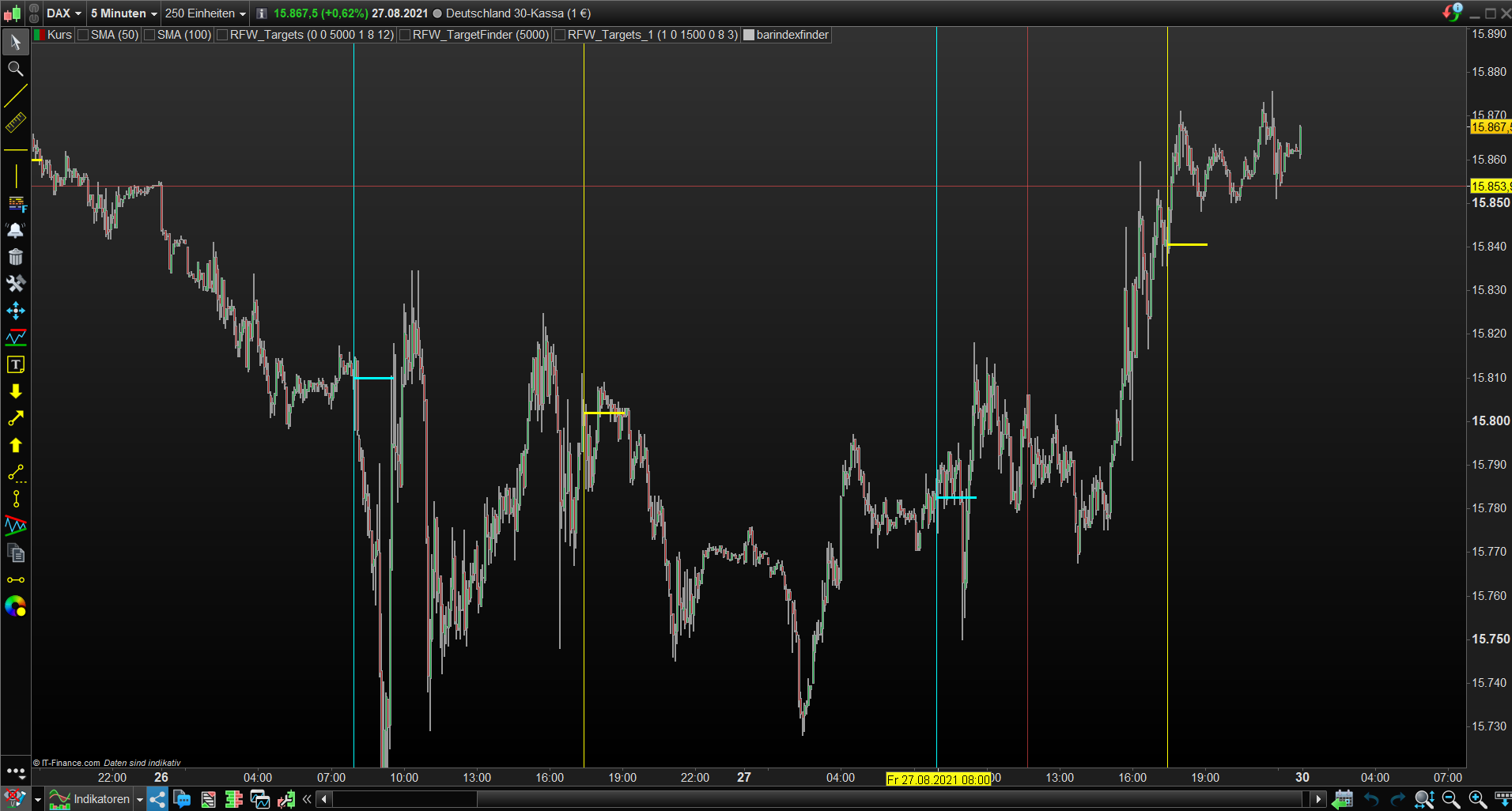
Zwischenzeitlich habe ich herausgefunden, wie entsprechender Barindex/Kurs zu ermitteln ist, siehe Code. Jedoch verstehe ich hier nicht so richtig, weshalb nicht nur von 17:30 Uhr Vortag bis 08:00 Uhr Folgetag gezeichnet wird, siehe Screenshots. Gern hätte ich eigentlich mit “Defparam Drawonlastbaronly = True” gearbeitet, aber dann bin ich noch ratloser, musss noch sehr viel lernen…
Ggf. Idee?
Recht herzlichen Danke vorab und schönes Wochenende. Ich teste weiter…
Liebe Grüße
Rainer
DtC = 10 // Days To Check
MinGap = 0
For Dx = 0 To DtC Do
If (Day[Dx+1] And Time = 173000) Then
CloseBarX = Barindex
ClosePrice = Close
DRAWVLINE(CloseBarX)Coloured(255,255,0)
DRAWSEGMENT(CloseBarX, ClosePrice, CloseBarX+20, ClosePrice)Coloured(255,255,0)Style(Line,3)
EndIf
If (Day[Dx] And Time = 080000) Then
OpenBarX = Barindex
OpenPrice = Open
DRAWVLINE(OpenBarX)Coloured(0,255,255)
DRAWSEGMENT(OpenBarX, OpenPrice, OpenBarX+20, OpenPrice)Coloured(0,255,255)Style(Line,3)
EndIf
If ((OpenPrice - ClosePrice) > MinGap) Then
DrawRectangle(CloseBarX,ClosePrice, OpenBarX,OpenPrice) Coloured(255,0,0,50) Bordercolor(255,0,0)Style(Line,3)
EndIf
If ((ClosePrice - OpenPrice) > MinGap) Then
DrawRectangle(CloseBarX,ClosePrice,OpenBarX,OpenPrice) Coloured(0,255,0,50) Bordercolor(0,255,0)Style(Line,3)
EndIf
Next
Return
…weshalb auch von 08:00 bis 1700 gezeichnet wird ist mir noch schleierhaft…
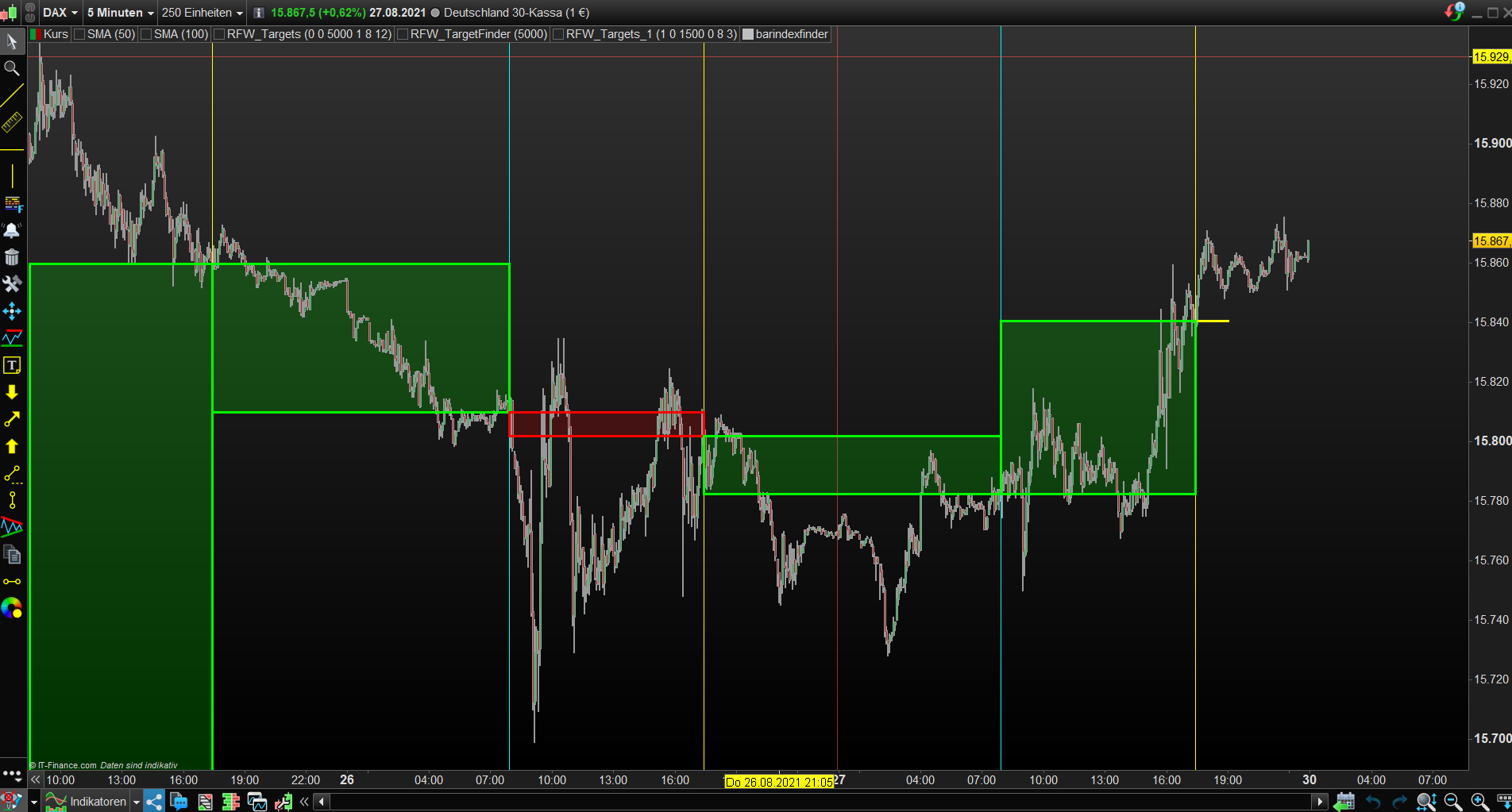
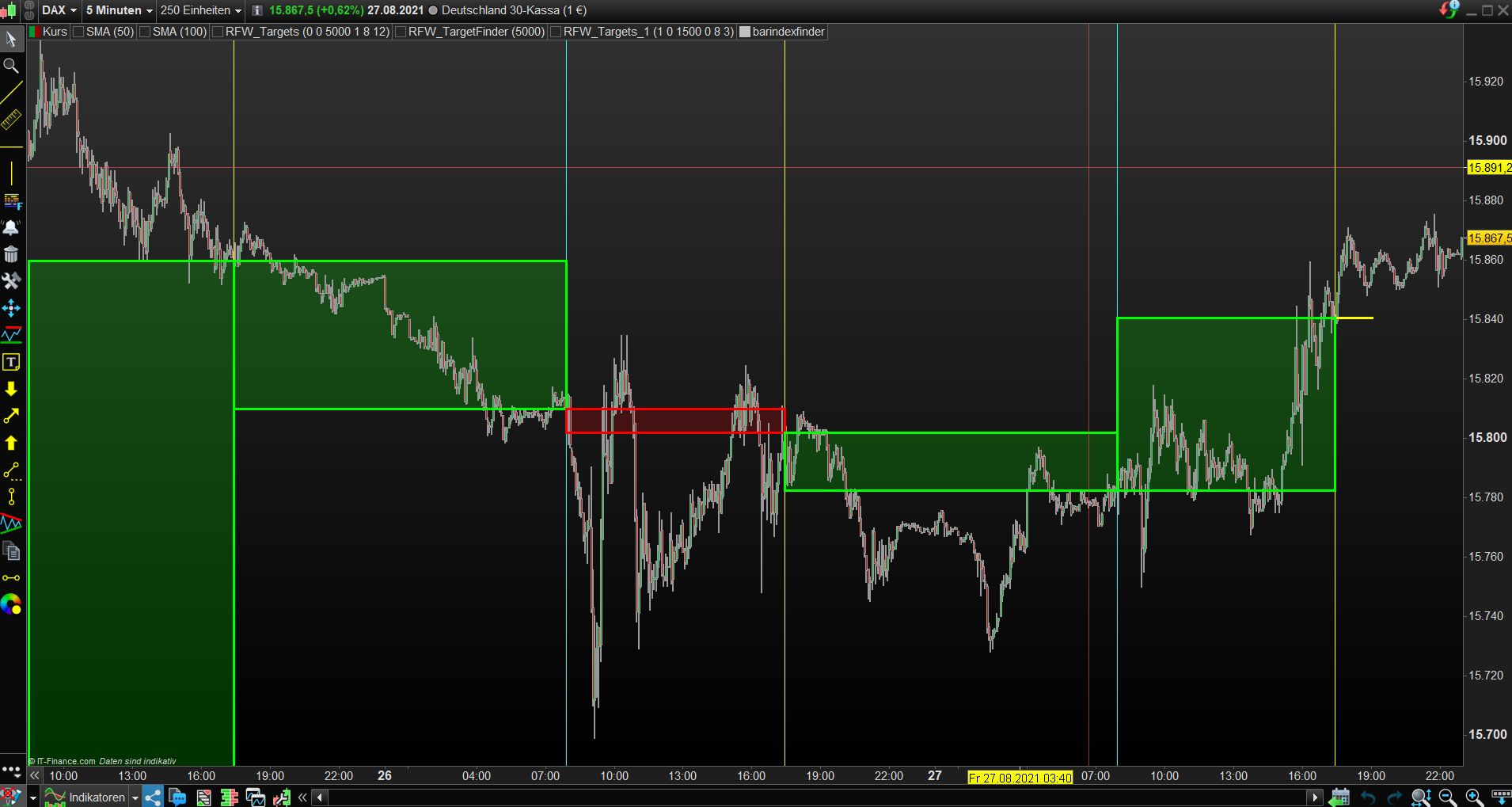
..mit Vergleich ob “Barindex Zeichnungsbeginn < Barindex Zeichnungsende diese Problem gelöst"
DtC = 10 // Days To Check
MinGap = 0
For Dx = 0 To DtC Do
If (Day[Dx+1] And Time = 173000) Then
CloseBarX = Barindex
ClosePrice = Close
DRAWVLINE(CloseBarX)Coloured(255,255,0)
DRAWSEGMENT(CloseBarX, ClosePrice, CloseBarX+20, ClosePrice)Coloured(255,255,0)Style(Line,3)
EndIf
If (Day[Dx] And Time = 080000) Then
OpenBarX = Barindex
OpenPrice = Open
DRAWVLINE(OpenBarX)Coloured(0,255,255)
DRAWSEGMENT(OpenBarX, OpenPrice, OpenBarX+20, OpenPrice)Coloured(0,255,255)Style(Line,3)
EndIf
If ((OpenPrice - ClosePrice) > MinGap) AND (CloseBarX < OpenBarX) Then
DrawRectangle(CloseBarX,ClosePrice, OpenBarX,OpenPrice) Coloured(255,0,0,50) Bordercolor(255,0,0)Style(Line,3)
EndIf
If ((ClosePrice - OpenPrice) > MinGap) AND (CloseBarX < OpenBarX) Then
DrawRectangle(CloseBarX,ClosePrice,OpenBarX,OpenPrice) Coloured(0,255,0,50) Bordercolor(0,255,0)Style(Line,3)
EndIf
Next
Return
Tolle Arbeit Lorien !
Hallo Roberto,
herzlichen Dank, sehr freundlich.
Allerdings hat es noch nicht ganz meinen Vorstellungen entsprochen.
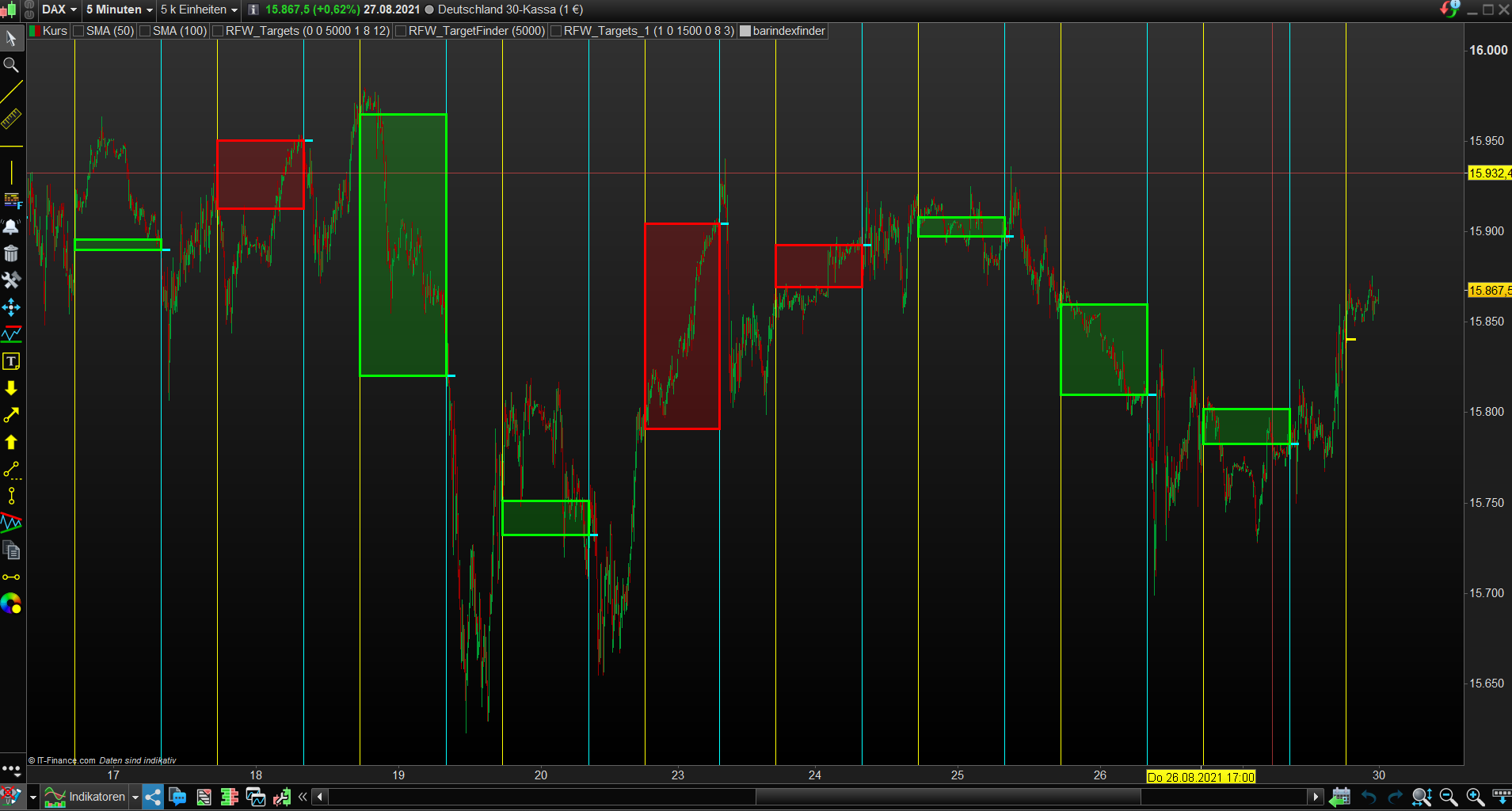
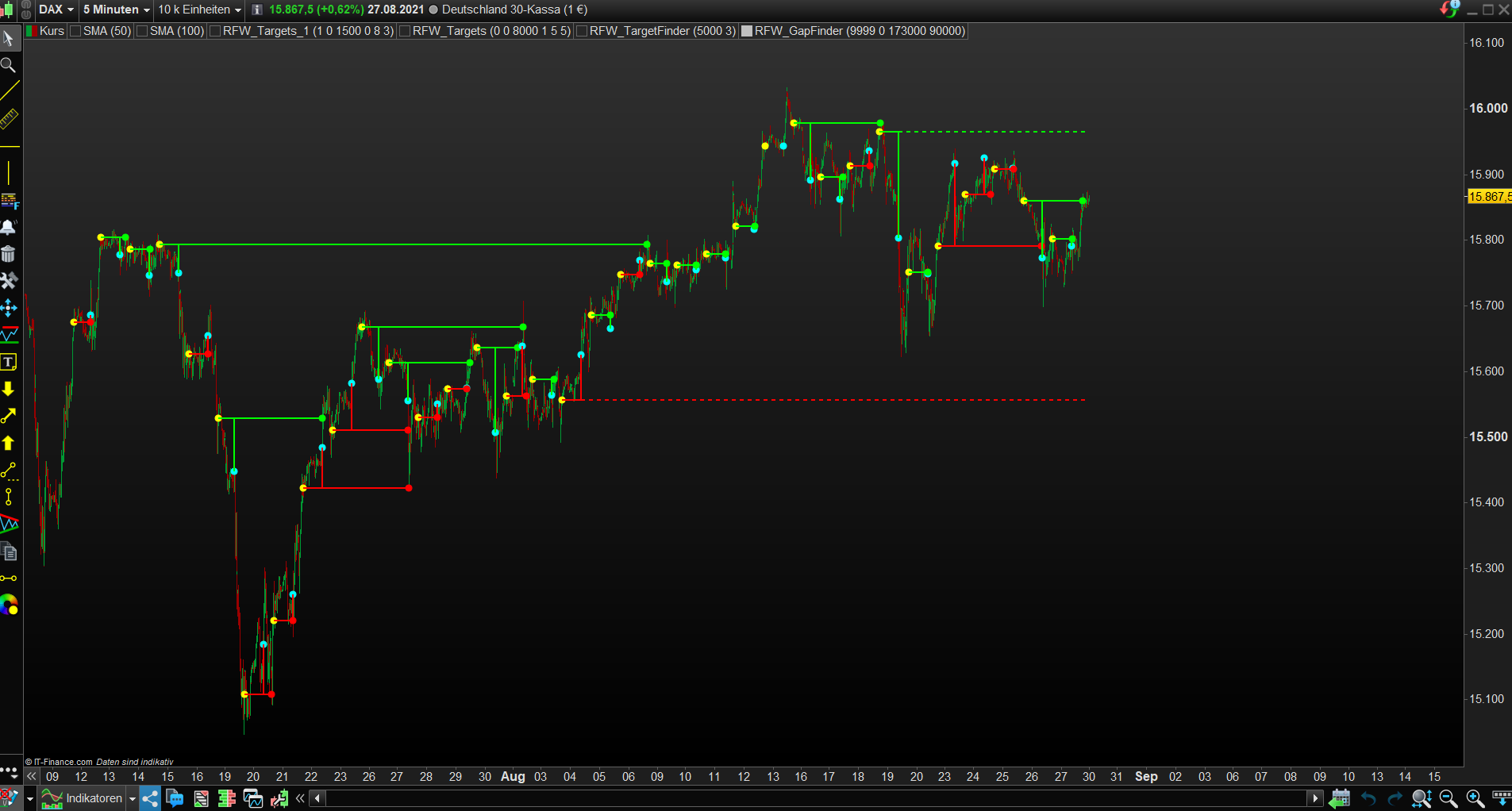
Nachfolgend, bzw. anbei/nachfolgend Screenshot/Endversion, nunmehr auch die eigentlich wichtige Anzeige von offenen Gaps. itf. Datei nachstehen, ggf. kann jemand dies sinnvoll einsetzen.
Noch einen schönen Sonntag und Danke für die stets vorbildliche Moderation/Hilfe.
Liebe Grüße
Rainer
// Rainer-Franz Wirth Rainer FW(RFW) @ prorealcode.com
//********************************************************************************************************************************************************************
Defparam Drawonlastbaronly = True
Defparam Calculateonlastbars = 10000
//********************************************************************************************************************************************************************
//LookBack = 3000
//MinGap = 10
GFCT = DayCloseTime // 173000
GFOT = DayOpenTime // 90000
//********************************************************************************************************************************************************************
For FOS = 0 To 250 Do
If Time[FOS] = GFOT Then
LOX = Barindex[FOS]
LOXC = Open[FOS]
Break
EndIf
Next
LBI = Barindex-LOX[FOS] // Last Open
//********************************************************************************************************************************************************************
If IsLastBarupdate Then
For LBX1 = LookBack DownTo LBI+1 Do
If Time[LBX1] = GFCT Then
CloseBarX = Barindex[LBX1]
ClosePrice = Close[LBX1]
DRAWPOINT(CloseBarX,ClosePrice,2)Coloured(255,255,0)Bordercolor(255,255,0)
DRAWSEGMENT(CloseBarX, ClosePrice, CloseBarX+20, ClosePrice)Coloured(255,255,0)Style(Line,2)
If CloseBarX > 0 Then
For LBX2 = LBX1-1 DownTo LBI Do
If Time[LBX2] = GFOT Then
OpenBarX = Barindex[LBX2]
OpenPrice = Open[LBX2]
DRAWPOINT(OpenBarX,OpenPrice,2)Coloured(0,255,255)Bordercolor(0,255,255)
DRAWSEGMENT(OpenBarX, OpenPrice, OpenBarX+20, OpenPrice)Coloured(0,255,255)Style(Line,2)
Break
EndIf
Next
EndIf
If ((OpenPrice - ClosePrice) > MinGap*PointSize) Then
UpGap = 1
DRAWSEGMENT(OpenBarX, ClosePrice, OpenBarX, OpenPrice)Coloured(255,0,0)Style(Line,2)
DRAWSEGMENT(CloseBarX, ClosePrice, OpenBarX, ClosePrice)Coloured(255,0,0)Style(Line,2)
For UpGapCSx = Max(1,(LBX2-1)) DownTo 0 Do
If Low[UpGapCSx] =< ClosePrice Then
UpGapCloseX = BarIndex[UpGapCSx]
DRAWPOINT(UpGapCloseX,ClosePrice,2)Coloured(255,0,0)Bordercolor(255,0,0)
DRAWSEGMENT(OpenBarX, ClosePrice, UpGapCloseX, ClosePrice)Coloured(255,0,0)Style(Line,2)
UpGap = 2
Break
EndIf
Next
If UpGap = 1 Then
DRAWSEGMENT(OpenBarX, ClosePrice, BarIndex+5, ClosePrice)Coloured(255,0,0)Style(Dottedline,2)
EndIf
EndIf
If ((ClosePrice - OpenPrice) > MinGap*PointSize) Then
DownGap = 1
DRAWSEGMENT(OpenBarX, ClosePrice, OpenBarX, OpenPrice)Coloured(0,255,0)Style(Line,2)
DRAWSEGMENT(CloseBarX, ClosePrice, OpenBarX, ClosePrice)Coloured(0,255,0)Style(Line,2)
For DownGapCSx = Max(1,(LBX2-1)) DownTo 0 Do
If High[DownGapCSx] >= ClosePrice Then
DownGapCloseX = BarIndex[DownGapCSx]
DRAWPOINT(DownGapCloseX,ClosePrice,2)Coloured(0,255,0)Bordercolor(0,255,0)
DRAWSEGMENT(OpenBarX, ClosePrice, DownGapCloseX, ClosePrice)Coloured(0,255,0)Style(Line,2)
DownGap = 2
Break
EndIf
Next
If DownGap = 1 Then
DRAWSEGMENT(OpenBarX, ClosePrice, BarIndex+5, ClosePrice)Coloured(0,255,0)Style(Dottedline,2)
EndIf
Endif
Endif
Next
EndIf
Return
Guten Morgen,
ich reiche noch die getestete Final-Version ergänzt um den DisplayMod nach:
DisplayMod 1 = nur offene Gaps
DisplayMod 2 = geschlossene Gaps
DisplayMod 3 = offene und geschlossene Gaps
Die übrigen Variablen sind ja ohnehin selbsterklärend, dennoch der Hinweis, das ggf. bei TimeFrame-Änderung die Uhrzeiten logischer Weise anglichen werden müssen, denn z.B. im 1 Hour TimeFrame kann natürlich kein Barindex mit 173000 gefunden werden….usw.
Ich denke, dass es eher ein Tool, als Indikator ist und daher wohl nicht so recht in die Library passt.
Schönen erfolgreichen Tag und GESUNDHEIT!
Liebe Grüße
Rainer
// Rainer-Franz Wirth Rainer FW(RFW) @ prorealcode.com
//********************************************************************************************************************************************************************
Defparam Drawonlastbaronly = True
Defparam Calculateonlastbars = 3000
//********************************************************************************************************************************************************************
//LookBack = 3000
//MinGap = 10
GFCT = DayCloseTime // 173000
GFOT = DayOpenTime // 90000
//********************************************************************************************************************************************************************
For FOS = 0 To 20 Do
If Time[FOS] = GFOT Then
LOX = Barindex[FOS]
LOXC = Open[FOS]
Break
EndIf
Next
LBI = Barindex-LOX[FOS] // Last Open
//********************************************************************************************************************************************************************
If IsLastBarupdate Then
For LBX1 = LookBack DownTo LBI+1 Do
If Time[LBX1] = GFCT Then
CloseBarX = Barindex[LBX1]
ClosePrice = Close[LBX1]
If CloseBarX > 0 Then
For LBX2 = LBX1-1 DownTo LBI Do
If Time[LBX2] = GFOT Then
OpenBarX = Barindex[LBX2]
OpenPrice = Open[LBX2]
Break
EndIf
Next
EndIf
If ((OpenPrice - ClosePrice) > MinGap*PointSize) Then
UpGap = 1
For UpGapCSx = Max(1,(LBX2-1)) DownTo 0 Do
If Low[UpGapCSx]-Spread*PointSize =< ClosePrice Then
UpGapCloseX = BarIndex[UpGapCSx]
UpGap = 2
Break
EndIf
Next
If UpGap = 2 Then
If (DisplayMod = 2) Or (DisplayMod = 3) Then
DRAWPOINT(CloseBarX,ClosePrice,2)Coloured(255,255,0)Bordercolor(255,255,0)
DRAWPOINT(OpenBarX,OpenPrice,2)Coloured(0,255,255)Bordercolor(0,255,255)
DRAWSEGMENT(OpenBarX, ClosePrice, OpenBarX, OpenPrice)Coloured(255,0,0)Style(Line,2)
DRAWSEGMENT(CloseBarX, ClosePrice, OpenBarX, ClosePrice)Coloured(255,0,0)Style(Line,2)
DRAWPOINT(UpGapCloseX,ClosePrice,2)Coloured(255,0,0)Bordercolor(255,0,0)
DRAWSEGMENT(OpenBarX, ClosePrice, UpGapCloseX, ClosePrice)Coloured(255,0,0)Style(Line,2)
EndIf
EndIf
If UpGap = 1 Then
If (DisplayMod = 1) Or (DisplayMod = 3) Then
DRAWPOINT(CloseBarX,ClosePrice,2)Coloured(255,255,0)Bordercolor(255,255,0)
DRAWPOINT(OpenBarX,OpenPrice,2)Coloured(0,255,255)Bordercolor(0,255,255)
DRAWSEGMENT(OpenBarX, ClosePrice, OpenBarX, OpenPrice)Coloured(255,0,0)Style(Line,2)
DRAWSEGMENT(CloseBarX, ClosePrice, OpenBarX, ClosePrice)Coloured(255,0,0)Style(Line,2)
DRAWSEGMENT(OpenBarX, ClosePrice, BarIndex+5, ClosePrice)Coloured(255,0,0)Style(Dottedline,2)
EndIf
EndIf
EndIf
If ((ClosePrice - OpenPrice) > MinGap*PointSize) Then
DownGap = 1
For DownGapCSx = Max(1,(LBX2-1)) DownTo 0 Do
If High[DownGapCSx]+Spread*PointSize >= ClosePrice Then
DownGapCloseX = BarIndex[DownGapCSx]
DownGap = 2
Break
EndIf
Next
If DownGap = 2 Then
If (DisplayMod = 2) Or (DisplayMod = 3) Then
DRAWPOINT(CloseBarX,ClosePrice,2)Coloured(255,255,0)Bordercolor(255,255,0)
DRAWPOINT(OpenBarX,OpenPrice,2)Coloured(0,255,255)Bordercolor(0,255,255)
DRAWSEGMENT(OpenBarX, ClosePrice, OpenBarX, OpenPrice)Coloured(0,255,0)Style(Line,2)
DRAWSEGMENT(CloseBarX, ClosePrice, OpenBarX, ClosePrice)Coloured(0,255,0)Style(Line,2)
DRAWPOINT(DownGapCloseX,ClosePrice,2)Coloured(0,255,0)Bordercolor(0,255,0)
DRAWSEGMENT(OpenBarX, ClosePrice, DownGapCloseX, ClosePrice)Coloured(0,255,0)Style(Line,2)
EndIf
EndIf
If DownGap = 1 Then
If (DisplayMod = 1) Or (DisplayMod = 3) Then
DRAWPOINT(CloseBarX,ClosePrice,2)Coloured(255,255,0)Bordercolor(255,255,0)
DRAWPOINT(OpenBarX,OpenPrice,2)Coloured(0,255,255)Bordercolor(0,255,255)
DRAWSEGMENT(OpenBarX, ClosePrice, OpenBarX, OpenPrice)Coloured(0,255,0)Style(Line,2)
DRAWSEGMENT(CloseBarX, ClosePrice, OpenBarX, ClosePrice)Coloured(0,255,0)Style(Line,2)
DRAWSEGMENT(OpenBarX, ClosePrice, BarIndex+5, ClosePrice)Coloured(0,255,0)Style(Dottedline,2)
Endif
EndIf
Endif
Endif
Next
EndIf
Return
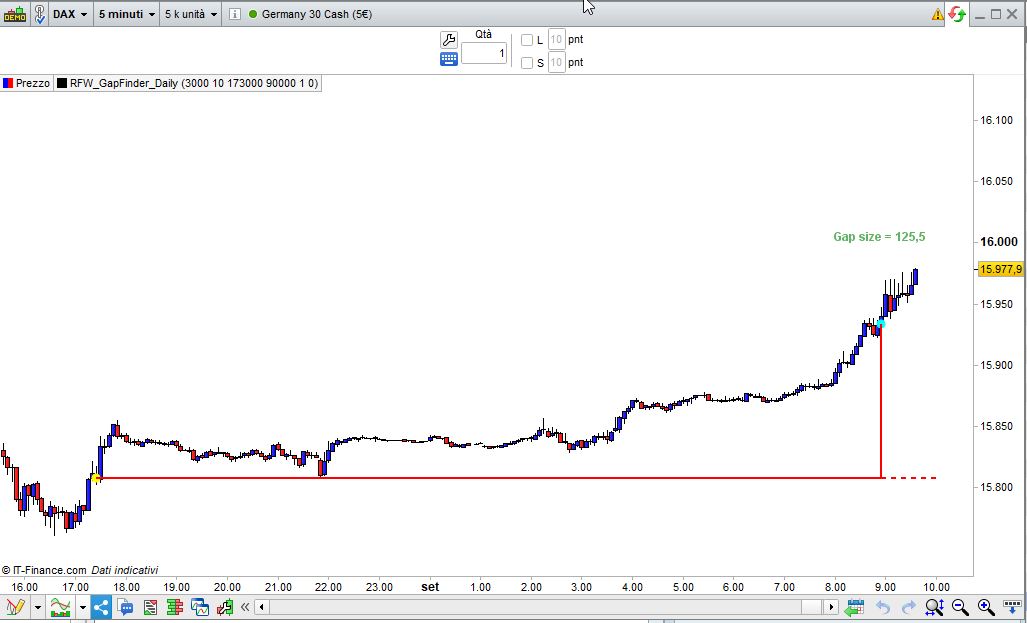
Ich habe diese Zeilen zwischen Zeile 93 (Next) und Zeile 94 (Endif) hinzugefügt, um die Lückengröße zu zeichnen:
Difference = abs(ClosePrice - OpenPrice)
Offset = max(close,max(ClosePrice,OpenPrice)) + (range * 2)
PlotBar = max(CloseBarX,OpenBarX)
DrawText("Gap size = #Difference#",PlotBar,Offset,Dialog,Bold,12) coloured(0,128,0,155)
Guten Morgen Roberto,
super Idee. Danke nochmals.
Liebe Grüße
Rainer
Daily Gap im 5 MinChart – Hilfe
This topic contains 10 replies,
has 2 voices, and was last updated by Rainer (RFW)
4 years, 6 months ago.
| Forum: | ProBuilder: Indikatoren & Custom Tools |
| Language: | German |
| Started: | 08/28/2021 |
| Status: | Active |
| Attachments: | 8 files |
The information collected on this form is stored in a computer file by ProRealCode to create and access your ProRealCode profile. This data is kept in a secure database for the duration of the member's membership. They will be kept as long as you use our services and will be automatically deleted after 3 years of inactivity. Your personal data is used to create your private profile on ProRealCode. This data is maintained by SAS ProRealCode, 407 rue Freycinet, 59151 Arleux, France. If you subscribe to our newsletters, your email address is provided to our service provider "MailChimp" located in the United States, with whom we have signed a confidentiality agreement. This company is also compliant with the EU/Swiss Privacy Shield, and the GDPR. For any request for correction or deletion concerning your data, you can directly contact the ProRealCode team by email at privacy@prorealcode.com If you would like to lodge a complaint regarding the use of your personal data, you can contact your data protection supervisory authority.