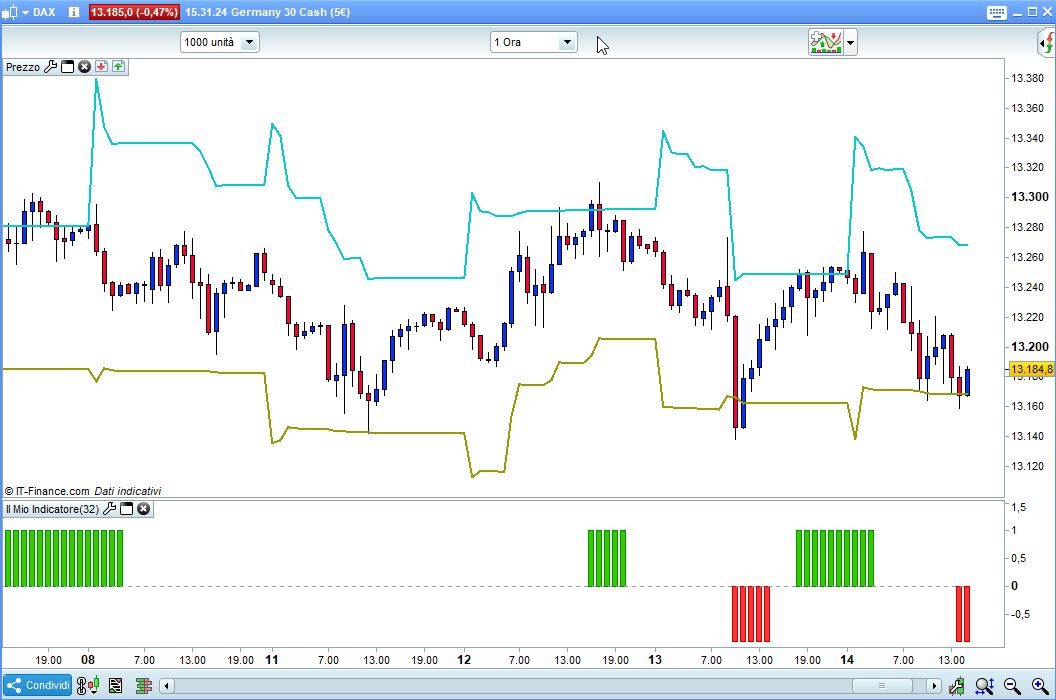
Your code, turned into an indicator, works finely:
LookBack = 5 //keep returned items alive for 5 bars
ATRperiod = 20 //change this period as you wish
dTR = 0
for i = 0 to ATRperiod
dTR=dTR+max(abs(Dhigh(i)-Dlow(i)),max(abs(Dhigh(i)-Dclose(i+1)),abs(Dlow(i)-Dclose(i+1))))
next
avg = dTR / ATRperiod
htr = Dlow(0) + avg[1]
ltr = Dhigh(0) - avg[1]
a = summation[LookBack](close > htr)
a = (a > 0) AND (a <= LookBack)
b = summation[LookBack](close < ltr)
b = (b > 0) AND (b <= LookBack)
x = 0
IF a THEN
x = 1
ELSIF b THEN
x = -1
ENDIF
RETURN x,0
//SCREENER [x] (x AS "Signal")
Yes but wanted it as a separate window as an alert for my large basket
Can you attach a screenshot or picture to show me, or describe, what you mean exacltly (the picture you attached misses something, it just shows the toolbar)?
ProScreener doesn’t allow to set alerts, because it’s an alert by itself with sound enabled.