customizing optimization report (adding variable)

Viewing 2 posts - 1 through 2 (of 2 total)
  • Author
    Posts
  • #211946 quote
    alfredocuaresma
    Participant
    New

    Hello,

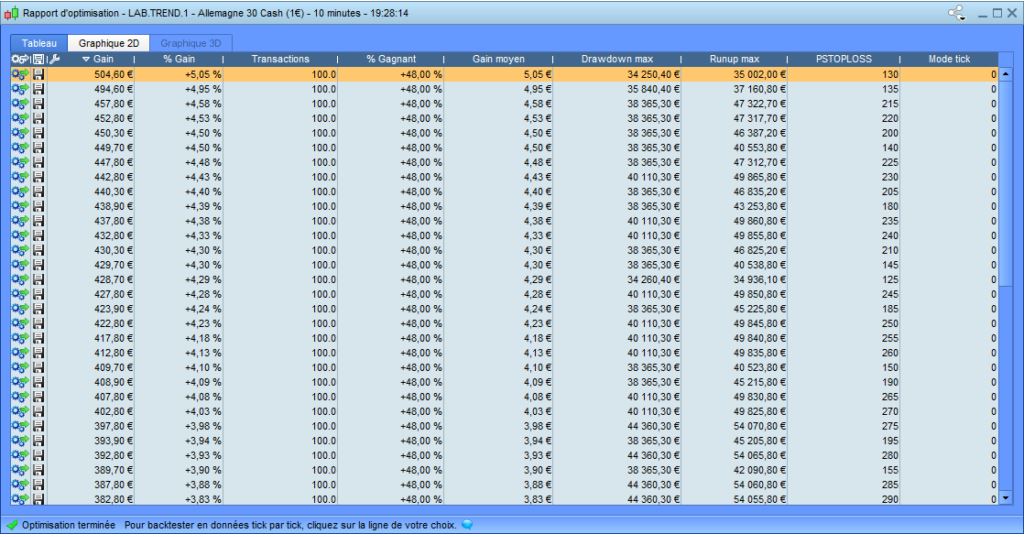
    in my code i’ve got a variable that reports the exact information i want to use to decide how to tune up my bot. Instead of deciding using the Gain column, i want to add my own column.

    That column is not a variable of the optimization box, neither i can calculate it at Excel, it is calculated on the ProRealTime code. Imagine it is “RealGains = STRATEGYPROFIT – fees” (so no sense to add it at the Optimization variables).

    I have displayed it using GRAPH for a single case and works like a charm, it probably will help me out a lot.

    So, how could i get the output of this variable when doing an optimization (running the common 10.000 combinations)?

    Thanks in advance.

    x-4.jpg x-4.jpg
    #211977 quote
    PeterSt
    Participant
    Master

    We can’t. 🙁
    Occasionally I want the same thing, though at this moment I can’t recall an example.

    Graph is the way to go …

Viewing 2 posts - 1 through 2 (of 2 total)
  • You must be logged in to reply to this topic.

customizing optimization report (adding variable)


ProOrder: Automated Strategies & Backtesting

New Reply
Author
Summary

This topic contains 1 reply,
has 2 voices, and was last updated by PeterSt

2 years, 11 months ago.

Topic Details
Forum: ProOrder: Automated Strategies & Backtesting
Language: English
Started: 03/22/2023
Status: Active
Attachments: 1 files
Logo Logo
Loading...