customizing optimization report (adding variable)

Viewing 2 posts - 1 through 2 (of 2 total)
  • Author
    Posts
  • #211946 quote
    alfredocuaresmaalfredocuaresma
    Participant
    New

    Hello,

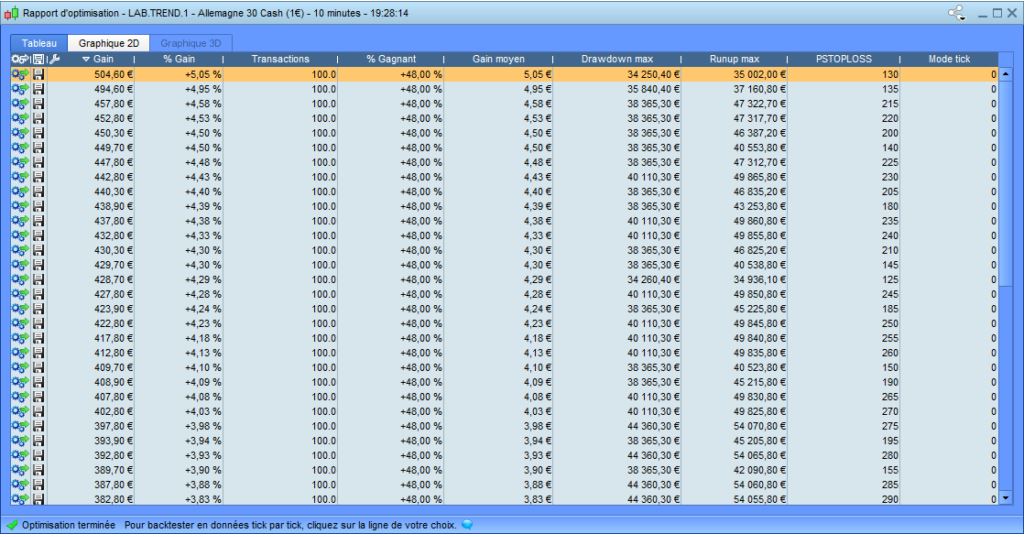
    in my code i’ve got a variable that reports the exact information i want to use to decide how to tune up my bot. Instead of deciding using the Gain column, i want to add my own column.

    That column is not a variable of the optimization box, neither i can calculate it at Excel, it is calculated on the ProRealTime code. Imagine it is “RealGains = STRATEGYPROFIT – fees” (so no sense to add it at the Optimization variables).

    I have displayed it using GRAPH for a single case and works like a charm, it probably will help me out a lot.

    So, how could i get the output of this variable when doing an optimization (running the common 10.000 combinations)?

    Thanks in advance.

    x-4.jpg x-4.jpg
    #211977 quote
    PeterStPeterSt
    Participant
    Master

    We can’t. 🙁
    Occasionally I want the same thing, though at this moment I can’t recall an example.

    Graph is the way to go …

Viewing 2 posts - 1 through 2 (of 2 total)
  • You must be logged in to reply to this topic.

ProRealAI ProRealAI New

Stuck on this ProBuilder code?

Describe what this topic is trying to build, in plain English, and ProRealAI writes the ProRealTime™ indicator, screener or system for you.

Available in 7 languages
Try ProRealAI

customizing optimization report (adding variable)


ProOrder: Automated Strategies & Backtesting

New Reply
Author
Summary

This topic contains 1 reply,
has 2 voices, and was last updated by PeterStPeterSt

3 years, 5 months ago.

Topic Details
Forum: ProOrder: Automated Strategies & Backtesting
Language: English
Started: 03/22/2023
Status: Active
Attachments: 1 files
ProRealCode ProRealCode
Loading...