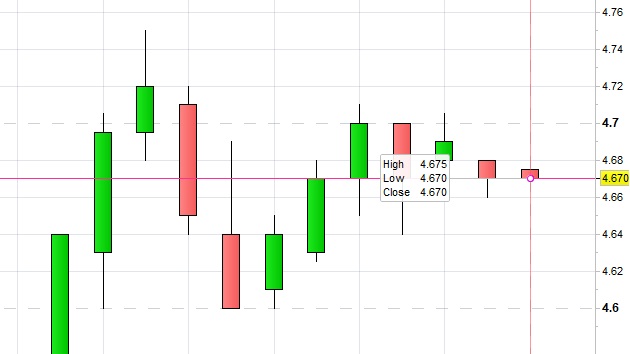
Is there a method / indicator to display current candle’s HLC permanently on the chart?
Something similar to the box pop up or maybe 3 horizontal lines displaying the HLC values of that particular current candle?
Thanks,
Wayne.
I moved this topic to ProBuilder support, as it’s not a screener related topic.
There you go:
DEFPARAM DrawOnLastBarOnly = True
Offset = average[20,0](range) //offset to plot text on the chart
Distance = highest[20](high) //price where data is plotted
OO = open
HH = high
LL = low
CC = close
DrawText("Open #OO#",BarIndex,Distance + Offset)
DrawText("High #HH#",BarIndex,Distance + Offset*1.5)
DrawText("Close #CC#",BarIndex,Distance + Offset*2.0)
DrawText("Low #LL#",BarIndex,Distance + Offset*2.5)
RETURN
Thanks Roberto,
Possible to have the Close drawtext changes color? For example:
If close is = or > than High, the color drawtext for close will display in green.
If close is = or < than Low, the color drawtext for close will display in red.
If close is = to Open, the color drawtext for close will display in blue.
Also I have followed the guide https://www.prorealcode.com/documentation/drawtext/ , I tried adding font and size, doesn’t seem to work?
DrawText(“C:#CC#”,BarIndex–1,Distance + Offset*1.0,Bold,16)coloured(204,0,204)
There you go:
DEFPARAM DrawOnLastBarOnly = True
Offset = average[20,0](range) //offset to plot text on the chart
Distance = highest[20](high) //price where data is plotted
OO = open
HH = high
LL = low
CC = close
DrawText("O:#OO#",BarIndex,Distance + Offset)
DrawText("H:#HH#",BarIndex,Distance + Offset*1.5)
DrawText("L:#LL#",BarIndex,Distance + Offset*2.0)
r = 0 //Black
g = 0 //Black
b = 0 //Black
t = 255 //Transparency (0-255, 0=invisible, 255=max visibility)
IF close >= high THEN
g = 255 //Green
ELSIF CLOSE <= low THEN
r = 255 //Red
ELSIF close = open THEN
b = 255 //Blue
endif
DrawText("C:#CC#",BarIndex,Distance + Offset*2.5,Dialog,Bold,16) coloured(r,g,b,t) //Verde
RETURN